Merlin Bird ID by Cornell Lab
- 30.95K
- 4.9
- Installs
- 10.00M
- Price
- Free

Screenshots

Analysis by Reviewed
I first opened Merlin Bird ID for the simple pleasure of putting a name to a song outside, and that small curiosity is still its best invitation. The app, made by Cornell Lab of Ornithology, is free and belongs to the books and reference category, but it feels most useful with your shoes on and your attention turned toward the trees. Its appeal is easy to understand: you can work from a few answers about what you saw, a photo, or a recording of a bird’s call.
The first-week appeal: curiosity becomes a habit
At the start, I’d use Merlin casually rather than treating it like a course. Hear a call on a walk, try an identification, then read enough to recognize the bird next time. The five-question route is handy when a bird is visible but you cannot get a clear picture; sound or a photo makes more sense when you have captured something useful. Switching between these approaches is a practical strength, since real sightings rarely happen under perfect conditions.
A realistic first outing might be a short walk near home. I’d note the location and time in my own mind, pause somewhere quiet, and record a call instead of chasing the bird through branches. That choice matters: movement and competing sounds can make a recording harder to interpret. I’d then compare the suggested bird with what I actually noticed, such as its size, color, or behavior, rather than accepting the first result automatically. Using the app as a guide, not an unquestionable answer, makes identification more rewarding.
What keeps it useful after the novelty
Have you ever strolled through a park, heard the sweet melody of a bird, and wondered what kind it was? Well, wonder no more! The Merlin Bird ID by Cornell Lab is your perfect companion for those nature walks. It’s like carrying a birding expert in your pocket, and trust me, it’s as cool as it sounds.
Getting Started with Merlin Bird ID
First things first, downloading the app is a breeze. Available on both Android and iOS, the Merlin Bird ID app is easy to find and install. Once you fire it up, you’re greeted with a friendly interface that feels like it’s welcoming you to the bird-watching club. And no, you don’t need to be an ornithologist to use it!
Features That Make It Fly High
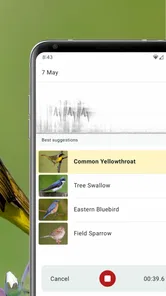
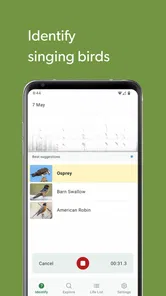
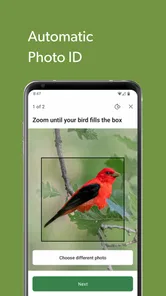
What sets this app apart is its ability to identify birds through photos and sound recordings. Yes, you heard that right! Imagine capturing a bird’s song and having the app tell you exactly which feathered friend is serenading you. It’s like Shazam for birds, and it works surprisingly well.
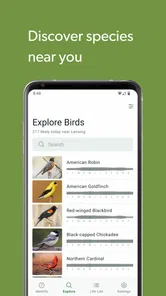
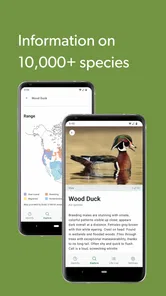
The app also offers a vast database of bird species, complete with beautiful images and detailed descriptions. Whether you’re a newbie or a seasoned birder, you’ll find the information comprehensive and easy to digest. Plus, the app updates regularly, ensuring you have the latest birding info right at your fingertips.
More From Our News Desk

Weather by Xiaomi Review: Clear at a Glance, Less Clear Up Close

X Under Pressure: Can It Recover When Posting Goes Wrong?

Clash of Clans Is Won Between the Battles

Android Auto Makes the Case for Quieter Car Software

MobiOffice: Transforming Mobile Productivity with Seamless Integration

EA SPORTS FC™ Mobile Soccer: Redefining Mobile Sports Gaming
Month-to-month value: learn to notice more
After the first burst of novelty, I think Merlin earns space on a phone when it changes how you pay attention. Instead of only checking an identification, I’d use the species information to look for a distinguishing feature on the next walk. A recurring route is especially useful: familiar surroundings make it easier to notice which birds are present on different visits, without turning every outing into a checklist exercise.
For a beginner, that gradual learning is more valuable than trying to memorize a field guide. For someone already comfortable with bird identification, the app is better as a quick reference or a second opinion than as a replacement for personal observation. General web searches can surface answers too, but they often take more effort when all you have is a brief call or an uncertain glimpse. Merlin brings those identification paths together in one place, though a field guide may suit someone who prefers browsing pages and comparing species without a phone.
It can also fit into routines that are not formal bird walks. I might use it during a lunch break in a courtyard, on a weekend visit to a relative, or while waiting at the edge of a sports field. These small moments are useful because there is no pressure to identify everything. One confirmed bird and one detail to watch for later can be a satisfying result, and the app remains relevant without demanding a dedicated hobby schedule.
If I were introducing it to a child or a friend who had never birded, I would keep the first outing focused on one question: what is making that sound? We could listen together, try the recording route, then compare the suggestion with the bird’s appearance if it comes into view. That makes the experience shared rather than turning the phone into the center of attention. For families, the Everyone age rating is reassuring, though an adult can still help younger users handle the device outdoors and think critically about results.
User Experience: As Smooth as a Bird’s Glide
Using the app feels intuitive. The developers have done a stellar job of making sure everything is just a tap away. From identifying birds to learning about them, every feature is just a few taps away. And if you’re worried about data usage, the app allows you to download bird packs for offline use. That’s right, you can take your birding adventures to the most remote places without worrying about cell reception.
One useful way to approach a difficult sighting is to treat the three identification routes as alternatives, not steps you must complete in order. If the bird is close and still, a photo may give you a useful starting point. If it is hidden but calling clearly, sound is the more sensible attempt. If neither capture is good, answering the questions from memory can be less frustrating than repeatedly trying to force a poor recording or photograph into a result.
That choice also helps explain how Merlin differs from the usual options. A printed guide gives a broader browsing experience and never competes with a phone screen for your attention, but it asks you to narrow down possibilities yourself. A general search engine can answer an occasional question, yet you may need to describe the bird or call in words first. Merlin’s advantage is its bird-focused identification paths and reference material in one app; its trade-off is that the result still depends on what you can observe and capture.
Maintenance without making birding a chore
Offline packs are worth thinking about before a trip rather than when you reach a quiet trail with weak reception. I’d download the relevant pack while connected, then check that it is available before heading out. It is a small preparation step, but it makes the app more dependable away from a signal and keeps an outing from becoming a search for mobile coverage. If you mainly explore near home with reliable service, you may not need to plan around offline use every time.
The app is free, rated for Everyone, and has a 4.9 average from around 144,000 ratings, with over 5 million installs. Those figures suggest broad appeal, but they do not tell you whether every identification will fit your situation. I’d keep the phone charged and use recordings selectively, especially if I wanted to stay focused on the walk rather than repeatedly checking the screen.
Maintenance is light, but a little preparation improves the experience. Before a longer outing, I’d check whether the bird pack I need is ready, especially if I expect to be away from a reliable connection. I’d also leave room for the practical basics: a charged phone, a way to keep it accessible, and enough patience to stop and listen. Those are not special birding skills, but they prevent a promising identification attempt from becoming a screen-and-signal problem.
It is worth remembering that offline access does not remove every uncertainty. A quiet location and a clear view still matter, and a recording can include several overlapping calls. I would not assume that downloading a pack guarantees a confident answer in every setting. The best preparation is not to rely on the app for the whole outing, but to have it ready as one tool among careful listening, looking, and a little local knowledge.
Sources of fatigue and when I’d choose something else
The main friction is the same thing that makes phone-based identification tempting: it can pull your attention away from the bird. A noisy setting, a distant call, or a quick, obstructed glimpse may leave you with an uncertain result. Photos also depend on getting a usable view, so this is not a shortcut around patience or clear observation. I would not rely on it as the sole authority for a consequential identification; checking the bird’s visible traits against the app’s descriptions is a better habit.
Merlin is less compelling if you rarely wonder about birds, dislike using a phone outdoors, or want a purely printed reference. It may also frustrate someone expecting every fleeting sound to produce a confident answer. For those cases, a traditional guide can be calmer and easier to browse, while a general search may be enough for an occasional question. I’d choose Merlin when I want identification methods and learning material together, not because a phone can replace looking carefully.
There is also a subtle risk of turning every walk into a test. If I stop for every call, open the app repeatedly, and feel that I have failed when a bird stays hidden, the tool has started to work against the pleasure that brought me outside. I get more from it by choosing a few moments to investigate and letting the rest pass. That boundary makes the app useful over time rather than a novelty that becomes an obligation.
Experienced birders may find that their needs are different from a newcomer’s. If I already know the common local species and mainly want detailed field notes or a personal record of sightings, I would compare Merlin with tools designed specifically for keeping those records rather than assuming identification is the same as tracking. Merlin’s strongest role is helping me make sense of a sighting and learn about birds; it is not necessarily the best fit for every specialized birding workflow.
Why You’ll Love It
There’s something incredibly satisfying about being able to name the birds around you. The app not only helps you identify them but also teaches you about their habitats and behaviors. It’s educational and fun, making it a delightful experience for users of all ages. Plus, knowing that you’re using a tool developed by the prestigious Cornell Lab adds a layer of trust and credibility.
The more lasting reward is not collecting names but noticing patterns in your own surroundings. After using an identification as a prompt, I might recognize a familiar call sooner, spot a bird’s shape before reaching for the phone, or remember which details helped distinguish it from another possibility. That kind of learning carries into the next walk even when the phone stays in my pocket. For me, that is a better measure of value than how often I open an app.
Long-term verdict: a useful companion, not a daily obligation
Merlin Bird ID was released on June 26, 2014, and its current version is 3.8.5, with support for operating systems from 7.0. I see its lasting value less in checking it every day than in having it ready for the moment a call catches my attention. It can support a family walk, a casual learner’s first attempts, or a more experienced birder who wants a convenient reference. The best routine is light: listen first, make an identification attempt, then use the information to sharpen your eyes and ears next time.
Its popularity is easy to understand: the app has around 27,000 written reviews, and the Cornell Lab name gives the reference side a reassuring sense of focus. But popularity is not a reason to keep an app you never use. I would keep it installed if birds regularly make me curious, if I enjoy learning a little at a time, or if I take walks where identifying calls adds something to the route. If those moments are rare, a borrowed guide or a quick search when needed may be enough.
In conclusion, if you have even the slightest interest in birds, the Merlin Bird ID app is a must-have. It transforms your bird-watching experience into something interactive and engaging. So next time you’re out in the wild, don’t just listen to the birds—let Merlin Bird ID tell you their stories. Happy birding!
Merlin Bird ID by Cornell Lab Frequently Asked Questions
Is Merlin Bird ID appropriate for children and families?
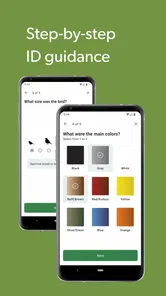
Merlin Bird ID is rated for everyone, making it suitable for families who want to explore birds together. Its guided identification option asks five questions about a bird someone has seen, which can turn a walk or backyard sighting into an easy learning activity. Children can take part by noticing details such as the bird’s appearance, while adults can help review the suggestions and learn more about each species.
How much storage space should I allow for Merlin Bird ID?
The amount of space the app needs can depend on how you use it, especially if you choose to keep bird information available offline. Merlin Bird ID supports downloading bird packs, which can include images, audio clips, and descriptions for a region. If storage is limited on your phone, consider which packs you need and check available space before downloading them. Keeping only useful regional resources can make offline birding more manageable.
Is Merlin Bird ID free to download, and who develops it?
Merlin Bird ID is free to download and is developed by the Cornell Lab of Ornithology. It is a bird-identification app in the Books & Reference category, designed to help people make sense of birds they encounter outdoors. The app is rated for everyone, so it can be considered by bird-curious families as well as individual users. Its central purpose is practical: help you identify a bird and learn more about it.
What is Merlin Bird ID by Cornell Lab?
Merlin Bird ID by Cornell Lab is an innovative app designed to assist bird enthusiasts in identifying bird species through photos and audio recordings. The app offers a user-friendly interface, allowing users to explore a vast database of bird species from around the world. It's an essential tool for both amateur and professional bird watchers, providing detailed information and high-quality images to help users learn more about the birds they encounter.
How does the photo identification feature work in Merlin Bird ID?
The photo identification feature in Merlin Bird ID allows users to upload or take a photo of a bird, which the app then analyzes to suggest possible matches from its extensive database. By using advanced machine learning algorithms, the app not only identifies the species but also provides additional information and similar species to consider. This feature is particularly useful for users who encounter birds they are unfamiliar with and wish to identify them quickly and accurately.
Pros
- Accurate bird identification
- User-friendly interface
- Extensive bird database
- Offline mode available
- Free to use
Cons
- Requires microphone access
- Limited to North America
- Occasional misidentifications
- In-app ads present
- No community features












