eBird by Cornell Lab
- 606.00
- 3.8
- Installs
- 1.00M
- Price
- Free

Screenshots
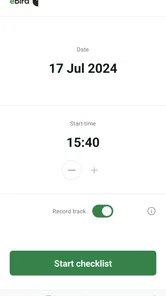
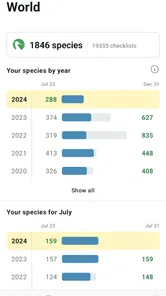
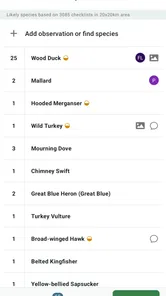
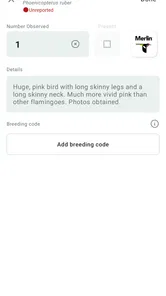
Analysis by Reviewed
When it comes to birdwatching, there's an app that stands tall among enthusiasts and beginners alike - eBird by Cornell Lab. Whether you're a seasoned birder or just getting started, this app transforms your smartphone into a powerful tool for exploring the avian world. Let's dive into what makes eBird such a hit among nature lovers.
Setting a sensible pace in the field
For a simple backyard walk, I find the experience best when I decide in advance to keep a list rather than trying to document every detail while birds are moving around. The app is built around recording sightings, so it suits a deliberate checklist habit more than casual browsing. I can focus on watching first, then enter observations during a pause; that small change makes the phone feel like a notebook instead of a distraction.
A realistic use is a short morning loop through a local park. I might note the familiar birds quickly, save the less certain identification for later, and review the outing when I am home. This is useful for beginners because it creates a record without demanding expert knowledge at every moment. It also gives experienced birders a consistent way to keep track of what they have seen. I would avoid guessing simply to complete a list: careful records are more valuable than a longer list built on uncertainty.
That pause-and-record rhythm is also a practical way to judge speed. I would not treat a birding app as something that must react instantly to every sighting; the bird may move on before I have even reached for my phone. When a species is obvious, a brief entry can keep the outing moving. When it is not, waiting until I can check a reference is a better use of time than rushing through a list. The useful measure is whether the app lets me preserve observations without making me watch the screen instead of the habitat.
Where eBird fits among birding tools
Many people begin with a field guide or a general bird-identification app. Those tools are often more helpful when the main question is “What bird am I looking at?” eBird’s central strength is different: it helps me record observations and connect them to a wider body of sightings. I see it as a companion to identification resources, not a replacement for a guide that explains plumage, calls, or distinguishing features in depth.
That distinction matters when travelling. A trip can bring unfamiliar species and tempting opportunities to record them, but a list-making app cannot remove the need to check an identification carefully. I would use a field guide or other trusted reference to resolve uncertainty, then use eBird to keep the observation. For someone who only wants occasional bird names and has no interest in maintaining records, that extra logging step may feel unnecessary; a simpler identification tool could be a better fit.
Discovering Birds in Your Backyard
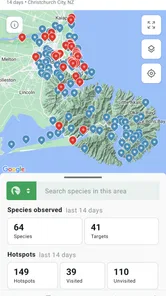
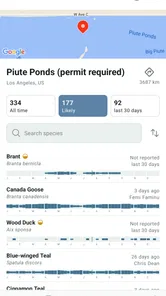
One of the coolest things about eBird is how it turns your locality into a birdwatching hotspot. By simply logging your location, you can access a treasure trove of bird sightings in your area. It's like having a personal guide to the birds around you! The app's vast database, contributed by birdwatchers from around the globe, means you're always in the know about which species are flapping around your neighborhood.
More From Our News Desk

Weather by Xiaomi Review: Clear at a Glance, Less Clear Up Close

X Under Pressure: Can It Recover When Posting Goes Wrong?

Clash of Clans Is Won Between the Battles

Android Auto Makes the Case for Quieter Car Software

MobiOffice: Transforming Mobile Productivity with Seamless Integration

EA SPORTS FC™ Mobile Soccer: Redefining Mobile Sports Gaming
Making local outings more useful
Local records are most valuable to me when I treat them as context rather than a promise that a particular bird will be waiting at a particular spot. Before a walk, I can use nearby sightings to decide what I might keep an eye out for, then still give the place my attention instead of chasing a checklist. A familiar park visited at different times can become a simple personal study: I can compare what I notice across outings and build a more grounded sense of its birdlife.
There is a small but important trade-off here. A list shaped by what other people have reported can encourage useful curiosity, but it can also make a quiet visit feel disappointing if I expect a long run of new species. I get more from the app when I count a careful record of common birds as worthwhile, rather than judging a walk only by rarities. That approach makes it useful for a beginner who is learning to notice patterns as well as for a regular birder checking a familiar patch.
User-Friendly Experience
The first thing that struck me about the app was its intuitive design. Navigating through eBird is as easy as pie, thanks to its clean interface. Whether you're logging a sighting or searching for a specific bird, everything is just a few taps away. It's clear that user experience was at the forefront when the developers crafted this app.
Another nifty feature is the ability to track your birdwatching history. You can easily access past observations, which is perfect for comparing notes and seeing how your local avian population changes over time. Plus, it's a great way to reminisce about your birding adventures!
For a useful routine, I would review an outing soon after returning, while the setting and uncertain details are still fresh. I can distinguish a bird I confidently recognized from one I only suspected, rather than letting a hurried entry become an unquestioned memory. A short note about where I was looking or what made me unsure can be more valuable later than trying to make every list look complete. This is a low-effort habit that helps keep personal records honest.
Contributing to Science
What I find particularly rewarding about using eBird is knowing that my observations contribute to scientific research. Every bird sighting logged helps researchers track bird populations and migration patterns. It's like being part of a massive, collaborative research project without needing a lab coat! This citizen science aspect not only enhances your birdwatching experience but also gives you a sense of contributing to the greater good.
Moreover, the app has a robust community feature. You can connect with fellow birders, share your findings, and even participate in local birding events. It's a fantastic way to meet like-minded individuals and learn from each other. Who knew birdwatching could be so social?
The citizen-science angle makes accuracy more than a private preference. I try to be conservative with records when identification or counts are uncertain, because the point is not to make my activity look impressive. If I am birding with someone who knows the area better, comparing what each of us noticed can also catch an easy mistake before it becomes part of a saved list. That kind of checking is especially worthwhile when the observation is unusual or I am outside the places I know well.
International Appeal
While it's fantastic for local birdwatching, eBird is also your best friend when traveling. The global database is a boon for adventurers wanting to discover new species in different parts of the world. From the rainforests of Costa Rica to the outback of Australia, you have a wealth of information at your fingertips.
On a trip, I would keep the roles of my tools clear: use a reference to work through unfamiliar identification, and use this app for the observation record. That separation reduces the temptation to treat a suggested or expected species as proof of what I actually saw. It also keeps the app relevant when the trip is busy: I can record the sightings I am sure about and leave uncertain possibilities out until I have had time to review them.
Accuracy, connection and practical trade-offs
The strongest reason I would keep using eBird is the continuity between an outing and a long-term personal record. A single observation can feel modest on its own, but repeated lists make it easier to look back and notice what appears regularly or only at certain times. That is a more meaningful payoff than simply collecting names, especially if you revisit the same patch of habitat.
There is a trade-off: recording while watching can pull attention away from the birds, and entering a list later depends on remembering what happened. I find it helps to make a quick note of uncertain sightings and the order in which they occurred, rather than repeatedly checking the screen. In a group, one person can watch while another handles the record, which keeps the outing social without turning every pause into phone time.
A related choice is whether to record everything immediately or keep a short mental or written checklist and enter it during a break. Immediate entry is better when details could blur together; delayed entry keeps my eyes up and is more comfortable on a relaxed walk. I would not force one method on every outing. A busy stop with many birds calls for more deliberate notes, while a quiet stroll may only need a few confident observations. The app works best when the recording method fits the pace of the birding, not the other way around.
Speed, reliability and older devices
In ordinary use, I would expect the basic job of recording an observation to feel direct, but birding conditions can complicate any phone workflow. Glare, cold hands, a weak connection, or a bird that vanishes quickly can matter more than the app’s interface. I prefer to prepare before setting off and avoid relying on live browsing as the only way to make a useful record. If the phone is slow or battery-sensitive, keeping the session focused on observations rather than leaving several screens open is sensible advice for any long outdoor walk.
eBird Mobile is a free Books & Reference app from Cornell Lab of Ornithology. It has a 4.0 average from around 3.8 thousand ratings, and more than a million installs. Version 3.3.2 supports Android 6.0 and later, with an Everyone age rating. Those details make it accessible to many Android users, although an older handset may still feel less responsive than a newer one; I would check that it runs comfortably on my own phone before planning a long trip around it.
For reliability, I think in terms of preparation and recovery rather than assuming every outdoor session will be seamless. Before leaving, I would make sure I know how I plan to keep the list and avoid depending on a live lookup at the exact moment a bird appears. If I am unsure whether I captured something correctly, I would review the record afterward instead of trying to fix it while the flock is moving. Keeping a separate note for observations that need checking also gives me a sensible fallback if using the phone becomes inconvenient during the walk.
Device limits matter most on longer outings, or when the phone is already struggling with other tasks. The stated Android minimum is 6.0, but meeting that requirement is not the same as guaranteeing a smooth experience on every older handset. I would test the app on my own device during an ordinary local walk before relying on it for a day away from home. Someone whose phone is sluggish, hard to use in bright conditions, or short on battery may prefer a small paper notebook in the field and enter records later.
Who will get the most from it
I recommend eBird to anyone who wants a durable record of birdwatching, enjoys revisiting familiar places, or likes the idea that observations can support wider research. It is especially worthwhile for people willing to learn a careful listing routine. If I only wanted a quick answer to a bird-identification question, I would choose a dedicated identification reference first. If I wanted to record sightings and see them as part of a broader community effort, eBird would be the more natural choice.
It is also a good fit for a family or pair of friends who want an easy shared purpose on a walk, as long as the list does not become the whole activity. One person can watch while another enters observations, then they can compare what they noticed afterward. I would skip it if I dislike keeping records, rarely revisit places, or want an app to identify every bird for me without consulting a guide. In those cases, a field guide, an identification-focused tool, or simply enjoying the walk without a phone may serve better.
Before heading out, I would make sure I know how I want to record the walk and leave time to review uncertain entries afterward. That simple habit helps balance speed with accuracy and prevents the phone from taking over the experience. For birders who value both personal history and shared observations, eBird is a practical companion; for people who never want to keep lists, its main strength may not matter enough to justify the extra step.
My performance verdict
My overall view is that eBird’s performance should be judged by whether it supports careful record-keeping without interrupting the outing. The workflow is most convincing when I have a plan: watch first, record during a natural pause, and check uncertain entries later. That approach is more dependable than trying to make the phone keep pace with every quick movement in the field.
It is not the right all-in-one choice for someone whose main need is instant identification, nor would I make it the sole plan for a long trip before trying it on my device. For a birder who likes lists, revisits local places, and values contributing observations, the balance is worthwhile. I would keep a reference guide nearby for identification and let eBird do the job it is best suited to: helping me maintain a thoughtful record of what I actually saw.
In conclusion, eBird by Cornell Lab isn't just an app; it's a gateway to the extraordinary world of birds. Its user-friendly interface, combined with its impactful contribution to science, makes it a must-have for anyone with a budding interest in birdwatching. So, why not give it a go and see what feathered friends you can discover today?
eBird by Cornell Lab Frequently Asked Questions
Do I need an account to use eBird Mobile?
eBird Mobile is designed to help you record bird observations and add them to eBird. If you plan to keep your sightings in the shared eBird database, an account is useful for associating those observations with you and accessing them later. You can also explore the app’s birding tools before deciding how actively you want to contribute.
What devices can run eBird by Cornell Lab?
eBird by Cornell Lab is available for Android and iOS. On Android, it requires version 6.0 or later, so it is worth checking your device’s operating system before downloading. The app is free and rated for Everyone, making it an accessible option for birdwatchers who want to record sightings on a compatible phone.
What is eBird by Cornell Lab and what does it offer?
eBird by Cornell Lab is a comprehensive birdwatching app that allows users to log their bird observations, explore birding hotspots, and contribute to a global database of bird sightings. This app provides tools for identifying bird species, tracking personal bird lists, and accessing information about bird distribution and trends, making it a valuable resource for both amateur and professional birdwatchers.
Is eBird by Cornell Lab free to use?
Yes, eBird by Cornell Lab is completely free to use. Users can download the app from the App Store or Google Play without any cost. While the app offers extensive features and functionalities, it encourages users to contribute to its community-driven database, helping to advance bird conservation efforts worldwide.
Can I use eBird offline, or is an internet connection required?
eBird offers offline capabilities, allowing users to log bird sightings and access certain features without an active internet connection. However, to upload your observations to the global database and access updated information about bird distribution and hotspots, an internet connection will be necessary. This ensures your data contributes to scientific research and conservation.
Pros
- Extensive bird species database.
- User-friendly interface.
- Offline capabilities.
- Real-time bird sightings.
- Engages citizen scientists.
Cons
- Requires internet for some features.
- Can be data-heavy on devices.
- Not all regions equally covered.
- Somewhat steep learning curve.
- Limited social features.












