MediBang Paint:Draw Art, Comic
- 14.32K
- 3.8
- Installs
- 10.00M
- Price
- Free
Screenshots
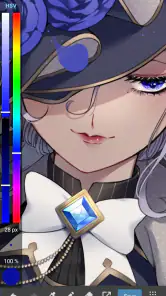
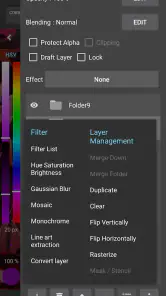
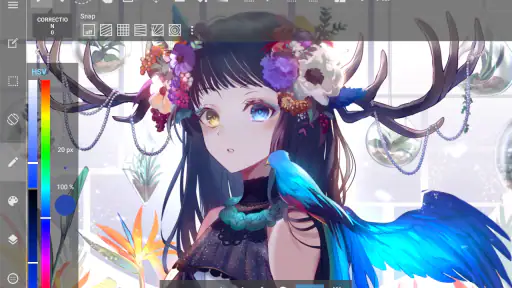
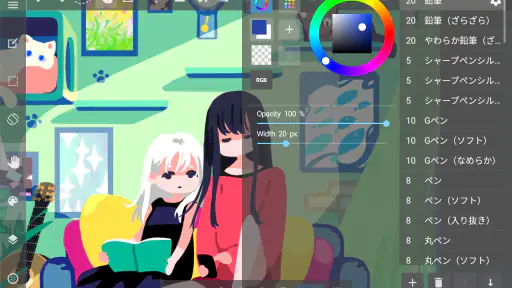
Analysis by Reviewed
I’m careful about trusting a mobile art app with work I may want to finish later, and connectivity is a big part of that decision. MediBang Paint is an art and design app from MediBang Inc. that suits quick sketches as well as comic-focused projects. I like its range, but I’d treat its connected features as useful extras rather than assume every part of my workflow will behave the same way on a weak network.
When the network becomes part of the workflow
The cloud is the most important connectivity consideration here. It can make it easier to move a project between sessions or work with other artists, but anything involving online storage or collaboration depends on being able to connect. I’d check that a project has finished syncing before closing the app or switching devices, especially if I’ve made changes somewhere with unreliable reception.
That distinction matters: a cloud copy is not the same thing as a local backup I have personally checked. For a comic page I care about, I’d keep a separate copy of important finished work and avoid treating an in-progress upload as proof that everything is safely stored. Sharing also relies on a connection when I send artwork outward, so I plan that step for when the network is steady instead of assuming it will complete instantly.
Drawing in short mobile sessions
On a phone, I find the app most useful for capturing an idea before it disappears: a character pose, a thumbnail for a comic panel, or a rough color test while I’m waiting for a bus. The small screen is less comfortable for judging fine details, so I’d use those moments for sketching and save careful cleanup for a larger display if one is available. A stylus can make precise strokes easier, but a finger is enough for rough planning.
A practical routine is to begin with a simple sketch, name or otherwise keep track of the project, and avoid adding lots of detail until I know the canvas feels manageable on my device. If I’m traveling, I’d also open the app and prepare the work I need before entering an area with patchy coverage. That keeps the session focused on drawing rather than troubleshooting a connection mid-idea.
What happens when syncing or sharing stalls?
Cloud features are convenient, but they add a point of friction: a slow or interrupted connection can make saving, moving, or sharing work feel less predictable. If something appears stuck, I would first pause and check the network rather than repeatedly tapping controls. I’d keep the app open while I confirm whether the change has synced, then retry a transfer once the connection is stable.
For work that matters, I’d build a simple recovery habit: save deliberately, verify that the latest version is where I expect it, and keep a separate copy of important exports. That advice is useful even when an app feels reliable, because a drawing can represent hours of careful work. I also wouldn’t start a large handoff right before I need to leave or shut down my device.
More From Our News Desk

Weather by Xiaomi Review: Clear at a Glance, Less Clear Up Close

X Under Pressure: Can It Recover When Posting Goes Wrong?

Clash of Clans Is Won Between the Battles

Android Auto Makes the Case for Quieter Car Software

MobiOffice: Transforming Mobile Productivity with Seamless Integration

EA SPORTS FC™ Mobile Soccer: Redefining Mobile Sports Gaming
Use data thoughtfully
Artwork sharing and cloud activity can use mobile data, so I’d reserve larger transfers for Wi-Fi when that is convenient. This is especially sensible for a multi-page comic or a project with many revisions: syncing every change over a limited connection may be less appealing than finishing a focused session and checking the upload afterward. I would still confirm that the latest work is safe before deleting or replacing anything.
The app is free, with in-app purchases priced from $2.49 to $8.99 per item. It has a Teen content rating, a 3.8 average from around 300,000 ratings, and over 10 million installs. Those figures suggest a well-used tool, though popularity alone doesn’t tell me whether its interface will suit every artist. Version 28.17 runs on Android 7.0 and up, which makes checking device compatibility a sensible first step.
Getting Started with Ease
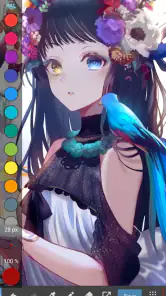
From the moment you open MediBang Paint, it feels like the app is holding your hand, guiding you through the vibrant world of digital art. The user-friendly interface is a breath of fresh air, especially if you've ever struggled with more complex software. Within minutes, I found myself doodling away, exploring all the brushes and tools with child-like glee. It's like having a mini art studio right in your pocket!
Unleash Your Creativity
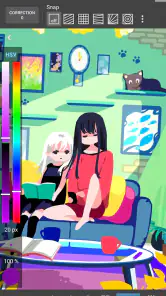
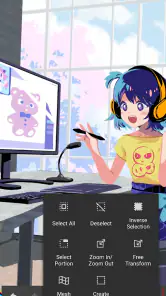
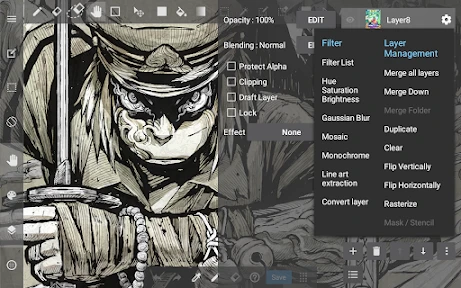
The app is packed with features that cater to every creative whim. Fancy trying your hand at manga? MediBang has got you covered with an array of comic panels, speech bubbles, and screentones. The layering system is intuitive, allowing you to experiment without the fear of messing up your masterpiece. And let's not forget the extensive library of brushes; whether you want to mimic the look of watercolor or oil paints, there's something here for everyone.
Collaborate and Share
One of the standout features is the cloud integration. Not only does it save your work automatically (goodbye, lost progress!), but it also allows you to collaborate with other artists. Imagine working on a comic strip with a friend halfway around the world; it's not just a dream with MediBang.
Sharing your creations is a breeze, too. With a few taps, you can post your artwork on social media or send it directly to friends and family. It's a wonderful way to get feedback and improve your skills. Plus, who doesn't love a little bit of showing off?
Free, but Worth Every Penny
Did I mention that this app is free? Yes, you heard that right! While there are in-app purchases available, the free version is more than sufficient for most users. It’s packed with enough features to keep you entertained and creatively fulfilled. And if you ever feel like unlocking a few extra tools, the prices are reasonable, making it accessible for everyone.
In conclusion, MediBang Paint is a must-have app for anyone looking to explore digital art without the hefty price tag or steep learning curve. Whether you're a beginner looking to dip your toes into the art world or a seasoned artist seeking a portable solution, this app will not disappoint. So why not give it a try? You might just discover a newfound love for digital painting.
Choosing it over other art apps
For me, the clearest reason to choose this app over a basic sketchpad is its combination of general drawing tools and comic-making elements. Panels, speech bubbles, screentones, layers, and varied brushes give me room to move from rough character concepts to a readable page without changing apps. A general painting app may feel more direct if I only want to make a single image, while desktop software is usually a better fit when I need a larger workspace and a keyboard-heavy production routine.
I would recommend it to beginners who want to learn by making things, comic artists who like building pages on the go, and hobbyists who want one mobile workspace for different styles. I’d be less enthusiastic about it for someone who needs a highly controlled desktop workflow, dislikes navigating tools on a phone, or expects every cloud action to work smoothly on an unstable connection. Before committing to a long project, I’d test the canvas size and controls with a small page.
A small, repeatable comic workflow
For an everyday example, I might sketch a scene during a lunch break, block in the panel layout, and leave lettering or final cleanup for later. Keeping the first pass simple helps me avoid spending time on details that may not survive a change in composition. On the next session, I can check the page at a comfortable size, refine the layers, and only then share a draft for feedback. This makes the phone useful for momentum, rather than asking it to replace every stage of a larger art setup.
One useful trade-off is that comic tools can speed up structure, but they don’t make storytelling decisions for me. I still need to choose panel rhythm, readable lettering, and where a screentone helps rather than crowds the art. I’d try a few small panels before building a full chapter, and keep a clean version of the page before experimenting with effects. That gives me room to revise without turning every test into a permanent commitment.
Who will get the most from it?
My strongest recommendation is for artists who want to alternate between casual sketching and comic work, and who are comfortable managing projects carefully across connected sessions. The free entry point makes it easy to explore before deciding whether any paid extras matter to a personal workflow. With 14,000 reviews alongside its ratings, there is plenty of user feedback to browse, but I would still judge the app by trying my own device, preferred brush style, and typical project size.
If I were starting from scratch, I’d make one character sketch, test a few brushes, and build a single comic panel with a speech bubble. Then I’d try saving, reopening, and sharing a copy when my connection is reliable. That short trial answers the practical questions that matter most: whether the controls feel comfortable, whether the comic tools fit my style, and whether the connected workflow suits how I work. For a portable art app with a clear comic-making angle, that is a worthwhile test before investing time in a bigger project.
MediBang Paint:Draw Art, Comic Frequently Asked Questions
Is MediBang Paint free to download, and what does the free version include?
MediBang Paint is free to download, and its basic purpose is to let you sketch, draw, and paint with pencil and pen. Optional in-app purchases are available for users who want additional content or features. The app’s purchase options range from around $2.49 to $8.99 per item, so it is possible to start creating without paying upfront and consider extras later.
Can I create comics with MediBang Paint, or is it mainly for illustrations?
MediBang Paint is intended for more than general sketching and painting: it also includes comic-focused tools, including a feature for creating comic panels. It can therefore suit creators who want to make comics as well as people working on digital illustrations. Its drawing tools and resources provide a flexible starting point for different kinds of art projects on a mobile device.
How popular is MediBang Paint, and is it still actively used?
MediBang Paint has more than 10 million installs and an average rating of 3.8 from around 300,000 ratings, with about 14,000 written reviews. Those figures suggest that it has reached a substantial audience, while individual experiences can still differ depending on a person’s device and creative needs. It is an established art app from MediBang Inc., released on June 16, 2015.
What is MediBang Paint, and who makes it?
MediBang Paint is an Art & Design app from MediBang Inc. for sketching, drawing, and painting with pencil and pen. It is aimed at creators who want to make digital art and comics on a mobile device. The app is free to download, with optional in-app purchases, so you can try its creative tools before deciding whether you need any paid extras.
What features does MediBang Paint offer for digital artists?
MediBang Paint offers a comprehensive suite of tools for digital artists, including over 50 brushes, various fonts, and pre-made backgrounds. It supports layers, has a comic panel feature, and offers cloud storage to save your work. Whether you're creating comics or digital paintings, MediBang Paint provides a versatile platform to bring your artistic visions to life.
Pros
- Wide variety of brushes and tools.
- User-friendly interface for beginners.
- Cloud saving to access work anywhere.
- Supports layers and customizable shortcuts.
- Free with optional in-app purchases.
Cons
- Advertisements in free version.
- Some features require internet connection.
- Limited text editing capabilities.
- Occasional lag on older devices.
- Complexity may overwhelm absolute beginners.
- Category
- Art & Design
- Version
- 28.17











