Medal - Gaming Clips
- 408.00
- 4.0
- Installs
- 1.00M
- Price
- Free

Screenshots
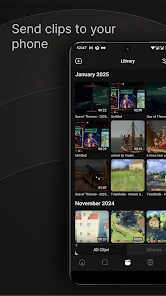
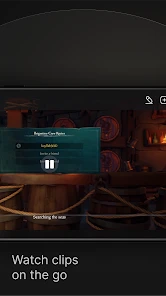
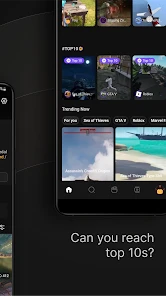

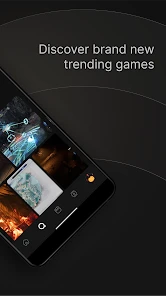
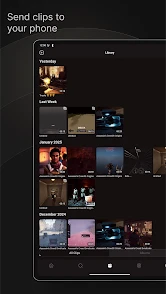
Analysis by Reviewed
My first-week impression of a gaming-clips app is usually shaped by one question: will I actually capture moments I would otherwise lose? Medal - Gaming Clips is built around that habit, bringing gaming clips into a social space where I can watch, edit, upload, and share them. That makes it more interesting than a basic folder of recordings, but it also means its value depends on whether I enjoy revisiting and sharing gameplay after the initial novelty wears off.
When the first week feels rewarding
The early appeal is easy to understand: a memorable play can become something I can revisit or send to someone, instead of disappearing when the session ends. Medal works best when I already have a clear reason to capture a moment, such as sharing a close finish with friends or keeping a funny mistake that everyone in a group will recognize. If I only install it because I assume every gaming session needs a highlight, that excitement can fade quickly.
A practical first-week test is to use the app for one specific purpose. I might save only moments that tell a complete little story: the setup, the surprise, and the reaction. That gives me a fair sense of whether I enjoy making clips, rather than confusing the thrill of trying a new app with a habit I will keep. It also prevents an early pile of recordings from becoming a backlog before I know what I want to do with them.
Dive into the World of Gaming Clips
So, what exactly is Medal - Gaming Clips? Think of it as a place to keep gaming moments moving: rather than leaving a recording tucked away, I can shape it into a clip and put it in front of other people. That distinction is useful if I play with friends who want to see the funny mishap or unusually good play, but less compelling if I only want a private archive. Medal B.V. makes a free social app, with optional in-app purchases, so I can try its basic appeal before deciding whether I want to spend anything.
Easy Peasy Recording
One of the things I absolutely love about this app is its user-friendly interface. I mean, who has the time to figure out complicated recording setups, right? With Medal, you just tap a button, and voila, your epic gaming moment is saved. Plus, the app runs smoothly in the background, so it doesn't mess with your gameplay.
The practical test is not whether I can save one spectacular play; it is whether I remember to capture ordinary moments worth sharing. For example, after a short evening session, I might want to keep a surprising win, then send it to a friend who missed the match. A useful habit is to decide before playing what is worth keeping, instead of trying to turn every session into a highlight reel. That keeps the clip collection intentional and makes browsing it later less of a chore.
Making clips easy to understand
There is a useful distinction between a clip that is exciting to me and one that makes sense to someone who was not there. Before sharing, I would check whether the important moment is visible without a long explanation. If it is not, a short caption can supply context; if the clip still needs a detailed play-by-play, it may be better kept for friends who know the match or left unposted. This small check helps avoid filling a social feed with moments that only make sense to the person who recorded them.
You May Like

Clash of Clans Is Won Between the Battles

Android Auto Makes the Case for Quieter Car Software

MobiOffice: Transforming Mobile Productivity with Seamless Integration

EA SPORTS FC™ Mobile Soccer: Redefining Mobile Sports Gaming

How Microsoft OneDrive Became a Mobile Productivity Giant

How Google Translate Breaks Language Barriers Effortlessly
Edit Like a Pro
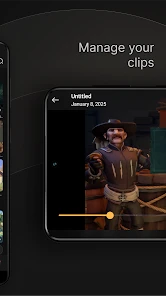
Now, let's talk about the editing features. Medal offers a bunch of editing tools that are super easy to use. You can trim your clips, add captions, and even throw in some cool effects. It's like having a mini editing studio right in your pocket. And the best part? You don't need to be a tech wizard to make your clips look awesome.
For a quick post, I would treat editing as a finishing step, not a reason to polish every recording. Trimming to the moment that explains the joke or play can matter more than adding effects; a caption can also make a clip easier to understand when someone does not know the match context. If a clip needs careful pacing, detailed overlays, or a longer story, a dedicated video editor is the better tool. Medal’s appeal is the shorter path from “that was worth saving” to something ready to share.
A simple routine for keeping the library useful
One trade-off worth thinking about is whether I want to edit immediately or save a batch for later. Doing it straight after a session keeps the memory fresh and makes it easier to choose the best moment, but it can also extend time on my phone after I meant to stop playing. Waiting until another day is more convenient when I have a busy evening, though a growing queue makes it harder to remember why each clip mattered. I would pick a rhythm that suits my play schedule and avoid treating every saved recording as an unfinished task.
If I play with the same friends often, I would also use a consistent personal standard for what gets shared: a genuinely surprising moment, a joke that lands without too much setup, or a play that teaches something. That makes the collection feel more like a set of highlights than a dump of footage. It is a small workflow choice, but it can make the difference between returning because I enjoy the clips and returning only because I feel obliged to sort them.
Share Your Awesomeness
Once you've got your clip perfected, sharing it is a breeze. Medal lets you post your clips directly to your favorite social media platforms. Whether it's Instagram, Twitter, or even Discord, you can show off your gaming prowess to your friends and followers in just a few taps. It’s all about spreading the gaming love!
That social focus is also the clearest difference from simply saving a screen recording to a phone or using a general-purpose social network. A camera roll is better for private storage and gives me fewer reasons to browse other players’ moments; a broad social feed is better when I want to mix gaming with everything else I follow. Medal sits between those choices, centering the clips themselves. I would choose it when gaming is already a regular part of my online social life, rather than expecting it to replace every other place I share videos.
Choosing the right place to share
The best destination depends on who is meant to see the clip. If I am sending a quick moment to a small group that understands the game, a direct social share is more useful than trying to make it appealing to a broad audience. If the goal is to keep a private record, ordinary device recording is the simpler fit. And if I want a carefully edited video with a beginning, middle, and end, a dedicated editor gives me more room to shape it. Medal is most convincing in the middle ground: short gaming moments that I want to share without turning them into a production.
For a realistic routine, imagine finishing a quick session after dinner while a friend is offline. I save the one unexpected win, trim away the waiting around, add a few words so the context is clear, and share it where that friend will see it. The next day, I can browse other gaming clips when I have a few spare minutes. That is a genuine use for the app; recording every match and expecting strangers to care about each one is a much less reliable plan.
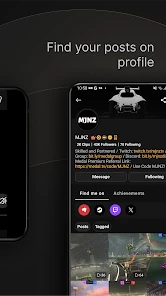
And let me tell you, the Medal community is something else. It's a vibrant place where gamers from all walks of life come together to share their passion. You can browse through tons of clips, get inspired, and maybe even pick up a few tips and tricks from fellow gamers. It's like being part of a global gaming family.
What Keeps It Useful After the First Week
For me, lasting value comes from having a reason to return: a friend who enjoys seeing clips, a game that regularly produces memorable moments, or the simple pleasure of discovering how other people play. The app has a 4.0 average from around 9,200 ratings, and it has passed a million installs, which suggests a substantial audience for that kind of sharing. Those figures are context, not a promise that every feed will match my tastes; social apps are most rewarding when the people and games I care about are represented.
One low-effort way to keep the habit manageable is to share only the clips with a clear point—a clever move, a close finish, or a funny exchange—rather than uploading everything. It makes the editing step quicker and gives friends a reason to watch. If I stop gaming or rarely want to show anyone what happened, the app may lose its place on my home screen. That is a real limitation of a social clip tool: its recurring value depends on both my play habits and my interest in an audience.
How the habit changes over time
After the novelty fades, I would judge Medal less by how many clips I can make and more by whether opening it still feels worthwhile. A healthy routine might mean recording only when I have a likely highlight, editing a few moments when I have time, and browsing when I actually want gaming content. If I find myself opening the app automatically but rarely watching, sharing, or enjoying anything, that is a sign the habit has become passive rather than useful.
There is a real difference between a social feed that helps me find people with similar interests and one that becomes another stream to keep up with. I would follow the clips and creators that make me want to play, laugh, or learn, and be selective about what I upload in return. That balance makes the social side feel reciprocal without turning every match into a performance. Someone who prefers to play without an audience may get more enjoyment from recording locally or not recording at all.
Small Frictions and Who Should Skip It
Medal is aimed at teens and older users, and the current version is 5.43.0, with Android 8.0 as the minimum operating-system requirement. I’d check that compatibility before installing, especially on an older device. The app is free to start, while in-app purchases range from $9.99 to $179.99 per item. I would explore the free experience first and only consider a purchase if I can name a feature or benefit I’ll use repeatedly; a large one-off clip backlog is not, by itself, a reason to spend.
There is also a small but meaningful maintenance cost: choosing which recordings deserve attention, trimming them, and deciding where to share them. If that begins to feel like another chore after gaming, I would keep using the phone’s ordinary recording and sharing tools instead. And if my priority is private, long-term storage or detailed video production, Medal is not the most natural fit. It makes more sense for people who enjoy lightweight editing and a gaming-centered social feed.
Who gets the most from it?
I would recommend Medal most readily to someone who plays regularly, has friends who like seeing gameplay, and enjoys making short clips more than simply storing recordings. It can also suit a curious viewer who wants gaming moments as a distinct social interest rather than one small part of a general feed. The key is having a recurring reason to return, not just a single impressive match that makes the app seem useful for one night.
I would be more cautious if I mostly play offline, rarely share videos, or want a dependable archive for every session. In those cases, the extra social layer may be unnecessary, and a phone’s built-in recording tools or a dedicated editing app may fit better. The choice is not really about which option has the most features; it is about whether I want to turn gaming moments into social posts or simply keep them for myself.
Final Thoughts
In a world where gaming is more than just a hobby, Medal - Gaming Clips shines as a must-have app for every gamer out there. Its ease of use, coupled with powerful features, makes it a winner in my book. So, whether you're looking to capture your finest gaming moments or just want to enjoy the creativity of others, Medal is definitely worth checking out.
In short, this app is a game-changer (pun intended). So, go ahead, give it a try, and dive into the exciting world of gaming clips. Who knows, you might just become the next viral sensation!
Medal - Gaming Clips Frequently Asked Questions
Is Medal - Gaming Clips free to download, and are there in-app purchases?
Medal - Gaming Clips is free to download, so you can try its core experience without paying upfront. The app also offers in-app purchases, with listed items ranging from $9.99 to $179.99 each. Before buying anything, review the purchase details shown in the app and consider whether the extra features suit how you plan to use Medal.
Is Medal suitable for younger users?
Medal is rated Teen, so it is intended for teen users and older audiences. As a social app centered on gaming clips, it can involve viewing and sharing content created by other people. Parents and guardians may want to discuss what their teen watches, uploads, and shares, and encourage thoughtful choices when interacting with a community.
What should I know about Medal’s reputation and developer before installing it?
Medal is developed by Medal B.V. and is a social app focused on gaming clips. It has an average rating of 4.0 from around 9,200 ratings, along with 408 written reviews. These figures offer a quick snapshot of user feedback, but individual experiences can differ depending on the device, gaming habits, and which features someone uses.
What is Medal - Gaming Clips and what sets it apart from other gaming clip apps?
Medal - Gaming Clips is a specialized app for gamers to capture, edit, and share their gaming moments seamlessly. Unlike other apps, Medal offers a robust community feature where users can interact, comment, and engage with clips. Its user-friendly interface and high-quality recording capabilities make it a standout choice for gamers looking to showcase their skills or memorable in-game moments.
How can I record and edit gaming clips using Medal?
Recording with Medal is straightforward. Users can start capturing clips by pressing a hotkey or using the on-screen controls. The app provides intuitive editing tools to trim, add effects, and enhance the captured footage. This makes it easy for both beginners and seasoned gamers to create professional-looking clips without needing extensive video editing knowledge.
Pros
- User-friendly interface
- easy navigation.
- High-quality video uploads and downloads.
- Supports multiple gaming platforms.
- Real-time sharing with friends.
- Customizable clip editing features.
Cons
- Occasional app crashes noted.
- Limited storage for free accounts.
- Ads can be intrusive at times.
- Some features require premium access.
- Slow loading on older devices.

- Category
- Social
- Version
- 5.43.0