Mathway: Scan & Solve Problems
- 36.42K
- 4.2
- Installs
- 50.00M
- Price
- Free

Screenshots






Analysis by Reviewed
When I use Mathway: Scan & Solve Problems, I treat it as a check on my reasoning, not a replacement for learning the method. That distinction matters: a quick answer can get me unstuck, but I get much more from the app when I first try the problem and then compare its result with my own work. As an education app from Chegg, Inc., it is free to install, with in-app purchases ranging from $0.99 to $149.99 per item, so I would check which options are included before relying on paid tools.
A reliable routine for working through a problem
My most useful routine is simple: enter or scan one problem, read the result carefully, and then identify the step where my approach differs. If I only collect final answers, it is easy to mistake speed for understanding. If I use the result to locate a sign error, a misplaced exponent, or a mistaken operation, the app becomes a more practical study companion.
Scanning is convenient when a worksheet uses clear, printed notation, but it is not a reason to skip checking what the camera has captured. Fractions, roots, cramped writing, and symbols that look alike can be easy to misread. I recommend comparing the recognized expression with the original before trusting the answer. When a scan seems off, entering the expression another way is a better next move than building more work on a possibly incorrect input.
Use the result to test understanding
For revision, I like to cover the answer, solve the question independently, and then use Mathway to check it. A second useful habit is to change a value in a similar problem and predict how the result should change before checking again. That turns a solver into a way to test whether I understand the relationship between the numbers, rather than a shortcut for copying a result.
Mathway is especially handy when a student is working alone and needs a quick way to check a calculation or get past a sticking point. It can also help an adult refresh a topic before helping with homework. But if your class requires a particular method, the app’s answer should not be assumed to match the teacher’s expected working. I would keep my own written steps and use the app as a comparison, especially when preparing for an exam.
Instant Problem Solving with a Snap
One of the coolest features of Mathway: Scan & Solve Problems is its ability to solve problems instantly with just a snap of your camera. That's right, you simply point your phone at the problem, snap a picture, and voilà – Mathway does the heavy lifting for you. It's like magic, only better because it actually works! This feature is perfect for those moments when you're knee-deep in homework and need a quick solution without the hassle.
A Versatile Math Companion
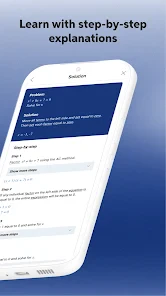
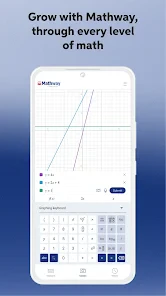
Whether you're dealing with basic algebra or tackling more complex calculus problems, Mathway has got your back. The app covers a wide range of topics, including algebra, geometry, trigonometry, calculus, and even statistics. It's like having a Swiss Army knife for math problems, ready to handle anything you can throw at it. Plus, the step-by-step explanations make it a fantastic learning tool, helping you understand the solution process rather than just providing the answer.
More From Our News Desk

Weather by Xiaomi Review: Clear at a Glance, Less Clear Up Close

X Under Pressure: Can It Recover When Posting Goes Wrong?

Clash of Clans Is Won Between the Battles

Android Auto Makes the Case for Quieter Car Software

MobiOffice: Transforming Mobile Productivity with Seamless Integration

EA SPORTS FC™ Mobile Soccer: Redefining Mobile Sports Gaming
User-Friendly Interface
Nobody likes an app that's harder to navigate than a corn maze, and thankfully, Mathway keeps things simple and intuitive. The clean, user-friendly interface ensures that you won't get lost in a sea of buttons and options. Everything you need is right at your fingertips, making the whole process as smooth as butter. Whether you're a tech wizard or someone who struggles with smartphones, you'll find Mathway easy to use and incredibly helpful.
Settings that shape a useful study session
Before depending on a solver for a class, I would check the available answer and explanation options and make sure they suit the way I am studying. Access to a final result and access to fuller working may not be the same experience, so it is worth checking what is available in the current app rather than assuming every explanation is included at no cost. The free app is a low-risk way to try the workflow, while the broad in-app purchase range makes it sensible to understand the specific purchase before paying.
I also find it useful to keep a small list of problem types I repeatedly miss. After checking a few examples, I can return to those topics and try fresh problems without immediately asking for a solution. That repeatable habit helps reveal whether I have learned the process or merely recognized one worked answer. It is more useful than scanning every exercise in a chapter and ending up with a screen full of answers but no clear sense of progress.
Where it fits among other math tools
Compared with a general web search, Mathway gives me a more direct route from a particular expression to a result, especially when taking a photo is easier than typing. A textbook or teacher is still better for a carefully sequenced explanation, class-specific notation, and feedback on why a method is expected. A graphing tool can be a better choice when I need to inspect how a function behaves visually, while a handwritten solution remains essential when I need to show my reasoning. I see Mathway as a useful companion to those approaches, not a substitute for all of them.
A realistic use is checking homework at the kitchen table after a long day: I work through a set of algebra questions, scan a printed problem I cannot confidently read, and compare the output with my paper steps. If the result differs, I revisit the setup rather than simply copying the displayed answer. That small pause is the difference between using a solver to learn and using it to finish faster without retaining anything.
A Lifesaver for Students
We all know that feeling of panic when a math test is looming, and you're not quite sure if you've got everything down pat. With Mathway, you can practice problems and check your answers, giving you that extra boost of confidence before walking into the exam room. It's like having a safety net, ensuring you're well-prepared and ready to ace that test.
Know when another approach is better
The main limitation is also the temptation: an instant solution can make it easy to stop thinking too soon. I would not use it during a closed-book assessment or as the only source for learning a new topic. It is also less convenient when a problem depends on a diagram, handwritten notation is hard to read, or the assignment asks for a specific proof or explanation. In those cases, a teacher, textbook, or carefully written solution is more dependable.
Mathway is rated 4.2 on average from around 415,000 ratings, has more than 50 million installs, and is suitable for everyone. It first appeared on February 4, 2012, and version 6.5.3 requires Android 8.0 or later. Those details make it a widely used option, but they do not change my practical advice: try it on the kinds of questions you actually study and see whether its input and explanations fit your routine.
In conclusion, Mathway: Scan & Solve Problems is an app that truly delivers on its promise to help you conquer math challenges with ease. Whether you're a student drowning in homework or just someone who loves numbers, this app is a game-changer. With its powerful features, user-friendly design, and ability to provide instant solutions, Mathway is a must-have for anyone looking to make math a little less daunting. So why not give it a whirl and see how it can transform your math experience?
My verdict on using it well
I recommend it to students who want a quick check, a way to get unstuck, or a convenient camera-based start to a problem. I would skip it if what you need is a full course, personal tutoring, or guaranteed alignment with a teacher’s preferred method. Used with a pencil, a first attempt, and a habit of checking the input, it can make practice more manageable. Used as an answer button, it is much less likely to make you better at math.
Mathway: Scan & Solve Problems Frequently Asked Questions
Can Mathway help me check my homework without simply giving me an answer?
Mathway can be useful as a way to review a problem and compare its solution with your own work. Its camera-based solving feature is designed to provide a solution, and the published description highlights step-by-step help. For the most benefit, try the problem yourself first, then use the result to check your approach and identify any part you may need to revisit.
Is Mathway appropriate for younger students?
Mathway is an education app with a content rating of Everyone, so it is intended for a broad audience. Its usefulness will depend on the learner’s subject and level: students can enter problems and use the results to support homework or practice. Parents and educators may find it helpful to encourage students to follow the reasoning and use the app as a study aid.
Can I type a problem instead of using the camera?
Yes. Mathway: Scan & Solve Problems is built around helping users enter math problems and get solutions, and scanning with a phone camera is one convenient option. Typing can be useful when a page is hard to photograph or when you are working from a digital question. Check the expression carefully before submitting it so the app solves the problem you intended.
Who makes Mathway, and what devices can run it?
Mathway is an education app developed by Chegg, Inc. It is available for Android and iOS, and its listed minimum operating system is version 8.0. Before downloading, check that your device meets the platform’s requirements and has enough room for another app. Mathway is free to download, though some features may involve in-app purchases.
What is Mathway: Scan & Solve Problems and how does it work?
Mathway: Scan & Solve Problems is an educational app designed to help students solve mathematical problems quickly and accurately. Users can simply take a photo of a math problem using their smartphone camera, and the app will provide a step-by-step solution. This feature is especially useful for students who need immediate assistance with homework or for those looking to improve their math skills.
Pros
- Instant solutions to complex math problems.
- Supports a wide range of math topics.
- User-friendly interface for all ages.
- Detailed step-by-step explanations provided.
- Works offline for easy access anywhere.
Cons
- Requires subscription for full access.
- Limited free features available.
- Occasional incorrect solutions reported.
- Ads can be intrusive in free version.
- No support for word problem explanations.
- Category
- Education
- Version
- 6.5.3












