Chegg Study - Homework Helper
- 7.91K
- 3.2
- Installs
- 10.00M
- Price
- Free

Screenshots

Analysis by Reviewed
I approached Chegg Study - Homework Helper as a student would: with a question in front of me, limited time, and a need for an explanation rather than a page of unrelated search results. It is an education app from Chegg, Inc. that brings homework help, exam preparation tools, and a question-scanning workflow into one place. The idea is appealing because it targets the moment when a textbook, class notes, or a general web search stops being enough.
My overall impression is mixed but useful. The app can be a practical study companion when I use it to understand a difficult step, check my approach, or organize revision around questions I already have. It is less convincing as a complete replacement for a teacher, tutor, or carefully written textbook. The difference matters: the best results come when I treat the app as a learning aid, not as an answer vending machine.
How Chegg Study fits into everyday studying
The app belongs to the education category and is free to install. Its content rating is Everyone, which makes the presentation broadly suitable for general users, although the usefulness naturally depends on the subject and the level of work being attempted. Chegg Study has been available since August 19, 2013, and the current Android release is version 15.40.0, requiring Android 8.0 or later.
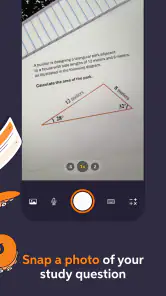
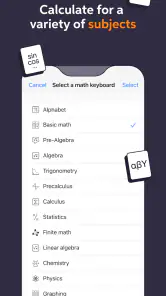
That long presence helps explain why the service feels designed around common student problems rather than one narrow classroom format. A user may arrive with a typed question, a problem from a worksheet, or a page that is easier to photograph than rewrite. The question scanner is especially relevant in that situation. Instead of spending several minutes reproducing symbols, fractions, or a long prompt, I can use the phone as the starting point for getting help.
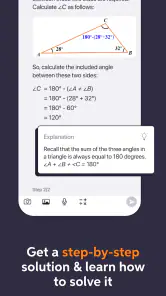
The important distinction is between finding an answer and learning from it. A solution can get me unstuck, but it does not automatically show whether I understand the method. I found the app more valuable when I paused at each step, compared the reasoning with my notes, and then tried a similar problem without looking. Used that way, it supports active study. Used passively, it can encourage me to copy a result without building confidence.
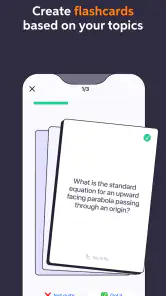
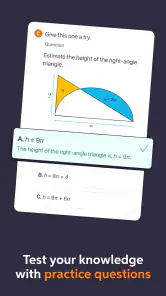
Chegg Study is also positioned for exam preparation, not only last-minute homework. That makes sense because the same question that exposes a gap in tonight’s assignment may reveal a larger topic I need to review before a test. Still, I would not rely on a single explanation as my entire revision plan. I would combine it with class material, practice questions, and the terminology used by my instructor.
What the free installation really means
There is an important cost distinction here. The app itself is free, so installing it and exploring its basic presence on a compatible device does not require an upfront purchase. However, in-app purchases are listed from $0.99 to $15.99 per item. That means “free” should be read as free to download, not as a promise that every form of help or every useful part of the service is available without payment.
More From Our News Desk

Clash of Clans Is Won Between the Battles

Android Auto Makes the Case for Quieter Car Software

MobiOffice: Transforming Mobile Productivity with Seamless Integration

EA SPORTS FC™ Mobile Soccer: Redefining Mobile Sports Gaming

How Microsoft OneDrive Became a Mobile Productivity Giant

How Google Translate Breaks Language Barriers Effortlessly
I appreciate this clarity because it changes how I would recommend trying the app. A student can begin by checking whether the workflow suits their subjects and study habits before deciding whether paid access is worthwhile. I would not commit money simply because a question scanner sounds convenient. I would first test how often I need help, whether the explanations make sense to me, and whether the available assistance matches the work I actually do.
The listed purchase range is broad enough that value depends on the individual situation. Someone who needs occasional guidance may view a small purchase differently from someone who expects regular exam preparation support. I would also separate convenience from educational value: paying to reach an explanation can save time, but it is only good value if the explanation helps me solve the next problem independently.
That is why I would make a short trial period of personal evaluation before spending. I would note the subjects where I get useful help, the questions that remain unclear, and how often I return to the app. This avoids a common mistake with study services: judging the price after one impressive answer instead of judging the overall benefit across a real week of studying.
A realistic homework workflow
Imagine I am working at the kitchen table after class. I understand the general topic, but one algebra problem has a transformation that does not make sense. I can scan the question rather than type every symbol, inspect the resulting explanation, and compare the method with the example in my notebook. Then I can close the app and redo the problem from the beginning. If I still make the same mistake, I know the problem is not just a missing final answer; it is a gap in the underlying step.
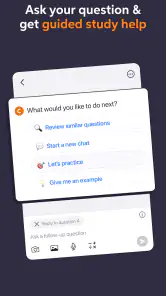
That workflow is more useful than opening the app only after I have given up. Before scanning, I would identify exactly where my reasoning stopped. After reading the solution, I would write a one-sentence explanation in my own words. This turns a quick lookup into a small lesson. It also makes it easier to notice when the response does not match the notation or method used in class.
The scanner has a practical trade-off. It can reduce typing, but a photograph is not automatically a perfect representation of the question. Cropped text, unusual formatting, handwriting, or several problems close together can make the starting point less reliable. I would always check that the captured question is complete before trusting the response. That small habit prevents a surprisingly frustrating cycle of trying to solve the wrong version of a problem.
For longer questions, I would keep the original wording visible in my notebook or textbook. A short formula may be easy to scan, while a word problem can depend on a condition that is easy to overlook. In those cases, manually reviewing the prompt is just as important as reviewing the answer. The app can help with the calculation, but I remain responsible for confirming what the question is actually asking.
Where the app adds real study value
The strongest use case is targeted clarification. When I already know the topic and can point to a particular obstacle, a guided solution can save time and show a route I had not considered. This is different from searching the open web, where I may find a video that is too advanced, an answer with different notation, or a discussion that never addresses the exact wording of my assignment.
The exam-preparation angle can also help me identify recurring weaknesses. Instead of treating every difficult question as an isolated emergency, I can group my mistakes by concept: setting up an equation, interpreting a graph, applying a formula, or explaining a conclusion. The app does not replace that organization, but it can provide material for it. I would keep a separate list of errors and revisit the list without assistance later.
Another useful trade-off is speed versus depth. A fast explanation is valuable when I am checking a small step, but speed can hide whether the reasoning is complete. I would slow down for topics where one skipped assumption changes the answer. For simple confirmation, the app may be efficient; for a foundational concept, a teacher’s explanation or a full textbook chapter may be better.
I also see value for students who are uncomfortable asking a basic question aloud. A private study tool can make it easier to admit that a first step is unclear. That benefit should not become isolation, though. If I repeatedly need help with the same concept, I would take the question to a teacher, tutor, or classmate. Repeated confusion is a signal that I need a different explanation, not merely more answer checks.
Limitations I would take seriously
The main limitation is that no answer-based tool can fully understand my course context unless I provide it. My instructor may require a particular method, notation, format, or level of justification. A solution can be mathematically sensible and still be a poor submission if it does not address the assignment’s expectations. I would use the app to learn and verify, then write the final work myself in the style required by class.
There is also a risk of overconfidence. Seeing a polished solution can make a problem feel familiar even when I could not reproduce it alone. My test is simple: after reading the explanation, I put the phone down and solve a related question from memory. If I cannot, I have recognized the method but not learned it yet.
Question scanning is convenient, but it should not be treated as infallible. A camera-based workflow is sensitive to how clearly the question is presented, and complex layouts deserve extra checking. I would use it for a clean, focused problem first. For a page containing diagrams, instructions, and multiple parts, I would verify every detail manually before relying on the result.
The rating is currently a 3.2 average from around 47 thousand ratings, with roughly 7.9 thousand written reviews. That is not a reason to dismiss the app, but it is a useful reminder to keep expectations realistic. A service can be helpful for one subject and frustrating for another, or convenient for one study style and unnecessary for someone who prefers books and office hours.
The app has more than 10 million installs, so it is clearly familiar to a large Android audience. Popularity does not settle the value question for an individual student. I would focus less on how many people have installed it and more on whether its explanations fit my level, whether the scanner saves me meaningful time, and whether I can use the help without becoming dependent on it.
How it compares with ordinary alternatives
Compared with a general search engine, Chegg Study is more focused on the student’s immediate question. A search engine offers breadth, but it can send me through several pages before I find an explanation that matches the problem. The advantage here is a more direct study workflow. The disadvantage is that a focused answer may not give me the wider lesson, background, or alternative viewpoint that a carefully chosen educational video or textbook provides.
Compared with a textbook, the app is faster for a single obstacle and more flexible when I am away from my desk. A textbook is usually better for building a complete sequence of ideas, seeing definitions in context, and following the instructor’s chosen progression. I would use Chegg Study to bridge a gap, then return to the textbook when the gap reveals a topic I do not understand broadly.
Compared with a human tutor, the app offers convenience and privacy, but not the same live adjustment. A tutor can notice hesitation, ask why I chose a step, and change the explanation immediately. If I am preparing for a major exam or repeatedly misunderstanding the same unit, that personal interaction may be worth more than quick access to another written solution.
Compared with free educational resources, the app’s appeal is the directness of its question-centered approach. Free videos and learning sites can be excellent, especially when I need a complete lesson, but they may take longer to search. The paid element becomes easier to justify only when the time saved and the usefulness of the explanation are both consistent. If I mostly need broad lessons, I would look elsewhere first.
Who is most likely to benefit
I would recommend trying it to students who regularly encounter specific homework roadblocks, work across several subjects, or prefer using a phone to type and scan questions. It may also suit someone who wants a private first pass before asking a teacher for clarification. The question scanner is particularly attractive when rewriting a problem would be tedious, provided the image is clear and the user checks the captured wording.
It is less suitable for a learner who wants a structured course from beginning to end. The app can respond to problems, but that is not the same as a complete curriculum with lessons arranged around a carefully planned progression. It is also not my first choice for someone who knows they learn best through conversation, demonstrations, or immediate correction from another person.
I would advise younger users to involve a parent, teacher, or trusted adult when deciding about in-app purchases. The Everyone rating describes the broad content suitability, not whether every paid decision is appropriate for every household. A student should understand what they are paying for before confirming anything and should judge the purchase by repeated educational benefit rather than urgency on one difficult evening.
Students should also skip it if their main goal is to submit work without understanding it. That approach may appear efficient, but it leaves the underlying weakness untouched and can become especially damaging before an exam. The app is at its best when I use it to ask better questions, test my understanding, and return to the problem independently.
My buy-or-skip verdict
My verdict is to try the free installation, but keep the spending decision separate from the download decision. The app offers a sensible combination of homework assistance, exam-oriented study support, and question scanning. Those tools can be genuinely useful in a busy student routine, especially when a single problem is blocking progress.
I would consider paid access only after confirming that it helps with the subjects I actually study and that the explanations improve my independent work. The listed in-app purchase range means the financial value cannot be judged by the word “free” alone. A small or larger purchase may be worthwhile for a student who uses the service regularly and learns from it; it is poor value for someone who opens it only to copy occasional answers.
My practical recommendation is simple: use Chegg Study as a checkpoint, not as your classroom. Scan or enter the problem, locate the step that caused trouble, compare the reasoning with your course material, and then solve a similar question without help. If that workflow makes difficult evenings more manageable, the app earns a place in your study routine. If you need a full lesson, personal feedback, or a carefully sequenced course, a teacher, tutor, textbook, or broader learning resource will probably serve you better.
In short, I see a useful education app with clear convenience and equally clear boundaries. Chegg, Inc. has built a tool for reaching help quickly, but the lasting benefit depends on what I do after the explanation appears. For students willing to slow down, verify the question, and practice independently, it is worth exploring. For anyone looking for effortless answers or a complete substitute for learning, I would skip the purchase and choose a more interactive or structured alternative.
Chegg Study - Homework Helper Frequently Asked Questions
Is Chegg Study suitable for younger students?
Chegg Study is an education app with an Everyone content rating, so its age classification is suitable for a broad audience. Whether it is appropriate for a particular student also depends on their course level, learning needs, and how they use the study resources. Younger learners may benefit from guidance from a parent or teacher when reviewing explanations or using outside help for assignments.
Who develops Chegg Study, and how popular is it?
Chegg Study is developed by Chegg, Inc. and is an established homework-help app. It has more than 10 million installs, an average rating of 3.2 from around 47,000 ratings, and about 7,900 written reviews. Those figures offer a broad sense of its reach and user feedback, but individual experiences can differ depending on the subjects and features someone uses.
What subjects can I study with Chegg Study - Homework Helper?
Chegg Study is an educational support app for homework help and exam preparation. Its resources cover subjects such as mathematics, science, business, engineering, and language studies, so it can be useful across a range of courses. The app’s question scanner can also help you look for support with a problem. What you can access depends on whether the relevant material is available in its library.
Do I need an account to use Chegg Study?
Chegg Study is developed by Chegg, Inc., and offers learning resources through its app. Some features may involve signing in or choosing a subscription, so check the access options shown when you open the app and before beginning any purchase. It is free to download, but that does not necessarily mean every study resource is free to use. Review the terms displayed during sign-up.
What is Chegg Study - Homework Helper used for?
Chegg Study is an educational support app designed to help students understand difficult homework and study topics. It provides access to textbook solutions, step-by-step explanations, expert answers, practice materials, and learning guidance across subjects such as mathematics, science, business, engineering, and language studies. It is most useful when you want to review a method or clarify a concept rather than simply copy an answer.
Pros
- Step-by-step explanations can clarify difficult homework topics.
- Search tools make it easy to find answers by textbook or subject.
- Available solutions cover many common college-level courses.
- Saved questions help you revisit explanations while studying.
- The app supports learning on the go from an Android or iOS device.
Cons
- Some answers may be incomplete
- outdated
- or contain errors.
- Full access to many solutions requires a paid subscription.
- The large answer library can encourage copying instead of learning.
- Photo-based question recognition may struggle with unclear handwriting.
- Subscription pricing may be expensive for occasional homework help.
- Category
- Education
- Version
- 15.40.0












