MAPS.ME: Offline maps GPS Nav
- 13.61K
- 4.1
- Installs
- 50.00M
- Price
- Free

Screenshots
Analysis by Reviewed
I judge a navigation app by what happens when the easy route disappears: a signal drops, a station exit leads to an unfamiliar street, or a planned stop turns out to be across town. MAPS.ME is built around travel and local discovery, and its appeal is straightforward: it can help you prepare for places where mobile data may be unreliable. I find it most useful as a map to plan around, rather than a reason to stop thinking about route conditions and backups.
When a connection changes the experience
With navigation, connectivity affects more than whether a map appears. It can shape how confidently you search, adjust a route, or check a point of interest while moving. I would prepare the areas I expect to visit before leaving dependable Wi-Fi, then check that the map is available on the device. That small habit matters more than discovering a weak connection after arriving at a rural junction.
Offline use is especially relevant for international trips, remote walks, and transit between places with inconsistent coverage. Still, I would not assume that every live detail or changing travel condition works without a connection. A preloaded map can orient me, but current closures, service changes, and other time-sensitive information are reasons to check a second source when I can.
Useful in different kinds of travel
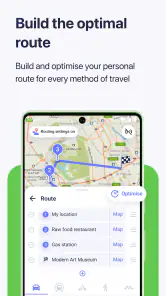
For a visitor on foot, saved places can turn a loose itinerary into a practical sequence: mark the hotel, a station, and a few sights before setting out, then use those reference points when choosing where to wander. For a driver, the value is different: route guidance may help on unfamiliar roads, but I would review the route before departure and follow local signs rather than treating any phone map as infallible.
Hikers and cyclists may appreciate map detail suited to outdoor routes, though a screen is no substitute for preparation. I would keep the phone charged, avoid relying on a single device in demanding terrain, and make sure a route makes sense before starting. In poor weather or on an exposed trail, the sensible choice is not to keep staring at a screen while walking; stop somewhere safe to check direction.
Where I would be cautious
Maps are only useful when the right area is ready and the route fits the journey. Downloading too late, choosing the wrong region, or setting off with a nearly empty battery can undermine the benefit of offline navigation. I would confirm the destination and map coverage in advance, especially for a trip crossing several regions. On a day when I need the freshest traffic or transit updates, a connectivity-focused navigation service may be a better companion.
There is also a practical trade-off between saving maps and managing storage. If I am planning a longer journey, I would keep only the areas I need on the device and remove them when they are no longer useful. That makes preparation deliberate, rather than letting old travel areas accumulate. The app is a good fit for people who value map access away from reliable data; it is less compelling for someone who mainly wants live commuting updates or never travels beyond strong coverage.
More From Our News Desk

Weather by Xiaomi Review: Clear at a Glance, Less Clear Up Close

X Under Pressure: Can It Recover When Posting Goes Wrong?

Clash of Clans Is Won Between the Battles

Android Auto Makes the Case for Quieter Car Software

MobiOffice: Transforming Mobile Productivity with Seamless Integration

EA SPORTS FC™ Mobile Soccer: Redefining Mobile Sports Gaming
Getting Started with MAPS.ME
First off, downloading the app was a breeze. Available on both Android and iOS, the app doesn't take up much space, which is already a win in my book. Once installed, you're greeted with a simple interface that's easy to navigate. No frills, just straightforward options to get you started. I particularly appreciated the quick access to download maps for offline use. This feature is a lifesaver, especially when you're in areas with spotty internet.
Features That Stand Out
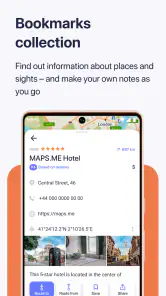
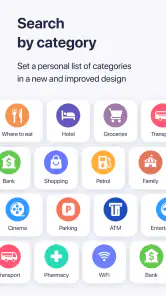
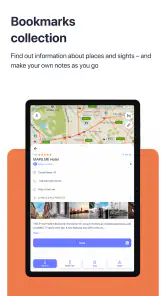
MAPS.ME boasts a plethora of features, but a few stood out to me. The offline navigation is incredibly accurate. I tested it on a recent trip to the countryside, and it didn't miss a beat, guiding me through winding roads and tiny villages with ease. The app also offers detailed points of interest, like restaurants and tourist attractions, which I found helpful for impromptu explorations. Another neat feature is the ability to bookmark your favorite spots. I found myself marking places I wanted to revisit, which made my travel planning a lot easier.
Additionally, there's a handy feature for hikers and bikers. The app includes topographic maps, which are perfect for those outdoor adventures. I took it on a hike, and it was reassuring to know exactly where I was without worrying about losing signal.
Is It Worth It?
Now, let's talk about the user experience. The app runs smoothly, with no noticeable lag, even when navigating through large maps. The design is clean and intuitive, making it easy for anyone to use, regardless of tech-savviness. However, one thing to note is the presence of ads. While they're not overly intrusive, they do pop up from time to time, which can be a slight annoyance during navigation.
On the plus side, the app is free, and for those who want to get rid of ads, there's an option to upgrade to a premium version. It's a small price to pay for uninterrupted navigation, especially if you're a frequent traveler.
Choosing it for the right trip
In the map-and-navigation category, I see this as a useful complement to mainstream services rather than an automatic replacement. Those services are often more convenient when I need changing traffic or transit information and already have a reliable connection. Here, the stronger case is having a prepared map for exploring away from dependable data, with bookmarked places helping me keep a trip organized. For a regular commute, I would choose the option that best reflects current road conditions; for a weekend in an unfamiliar town, I would value having the map ready before I arrive.
A realistic routine is simple: while connected at home or at the hotel, find the neighborhood, save the places I expect to visit, and make sure the relevant map is ready. Then, if a café stop turns into a long walk or the phone loses service, I have a useful starting point without needing to improvise the whole plan. I would still check opening hours and any time-sensitive details separately, since a map is not a guarantee that a business or route remains unchanged.
Who will get the most from it
The app suits travelers who like to explore independently, people visiting areas with patchy coverage, and outdoor users who want a map close at hand. It can also be handy as a secondary navigation option when I prefer not to make every decision depend on a mobile connection. Someone who expects turn-by-turn guidance to solve every situation, wants continuously refreshed conditions, or dislikes preparing before a trip may be happier with another navigation service. The best choice depends less on which app has the longest feature list and more on whether its strengths match the way you travel.
MAPS.ME is free to download, with optional in-app purchases ranging from $0.99 to $54.99 per item. It is developed by Maps_Me, is rated for Everyone, and its current Android version is v17.6.71940-googleRelease, requiring Android 6.0 or later. The app has an average rating of 4.1 from around 1.3 million ratings, with more than 50 million installs. Those figures suggest a widely used travel tool, but I would still decide based on my own need for prepared maps, rather than popularity alone.
Making a downloaded map work harder
I get more from an offline map when I treat preparation as part of the trip, not a last-minute download. Before leaving, I would search for the places I know I need, save a few useful landmarks, and inspect the surrounding area at a closer zoom. A hotel pin on its own may not tell me which side of a large block the entrance is on; nearby streets and recognizable public places can make the final approach less confusing.
For a multi-stop day, I would also avoid building an itinerary around a long string of addresses that I have never checked. Saving a station, a meeting point, and a backup café gives me orientation even if plans change. The trade-off is that bookmarks need a little housekeeping: old pins can clutter a map and make the places I care about harder to pick out. I would clear them after a trip rather than treating the app as a permanent archive of every stop.
What to do when the route is uncertain
If a route looks odd, I would pause somewhere safe and compare it with road signs or another source rather than repeatedly changing directions while moving. This matters most when a journey crosses from a city into less familiar roads, where a small turn can have a larger consequence than a wrong turn on a dense street grid. The app can help me understand where I am, but it cannot judge temporary barriers or local conditions that have changed since the map was prepared.
For an everyday example, imagine taking a train to a town for an appointment, then walking from the station to a building on the far side of the center. I would save the station and destination while connected, check the route before boarding, and keep the map ready for the walk. If a street is closed or the entrance is not where I expected, the saved landmarks give me a way to reorient. I would still use a current transit source for delays or service changes, since those are exactly the details a prepared map should not be asked to settle.
How it fits beside other navigation apps
The familiar map apps are often the easier choice when I want live traffic, changing public-transport information, or a quick search while already online. Their advantage is less about replacing a paper map and more about folding current services into the route. MAPS.ME makes a different case: prepare the geographic reference in advance and use it when data access is uncertain. I would not choose one tool for every journey; keeping a primary online navigator and this as a travel backup can be a sensible arrangement.
That pairing is particularly useful when a trip alternates between connected and disconnected settings. I can use an online service to check a current disruption before setting out, then rely on the downloaded map for basic orientation if reception fades. It is not a guarantee that every search or changing detail will behave the same way offline, so I would test the specific area and route before depending on it. For a familiar commute with reliable coverage, maintaining a separate map may simply be extra work.
Cost, setup, and a sensible trial
Because the app is free to download, I can try it on a short outing before relying on it for a major trip. I would choose a nearby area, prepare the map while connected, and then see whether the saved places and route are clear enough for my habits. That trial can reveal practical issues early, such as whether I am comfortable reading the map while walking or whether I would rather use a different app for spoken guidance and live conditions.
Optional purchases are available, but I would first decide whether the basic map workflow solves a real problem for me. The presence of a paid option is not, by itself, a reason to upgrade; what matters is whether its specific benefits are worth the cost for the way I travel. Since the free starting point lowers the barrier, the most useful test is not a long feature comparison but a realistic walk or drive in an area I already know, with connectivity turned off only if I can do so safely.
Final Thoughts
In conclusion, MAPS.ME is a solid choice for anyone in need of reliable offline navigation. It combines essential features with user-friendly design, making it a must-have for travelers and adventurers alike. Whether you're trekking through mountains or exploring a bustling city, this app ensures you're never lost. So, next time you plan a trip, give it a try, and enjoy the peace of mind that comes with having a trusty map in your pocket.
MAPS.ME: Offline maps GPS Nav Frequently Asked Questions
Can I use MAPS.ME to find places and services while traveling?
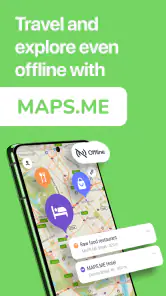
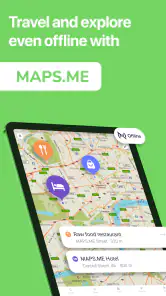
MAPS.ME is designed for travel and local navigation, with maps that can be saved for offline use. Having the relevant map downloaded before you go can help you explore an area and navigate even when you are away from a reliable internet connection. It is a practical option for travelers who want to consult a map without depending on mobile data.
Do I need an internet connection every time I use MAPS.ME?
You can use downloaded maps offline, so an internet connection is not needed every time you open the app or navigate in a region you have saved. You do need to be online to download the maps you plan to use. Preparing before departure is a simple way to make sure the areas you need are available when connectivity is limited.
Can I plan a trip in MAPS.ME before I leave home?
Yes. You can download the maps you need while you have an internet connection, then use those saved maps to explore and navigate offline during your trip. Preparing in advance is particularly helpful if you expect limited connectivity or want to avoid relying on mobile data while traveling. Make sure the relevant regions are downloaded before you set out.
What is MAPS.ME and how does it work offline?
MAPS.ME is a mobile application offering detailed offline maps that enable users to navigate without an internet connection. It achieves this by allowing users to download maps of specific regions or countries when online, ensuring they can access and use them offline. This is especially useful for travelers who may not have consistent internet access.
Is MAPS.ME free to use, and are there any in-app purchases?
Yes, MAPS.ME is free to download and use, providing essential features such as offline maps and GPS navigation without any cost. However, it does offer in-app purchases, with options ranging from $0.99 to $54.99 per item. These purchases can provide additional features or content, so review the available options in the app if you are considering them.
Pros
- Offline access saves data usage.
- User-friendly and intuitive interface.
- Comprehensive global map coverage.
- Includes hiking trails and tourist spots.
- Free with optional in-app purchases.
Cons
- Limited real-time traffic updates.
- Occasional map inaccuracies.
- Large app size may impact storage.
- In-app purchases for some features.
- No social sharing or integration.
- Category
- Travel & Local
- Version
- v17.6.71940-googleRelease