Lift: AI Photo Editor
- 152.00
- 4.2
- Installs
- 1.00M
- Price
- Free

Screenshots
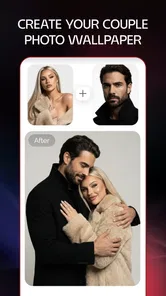
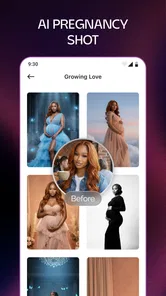
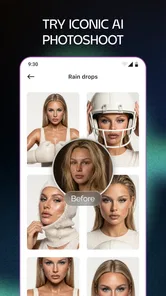
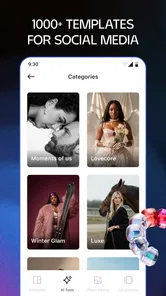
Analysis by Reviewed
I reach for Lift: Reels & Stories Maker when I have something worth sharing but do not want a simple photo to feel like an afterthought. It is a photography app built around making short social content, and its template-first approach gives me a place to begin without asking me to design every detail from a blank screen. I see its appeal most clearly in everyday projects: a small shop showing a new product, a friend collecting birthday photos, or a creator trying to keep a steady rhythm of posts.
A quick idea can become a finished post
I find Lift most useful when I have a photo or a few clips ready but no clear plan for turning them into a post. Rather than opening a blank editing project and deciding every detail from scratch, I can begin with a template and use its structure as a prompt. That makes it a practical fit for a small business sharing a new item, a friend putting together a birthday story, or a creator who wants to keep a regular posting rhythm without treating every post like a full production.
A useful way to work is to choose the photos and clips before settling on a template. That gives me a better chance of picking a layout that suits the material, instead of forcing a favorite design onto images that do not fit it. For a quick everyday post, I would keep the number of visual ideas low: one clear subject, a short line of text, and a consistent look. Templates can speed up the start, but they work best as a framework rather than a substitute for deciding what I want the viewer to notice.
Finding the right starting point
In practice, I would first decide what the post needs to communicate, then look for a design that supports that purpose. A product announcement benefits from a clear view of the item; a personal story may have more room for several images and a casual caption. This order matters because a template can be attractive while still being wrong for the material. If the main photo is busy, for example, a crowded layout is likely to make the finished story harder to read rather than more polished.
Lift is especially appealing if choosing fonts, spacing, and visual arrangements from scratch is the part of editing that slows you down. Its templates offer a creative nudge, not a guarantee that every result will feel original. I would treat them as a starting structure, then make the choices that give the post its own voice: select images with a common mood, keep copy concise, and avoid adding decorative elements that do not help tell the story.
Get Ready to Unleash Your Creativity
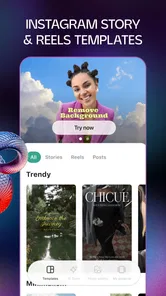
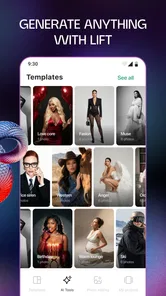
One of the first things I noticed about Lift: Reels & Stories Maker is its user-friendly interface. From the moment you open the app, it feels like a playground for your imagination. Whether you want to create a short reel or a detailed story, the app offers a variety of templates that cater to different moods and themes. This means you don’t have to start from scratch each time, which is a huge time-saver.
Features That Make a Difference
What really sets this app apart is its extensive library of effects and music. The selection is diverse, ranging from trendy beats to classic tunes, which allows you to set the perfect tone for your creation. And let’s not forget the filters – oh, the filters! They’re not just about enhancing the visuals, but also about transforming the entire vibe of your video.
More From Our News Desk

 MX Player
 and the Small, Private Rituals of Mobile Viewing
A practical video player reveals how mobile viewing has become private, portable, and woven into the spare minutes of ordinary life.

 Piano Fire: Edm Music & Piano
Piano Fire Tested: How Well Does It Recover When a Run Breaks?
A rhythm game lives or dies by recovery as much as reflexes. Piano Fire makes a brisk, colorful loop, but its rough edges matter most after a missed note or interrupted run.

 Ludo King®
Ludo King Turns Quick Matches Into a Lasting Social Ritual
A close look at how quick matches, private rooms and familiar rivalries turn this digital Ludo game into a small, durable social ritual—and where that community has limits.

 YouTube Music
 Turns Video Discovery Into Listening Power
A capable music service with an unusually strong route into discovery, YouTube Music shows how Google can turn a video habit into control over what listeners hear next.

 Netflix
 Is Building a Daily Habit Beyond Its Biggest Shows
A familiar streaming app is gaining new weight as Netflix pushes games, live programming, and discovery into the same daily habit. The growth is real, but so are the limits.

 Ramp Car Games: GT Car Stunts
Ramp Car Games: The Risk-and-Reward of Every Jump
A stunt racer built around one deceptively rich decision: how much speed to carry into a jump, and how much control to keep for the landing.
Latest News



Moreover, the app allows you to play around with text and stickers, adding personalized touches to your videos. The drag-and-drop functionality makes it super easy to position these elements exactly where you want them. And for those more tech-savvy folks out there, the app also supports advanced editing features, giving you full control over your content.
Making a post that stays readable
Text and stickers can help a story feel personal, but they also create a small-screen design problem: what looks balanced while editing may cover the subject or become difficult to read when viewed on a phone. I would keep text brief and check its placement against every image or clip, not just the first one. If a phrase crosses a moving face or an important product detail, shifting it or simplifying the wording is usually better than adding more decoration.
For a practical shop workflow, I might use the same general visual direction for a few related product posts, while changing the featured image and the key message each time. That can make a set feel connected without making every post a duplicate. The trade-off is that repeated layouts can become predictable, so I would vary the composition when the photos call for it rather than insisting on a uniform template for every item.
Building a repeatable editing routine
When I am making several related posts, I would treat the first one as a visual test rather than immediately repeating the same choices. A template that looks balanced with one set of images may crowd a different set, and text that reads clearly on a still image can become hard to follow over moving footage. I would check each frame on a phone-sized preview and keep important words away from the main subject. This small review helps catch awkward crops and clutter before the post is ready to share.
Music and effects can set a mood quickly, but they also make restraint important. If the footage already has a strong look, a heavy filter may push its colors too far; if a track is doing most of the emotional work, extra stickers and animated text may compete with it. I find it helps to change one element at a time, then compare the result with the original. That makes it easier to keep the finished piece coherent instead of adding effects simply because they are available.
Choosing what to refine
My best advice is to make one deliberate editing pass for the message and a separate pass for visual polish. First I would ask whether someone seeing the post without context can understand its point. Then I would decide whether the filter, music, and text improve that message. Separating those questions prevents a common trap: spending time tuning effects while the central idea remains unclear.
It is also worth checking whether the template’s style matches the account or occasion. A playful design may suit a birthday recap but feel out of place for a restrained product announcement. When I am unsure, I would compare the draft with a recent post from the same account. Lift can help make an individual piece look finished, but the creator still has to decide whether it belongs beside the rest of their work.
From edit to handoff
Lift is aimed at creating social-ready visual content, so I would use it for shaping a short story or reel rather than as my only tool for a complex video project. Before sharing, I would watch the whole piece once without stopping: text should remain readable, the pacing should feel intentional, and the final image should not look like an afterthought. If the result needs detailed audio mixing, precise clip timing, or a long sequence, a dedicated video editor is likely a better fit. Lift’s value is in helping me assemble a polished, compact piece without turning a simple post into a lengthy editing session.
That distinction also helps answer whether it replaces the usual alternatives. Compared with starting in a general photo editor, a template-led approach gives me a quicker route to a designed story, especially when text and stickers are part of the idea. Compared with a full video-editing app, it is better suited to quick social pieces than intricate timeline work. I would choose based on the job: Lift for fast, styled content; a more specialized editor when exact control over every cut or sound matters.
A realistic day-to-day use
Imagine I have taken a few photos of a new item for a small business after a busy day. I could choose the strongest image first, then select a template that leaves the item visible and gives the message enough room. I would add a short description, check that it stays legible over the image, and use a filter only if it improves the photos as a group. Before handing the post off to the social account, I would review the full sequence and confirm that its opening makes the subject clear. This is the sort of contained task where a template-led editor can save effort without needing a full desktop workflow.
For a personal occasion, the priorities change. A handful of mixed photos may matter more than a perfectly consistent visual style, so I would choose a layout that accommodates the images rather than cropping them to match a preferred design. If a template makes a favorite moment feel cramped, I would pick another one instead of trying to rescue the composition with extra stickers. That flexibility in decision-making is more useful than assuming every project should look like a polished promotional reel.
Who it suits, and what to consider
Lift is a photography app from Lift App, available free, with optional in-app purchases ranging from $2.99 to $59.99 per item. It is rated for Everyone, and its current version is 1.47.0.b6, with a minimum operating system requirement of 11. Its average rating is 3.8 from around 6,000 ratings, and it has over 1 million installs. Those figures make it a familiar option, but they do not tell me whether its style will suit every project. I would try the free experience first and decide whether the available designs fit the kind of content I actually make before paying for anything.
The app is a strong candidate for casual creators who want templates, visual polish, and a manageable editing process on a phone. I would be less likely to recommend it to someone who wants complete control over a multi-track video, or who prefers to build every design from a blank canvas. The template approach saves time, but it can also make different posts feel alike unless I change the imagery, wording, and visual choices with care. The app was released on August 4, 2023, and its focus on reels and stories makes its intended use straightforward: short-form social content, not every kind of photo or video project.
For anyone weighing the optional purchases, I would begin by checking whether the designs and editing choices available in the free experience cover the work they actually plan to make. Paying makes sense only if the added options solve a real recurring need, such as finding a suitable look for posts you create often. If you only edit occasionally, or if you already have a reliable routine in another editor, there may be little reason to change tools just for the sake of having more templates.
When another tool makes more sense
I would skip Lift if the project depends on exact control over a long video, careful audio work, or a detailed sequence of cuts. A full video editor is a better match for those jobs because the priority is precision across a timeline, not simply getting a compact social piece ready. Likewise, someone who wants a clean, custom layout from a blank canvas may prefer a general design or photo-editing tool rather than adapting a template.
On the other hand, a general photo editor can be slower when the goal is a story built from several images, text, and decorative touches. That is where Lift’s focused approach is useful: it reduces the number of decisions needed to get a draft together. The best choice depends less on which app has the longest feature list and more on whether you value a guided start or granular control.
Why You'll Love It
Using Lift: Reels & Stories Maker feels like having a professional editing suite in your pocket. The app is designed to be intuitive, making it accessible for beginners, yet it offers enough depth for those who want to delve deeper into video editing. I found myself spending hours tinkering with different features, losing track of time as I created content I was genuinely proud of.
Another aspect worth mentioning is the app’s performance. It runs smoothly, without any noticeable lags or crashes, which is crucial when you’re in the zone and don’t want any interruptions. The developers have clearly focused on providing a seamless user experience.
Final Thoughts
All in all, Lift: Reels & Stories Maker is a fantastic tool for anyone looking to enhance their social media game. Whether you’re a seasoned content creator or someone who just wants to have a bit of fun, this app has something for everyone. The combination of its ease of use, powerful features, and reliable performance makes it a must-have for anyone serious about their online presence.
So, what are you waiting for? Dive into the world of creative possibilities and let your stories shine!
Lift: AI Photo Editor Frequently Asked Questions
Can I use Lift: Reels & Stories Maker to edit photos as well as videos?
Yes. Lift: Reels & Stories Maker is a photography app for creating and editing photos, videos, and stories, with hundreds of templates to help shape your content. That makes it useful if you want one place to prepare different kinds of social posts, rather than focusing only on reels. You can browse the available templates and choose one that suits the content you want to make.
What is Lift: Reels & Stories Maker?
Lift: Reels & Stories Maker is a creative application designed for users who want to enhance their social media presence. It allows users to create engaging and visually appealing reels and stories with ease. The app offers a variety of templates, editing tools, and effects that simplify the creation process, making it suitable for both personal and professional use.
Is Lift: Reels & Stories Maker free to use?
Lift: Reels & Stories Maker is free to download and offers access to basic features and templates. Some tools and content are available through in-app purchases, with options ranging from $2.99 to $59.99 per item. You can explore the free offering first and decide whether the additional features are worthwhile for your editing needs.
What platforms is Lift: Reels & Stories Maker available on?
Lift: Reels & Stories Maker is available on both Android and iOS platforms. Users can download the app from the Google Play Store for Android devices and the Apple App Store for iOS devices. This ensures that a wide range of users can access and enjoy the app's features regardless of their smartphone preference.
What age group is Lift: Reels & Stories Maker suitable for?
Lift: Reels & Stories Maker has an Everyone content rating, so it is presented as suitable for a broad audience. Its focus is on editing photos, videos, and stories with templates and creative tools. As with any app, parents may still want to review how a child uses social platforms and shares finished content, since that activity happens beyond the editing features themselves.
Pros
- User-friendly interface for easy navigation
- Wide variety of templates for customization
- High-quality export options
- Seamless integration with social media
- Regular updates with new features
Cons
- Limited free version features
- Occasional app crashes reported
- Subscription can be pricey
- Requires internet connection
- Some templates have watermarks