La Biblia en Español
- 4.48K
- 4.9
- Installs
- 1.00M
- Price
- Free

Screenshots
Analysis by Reviewed
When I want to read or revisit a passage of the Bible in Spanish, I value being able to get straight to the text without carrying a separate book. La Biblia en Español is a focused Books & Reference app from Warp Studios Bibles, and its appeal is practical: it brings reading, searching, saved passages, and listening together in one place. I see it as a convenient companion for personal reading, though it won’t replace every kind of study tool.
What the free access means
The app is free to download, so you can try its basic experience without paying upfront. It also offers in-app purchases ranging from $0.99 to $3.49 per item. I’d treat that as a reason to check the options shown inside the app before buying anything: the existence of purchases does not mean you need them to decide whether the reading experience suits you. For someone who simply wants a Spanish Bible on a phone, the free entry point is the clearest value.
Its audience is broad: the content rating is Everyone, and it has been available since February 9, 2013. The current version is 3.3.16, and it runs on Android 5.0 or later. Those details make it easier to judge whether it fits your device and household, but the more important question is whether its particular tools match how you like to read.
What to check before settling into a routine
If you are choosing a Bible app for regular use, I would first test the things that shape your reading rather than judging it by the number of buttons. Open a passage you know well, adjust the text until it feels comfortable, then try finding a second passage from a phrase you remember. That quick trial tells you more about whether the app suits you than browsing a long feature list.
I would also make a short list of the passages or topics I return to often and see whether saving them fits naturally into my habits. A bookmark is most useful when it helps you resume a thought, not when it becomes a pile of saved verses you never revisit. Keeping that list purposeful makes it easier to use the app as a reading companion instead of just another place to collect things.
Reading, finding, and returning to passages
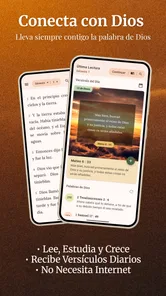
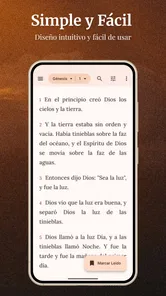
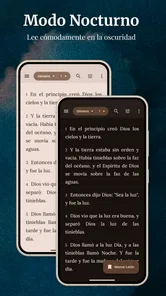
First things first, let’s chat about the interface. When you open La Biblia en Español, you’re greeted with a clean and simple design. It’s incredibly user-friendly, which is great for those of us who might not be the most tech-savvy. You won’t find yourself lost in a maze of confusing menus here; everything is laid out in a way that just makes sense. Plus, the text is easy to read, and you can adjust the font size to suit your preferences. I mean, who doesn’t love a bit of customization?
Features That Stand Out
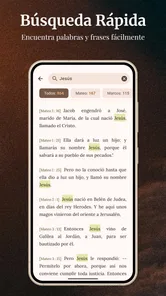
One of the standout features of this app is its search functionality. You can search for specific verses or keywords, making it super easy to find what you’re looking for. Whether you’re preparing for a study session or just want to find that one verse you love, this feature is a real time-saver.
More From Our News Desk

Weather by Xiaomi Review: Clear at a Glance, Less Clear Up Close

X Under Pressure: Can It Recover When Posting Goes Wrong?

Clash of Clans Is Won Between the Battles

Android Auto Makes the Case for Quieter Car Software

MobiOffice: Transforming Mobile Productivity with Seamless Integration

EA SPORTS FC™ Mobile Soccer: Redefining Mobile Sports Gaming
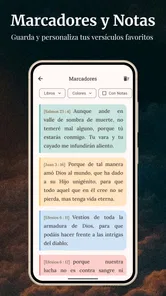
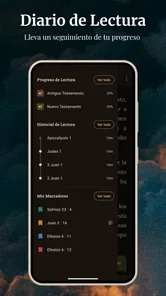
Another cool aspect is the bookmarking feature. You can bookmark your favorite passages, which means you can easily come back to them later. This is especially handy for those of us who love revisiting certain verses for inspiration or guidance.
Let’s not forget about the audio option. Sometimes, I just want to sit back and listen instead of reading, and this app lets you do just that. You can listen to the Bible being read aloud, which is perfect for when you’re on the go or just want to relax and absorb the words in a different way.
A useful routine, with a few practical limits
What I love most about La Biblia en Español is how it seamlessly fits into daily life. Whether you’re commuting, on your lunch break, or just winding down at home, this app makes it easy to incorporate spiritual reading into your routine. It’s like carrying a pocket-sized Bible with you wherever you go, without the bulk.
And let’s be real, sometimes life gets hectic, and finding time to sit down and read can be a challenge. This app makes it so much more accessible, allowing you to connect with your faith whenever you have a spare moment. It’s like having a little spiritual oasis in your pocket.
A small but useful way to get more from search is to try both a remembered phrase and a direct reference when you are looking for a passage. If one approach does not bring up what you expect, the other may be easier, especially when you recall the meaning but not the exact wording. I also like treating bookmarks as a short reading queue: save a handful of passages for a theme, then return to them together instead of relying on memory or repeating the same search.
For example, on a busy morning I might search for a verse I have been thinking about, bookmark it, and listen while getting ready rather than trying to set aside a long reading session. Later, I can open the saved passage and read it more carefully. That simple read-listen-return pattern is more realistic for me than expecting a perfect daily schedule, and it makes the app useful in small stretches of time.
Making a passage easier to revisit
There is a useful distinction between finding a verse and making it part of a routine. Search is best for the moment when a reference or phrase is on your mind; bookmarks help when you want to return to a passage without reconstructing that search later. I would use the two together: search first, save only what I genuinely plan to revisit, and periodically read through those saved passages as a small personal set.
That approach is especially helpful when preparing for a conversation, a personal reflection, or a short reading break. Rather than trying to remember a string of references, I can gather a few passages around one subject and reopen them when I have time. The trade-off is that saved items need a little attention: if I bookmark everything that catches my eye, the collection stops being a useful route back and becomes another list to sort through.
Where it fits among Bible apps
Compared with a printed Spanish Bible, this app is easier to carry and makes locating a remembered passage quicker, while paper may be preferable if you want to read without a screen or mark pages by hand. Compared with a general e-book reader, its Bible-focused search and bookmarks are more directly suited to returning to scripture. If your main goal is a broad research library, detailed cross-references, or a particular translation for formal study, I would compare those needs carefully before making this your only resource.
Listening is another meaningful option, but it serves a different purpose from close reading. I find audio convenient when my hands or eyes are occupied; for comparing wording or slowly studying a sentence, reading on screen is the better choice. A practical approach is to use audio for familiar passages and switch to text when you want to pause, search, or save something for later.
When the alternatives make more sense
A printed Bible remains a better fit for readers who want a screen-free period, prefer the feel of turning pages, or like making handwritten notes in the margins. A general e-book app can be more comfortable if most of your reading already happens there, though it may not offer the same scripture-focused way of locating and saving passages. For serious comparative study, I would choose a resource designed around the translation and research tools I need, then keep this app for quick reading and listening.
There is also a practical question about audio: it is convenient when you can listen attentively, but it is not automatically the best choice for every commute or household task. Background noise can make it hard to follow, and listening while doing something demanding may mean missing a line. I treat it as an alternative route into familiar material, not a substitute for focused reading whenever precision matters.
Who will get the most from it
I’d recommend it to Spanish-speaking readers who want quick access to scripture, appreciate adjustable text, and expect to revisit passages on a phone. It can also suit someone building a modest personal routine from brief reading sessions rather than long study blocks. The app has a 4.9 average from around 54,000 ratings, with over 1 million installs, so it has reached a substantial audience; those figures are context, not a guarantee that its style will suit every reader.
I would look elsewhere if you need a specific translation that this app does not offer, prefer a physical book, or want a study environment centered on extensive scholarly tools. I would also avoid assuming audio will fit every setting: listening in a noisy commute may be less useful than reading, and using a phone can bring the usual interruptions. For a focused Spanish reading companion, though, its combination of text, search, bookmarks, and audio is a sensible set of everyday tools.
A realistic way to use it through the day
Imagine having a few spare minutes before work and wanting to revisit a passage from a recent conversation. I would search for a phrase I remember, save the passage, and read it once while I have a quiet moment. If the morning gets busy, listening later can keep that passage in my day without needing to sit down with a book. In the evening, I can return to the saved text and read it more slowly. The value is not that the app creates extra time; it gives several ways to use the small pockets of time that are already there.
For a family member who is less comfortable with phone menus, I would set up the reading experience together first: find a familiar passage, adjust the text size, and show how to return to it. That is a more useful test than assuming a simple interface will feel simple to everyone. If navigating a phone remains frustrating, a paper Bible may be the kinder and more dependable choice.
My verdict on value
Overall, La Biblia en Español is a fantastic app for anyone looking to deepen their spiritual journey. With its user-friendly design, robust features, and ability to fit seamlessly into everyday life, it’s a tool that enhances both your tech and faith experience. So, if you haven’t checked it out yet, I’d definitely recommend giving it a try. Who knows? It might just become your go-to spiritual companion.
My recommendation is simple: start with the free experience and see whether its reading, search, bookmarks, and audio match your habits before considering an in-app purchase. For the reader who wants convenient Spanish scripture access, that is an easy way to judge its value without overcommitting. If your needs are more specialized, use it alongside a study reference or choose a resource built around those requirements instead.
One last decision check
The clearest reason to try it is also the simplest: free access gives you a chance to see whether this particular reading style works for you before spending anything. The paid items are optional purchases, so I would decide on them only after checking what each offers in the app and whether it answers a need you actually have. I would not pay just because the app has been around for a long time or is popular; my own test would be whether I can find, read, save, and return to passages comfortably.
If that everyday flow feels natural, it is an easy recommendation for carrying Spanish scripture in a convenient format. If you need a specific translation, extensive study aids, or a distraction-free reading experience, another resource may serve you better. For everyone between those extremes, I think it is worth trying as a practical companion rather than expecting it to do the work of a complete study library.
La Biblia en Español Frequently Asked Questions
Can I share Bible verses with other people using La Biblia en Español?
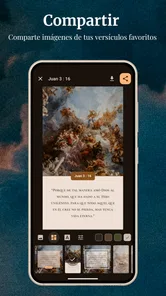
Yes. Sharing verses is one of the app’s stated purposes, making it useful when you want to pass along a passage to friends, family, or a study group. The app focuses on reading and sharing scripture in Spanish, so it may suit people who want a convenient way to keep Bible passages close and discuss them with others.
Is La Biblia en Español suitable for new Bible readers as well as regular readers?
La Biblia en Español is intended for a general audience and is rated Everyone, so it can be considered by readers at different stages of familiarity with the Bible. Its focus on Spanish scripture and its reading and study features may appeal to both someone starting to explore the text and someone who already has an established reading routine.
Does La Biblia en Español support reading the Bible in Spanish?
Yes. The app is centered on the Bible in Spanish, and its store summary describes it as a way to study the word of God and share verses in Spanish. This makes it a natural option for readers who prefer scripture in Spanish or want a Spanish-language Bible app for personal reading and study.
Is La Biblia en Español free to download, and are there optional purchases?
La Biblia en Español is a free Bible app in the Books & Reference category, so you can get started without paying to download it. It also offers optional in-app purchases, which are priced from $0.99 to $3.49 per item. If you prefer to use an app without spending extra, check the available purchase options before buying anything.
What versions of the Bible are available in La Biblia en Español app?
La Biblia en Español app offers multiple versions of the Bible, including the Reina-Valera 1960, the Reina-Valera Antigua, and several modern translations. Users can choose the version that best suits their preference for reading and studying. This flexibility makes the app suitable for both traditional readers and those seeking a more contemporary understanding of the scriptures.
Pros
- Comprehensive and easy-to-navigate interface.
- Includes daily verses to inspire you.
- Offline access to all features available.
- Customizable reading plans and bookmarks.
- Multiple translations for better understanding.
Cons
- Contains ads that can be distracting.
- Some translations require in-app purchases.
- Limited audio features for some versions.
- User interface may be overwhelming for new users.
- Requires regular updates for new features.












