King James Bible (KJV)
- 8.34K
- 4.7
- Installs
- 5.00M
- Price
- Free

Screenshots

Analysis by Reviewed
I judge a Bible app less by how many extras it advertises than by whether it makes it easy to return to a passage, keep a reading habit, and use the text in the way I actually need. King James Bible (KJV) is a free Books & Reference app from Warp Studios Bibles, built around the King James translation. In my view, its main appeal is a familiar text in a convenient digital form, with a few study and reading aids alongside it.
What free access means in practice
The app is free to download, so you can try its core reading experience without paying upfront. It also offers optional in-app purchases priced from $0.99 to $3.49 per item. I’d treat that as a reason to check the purchase details in the app before buying, rather than assuming every extra is included or that you need to pay to read. For someone who simply wants to open the KJV and read, the free starting point is the clearest part of the value.
That distinction matters if you are comparing it with a printed Bible or another digital edition. A print copy gives you a physical object and a page layout you can browse without a screen; this app trades that feel for portability and search. If your main concern is getting the text onto your phone at no initial cost, the balance is attractive. If you want a particular study edition or a structured course, I would first check that the app’s available tools match that need before spending on anything.
Delving into the Features
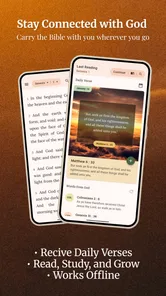
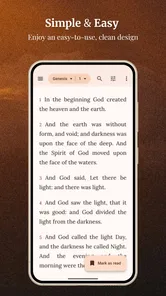
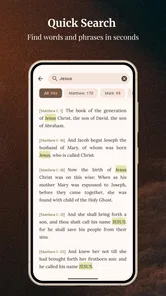
First off, the King James Bible (KJV) app is super user-friendly. As soon as I opened it, I was greeted with a straightforward interface that even my grandma could navigate. The search feature is a lifesaver, especially if you’re like me and sometimes need to find that specific verse that’s on the tip of your tongue. No more flipping through pages like the old days!
Search is especially useful when you remember only a phrase or want to revisit a passage mentioned in conversation. I’d use it before a study group to locate a reference, then bookmark the verse so I can return to it instead of searching from scratch next time. One practical trade-off is that a digital search works best when you have a word or wording to start from; if you only remember the subject, you may need to browse books and chapters instead.
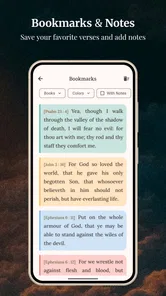
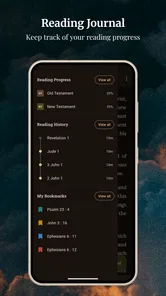
One cool thing I noticed is the ability to bookmark verses. This feature is perfect if you’re someone who likes to keep track of passages that resonate with you or if you need to reference them later during discussions or study groups. Plus, there’s a handy note-taking feature where you can jot down your thoughts or reflections as you read. It's like having a digital journal and Bible all in one.
For a useful personal workflow, I’d keep bookmarks selective: one for passages to revisit, another for material I want to bring to a discussion, and notes for questions rather than trying to turn the app into a complete research library. That separation makes saved verses easier to use later. If you prefer elaborate cross-references, commentary, or a full lesson plan, a dedicated study resource may serve you better than a reader-first app.
More From Our News Desk

Weather by Xiaomi Review: Clear at a Glance, Less Clear Up Close

X Under Pressure: Can It Recover When Posting Goes Wrong?

Clash of Clans Is Won Between the Battles

Android Auto Makes the Case for Quieter Car Software

MobiOffice: Transforming Mobile Productivity with Seamless Integration

EA SPORTS FC™ Mobile Soccer: Redefining Mobile Sports Gaming
Stay Connected with Audio and Daily Verses
For those days when you’re on the go, or maybe your eyes are just too tired to read, the audio feature is an absolute gem. Just plug in your headphones and listen to the soothing recitation of the scriptures. It’s like having your own personal choir, right in your pocket!
Audio changes the app’s role: it can accompany a commute, a walk, or a quiet task when looking at a screen is inconvenient. I’d use it as a way to keep a reading routine on a busy day, while choosing text when I want to pause, compare a verse with a note, or find a specific passage. That choice is more useful than treating listening and reading as interchangeable; each suits a different moment.
Let’s not forget about the daily verse notifications. Every morning, like clockwork, I receive a new verse to ponder throughout the day. It’s a gentle nudge that keeps me grounded and starts my day on a positive note. If you're someone who thrives on routine, this feature can be a game-changer.
A daily verse can be a small prompt rather than a substitute for reading a full chapter. I’d use it as a reminder to open the text, then follow the surrounding passage when context matters. If notifications interrupt your mornings or you prefer setting your own reading plan, you may find a scheduled plan in another Bible app more suitable. The useful question is whether a gentle reminder helps you return to the text or simply adds another alert to dismiss.
Personalization and Community
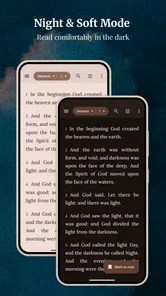
What’s also impressive is how you can customize the app to suit your preferences. Whether you prefer reading in the dark mode, adjusting the font size, or changing the background color, the app has got you covered. It’s all about making your reading experience as comfortable as possible.
These display choices are more than decoration for long reading sessions: larger text can make a passage easier to follow, while a darker screen may feel more comfortable in a dim room. I’d set the appearance once before settling into a routine, then focus on the text rather than adjusting it every session. The app is a practical fit for readers who value comfort and quick access over a highly designed study workspace.
Moreover, the app connects you with a wider community of believers. You can share verses and insights with friends or family directly through the app, fostering a sense of community and shared learning. It’s a fantastic way to stay connected with others who share your faith and values.
Sharing is handy when a particular verse comes up in a conversation or you want to send a passage to someone who uses a different reading setup. I’d still treat a shared verse as an invitation to read its surrounding lines, especially in a group discussion where context can change how a sentence lands. That makes the sharing feature most useful as a quick pointer, not a replacement for talking through the passage together.
Using it in ordinary routines
A useful way to test whether this reader fits is to give it one small job for a week rather than trying every feature at once. For example, I’d open a passage after breakfast, save only the lines I genuinely want to revisit, and use a note to record a question that came up. Later, search can help me return to the wording, while a bookmark gives me a direct route back. This routine makes the app’s tools work together without turning reading into a project-management task.
It can also help when preparing for a conversation, provided I keep the goal modest. If someone mentions a familiar phrase, I can search it, read the surrounding passage, and share the reference rather than relying on memory. If the discussion needs historical background or comparisons among translations, I would use another resource alongside it. The strength here is quick access to the KJV text, not a promise that one reader will answer every interpretive question.
One trade-off worth considering is how a phone changes attention. Search and bookmarks reduce the effort of finding a passage, but the same device can bring messages and other distractions into the reading session. I’d use a quiet moment or the phone’s focus controls if notifications tend to pull me away. Someone who wants a screen-free devotional routine may be better served by print, even though it is less convenient to search.
Who is likely to get the most from it?
This is a good match for someone who already wants the King James text and values having it close at hand. A realistic day might begin with the daily verse, continue with audio while travelling, and end with a bookmarked passage and a short note after reading. The combination supports a simple habit without requiring a printed book to be within reach.
The app has a 4.7 average from around 55,000 ratings, and it has passed 1 million installs. That reach suggests many readers find the format useful, but popularity alone does not decide whether it suits your preferences. Its age rating is Everyone, and the release history begins in 2013; the current version is 3.3.16 and requires Android 5.0 or later. I’d check your device compatibility before downloading, particularly if you use an older phone.
If you want several Bible translations side by side, deeper scholarly tools, or a planned course with guided lessons, I would compare alternatives designed around those jobs. This app’s focus on the KJV is a benefit when that is the version you want, but a limitation if you regularly need wording from other translations. Likewise, anyone who prefers paper, avoids phone notifications, or does not want reading to depend on a device may be happier with a physical Bible.
It is also a sensible option for someone new to digital Bible reading who does not want to learn a complicated interface before opening a passage. The familiar chapter-and-verse structure gives a clear starting point, and basic habits such as searching, saving, and making a short note are easy to understand. By contrast, readers who already organize extensive study notes or need a searchable collection of several translations may find a more research-focused Bible platform a better daily workspace.
For readers deciding between this and another free Bible app, I’d start with the translation rather than the number of tools. If the KJV is the text you want to read, a focused reader can be more useful than a broader catalog you rarely use. If you often compare wording, however, a multi-translation app is likely the more practical choice. A paper Bible remains preferable when you want to mark pages physically, avoid screen time, or read without depending on your phone.
My verdict on its value
All in all, this app is more than just a digital Bible. It’s a portable, interactive experience that brings the timeless wisdom of the scriptures to your fingertips, anytime and anywhere. Whether you're a daily reader or someone who checks in occasionally, the King James Bible (KJV) app is definitely worth the download. Give it a try and see how it can enrich your spiritual journey.
My recommendation is strongest for readers who want a straightforward KJV companion and will use search, saved passages, audio, or daily prompts. Start with the free access and see whether those habits fit your day; consider an optional purchase only if its specific contents are useful to you. I’d skip it if your priority is a different translation or a richer study system. For a no-cost first step into carrying the KJV on a phone, though, it is an easy option to try.
King James Bible (KJV) Frequently Asked Questions
Can I read the Bible without an internet connection after downloading the app?
Yes. The app is described as an offline Bible reader, so you can access the KJV text without staying connected to the internet. That can be useful when travelling, reading somewhere with limited connectivity, or simply choosing to read without relying on a connection. Daily verses and study tools are also part of the app’s reading experience.
What should I know about the Bible translation and its reading style before installing?
The app centers on the King James Version, making it a fit for readers who want the traditional English Bible text. Its wording may feel formal compared with more modern translations, particularly if you are new to the KJV. If you already prefer the classic style, the app provides a focused way to read it; readers seeking a different translation may want to consider that preference first.
Is the King James Bible (KJV) app suitable for someone new to Bible reading?
Yes. The app is a straightforward Bible reader built around the King James Version, so newcomers can open the text and read without needing to learn a complicated interface. Daily verses offer a simple starting point, while study tools can support a closer look at passages. The traditional English wording may feel formal to some readers, but it is central to the KJV experience.
What features does the King James Bible (KJV) app offer?
The King James Bible (KJV) app includes features like daily Bible verses, offline access to the full text, audio versions for listening, and a search function to quickly find specific passages. It also offers bookmarks, notes, and sharing options, allowing users to personalize their reading and spread inspirational messages.
Is the King James Bible (KJV) app free to use?
Yes, the King James Bible (KJV) app is free to download and use. However, some advanced features or ad-free experiences might require in-app purchases. Users can enjoy the basic functionalities without any cost, making it accessible for anyone interested in reading and studying the Bible.
Pros
- Comprehensive verse search feature.
- Offline reading mode available.
- Daily verses for inspiration.
- Customizable reading plans.
- Audio versions for hands-free use.
Cons
- Contains ads in free version.
- Limited translation options.
- No annotation features.
- Requires account for sync.
- Occasional app crashes reported.












