KWGT Kustom Widget Maker
- 2.29K
- 3.9
- Installs
- 10.00M
- Price
- Free

Screenshots
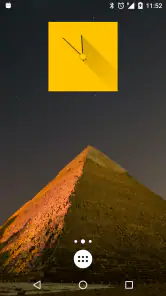
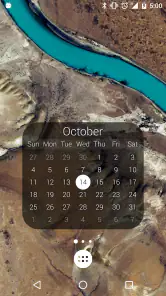
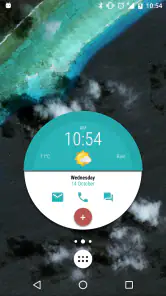
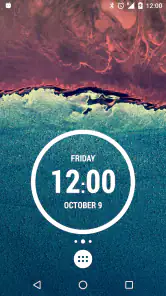
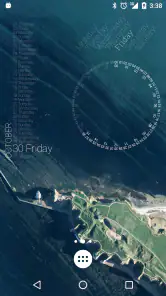
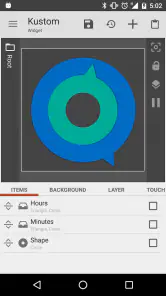
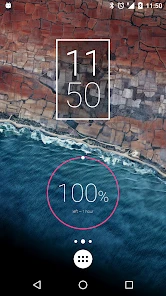
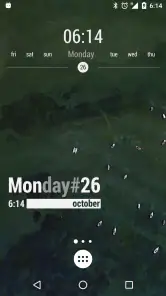
Analysis by Reviewed
I like the idea of a shared household home screen that gives everyone a quick glance at useful information, but a personalized widget is usually tied to the phone it sits on. That makes KWGT Kustom Widget Maker a creative choice for a family member who wants to shape their own device, rather than a shared dashboard everyone edits together. In my experience, that distinction matters: the appeal is personal control, not household coordination built into the app.
A personal screen in a shared home
For example, one person might make a clock and weather layout that suits their morning routine, while someone else keeps a simpler screen for calls and everyday apps. The value is in making each phone easier to scan at a glance, not in expecting matching designs or a single place to manage everyone’s information. I’d treat each device as its own project and agree on a simple visual style only if consistency matters to the household.
That approach also avoids a common source of friction: a widget that looks perfect on one screen may not suit another person’s habits or layout. Before spending time on fine details, I’d settle on what the widget should help its owner do. A clear clock or a focused weather display can be more useful than squeezing every idea into one busy design.
Decide who will customize each device
KWGT is a personalization app from Kustom Industries, and its flexibility is also its main setup boundary. It gives the person building a widget plenty of room to experiment, but it isn’t a household account or coordination tool. I would not choose it to keep family settings, shared schedules, or separate user profiles in sync; I’d use an option designed for those jobs and keep KWGT for the visual layer on an individual phone.
If several people share one device, it’s worth agreeing who is changing the home screen before anyone starts editing. A widget that one person carefully tuned can be confusing to another, especially if they do not know how it was assembled. Keeping a note of the intended layout, or simply asking before changing it, is a low-effort way to avoid accidentally undoing someone else’s work.
What the learning curve really asks of you
For someone who enjoys tweaking a screen, the editor’s depth is a reason to stay. For someone who only wants a ready-made clock, it can feel like more choice than they need. I’d begin with a template, change one thing at a time, and check the result on the home screen before adding more layers. That makes it easier to tell which adjustment helped and which one made the widget harder to read.
There is a practical trade-off between visual detail and everyday usefulness. Small text and crowded elements may look polished while editing, but they are less helpful when you are checking the phone quickly. I’d prioritize legibility and keep the most important information prominent, particularly on a device used by more than one person or by someone who prefers a straightforward screen.
More From Our News Desk

Weather by Xiaomi Review: Clear at a Glance, Less Clear Up Close

X Under Pressure: Can It Recover When Posting Goes Wrong?

Clash of Clans Is Won Between the Battles

Android Auto Makes the Case for Quieter Car Software

MobiOffice: Transforming Mobile Productivity with Seamless Integration

EA SPORTS FC™ Mobile Soccer: Redefining Mobile Sports Gaming
Who will enjoy it, and who may prefer another route
Compared with the usual built-in widgets, which tend to be quicker to add and simpler to configure, KWGT is better suited to people who want to shape the appearance and arrangement themselves. A pre-made widget can be the faster choice if all you need is a basic glanceable tool. KWGT makes more sense when you want to adjust a design rather than accept the default look.
It is free to start, rated Everyone, and has a 3.9 average from around 48,000 ratings, with over 10 million installs. In-app purchases are available at $6.99 per item. I’d try the free app before paying for anything, because the key question is whether you enjoy the hands-on design process. The current version is 3.81b530915 and it requires Android 8.0 or later, so it is intended for compatible Android devices rather than an iPhone.
Why KWGT?
So, why should you even consider using KWGT Kustom Widget Maker? Well, it's simple. This app is like a blank canvas, giving you all the tools you need to create something unique. Whether you want a sleek clock, a weather widget, or something completely out of the ordinary, KWGT has got you covered.
Getting Started
When you first dive into KWGT, it might feel a tad overwhelming. But don’t worry, I’ve been there too. The app offers a plethora of options, so it’s best to start with the basics. You can choose from a variety of pre-made templates if you’re not quite ready to design from scratch. Trust me, these templates are lifesavers when you’re still finding your footing.
Once you’re comfortable, the real fun begins. You can customize everything from the shape and size of your widgets to the fonts and colors. Want to add a personal touch? Go ahead and include images or even animations. The possibilities are endless, and the app makes it surprisingly easy to bring your vision to life.
The Creative Process
One of the things I love about KWGT is how it encourages creativity. It's not just about creating functional widgets; it's about making something that's truly yours. I found myself spending hours tweaking my designs, trying out different combinations, and discovering new features I hadn't noticed before. It’s like being a kid in a candy store!
And don’t worry if you're not an artist. The app is designed to be user-friendly, and there are plenty of online communities filled with fellow KWGT users who love sharing tips and tricks. It’s a fantastic way to learn and get inspired.
Small design decisions that pay off
I get the best results when I decide on the job of a widget before opening the editor. For a morning screen, I might want the time to be the anchor and weather to be secondary; for a workday screen, I may prefer a compact design that leaves room for the apps I open most. This simple planning step keeps experimentation from turning into decoration without a purpose.
Another useful habit is to test the widget at its actual size rather than judging it only in the editor. A typeface that seems elegant up close can become hard to read on the home screen, and a carefully aligned element may feel cramped once the widget occupies a smaller area. I’d make one meaningful change, return to the launcher, and check whether the information is still clear at a glance.
There is also a trade-off in choosing a highly distinctive layout: the more a widget departs from familiar patterns, the more its owner may need to pause to interpret it. That can be worthwhile on a personal device, but it is less ideal if someone else regularly relies on the same phone. In a shared-device household, recognizable labels and a restrained layout are often more useful than a design that only its creator understands.
A realistic routine, not just a showcase screen
Imagine getting ready in the morning while another household member needs to check the same phone later. I’d make the screen useful without making it dependent on my preferences: keep the time easy to spot, avoid tiny decorative text, and leave familiar app icons where the other person expects them. The widget can give the device character while the rest of the screen remains predictable.
For a personal phone, I might instead build around a particular routine, such as checking the weather before leaving and keeping a favorite image in the design. The important question is whether that information earns its space. If I find myself opening an app anyway because the widget is too crowded or unclear, I would simplify it rather than keep adding details just because the editor allows them.
That is where KWGT differs from a typical built-in widget. The standard option usually wins on speed: add it, choose from a few settings, and move on. KWGT is for the person who is willing to invest time in a more individual result. It is not automatically better for every task; it is better when appearance and composition matter enough to justify the extra setup.
Household boundaries, age, and trust
The Everyone content rating makes the app suitable in that broad age context, but I would still treat the editing experience as something that depends on the user. A younger family member who enjoys arranging colors and images may have fun learning through templates, while someone who only needs a dependable, simple home screen may find the many choices distracting. I would help a new user start with a clear, limited design rather than assume every option needs exploring.
For account boundaries, I would keep expectations practical: KWGT is a way to customize a device’s appearance, not a method for separating household information or controlling who can see it. If a phone is shared, the people using it should agree on what belongs on the screen and who is allowed to change the layout. That conversation matters more than trying to use a widget as a substitute for separate accounts or privacy settings.
Coordination can stay simple. If one person is the main designer, they can tell others what the widget is intended to show and avoid changing it without checking. If everyone wants a different look, separate personal devices are a more natural fit than trying to make one screen satisfy every preference. For shared appointments or household planning, a dedicated calendar or other shared tool is the better place to coordinate; the widget can only serve as a visual layer on the device where it is set up.
When the editor is worth the effort
I’d recommend trying KWGT if you enjoy shaping a home screen and are comfortable learning through small experiments. Its free starting point lets you find out whether the process suits you before deciding whether an in-app purchase makes sense. The app is free, and optional purchases are listed at $6.99 per item; I would not pay just because a custom screen seems appealing in theory. First see whether you enjoy building and refining one useful widget.
It may not be the right choice if you want a finished result immediately, dislike adjusting visual details, or rely on a screen that several people need to understand without explanation. In those cases, a built-in widget or a simpler ready-made option is likely less work. On the other hand, someone who likes to adjust spacing, color, type, images, and overall composition will have more room to make the screen feel personal here.
The app has been available since October 14, 2015, and its current version is 3.81b530915. It needs Android 8.0 or later, which is worth checking before planning a design around it. The 3.9 average from around 48,000 ratings and more than 10 million installs suggest that many people have tried it, though those figures do not tell me whether its hands-on style will suit a particular person. I’d use the free experience to make that decision for myself.
All in all, KWGT Kustom Widget Maker is a must-have for anyone who loves personalizing their phone. It gives you the freedom to create something that’s truly unique and reflective of your style. Whether you're a seasoned designer or just starting out, KWGT is a fantastic tool that's sure to keep you entertained and your home screen looking fabulous.
So, if you're ready to take your home screen to the next level, give KWGT a try. I promise you won't be disappointed!
KWGT Kustom Widget Maker Frequently Asked Questions
Is KWGT Kustom Widget Maker available for Android, and what devices can run it?
KWGT Kustom Widget Maker is an Android personalization app for building custom home-screen widgets. It requires Android 8.0 or later, so check your device’s operating system before downloading. The app is free to install, with optional in-app purchases. Its age rating is Everyone, making it suitable for a broad audience of Android users interested in changing their home-screen appearance.
Does KWGT Kustom Widget Maker work on iPhone or iPad?
KWGT Kustom Widget Maker is an Android personalization app, so it is intended for Android devices rather than iPhone or iPad. If you are planning to customize an Android home screen, it lets you build widgets to suit your preferred look and layout. Before downloading, check that your device runs Android 8.0 or later, since that is the minimum operating system requirement.
Can I use KWGT widgets alongside my existing home screen launcher?
KWGT is designed to place custom widgets on an Android home screen, so it can be part of a setup that includes your existing launcher. The widgets are created in KWGT and then added to the home screen through the usual widget-adding process. Launcher layouts and controls can differ, but the app’s purpose is to let you personalize the screen with widgets that fit your chosen style.
What is KWGT Kustom Widget Maker and how does it work?
KWGT Kustom Widget Maker is a powerful tool for Android users that allows for the creation of custom widgets right on your home screen. It works by providing a wide array of design options, including text, shapes, weather information, clocks, and battery meters. Users can design widgets from scratch or modify existing templates to suit their personal style and needs. With a drag-and-drop interface and numerous customization features, KWGT makes it easy to create widgets that perfectly match your device's theme.
Is KWGT Kustom Widget Maker free to use?
KWGT Kustom Widget Maker is free to download and offers a set of features for basic customization. Some additional features and content require in-app purchases, with purchases priced at $6.99 per item. The free version provides a useful starting point for creating a personalized home screen, while paid options may suit users who want access to more of the app’s capabilities.
Pros
- Highly customizable widgets
- User-friendly interface
- Frequent updates
- Wide range of templates
- Supports community sharing
Cons
- Steep learning curve
- In-app purchases
- Limited free features
- Occasional bugs
- High battery usage
- Category
- Personalization
- Version
- 3.81b530915












