KWGT Kustom Widget Pro Key
- 359.00
- 3.9
- Installs
- 500.00K
- Price
- $6.99

Screenshots
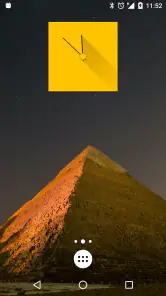
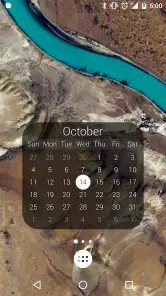
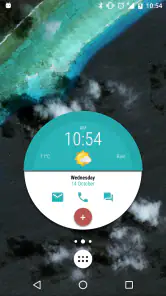
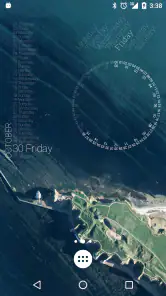
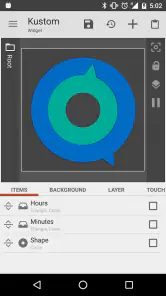
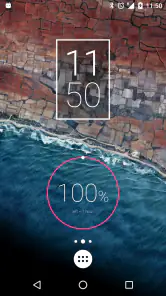
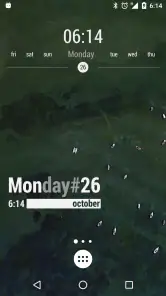
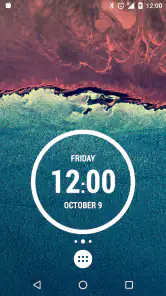
Analysis by Reviewed
Have you ever felt like your phone's home screen needed a bit more pizzazz? Enter KWGT Kustom Widget Pro Key, the app that promises to spice up your Android experience with custom widgets. I've had the pleasure of diving into this app, and let me tell you, it's like giving your phone a personality makeover.
A home screen you can shape around your routine
What makes a custom widget useful is not just how it looks, but whether it puts the information you actually check within easy reach. I’d use KWGT to make a compact clock and date display for a quiet home screen, or build a more information-heavy layout when I want several details visible at once. The useful trade-off is control: instead of accepting the size and appearance chosen by a stock widget, I can adjust the design to fit the space I have and the look I want.
That freedom also means the result depends on how much time I’m willing to spend. If I only want a ready-made clock, a launcher’s built-in widgets or the default Android options are quicker. KWGT makes more sense when those basic choices feel too rigid and I’m happy to tweak a design until it sits neatly alongside my icons and wallpaper.
What customization changes in practice
The most useful way to approach a custom widget is to think in terms of a job it needs to do, not a list of effects to add. I’d decide first whether I want one glanceable detail or a compact panel, then leave enough breathing room around the text. A design that looks impressive in an editor can become hard to read once it is reduced to the size of a home-screen widget, so I’d check it at its actual size before spending time polishing small details.
This also makes KWGT a different proposition from choosing a themed launcher or changing an icon pack. Those options can alter the overall appearance of a home screen quickly; KWGT is more focused and lets me work on the widget itself. That focus is valuable when the launcher already suits me, but it is not the right shortcut if what I really want is a complete visual overhaul.
Getting Started with KWGT Kustom Widget Pro Key
First things first, let's talk about how easy it is to get started. After downloading and installing KWGT Kustom Widget Pro Key, you're greeted with a user-friendly interface that's as inviting as a warm cup of coffee on a chilly morning. The app walks you through the basics, and before you know it, you're knee-deep in customization options.
Customization Galore
This app is a paradise for anyone who loves personalization. Whether you're a minimalist wanting a simple clock widget or someone who craves a data-packed home screen, KWGT has you covered. The range of widgets you can create is simply staggering. You can customize everything from fonts and colors to shapes and sizes. And the best part? You don't need to be a coding wizard to make it happen.
More From Our News Desk

Weather by Xiaomi Review: Clear at a Glance, Less Clear Up Close

X Under Pressure: Can It Recover When Posting Goes Wrong?

Clash of Clans Is Won Between the Battles

Android Auto Makes the Case for Quieter Car Software

MobiOffice: Transforming Mobile Productivity with Seamless Integration

EA SPORTS FC™ Mobile Soccer: Redefining Mobile Sports Gaming
One of my favorite features is the ability to import widget packs. This means that if you're feeling a bit lazy, or if you're just not in the mood to design something from scratch, you can simply download pre-made widgets from the community. It's like having a wardrobe full of outfits ready to wear!
Building a setup that stays practical
For a realistic everyday setup, I’d start with one widget I know I’ll check—perhaps a clock—and make sure it remains readable against the wallpaper before adding anything else. Then I’d try a second layout only if it solves a genuine problem, such as making a busy home screen easier to scan. A useful habit is to keep an untouched copy of a design before experimenting; that gives me a simple way back if a color or size change makes the widget harder to use.
Imported packs can save design time, but they don’t remove every bit of setup. A pack is a starting point, not a guarantee that its style will suit my screen, so I’d expect to adjust its sizing and appearance rather than assume it will look right immediately. That’s a small but important distinction for anyone hoping to install a pack and be finished in seconds.
Making a widget useful from morning to evening
Imagine checking your phone before leaving home and wanting the time to be obvious without opening another app. I’d keep the clock prominent, choose a simple contrast against the wallpaper, and resist adding extra decoration that competes with the main information. Later, if I find myself repeatedly opening the same screen to check another detail, I could revise the layout around that habit. The point is not to fill every available pixel; it is to make a glance more useful.
There is a practical trade-off when a design contains many elements: each one asks for space and attention. A dense layout may suit someone who enjoys a dashboard-like home screen, while a person who wants to find an app quickly may be better served by fewer elements and more open space. I’d treat readability and quick access as the test, not the number of things I manage to fit into one widget.
Performance and Usability
Now, I know what you're thinking. All this customization must take a toll on your phone's performance, right? Surprisingly, it doesn't. The app runs smoothly, and I didn't notice any significant battery drain or lag, which is a relief because nobody likes a sluggish phone.
Usability-wise, the app scores high. The drag-and-drop interface makes it easy for anyone to create stunning widgets. And if you ever find yourself stuck, there's a plethora of tutorials available online, thanks to the app's vibrant community.
Where the learning curve shows
Even with visual controls, creating a widget is a more involved task than selecting a ready-made clock. The number of choices can be enjoyable once I have a clear idea, but it can also slow me down when I am still deciding what the widget should contain. My advice is to change one thing at a time: first the size and placement, then legibility, and only after that the decorative touches. It is easier to see what improved the result, and easier to undo a change that made it worse.
Another useful distinction is between designing and maintaining. A widget can feel finished on day one, yet a later wallpaper or layout change may make its colors or proportions less suitable. I would not choose this tool if I want a set-and-forget screen that I never revisit. The flexibility is the appeal, but it naturally rewards someone willing to make occasional adjustments.
Who will get the most from it?
This is a strong fit for Android users who enjoy arranging their home screen and want more say over how a widget looks than standard launcher tools usually offer. It can also suit someone who wants a distinctive layout without learning to code, since visual adjustments and ready-made packs offer approachable ways to begin. By contrast, if I rarely use widgets, prefer a fixed interface, or don’t want to spend time tuning small details, I’d stick with the simpler options already on the phone.
It’s worth keeping the platform in mind, too: this is an Android customization tool, not a general phone makeover that changes every screen or app. The value is concentrated on widgets. That focus is a strength for people who want a tailored home screen, but it may disappoint anyone expecting a full launcher replacement.
Choosing between KWGT and simpler options
For a single basic function, such as placing a plain clock on the home screen, the built-in widget from a clock app or the launcher is usually the more convenient choice. There is little reason to spend time shaping a custom design if the standard one is already readable and fits the layout. I would turn to KWGT when the standard options feel visually awkward, take up the wrong amount of space, or do not match the rest of the screen.
It also sits differently from wallpaper and icon customization. A wallpaper changes the background and an icon pack changes app symbols; neither gives the same control over the information presented in a widget. KWGT can complement those choices, but it does not replace them. If my main goal is coordinated icons, I would look at an icon-focused option; if the widget is the part that feels out of place, this is the more relevant tool.
What the price and track record suggest
KWGT Kustom Widget Pro Key is a paid Tools app from Kustom Industries, priced at $6.99, and it carries an Everyone age rating. It has an average rating of 3.9 from around 5,400 ratings, with roughly 359 written reviews and over 500,000 installs. First released on October 14, 2015, its current version is F and it supports Android 5.0 and later. Those figures suggest an established niche tool, though the rating also hints that the flexibility won’t feel effortless or worthwhile for every user.
Before paying, I’d ask myself whether I want to build and refine widgets, rather than merely add a clock or weather display. If I expect a polished result instantly, I may find the learning and adjustment more involved than I hoped. If I enjoy experimenting and value a home screen that feels deliberately arranged, the one-time purchase is easier to justify.
Questions I’d settle before choosing it
Does a ready-made pack mean there is no work involved? Not quite. Packs can provide a useful starting design, but I would still check whether the result fits my screen and make adjustments where needed. That makes them a good middle ground for someone who wants more character than a stock widget but does not want to begin with a blank design.
Is it a good choice for someone who does not care about home-screen appearance? Probably not. If I only need occasional information and the phone’s existing widgets do the job, the extra choices are unlikely to repay the time spent learning them. The same applies to anyone who prefers a fixed, predictable layout and does not want to revisit it after changing their wallpaper or arrangement.
Can it replace a launcher? No: its purpose is widget customization, not changing the whole home-screen system. I would keep the launcher I already like and use KWGT only if I want more control over the widget area. And for someone starting from scratch, I’d begin with one compact design rather than trying to rebuild the entire screen at once.
Final Thoughts
In a world where everyone is looking for ways to stand out, KWGT Kustom Widget Pro Key offers a unique opportunity to make your phone truly yours. With its endless customization options, user-friendly interface, and seamless performance, it's a must-have for any Android user looking to add a personal touch to their device.
So if you're ready to transform your home screen into something spectacular, give KWGT a try. Trust me, once you start, you'll wonder how you ever lived without it!
My recommendation is more measured: I’d choose it if shaping a widget sounds like part of the fun, or if the standard choices repeatedly fail to fit the screen I want. I would skip it if I only need a basic clock, do not enjoy tweaking layouts, or expect a complete launcher makeover. For the right Android user, its strength is not simply that it offers more choices; it is that those choices can make a frequently seen part of the phone feel genuinely personal and better suited to daily use.
KWGT Kustom Widget Pro Key Frequently Asked Questions
Is KWGT Kustom Widget Pro Key compatible with my Android device?
KWGT Kustom Widget Pro Key is an Android app, and its minimum operating system requirement is Android 5.0. Before downloading, check that your device meets this requirement. The Pro Key is intended to work alongside KWGT Kustom Widget Maker, so compatibility with the app you use to build and place widgets is also important.
What is KWGT Kustom Widget Pro Key?
KWGT Kustom Widget Pro Key is an Android application that allows users to create customized widgets for their home screen. With a wide range of features, users have the freedom to design unique widgets tailored to their preferences, enhancing both functionality and aesthetic appeal on their device.
How does KWGT Kustom Widget Pro Key enhance my Android experience?
KWGT Kustom Widget Pro Key enhances your Android experience by allowing you to create fully customizable widgets that display information such as weather, calendar events, system info, and more. This app gives you the flexibility to personalize your home screen layout, making your device truly unique and tailored to your needs.
Is KWGT Kustom Widget Pro Key easy to use for beginners?
While KWGT Kustom Widget Pro Key offers extensive customization options, it may have a learning curve for beginners. However, the app provides tutorials and a user-friendly interface that help new users get started. With practice and exploration, users can quickly become proficient in creating their own widgets.
What are the key features of KWGT Kustom Widget Pro Key?
Key features of KWGT Kustom Widget Pro Key include a wide variety of widget templates, advanced customization options, support for touch actions, live map widgets, and the ability to display system information. These features provide users with the tools needed to create personalized widgets that meet their specific requirements.
Pros
- Highly customizable widgets
- Integrates with other apps
- Regular updates
- User-friendly interface
- Wide range of templates
Cons
- Steep learning curve
- Some features require payment
- Occasional bugs
- Consumes battery quickly
- Limited support for beginners
- Category
- Tools
- Version
- F









