Kick: Live Streaming
- 6.21K
- 4.0
- Installs
- 10.00M
- Price
- Free

Screenshots





Analysis by Reviewed
I’d treat Kick as a place to discover live broadcasts and spend time with creators, rather than assuming it will behave like a polished on-demand video library. The appeal is the feeling of being there while something is happening: you can watch, follow the conversation, and decide whether a channel’s style suits you. If you’re new to live-streaming apps, that immediacy can be fun, but it also means the experience depends heavily on which stream you choose and when you open the app.
What to expect from a live-first app
Kick: Live Streaming is a free entertainment app from Kick: Live Streaming, with a Teen age rating. It has an average rating of 4.0 from around 190,000 ratings and more than 10 million installs, so it has a substantial audience without being a guarantee that every channel will match your taste. The app includes in-app purchases, with items ranging from about $1.59 to $299.99; I’d explore the viewing experience first and treat any paid option as optional rather than part of getting started.
Compared with the usual mix of short clips, recorded videos, and subscription-based streaming services, Kick is most interesting when you want a live moment and a shared chat. It is a weaker fit when you need a specific film, a quiet background playlist, or content you can pause and resume at exactly the same point. Live discovery can take a little patience: a stream’s title and current conversation are useful clues, but they cannot tell you whether you’ll enjoy its pace until you spend a few minutes watching.
Make your first visit easier
On your first session, I’d keep the goal small: open the app, look around, and choose one live stream that genuinely interests you. Don’t feel obliged to follow a channel or join the chat immediately. Give the host a little time to establish what the stream is about, then decide whether the atmosphere works for you. This is a more reliable first test than jumping between several broadcasts and judging the whole app from a few seconds of each.
A practical everyday use is checking in during a break: find a live discussion or creator you already recognize, watch for a few minutes, and read the chat to see whether viewers are adding useful context or simply moving quickly. If you’d rather watch quietly, you can still use the stream as the main event and ignore the conversation. If you do join in, keep your first message relevant to what is happening; it is an easy way to participate without needing to know the regulars or the channel’s history.
Small choices that improve the experience
One useful habit is to judge a channel by both its content and its chat. A broadcast may interest you while the conversation feels too busy, or the host may be engaging even when the chat is not. Those are separate parts of the live experience, so you can enjoy one without treating the other as a requirement. If you find a creator you like, returning to that channel is often more rewarding than repeatedly browsing at random.
Live viewing also asks for a little flexibility. A stream can change direction, and the most interesting moment may happen after you arrive rather than immediately. That makes Kick better for casual discovery than for anyone who needs a tightly scheduled, predictable viewing session. I’d also be cautious about spending on gifts or other in-app items before you know how often you watch and what kind of support you actually want to offer.
More From Our News Desk

Weather by Xiaomi Review: Clear at a Glance, Less Clear Up Close

X Under Pressure: Can It Recover When Posting Goes Wrong?

Clash of Clans Is Won Between the Battles

Android Auto Makes the Case for Quieter Car Software

MobiOffice: Transforming Mobile Productivity with Seamless Integration

EA SPORTS FC™ Mobile Soccer: Redefining Mobile Sports Gaming
Getting Started with Kick: Live Streaming
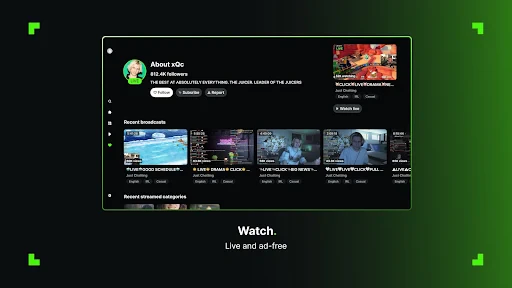
Right off the bat, downloading and installing Kick: Live Streaming was a breeze. Available on both Android and iOS, the app’s interface is sleek, intuitive, and user-friendly. Once you’ve signed up, which is a quick process, you’re greeted with a homepage that screams simplicity yet functionality. It’s like the app is saying, “Hey, let's make streaming fun and not a chore!”
Features That Pack a Punch
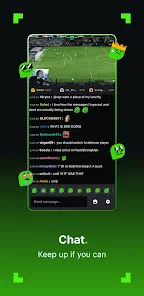
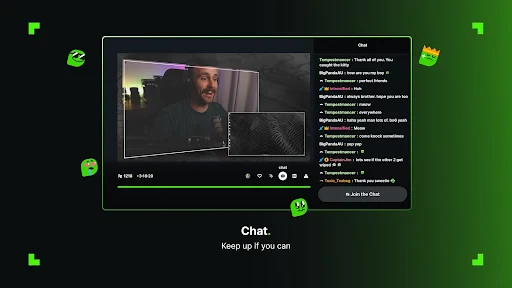
What truly sets Kick apart are its features. You have your usual live chat options, but the app takes it a notch higher with interactive emojis and stickers that make interactions vibrant. The streaming quality is top-notch, and I didn’t experience any lag, which is a huge plus for any live streaming enthusiast. Imagine hosting a live session and not having to worry about buffering – pure bliss!
Moreover, the app allows multi-streaming, so you’re not just confined to one platform. This is particularly useful for influencers or content creators wanting to reach a broader audience. Who wouldn’t want to be seen everywhere at once, right?
For someone trying streaming for the first time, I would separate watching from broadcasting as two different goals. If you’re simply exploring, watch first and get a feel for how creators pace their sessions and respond to chat. If your aim is to go live, sketch out a basic topic and a natural opening before you begin; even a simple plan can make the first few minutes less awkward. Treat the chat as a conversation, not a scoreboard, and give viewers a reason to stay beyond the initial hello.
The Community Vibe
One of the standout aspects of Kick is its community. The app has cultivated a space where users can easily interact and collaborate. I found myself engaging with other streamers and viewers without any hassle. It’s almost as if the app whispers, “Come for the streaming, stay for the community.”
Kick also has a neat feature where viewers can send gifts to their favorite streamers. This not only supports content creators but also adds a layer of connection between the streamer and their audience. It’s a win-win situation!
That said, I wouldn’t recommend making gifts the first way you participate. Watch enough to know what you enjoy, then decide whether supporting a creator fits your budget. The range of in-app purchase prices makes it sensible to pause before confirming a purchase, especially if you are new to the platform or sharing a device. For many viewers, chatting, returning to a stream, or simply watching attentively is already a meaningful form of participation.
Who will get the most out of it?
I’d point Kick toward people who enjoy the unpredictable rhythm of live content, like talking with other viewers, or want to build an audience through streaming. It can also suit someone who follows a creator and wants to catch their broadcasts as they happen. I’d steer away if you mainly want edited, searchable videos, a completely quiet viewing experience, or a fixed schedule you can plan around; a conventional video service may serve those needs better.
As an app, Kick sits in the entertainment space, and it was released on March 31, 2023. Its central draw is not simply that content is playing, but that a creator and audience can share a moment in real time. That distinction matters: the chat can add context and energy, yet it can also distract from the broadcast. I’d try a stream with chat visible, then decide whether keeping your attention on the video alone makes the session more enjoyable.
Choosing a good first stream
A useful way to avoid a frustrating first impression is to choose a broadcast for its subject, not just because it is prominent or already busy. If you recognize the creator, you have a better chance of understanding the tone quickly. If you don’t, look for a title that tells you what is happening now rather than one that sounds broad or mysterious. Then stay long enough to hear the host explain the format. Live content often has a slower start than a tightly edited clip, and that pause is part of the format rather than proof that the app has nothing for you.
For a first meaningful success, I’d count finding one channel you would willingly return to—not sending a message, buying something, or trying to broadcast immediately. Follow the conversation only if it improves the experience. If chat moves too quickly, let it go; if a viewer’s comment gives helpful context, use it to understand the stream. This gives you a simple way to judge whether Kick fits your habits without turning a casual test into a project.
From watching to taking part
If you decide to join the chat, a small, specific response is usually more natural than trying to make an impression. React to the topic in front of you, and give the host room to answer rather than sending several messages in a row. A live audience can be moving quickly, so a message not getting a reply is not necessarily a personal rejection. You can still enjoy the broadcast without becoming a regular voice in the room.
For a creator considering a first broadcast, I’d keep the setup modest and the plan realistic. Decide what you want to talk about, how you’ll begin, and what you can comfortably keep discussing if the room is quiet. Multi-streaming may help a creator reach viewers across platforms, but it also divides attention: you may need to keep track of more than one audience and conversation. I’d try to make one stream feel comfortable before adding that extra complexity.
Where the live format can frustrate
The trade-off behind live interaction is that you do not control the pace. A useful discussion can turn into a tangent, a chat can become hard to follow, and a creator may be live at a time that does not suit you. This makes the app less dependable than recorded video when you want a specific answer or a short, carefully edited explanation. I’d use a conventional video platform for that kind of task, then come to Kick when the process of watching something unfold is part of the appeal.
It is also worth separating the quality of a particular broadcast from the quality of the app as a whole. A quiet room or an uninteresting stream may simply be a poor match for your moment, while a lively chat can still be too noisy for your taste. Try changing one thing at a time: choose a different creator, watch without following chat, or return at another point in the broadcast. That makes your judgment more useful than treating one visit as a final verdict.
How I’d fit it into an ordinary day
Picture a short break between errands or tasks. Rather than opening Kick and browsing without a plan, I’d search for a creator whose subject I already enjoy, watch long enough to understand what the session is about, and decide whether to stay. If the stream is engaging, it can turn a few spare minutes into a shared event; if it is not, leave without feeling you need to catch up later. That low-pressure approach suits live entertainment better than expecting every visit to deliver a complete, polished episode.
For a longer evening, the decision is different. I’d choose a stream because I want the company of a live host and audience, not because I need background content that will never interrupt my attention. The chat can make a broadcast feel social, but it also asks you to split focus. If you want to concentrate on a film, listen to music, or get through a tutorial at your own pace, another format will probably be more comfortable.
Final Thoughts
So, is Kick: Live Streaming worth your time? Absolutely! With its seamless interface, engaging community features, and the ability to multi-stream, it’s a solid choice for anyone looking to dive into the world of live streaming. Whether you’re a newbie or a seasoned streamer, this app has something for everyone. Plus, the added bonus of no lag is just the cherry on top.
If you’re on the hunt for a fresh and exciting streaming app, give Kick a shot. Who knows, you might just find your new favorite platform!
Kick: Live Streaming Frequently Asked Questions
Is Kick: Live Streaming suitable for teenagers?
Kick: Live Streaming is an entertainment app with a Teen content rating, so it may be appropriate for some teenagers, depending on their age and maturity. Live broadcasts and chat can involve unpredictable conversations or topics, as content comes from streamers and viewers in real time. Parents and teens should consider the app’s interactive nature and use available safety and privacy controls thoughtfully.
Do I need an account to get started with Kick: Live Streaming?
An account can be useful if you want to follow channels, join conversations, or build a channel of your own. Before signing up, think about what profile details you want to share and how you intend to use the app. Live-streaming platforms are most interactive when viewers participate, but you can also approach Kick simply as a place to discover broadcasts.
Can I watch streams without creating my own channel?
Yes. Kick: Live Streaming is designed for both viewers and creators, so you can use it to watch live content without broadcasting yourself. You can explore channels, follow streamers you enjoy, and join live chats to interact with the community. If you later decide to stream, the app also supports sharing your own content with an audience.
Will Kick: Live Streaming use a lot of mobile data?
Watching live video can use a noticeable amount of mobile data, particularly if you spend long sessions viewing broadcasts. If your data allowance is limited, consider watching over Wi-Fi and keeping an eye on your device’s data-use settings. Live chat may add interaction, but the video itself is usually the main consideration when deciding whether to stream on a mobile connection.
What should I consider before spending money in Kick: Live Streaming?
The app is free to download, but it offers optional in-app purchases. These may include ways to support streamers or other paid items, so it is worth checking the purchase details before confirming anything. If a young person uses the app, consider reviewing purchase permissions on the device and discussing when spending is appropriate.
Pros
- High-quality video streaming
- User-friendly interface
- Interactive community
- Variety of content creators
- Real-time chat features
Cons
- Limited parental controls
- Requires stable internet
- Ads can be intrusive
- Limited offline access
- Occasional bugs and glitches
- Category
- Entertainment
- Version
- Varies with device











