KAYAK: Flights, Hotels & Cars
- 38.68K
- 4.8
- Installs
- 10.00M
- Price
- Free

Screenshots


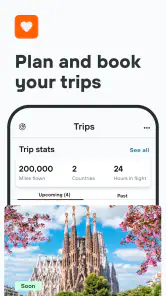

Analysis by Reviewed
For me, the useful question is not whether one travel app can make a whole trip effortless; it is whether it helps me compare the big choices without bouncing between dozens of tabs. KAYAK: Flights, Hotels & Cars is built for that early planning stage, bringing flight, hotel and rental-car searches together. I find it most helpful when I have a destination in mind but still need to weigh dates, prices and practical details before committing.
Start with the choices you still need to make
I would use KAYAK differently depending on how fixed my plans are. If I already know the exact flight and hotel I want, going straight to the relevant airline or property may be quicker. But when I am flexible about timing or still comparing places to stay, a travel-search app can make the shortlist easier to manage. The main benefit here is breadth across three common parts of a trip, rather than a promise that every result will be the cheapest or the best fit.
That distinction matters: comparison is a starting point, not a substitute for reading the booking terms. I make a habit of checking baggage needs, cancellation conditions, hotel location and rental-car inclusions before I choose. A low headline price can be less appealing once I account for what the trip actually requires.
A practical way to compare without rushing
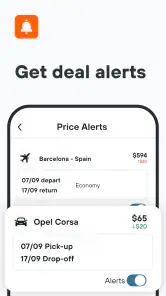
One small workflow I like is to search early, save a few plausible options mentally or in my own trip notes, then return after checking the details directly with the provider. For flights, a price alert can be useful if I have some flexibility and do not need to book immediately. It is less useful when my dates are fixed and I am ready to buy, because waiting for a possible drop may not be worth the uncertainty.
For a family visit, for example, I might compare flights first, then look for a hotel near the place I actually need to be rather than simply choosing the lowest nightly price. If I also need a car, I can compare rental options in the same planning session. That makes the app convenient for coordinating decisions, though I would still verify pickup details and conditions before paying.
Who will get the most from it
I think KAYAK suits people who travel occasionally or regularly and want a broad view before booking, especially when a trip involves more than one type of reservation. It can also help someone planning a weekend away who wants to compare a flight-and-hotel combination of choices without starting from scratch on each category. The trade-off is that frequent travelers with a preferred airline, hotel program or booking provider may find their existing account and loyalty tools more useful for the final purchase.
It is a free travel and local app from KAYAK.com, and it is rated for Everyone. Its 4.8 average from around 389,000 ratings, alongside over 10 million installs, suggests that many travelers use it, but popularity alone does not tell me whether a particular result suits my needs. I would treat the comparison as a way to discover options, then judge each one by its terms and fit.
More From Our News Desk

Weather by Xiaomi Review: Clear at a Glance, Less Clear Up Close

X Under Pressure: Can It Recover When Posting Goes Wrong?

Clash of Clans Is Won Between the Battles

Android Auto Makes the Case for Quieter Car Software

MobiOffice: Transforming Mobile Productivity with Seamless Integration

EA SPORTS FC™ Mobile Soccer: Redefining Mobile Sports Gaming
What I would check before choosing a result
A comparison screen can make unlike offers look deceptively similar. Before I commit, I check whether the flight timing works door to door, not just whether the departure time looks convenient. A very early departure may mean a costly ride or an overnight stay; a late arrival can complicate hotel check-in or car pickup. Thinking through those connections is more useful than sorting by the first price I see.
For accommodation, I use the map and the trip’s actual purpose as a test. A hotel that looks inexpensive may be a poor match if it adds a long commute to the place I need to visit. For a car, I consider whether I will use it throughout the stay or only for one day. If most plans are walkable or rely on other transport, comparing rental cars is still useful because it helps me decide not to rent one.
Planning when dates are not settled
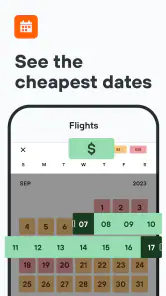
When my schedule is uncertain, I separate research from booking. I first compare a small range of dates and note which options are realistic, then I check the conditions on the provider’s side before paying. A price alert is worth considering only when I can genuinely wait and would accept more than one travel time. If a specific event fixes my dates, I would prioritize a workable itinerary and clear terms instead of trying to time a potential price change.
This approach is also helpful when two people are planning together. One person can focus on flight times while the other checks where the hotel sits relative to the destination. The app’s cross-category scope makes that conversation easier to organize, but it does not remove the need to agree on what matters most: arrival time, location, flexibility or total cost. I find that deciding those priorities first prevents a tempting deal from steering the whole trip.
Where its comparison role has limits
I would not treat a search result as a guarantee that every detail is settled. Travel offers can involve different terms and booking providers, so I read the final conditions carefully and keep the confirmation information after making a reservation. If I need help later, knowing which company took the booking is important. That small record-keeping habit saves confusion when a trip has separate flight, hotel and car arrangements.
There is a balance between breadth and familiarity. Searching several kinds of travel in one place is convenient, while a provider’s own app may be better when I already have a relationship there and want to manage a booking through the same account. I would use KAYAK to widen the options I consider, then use the provider’s own details to make the final call. That is a practical division of labor, not a reason to expect one app to handle every part of travel equally well.
When it comes to planning a trip, the first thing that pops into my mind is the KAYAK: Flights, Hotels & Cars app. This app is like having a personal travel assistant right in your pocket. I mean, who doesn't love the idea of having all their travel needs sorted in one place, right?
Your One-Stop Travel Solution
So, let's dive into what makes the KAYAK app a go-to for travel enthusiasts. First off, it's all about convenience. Whether you're looking to book a flight, find a hotel, or rent a car, this app has got you covered. The interface is super user-friendly, which means I didn't have to be a tech wizard to navigate through it. Just a couple of taps and I was exploring the best travel deals out there!
Flights That Suit Your Budget
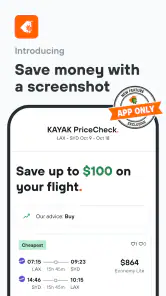
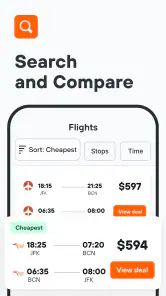
One of the coolest features of the app is the flight search. You know that feeling when you find a flight that doesn't break the bank? Yeah, that's what KAYAK is all about. It compares hundreds of airlines and travel sites to show you the best options. Plus, there's a price alert feature that notifies you when prices drop. I found this super handy because who doesn't love saving a few bucks?
Hotel Bookings Made Easy
Next up, the hotel booking feature. It's like having a personal concierge! I could filter my search by price, location, and even guest ratings. The app also offers exclusive mobile-only rates, which was a nice little surprise. And if you're anything like me, you appreciate a good deal without compromising comfort.
Hit the Road with Confidence
Now, let's talk about car rentals. The app provides a seamless way to compare rental car prices from a variety of providers. I particularly liked the clear and detailed information on rental inclusions and policies. It's perfect for those spontaneous road trips where you need a car at the last minute!
What really stands out about the KAYAK: Flights, Hotels & Cars app is its ability to streamline the whole travel planning process. It's like having a travel agency right in your hand. The app's design is sleek, and it runs smoothly without any annoying glitches. Plus, the fact that it offers a dark mode is a bonus for those late-night travel searches!
Where another approach may work better
For a simple trip with one fixed booking, I would compare the final offer with the airline, hotel or rental provider directly. That extra check helps me confirm the rules that matter to me, such as whether a room can be cancelled or what is included in a car rental. KAYAK is strongest as a comparison tool; travelers who want all their bookings managed through one provider may prefer to keep the purchase and support relationship in that provider’s own app.
There is also a practical switching cost if I move from a familiar booking service: I need to check where the actual reservation is made and which company handles changes or questions. I would keep confirmation details together and note the provider name after booking, rather than assuming the comparison app is the point of contact for every part of the trip. That bit of care matters most when plans are likely to change.
Choosing between a search app and a familiar provider
The usual alternatives are not all the same kind of tool. An airline’s own app is the natural choice when I have already settled on that airline or need to focus on its booking and account tools. A hotel’s direct channel can be more convenient if I value dealing with the property itself. A general travel booking service may suit someone who wants a familiar place to keep a reservation. KAYAK’s advantage is earlier in the process: it gives me a way to look across flight, hotel and car options before I decide which provider deserves my booking.
That means I would not switch everything to it just for the sake of using one app. If I already know exactly what I want, the extra comparison step can be unnecessary. If I am unsure about the destination details, timing or transport, seeing choices together is more valuable. My rule is simple: use comparison to explore, and use the booking provider’s own information to verify the offer and understand who will handle it.
Cost of changing a familiar travel routine
Moving from one booking routine to another has a small but real cost: I need to learn where each reservation is completed, keep track of separate confirmation details, and know which provider to contact about a change. That is manageable for a simple trip, but it can become annoying when plans involve several bookings and may shift. I would not discard a routine that already works well just because a comparison app offers a broader starting point.
For a new trip, I can avoid confusion by keeping a short note with the provider name, itinerary details and any conditions I want to remember. I also make the final check while I still have the booking screen open, rather than relying on memory later. This is especially worthwhile for a car rental, where pickup timing and the inclusions can affect whether the option is practical, and for a hotel when arrival time or cancellation terms matter.
Final recommendation for a real trip
If I were planning a short break after work, I would use the app to explore flight times, check hotel locations against the places I intend to visit, and see whether a rental car is genuinely useful. I would set a flight alert only if I had room to wait, and I would compare the final terms before booking. This workflow makes the search less scattered without treating a low price as the only measure of value.
KAYAK is a sensible choice if you want one place to begin comparing flights, accommodation and cars, and you are comfortable checking booking details before you commit. If you already know exactly where you want to book, or prefer a single provider’s loyalty and support tools, another route may suit you better. For flexible planning, though, I find its combination of search and comparison genuinely handy.
Who should pass, and what to expect from the app
I would skip it as my main planning tool if I only ever book through one trusted provider, do not want to compare alternatives, or prefer to manage every part of a trip inside a single company’s account. It is also not the right place to stop researching when a complicated itinerary depends on fine print. In those cases, a direct provider app or a more focused booking workflow may feel clearer. KAYAK is most useful when the first decision is still open.
The app is free, developed by KAYAK.com, and its current version is 244.0 for devices running Android 9 or later. Those details make it straightforward to consider as a starting point, while the Everyone content rating reflects its broad travel-planning purpose. I would still judge it by whether its comparisons fit my own trip rather than by its popularity or version number.
In conclusion, if you're someone who loves to travel or needs to plan a trip without the hassle, I highly recommend giving the KAYAK app a try. With its comprehensive features and ease of use, it's no wonder this app is a favorite among travelers. So why not download it and start planning your next adventure today?
KAYAK: Flights, Hotels & Cars Frequently Asked Questions
What can I search for with KAYAK, and is it useful for planning different kinds of trips?
KAYAK is a travel app for finding, comparing and booking flights, hotels and car rentals. Bringing these searches together can make it easier to explore several parts of a trip without starting with separate apps. You can compare available options and then review the provider’s details before deciding whether to proceed with a booking.
Is KAYAK suitable for travelers who want to compare options before making a decision?
Yes. KAYAK is designed to help travelers search and compare flights, hotel stays and car rentals before choosing an option. That makes it useful when you want to review alternatives rather than commit to the first result you find. Take time to check the offer and the provider’s terms before booking, as the provider handles the reservation.
Is KAYAK free to download, and what devices can run it?
KAYAK is free to download and is available for Android and iOS devices. The app is listed for devices running Android 9 or later, so it is worth checking your phone’s operating system before installing. It brings flight, hotel and car rental searches together in one travel app, whether you are planning from a smartphone or tablet.
What platforms is the KAYAK app available on?
The KAYAK app is available for both Android and iOS devices. Users can download the app from the Google Play Store or the Apple App Store. It ensures a seamless experience across smartphones and tablets, making it convenient for users to plan and book their travel itineraries on-the-go.
How does KAYAK help in finding the best travel deals?
KAYAK offers a comprehensive search engine that aggregates data from hundreds of travel sites, allowing users to compare prices for flights, hotels, and car rentals. It also provides features like Price Alerts and Explore, enabling users to track changes in prices and discover budget-friendly travel options based on their preferences.
Pros
- Comprehensive travel booking app.
- User-friendly interface.
- Includes price alerts for deals.
- Integrates with travel itinerary.
- Offers various travel options.
Cons
- Can have slow load times.
- Occasional booking errors.
- Limited customer support.
- Ads in free version.
- Requires internet connection.
- Category
- Travel & Local
- Version
- 244.0