KAPI
- 35.00
- 4.5
- Installs
- 5.00M
- Price
- Free

Screenshots

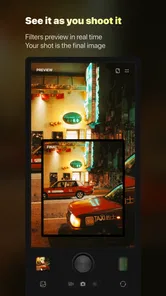
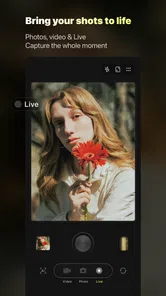
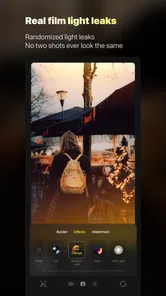

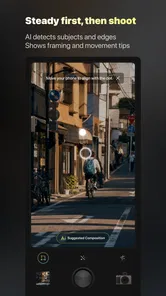

Analysis by Reviewed
Have you ever found yourself in a situation where you wish you could have a personal assistant right in your pocket? Well, that's where KAPI comes in! As someone who's always on the lookout for apps that can make life a tad bit easier, stumbling upon KAPI was like finding a hidden gem.
A camera app for deliberate, nostalgic moments
That pocket-assistant description is a poor fit for what I found: KAPI is a photography app from Sensevideo, built around giving photos and videos the character of older DV, CCD and film cameras. Its appeal is not managing a packed calendar but choosing a visual mood before recording something ordinary. I’d reach for it when I want a casual clip or snapshot to feel more like a memory than a polished phone-camera image.
It is free to download, rated Everyone, and has an average rating of 4.5 from around 13,000 ratings, with over 5 million installs. The app first appeared on January 23, 2024, and version 3.26.1 requires Android 7.0 or later. Those figures suggest it has found an audience, but they don’t tell me whether its look will suit your taste: the important question is whether you enjoy the app’s particular nostalgic treatment.
I’d approach it as a camera with a point of view, rather than a replacement for every camera on a phone. That distinction helps set expectations. The draw is the chance to make a quick recording feel intentionally dated in a pleasing way; the trade-off is that the result may be less neutral than what you’d want for a practical record. If I were choosing an app for a friend, I’d ask whether they want atmosphere in-camera or maximum flexibility afterward.
How KAPI fits into everyday photography
First things first, KAPI is an all-in-one personal assistant app designed to streamline your daily tasks. Whether you need reminders for meetings, a quick check on your to-do list, or even just a weather update, this app has got you covered. It's like having a mini-manager who doesn't mind working overtime for you.
Network-dependent moments and mobile use
For a realistic outing, imagine walking through a weekend market and wanting to capture a friend choosing fruit, the stalls, and the bustle around them. The retro-camera idea makes sense here because it encourages a consistent mood across small moments rather than asking you to perfect every frame. I’d decide on the visual style before the busy part starts, then keep the phone ready instead of pausing to compare looks after each shot. That workflow matters more than chasing a technically flawless image.
Connectivity can shape the experience whenever an app needs to load or refresh something, so I would get the camera ready while I have a dependable connection rather than assume every part will behave the same way in a dead zone. I can’t treat offline behavior as a guarantee. If you’re heading somewhere with patchy reception, test the particular capture and saving steps you plan to rely on beforehand. That small check is more useful than discovering a limitation when the moment is already passing.
More From Our News Desk

 MX Player
 and the Small, Private Rituals of Mobile Viewing
A practical video player reveals how mobile viewing has become private, portable, and woven into the spare minutes of ordinary life.

 Piano Fire: Edm Music & Piano
Piano Fire Tested: How Well Does It Recover When a Run Breaks?
A rhythm game lives or dies by recovery as much as reflexes. Piano Fire makes a brisk, colorful loop, but its rough edges matter most after a missed note or interrupted run.

 Ludo King®
Ludo King Turns Quick Matches Into a Lasting Social Ritual
A close look at how quick matches, private rooms and familiar rivalries turn this digital Ludo game into a small, durable social ritual—and where that community has limits.

 YouTube Music
 Turns Video Discovery Into Listening Power
A capable music service with an unusually strong route into discovery, YouTube Music shows how Google can turn a video habit into control over what listeners hear next.

 Netflix
 Is Building a Daily Habit Beyond Its Biggest Shows
A familiar streaming app is gaining new weight as Netflix pushes games, live programming, and discovery into the same daily habit. The growth is real, but so are the limits.

 Ramp Car Games: GT Car Stunts
Ramp Car Games: The Risk-and-Reward of Every Jump
A stunt racer built around one deceptively rich decision: how much speed to carry into a jump, and how much control to keep for the landing.
Latest News



There is a useful difference between preparing for a photo walk and trying to use a camera app spontaneously. When I know I’ll be taking pictures, I can open the app before leaving, check that the camera is ready, and avoid making a network-dependent step part of the moment itself. On an ordinary commute, by contrast, I’d keep the regular camera close at hand if a fast, unrepeatable shot matters more than the retro treatment. This is not a reason to avoid KAPI; it is a reminder to match the tool to the pace of the situation.
For mobile use, I’d also think about handling rather than just image style. A one-handed shot while carrying a drink or shopping bag leaves little time to explore choices. It is worth getting familiar with the camera’s basic flow in a calm setting, then using it for a short sequence when out and about. That way, the app’s character can shape the pictures without turning each capture into a small setup task.
Features that Stand Out
One of the coolest features of KAPI has to be its voice recognition capability. You can literally speak into your phone and have it execute commands without lifting a finger. Imagine being able to set up appointments or send texts while cooking dinner. It’s multitasking at its finest!
Another feature that deserves a shoutout is the app’s ability to integrate with other tools. Whether you’re using Google Calendar or Microsoft Outlook, KAPI syncs effortlessly, ensuring that you never miss a beat. Plus, the interface is super intuitive, making it easy for even the least tech-savvy among us to navigate.
Those descriptions do not match the photography app I’m reviewing, so I would not rely on them when deciding what to install. The practical question here is much narrower: does a camera built around nostalgic-looking photos and videos fit the way you like to capture daily life? For someone choosing between camera apps, that focus is more useful than expecting planning, voice commands, or calendar tools.
Making the look work for your photos
Compared with the standard camera app, which is usually the straightforward choice for quick, clean captures, KAPI is for people who want the camera’s character to be part of the result. A general-purpose photo editor gives you more reason to shoot first and adjust later; this app’s retro framing is better suited to choosing a feel before you capture. Neither approach is universally better. If accuracy, flexible editing, or a neutral image matters most, your built-in camera or a dedicated editor is likely the more sensible tool.
A useful habit is to try the same ordinary subject in different light before making the app your default. A bright window, a shaded street, and an indoor evening scene can make a nostalgic treatment feel quite different. I’d also avoid applying a strong vintage look to every important photo: for documents, product details, or images where color needs to be dependable, a plain camera is the safer choice. KAPI makes more sense for expressive keepsakes than for evidence or precision.
One non-obvious trade-off is that a consistent retro feel can make a set of pictures look cohesive even when the subjects are unrelated, but it can also make visual details harder to compare from one photo to another. If you are documenting how a room changes during a renovation, recording a recipe step, or photographing an item you might need to identify later, keep a straightforward image too. I think of the nostalgic camera as the expressive take, not the archival master copy.
For a small travel diary, that division can be especially helpful. I might use KAPI for the café table, a rainy street, or friends laughing on a train, then use the normal camera for a route sign, a booking detail, or a landmark I want to recognize clearly later. It is a simple two-camera habit, but it avoids asking a stylized image to serve both as a keepsake and as a reliable reference.
Why You’ll Love It
Now, let's talk about why KAPI might just become your new best friend. For starters, it’s incredibly user-friendly. I remember downloading it and within minutes, I was setting reminders and organizing my week like a pro. It’s like having a personal secretary who’s dedicated to making your life smoother.
In practical use, the best fit is someone who enjoys sharing informal moments and wants a recognizable visual style without turning every photo into an editing project. It may also suit someone making a small collection of travel or family clips with a coherent, old-camera feel. I’d skip it if you mainly need dependable, unaltered records, advanced image controls, or a camera workflow designed around professional delivery. A nostalgic effect is a creative choice, not a substitute for those priorities.
I would also recommend it to people who like the look of old camera formats but do not want every picture to become a separate editing exercise. Choosing a mood at capture time can make a casual set of images feel connected, which is handy for a birthday afternoon, a walk with a friend, or a few clips from a weekend away. It is less appealing if you usually take one quick picture, crop it heavily, correct the colors, and export it for a specific project; a conventional camera and editor give that workflow more room.
A good first test is to take a few low-stakes pictures of the same subject rather than judge the app from a single shot. A doorway, a cup on a table, or a familiar corner gives you a stable comparison without wasting an important moment. Then look at the pictures later, not just in the camera preview. The question is whether you still like the treatment when the initial novelty wears off and whether the image remains useful for what you wanted to remember.
If you share images with people who prefer a clean, realistic look, consider mixing styles instead of applying the same treatment to every occasion. A short nostalgic clip can carry the mood of a gathering, while a few normal photos preserve faces and details in a familiar way. That balance makes the app more useful than treating it as an all-or-nothing replacement for the camera already on your phone.
Failure, recovery, and sensible data use
If something stalls while you’re preparing to shoot, I’d first check whether the connection has returned and whether the app is responsive before repeatedly tapping capture. For an important moment, use the phone’s regular camera as a fallback rather than risk missing it while troubleshooting. That is a practical limitation of relying on a specialized camera app in the moment: even a pleasing look is no help if you cannot get to the camera quickly.
For data-conscious use, remember that app updates and any online-dependent loading can use a connection, while mobile data habits vary by person and plan. I’d install updates over Wi-Fi when convenient and avoid assuming that every adjustment or effect is stored locally. The app is free, but it offers in-app purchases ranging from $1.98 to $69.99 per item, so check what an optional purchase includes before paying. You can start by exploring the free experience and decide whether its particular look is worth spending on.
When an app appears stuck, I would keep recovery simple: give it a moment, check the connection if the screen suggests something is loading, and avoid restarting repeatedly while a shot is still being prepared. If the moment cannot wait, switching to the standard camera is a better decision than spending a minute diagnosing a creative tool. Afterward, I’d reopen KAPI when there is time to see whether the issue was temporary. This practical fallback matters most at crowded events, on a moving outing, or whenever a subject will not pose twice.
For anyone watching mobile data use, the sensible approach is to separate taking pictures from optional browsing, refreshing, or downloading. I would do any exploring and app maintenance on a connection I am comfortable using, then avoid making assumptions about what will load when reception is weak. That advice does not require treating every camera action as data-heavy; it simply avoids surprises and helps keep a limited plan available for the things that genuinely need it.
Moreover, the app is constantly updated with new features and improvements, meaning it only gets better with time. The developers are clearly committed to making KAPI the best it can be, and it shows in the quality and reliability of the app.
Optional purchases are another reason to try the app with a clear purpose. I would first decide whether the basic nostalgic look already suits my pictures, then consider paying only if a particular extra is clearly relevant to how I shoot. The listed purchase range runs from $1.98 to $69.99 per item, so there is no reason to assume every paid option is a small add-on. Checking the purchase screen carefully is a better habit than tapping through because a look seems appealing in the moment.
My connectivity verdict
In a world where time is of the essence, having an app like KAPI can be a game-changer. Whether you’re a busy professional or someone who just wants to keep life a bit more organized, this app is worth a try. It’s like having a little helper who’s always ready to lend a hand, and honestly, who wouldn’t want that?
For me, its strongest case is a planned, casual photo walk or a relaxed get-together where there’s enough time to choose a look and capture several moments. I would not make it my only camera for travel documents, urgent shots, or places where connectivity and quick recovery are uncertain. Treat it as a creative option alongside the regular camera, and you can enjoy its retro-minded approach without depending on it for every situation.
So, if you’re on the fence about downloading KAPI, just go for it. You might find yourself wondering how you ever managed without it!
My overall recommendation is to try it as a second camera with a specific job: giving ordinary memories a deliberate, nostalgic character. It is a sensible choice for casual photographers who enjoy that visual direction, and less so for anyone who needs neutral color, extensive control, or a dependable tool for every urgent capture. Before an outing, I’d check the camera flow and connection in advance, keep the phone’s standard camera as a backup, and decide whether any optional purchase adds something I will actually use. With those expectations, the app’s appeal is clear without asking it to do a different job.
KAPI Frequently Asked Questions
What is KAPI and what does it offer to its users?
KAPI is a versatile application designed to enhance productivity and streamline daily tasks. It offers an intuitive interface with a range of features such as task management, reminders, and collaboration tools. Users can easily organize their schedules, set goals, and work with others, making it ideal for both personal and professional use.
Is KAPI available for both Android and iOS devices?
Yes, KAPI is available for download on both Android and iOS platforms. Users can find it on the Google Play Store for Android devices and the Apple App Store for iOS devices. This cross-platform availability ensures that users can access their tasks and information seamlessly across different devices.
Does KAPI require a subscription or is it free to use?
KAPI offers both free and premium versions to cater to different user needs. The free version provides basic functionalities that are sufficient for individual users, while the premium version includes advanced features such as enhanced collaboration tools and customization options. Users can choose to upgrade based on their requirements.
How secure is my data on KAPI?
KAPI prioritizes user data security by implementing robust encryption protocols and secure data storage solutions. Users can rest assured that their information is protected from unauthorized access. Additionally, KAPI offers regular updates and security patches to address any vulnerabilities and enhance overall security measures.
Can I use KAPI for team collaboration and project management?
Absolutely! KAPI is an excellent tool for team collaboration and project management. It allows users to create shared workspaces, assign tasks to team members, and track progress in real-time. The app's collaborative features are designed to improve communication and efficiency, making it a valuable asset for project teams.
Pros
- User-friendly interface for easy navigation.
- Rich library of resources and tools.
- Compatible with various devices and platforms.
- Offers personalized learning experiences.
- Regular updates with new content.
Cons
- Requires internet connection for full functionality.
- Some features may require a subscription.
- Limited offline access to materials.
- Can be overwhelming for beginners.
- Occasional bugs or performance issues.