Jooble — Job Search App
- 64.00
- 4.4
- Installs
- 5.00M
- Price
- Free
Screenshots

Analysis by Reviewed
Looking for a job can be as thrilling as it is nerve-wracking. I recently downloaded the Jooble — Job Search App, and let me tell you, it’s like having a personal job assistant right in your pocket. If you’re always on the hunt for the perfect gig, this app might just be your new best friend.
Designed for a search you can revisit
I find a job-search app most useful when it helps me keep a broad search manageable, rather than promising to do the hard decisions for me. Jooble is a free business app from Jooble, and its focus is practical: browse opportunities, narrow them down, and keep an eye out for relevant openings. It suits someone who is exploring several kinds of work, including part-time roles, more than someone who already has one specific employer and application route in mind.
That distinction matters when choosing between Jooble and the usual alternatives. A company’s own careers page can be the better choice when you want to check a particular employer’s openings directly. A general job-search app is more useful when you want to scan across options and compare possibilities in one place. I would use Jooble for discovery, then read each listing carefully and follow the application route it provides rather than treating a quick match as proof that the role is right for me.
For someone returning to work after a break, or testing whether a change of field is realistic, that broad starting point can be valuable. I’d use separate searches for genuinely different goals instead of trying to make one set of filters cover everything. A part-time search and a full-time search, for example, may call for different locations or expectations. Keeping those aims distinct makes it easier to notice which results are worth a closer look, rather than judging the whole app by a mixed list.
Getting Started with Jooble
So, I fired up the Jooble — Job Search App after a quick download, which was smooth as butter. The first thing that caught my eye was its sleek, user-friendly interface. It felt like the app was saying, "Hey there, let's find you that dream job." You know that feeling when you open a well-organized closet? That’s Jooble for you in the job search world.
Features That Stand Out
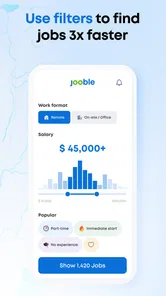
One feature that I absolutely loved was the ability to filter job searches. You can customize your search based on location, salary, and even the type of employment. Whether you’re looking for a full-time hustle or a part-time gig to earn some extra cash, Jooble’s got your back.
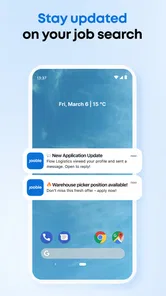
Another cool feature is the app’s alert system. You set your preferences, and boom! Jooble sends you notifications about new job postings that match your criteria. It’s like having a little birdie on your shoulder, whispering about new opportunities.
More From Our News Desk

Weather by Xiaomi Review: Clear at a Glance, Less Clear Up Close

X Under Pressure: Can It Recover When Posting Goes Wrong?

Clash of Clans Is Won Between the Battles

Android Auto Makes the Case for Quieter Car Software

MobiOffice: Transforming Mobile Productivity with Seamless Integration

EA SPORTS FC™ Mobile Soccer: Redefining Mobile Sports Gaming
My practical tip is to begin with a search broad enough to show the shape of the market, then tighten the location or employment type once you see what is appearing. If I make every filter strict from the outset, I can miss roles described in unexpected ways. Alerts work best as prompts to review new listings, not as a reason to stop checking whether the title, duties, and conditions actually suit me.
Salary filters deserve a little care, too. I would use them to focus a search, not as a substitute for reading how compensation is described in a particular listing. If I see very few results, I’d loosen one criterion at a time and check what changes. That small experiment can show whether my location, employment type, or pay expectation is narrowing the pool most sharply, and it helps me adjust deliberately instead of abandoning the search.
Readability, navigation, and everyday access
The simple layout described in my first impression is helpful when I want to get in, adjust a search, and leave without navigating a maze. Still, a clean interface is not the same as being comfortable for everyone. People who need larger text, strong visual contrast, or assistive technology should judge the screens on their own device; I would not assume that a job app’s uncluttered appearance guarantees every control will be easy to identify or use.
Motor and sensory needs can also change how useful alerts feel. A notification may be convenient during a break, but distracting while someone is working, commuting, or caring for another person. I’d keep alerts focused on the searches I genuinely want to act on and review them when I have time to read a listing properly. If tapping through forms is difficult, having a CV prepared before starting an application can reduce last-minute effort, though the app should not be mistaken for a substitute for checking the employer’s application steps.
For a realistic routine, imagine checking listings during a lunch break, saving the most promising searches in your own notes, and returning later on a larger screen to compare responsibilities and prepare an application. That split works well for people whose phone time is short or whose attention is interrupted. It also avoids the pressure to apply immediately just because a new alert arrived.
That approach is useful when a job search has to fit around shift work or an unpredictable schedule. I’d make a brief note of the role title, employer, location, and the question I still need answered, rather than relying on memory after scrolling through several similar posts. When I return, I can spend my attention on comparing the actual duties instead of trying to reconstruct why a listing caught my eye.
Usability and Performance
Now, let’s talk about how it performs. The app runs smoothly without any hiccups. I’ve had zero issues with lag or crashes, which is a big win in my book. Navigating through different tabs and options is a breeze, making the whole job search process less of a chore and more of an adventure.
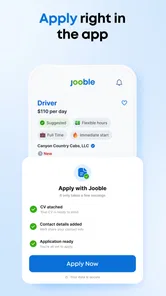
And oh, did I mention the resume upload feature? You can upload your CV directly to the app. It’s as simple as snapping your fingers. Having your resume ready to go means you can apply for jobs with a single tap. How cool is that?
I’d treat the uploaded CV as a useful starting point, not a finished application. Before sending it anywhere, I would check that it reflects the role I’m applying for and that the contact details are current. A listing may lead to an employer’s own process, so a ready document can save preparation time without guaranteeing that every application is completed inside Jooble.
A sensible workflow is to keep a clean, current CV ready, then tailor a copy for roles that genuinely call for different experience. I wouldn’t assume one uploaded document makes every application equally strong. The time saved is most useful when it goes toward checking whether the job’s requirements match what I can offer, and making sure the employer receives the version that best explains that fit.
Who will get the most from it?
Jooble is especially appealing if you are early in a search, open to more than one role type, or balancing a job hunt with school, caregiving, or existing work. Its filters and alerts can help turn short, scattered sessions into a more deliberate routine. The app is free, rated for Everyone, and has an average rating of 4.4 from around 33 thousand ratings, with over 5 million installs. Those figures suggest a widely used option, but they cannot tell me whether a particular listing fits your needs.
I would be more cautious if you need a highly specialized search, want extensive employer research in the same place, or prefer to contact companies directly without scanning a broad range of listings. In those cases, a specialist service or the employer’s own site may be a better next stop. Jooble is best treated as a discovery tool; the final checks on location, pay, duties, and application details still belong to you.
It can also suit someone who is not ready to apply today but wants to understand what employers are asking for. Looking across a few relevant listings can reveal recurring skills or qualifications to investigate before committing to a course or changing a CV. I’d treat that as informal market research, not a guarantee that every employer uses the same criteria. If the search is for a regulated profession or a narrow specialty, a field-specific source may give more useful detail than a broad scan.
If you are helping another person search, the app can be a shared starting point for discussing possible roles, but I would keep the applicant in control of decisions and applications. A family member or support worker can help compare listings or prepare questions, while the person applying checks that the role fits their needs. That distinction matters: finding a listing is only one step, and a good match depends on factors that filters cannot decide for someone.
Situational access and remaining barriers
For people using a phone in brief windows between other responsibilities, alerts and filters can reduce the effort of restarting from scratch each time. But a phone is not always the easiest place to assess a long description or complete an application. I’d use the app to find and revisit opportunities, then switch to a larger screen when I need to compare detailed requirements or prepare documents. That is a practical workaround, not a claim that every part of the process transfers seamlessly between devices.
There are other situations where Jooble may be less comfortable. Someone with limited data, an unreliable connection, or little time to read carefully may find that browsing and reacting to listings takes more effort than expected. A notification is useful only if I can pause and review what it points to. If I cannot, I’d rather check at a chosen time than let incoming prompts turn the search into another source of pressure.
Job searching is stressful partly because listings can look promising before you have checked the details. Filters reduce the amount to scan, but they do not remove the need to compare requirements or decide whether a role is realistic. Alerts can create a sense of urgency, too; I would rather miss a notification than rush through a decision that deserves a careful read. This is the main trade-off: convenience helps organize the hunt, while judgement and follow-through remain personal work.
Jooble was released on June 3, 2022, and its current version is 1.29.0, with Android 7.0 or later required. I see it as a useful companion for keeping a search moving, especially when I need to explore options from my phone. It is not a promise of an interview or a replacement for evaluating each employer, but it can make the discovery stage feel less scattered.
Final Thoughts
In a world where job searching can feel like a full-time job in itself, the Jooble — Job Search App makes it feel manageable and even enjoyable. It’s like having a trusty sidekick who’s always ready to help you find your next big opportunity.
So, if you’re in the market for a new job, give Jooble a whirl. With its intuitive design, reliable performance, and wealth of features, it’s a tool that can make your job search journey a whole lot easier. Trust me, your next job is just a tap away!
Jooble — Job Search App Frequently Asked Questions
Does Jooble cover the kind of work I’m looking for?
Jooble is intended for people exploring careers, full-time work, part-time jobs, and other opportunities. Its search can help you look across different roles and locations, so it may be useful whether you are beginning a career search or considering a change. The results you see will depend on the role and place you enter.
What devices and age group is Jooble intended for?
Jooble is rated for Everyone and is designed for job seekers using Android devices running Android 7.0 or later. Before downloading, check that your device meets this requirement. The app’s focus is career and job discovery, including part-time opportunities, so it is aimed at people who want to explore work options from a mobile device.
Can Jooble help me search for work in a particular location?
Yes. Jooble is built around finding work that suits your career and location, so you can search for opportunities using a place alongside the kind of role you want. You can also save searches and receive notifications about matching new postings, making it easier to keep track of openings in the area that matters to you.
What should I know about the app before installing Jooble?
Jooble is a free job-search app from developer Jooble, in the Business category. It is rated for Everyone and supports devices running Android 7.0 or later. The app’s focus is finding careers, work, part-time jobs, and new opportunities, making it a practical option if you want to explore vacancies from your phone.
What is Jooble and how does it work?
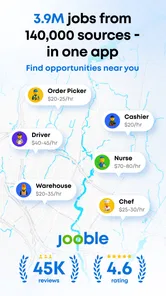
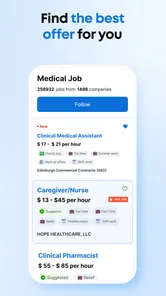
Jooble is a comprehensive job search app designed to help users find employment opportunities across various industries and locations. By aggregating job postings from thousands of sources, Jooble allows users to search using specific criteria such as job title, location, and salary expectations. The app also provides tools to save job searches, apply directly through the platform, and receive notifications about new job postings that match your preferences.
Pros
- Wide variety of job listings.
- User-friendly interface.
- Real-time job alerts.
- Customizable search filters.
- Detailed job descriptions.
Cons
- No salary information provided.
- Limited company reviews.
- In-app ads can be distracting.
- Requires internet connection.
- Occasional loading delays.











