Invoice Simple: Invoice Maker
- 21.73K
- 4.8
- Installs
- 5.00M
- Price
- Free

Screenshots
Analysis by Reviewed
When a customer asks for an estimate while I’m away from my desk, I want to send something clear without turning the moment into a paperwork session. Invoice Simple: Invoice Maker is built for that kind of small-business task: preparing billing documents on a phone, then keeping the process moving. I see its main appeal in reducing friction for people who do their own admin, rather than replacing a full accounting setup.
What the free access means in practice
The app is free to download, and Invoice Simple is the developer. Optional in-app purchases range from $4.99 to $323.99 per item, so free access should not be confused with every feature or level of use being free. I would check the available purchase options in the app against the way I expect to use it before building a regular workflow around it; the listed range alone does not tell me which option suits a particular business.
That distinction matters most if you invoice occasionally. A person sending a few bills may find the basic app a convenient place to start, while someone relying on invoicing every workday should assess whether the paid options fit their budget and needs. The app is rated for Everyone, and its long presence in the business-app space suggests it is aimed at practical everyday work, not specialist accounting teams.
Getting Down to Business with Invoice Simple
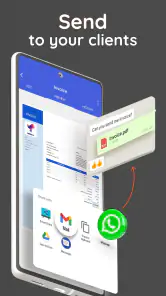
First things first, let's talk about the user interface. It's clean, straightforward, and designed with usability in mind. When I first opened Invoice Simple: Invoice Maker, I was greeted with a dashboard that didn't make me feel like I needed a degree in accounting to navigate. Everything is laid out intuitively, so creating and sending invoices feels like a breeze.
Features That Shine
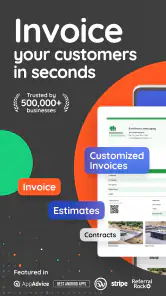
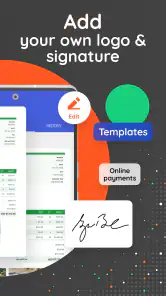
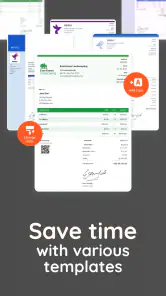
One of the features I absolutely love is the ability to customize invoices. You can add your logo, choose your color scheme, and even tweak the layout to reflect your brand's personality. This isn't just an invoice; it's your business card in billing form. Plus, the app supports multiple currencies and languages, which is a huge plus if you're dealing with international clients.
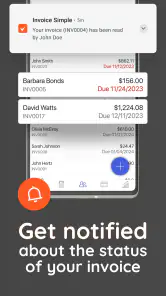
Tracking payments is another area where Invoice Simple excels. The app lets you know when an invoice has been viewed and when it's been paid. There's something incredibly satisfying about watching those notifications roll in. And if you're the forgetful type, you can set up automatic reminders to nudge your clients when invoices are overdue.
Making an estimate useful beyond the first message
For a home repairer, photographer, or independent tutor, an estimate can do more than tell a customer a likely total. I would use it to agree on the scope before starting, then keep a note of any change the customer approves. If the final bill differs, I can explain the difference against that earlier expectation instead of relying on memory. This is especially helpful when a job spans several visits or a client asks for an extra task halfway through.
More From Our News Desk

Weather by Xiaomi Review: Clear at a Glance, Less Clear Up Close

X Under Pressure: Can It Recover When Posting Goes Wrong?

Clash of Clans Is Won Between the Battles

Android Auto Makes the Case for Quieter Car Software

MobiOffice: Transforming Mobile Productivity with Seamless Integration

EA SPORTS FC™ Mobile Soccer: Redefining Mobile Sports Gaming
One practical tip is to prepare a small set of consistent descriptions for work I do repeatedly. Even without turning the app into a full inventory system, using the same wording for familiar services makes bills easier for customers to understand and easier for me to review later. I would still check each line rather than reuse a description blindly: the same service can involve different materials, time, or conditions on different jobs.
There is also a useful boundary to keep in mind. A polished estimate can make expectations clearer, but it is not a replacement for a written agreement when a project has complex terms, milestones, or responsibilities. I would use an invoice app for the billing document and keep more involved project terms in a separate contract or communication trail. That separation helps avoid expecting a simple estimate to carry more legal or operational detail than it is designed to handle.
How it fits into a working day
A useful way to think about the app is as a mobile front desk for billing, not as a replacement for every financial tool a business might need. Imagine finishing a repair job, confirming the work with the customer, and preparing the bill before leaving the site. Having the document ready while the details are fresh can help avoid the familiar end-of-week scramble to remember what was done and when.
Estimates also have a practical role before work begins. I would use one to set out the expected charge clearly, then keep the eventual invoice tied to the same customer and job in my own records. That habit makes it easier to compare what was proposed with what was billed. It is a small workflow choice, but it can prevent confusion when a project changes along the way.
There is a trade-off to the phone-first approach: entering detailed line items on a small screen can feel slower than working at a desk, especially if a job has many parts or changing quantities. For a short service call, that convenience is compelling; for a complex project with lots of revisions, I would prepare the figures carefully first or use a larger-screen tool.
Keeping the workflow tidy as work grows
When several jobs are active, the easiest mistake is not necessarily a calculation error; it can be attaching the right amount to the wrong customer or job. I would pause before sending each document to check the recipient, the work description, and the total, then use a consistent naming habit so I can recognize the job later. That brief review is particularly worthwhile when I am creating an invoice between appointments.
For a small operation with one person handling billing, a phone-based workflow can reduce the delay between finishing work and asking to be paid. It may also make it easier to respond while a customer is still discussing the job. But if multiple staff members need to create, approve, and reconcile documents, convenience on one phone is not the same thing as a shared business process. I would look for a system built around team permissions and centralized records in that situation.
A sensible routine is to treat payment status as a prompt for follow-up, not as the whole story. If a customer says they have paid but the record does not appear updated, I would confirm the payment directly before sending another reminder. That avoids an awkward duplicate nudge and keeps the relationship professional. Automated reminders can save time on routine late payments, but they cannot judge whether a client has raised a genuine question about the work or the amount.
Why It Stands Out
What sets Invoice Simple apart from other invoicing apps is its simplicity without sacrificing functionality. It's perfect for those who want to spend less time on paperwork and more on what they love doing. I mean, who doesn't want to cut back on admin time?
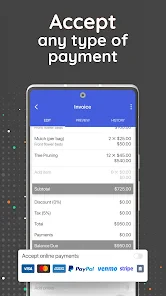
Moreover, the app offers seamless integration with payment platforms like PayPal and Stripe. This means getting paid is as easy as pie. Clients can click a link, make a payment, and voila, the money's in your account. No more chasing after checks or waiting for bank transfers.
Compared with a spreadsheet, a dedicated invoicing app can make a document look more polished and keep routine billing steps together. Compared with full accounting software, though, a focused invoice maker is narrower by design. I would not treat it as a substitute for bookkeeping, tax preparation, or a detailed view of business finances. If those are the main problems I need to solve, a broader accounting product is likely a better fit.
For a more reliable routine, I would settle on a consistent naming style for customers and jobs, and review each estimate before sending it. A clean, branded invoice helps, but accuracy still depends on checking the recipient, the work description, and the amount. Payment tracking and reminders can make follow-up less awkward, yet they do not remove the need to resolve disputed charges or confirm a client’s payment arrangements directly.
Where the value comes from—and where it stops
The useful comparison is not simply “free app versus paid app.” It is whether a purpose-built billing flow saves enough time and reduces enough confusion to justify any purchase I choose. A spreadsheet has the advantage of flexibility and familiar formulas, but I have to maintain its layout, handle each document consistently, and manage follow-up myself. A focused invoice maker is more convenient when I need a presentable bill quickly; accounting software is stronger when invoices are only one part of a larger financial picture.
I would not assume that every optional purchase is necessary just because the app is free to download. First, I would test the ordinary task I care about: create a realistic estimate, make an invoice for a completed job, and see whether the process feels comfortable. Then I would check which purchase option, if any, addresses a real limitation in my own use. Since the purchase range is broad, the amount alone is not enough to judge value without looking at the specific option and its terms in the app.
One question a new user may have is whether this can support occasional work without becoming another subscription-style commitment. The straightforward answer is that the app has free access, while optional in-app purchases are available; I would verify the current options before relying on a particular feature or committing to a routine. Someone who only needs a handful of bills should compare the cost of any chosen option with the time saved, rather than paying for capabilities they will rarely use.
Another practical question is whether it suits international customers. Multiple currencies and languages are supported, which can help when working across borders, but I would still confirm that the invoice wording and local tax requirements match the rules where I operate. A currency choice does not by itself make a document compliant with every country’s invoicing requirements, so a business with complex tax obligations should use appropriate local guidance or a more specialized system.
Who gets the most value
I’d recommend considering it if you work independently, run a small service business, or need to create straightforward invoices while away from a computer. The app has a 4.8 average from around 163,000 ratings, and more than 5 million installs, which indicates that many people have tried it; those figures are context, not a guarantee that its purchase options or workflow will suit every business.
It may be less suitable for a team that needs detailed accounting controls, extensive reporting, or a shared back-office process. In that case, choosing a broader system first can save the trouble of maintaining customer and payment information in separate places. Version 5.6.1 is the current version, and the app requires Android 7.0 or later; I would check device compatibility before downloading if I use an older phone.
I also think it makes sense for someone who wants a professional-looking document but does not want to learn an accounting package just to bill for a small number of jobs. A freelancer who travels between clients, a tradesperson wrapping up a short visit, or a side-business owner handling orders after regular work may value that quick, direct approach. The strongest fit is a person who can make billing decisions themselves and mainly needs to create, send, and follow up on ordinary documents.
I would steer away from it if my priority were inventory management, payroll, detailed profit reporting, tax filing, or a complete record of business finances. Those needs call for more than a convenient way to prepare invoices. Likewise, if billing is shared across a growing team, I would compare products based on collaboration and oversight before choosing a mobile-first tool. It is better to select the system that matches the whole workflow than to force a narrow app to become an accounting department.
Wrapping It Up
So, what's the final verdict? If you're looking for an invoicing app that's easy to use, highly customizable, and packed with all the essential features, Invoice Simple is definitely worth checking out. It's like having a personal accountant in your pocket, minus the hefty fee.
Whether you're a seasoned freelancer or just starting your small business journey, this app can help take some of the financial stress out of the equation. Give it a try, and you might find invoicing isn't as daunting as it seems!
Invoice Simple was released on February 1, 2013, and its continued focus on everyday billing makes it easy to understand why it appeals to people who want a direct route from completed work to a document they can send. The best reason to try it is convenience, not an assumption that it will cover every financial task. I’d start with one real invoice, see whether the workflow feels natural, and decide from there whether the free access and any optional purchases make sense for my work.
A practical way to decide
My recommendation is to judge it against one normal week of billing rather than an idealized business workflow. Note how often I prepare estimates, how much time I spend re-entering customer or job details, and whether having a document ready on the phone changes when I follow up. If those small gains matter, the app may earn a place in the routine. If I still need several other tools to complete each job, a broader system could be the more sensible choice.
Before making it part of daily operations, I would also settle on a simple filing and review habit outside the act of sending an invoice. Keep the supporting job notes, confirm the agreed scope, and check payment status before contacting a customer again. This does not add complexity for its own sake; it protects the useful convenience of quick billing from avoidable mistakes. For a solo business with straightforward charges, that balance is where a dedicated invoicing app can feel most worthwhile.
Invoice Simple: Invoice Maker Frequently Asked Questions
Is Invoice Simple available for both Android and iOS?
Invoice Simple is available for Android and iOS, so you can look for the version compatible with your device in its app store. Before installing, check that your phone or tablet meets the minimum operating system requirement. The app is designed for creating business documents on mobile, making it a convenient option for people who need to handle routine paperwork away from a computer.
Who develops Invoice Simple, and is it suitable for all ages?
Invoice Simple is developed by Invoice Simple and is listed with an Everyone content rating. Its business focus is on preparing invoices, bills, receipts, and estimates, so it is intended for practical work-related use rather than entertainment. The age rating describes the app’s content classification; whether it suits your needs depends on the kinds of business documents you want to prepare.
Who is Invoice Simple: Invoice Maker designed for?
Invoice Simple is aimed at people who need a straightforward way to prepare business paperwork on a mobile device, including small business owners, freelancers, and contractors. Its focus on invoices, bills, receipts, and estimates makes it useful for users who want to organize routine client transactions without relying on a desktop workflow. The app is listed in the Business category and is suitable for everyone.
Can Invoice Simple create estimates as well as invoices?
Yes. Invoice Simple’s app description includes estimates alongside invoices, bills, and receipts, so it can help with more than billing completed work. Estimates let you present expected charges to a client before a job is finished, while invoices can be used to request payment. The app’s stated purpose is to make these documents on a mobile device, giving users a practical option when handling business paperwork away from a computer.
What is Invoice Simple: Invoice Maker?
Invoice Simple: Invoice Maker is a user-friendly mobile application designed to help small business owners, freelancers, and contractors create professional invoices quickly and easily. With its intuitive interface, users can customize invoices with their logos, add client details, and track payment statuses, all from their smartphones.
Pros
- Easy to use interface for quick invoicing
- Supports multiple currencies for global business
- Customizable templates enhance brand identity
- Real-time notifications on invoice status
- Efficient expense tracking and management
Cons
- Limited reporting features for analytics
- No integration with accounting software
- Subscription required for premium features
- Mobile-only app
- no desktop version
- Occasional sync issues with cloud storage
- Category
- Business
- Version
- 5.6.1











