InstaSize: AI Photo Editor
- 27.41K
- 4.7
- Installs
- 50.00M
- Price
- Free

Screenshots

Analysis by Reviewed
I first noticed InstaSize in the kind of situation where a photo editor earns its place: a shared phone, several pictures from the same day, and someone wanting a clean collage before the moment passes. It is a photography app from Instasize, Inc. that focuses on quick visual jobs rather than turning the phone into a full desktop editing suite. I can crop images, arrange several shots together, adjust the surrounding background, and finish something presentable without spending a long time learning complicated controls.
That simplicity is its main appeal. The app is free to start, suitable for Everyone, and available on devices running Android 6.0 or later. Its current version is 5.6.4, and it has been around since Dec 26, 2012. With over 50 million installs and a 4.7 average from around 1.1 million ratings, it is clearly a familiar choice for people who want fast social-ready edits rather than a technical photography workspace.
How InstaSize works in a shared household
A realistic household use case is a family returning from a day out with photos scattered across one phone. One person wants a square collage, another wants a single image cropped for a profile picture, and someone else wants the empty space around a portrait changed so the composition feels less cramped. InstaSize handles these as separate, approachable tasks, which makes it useful when the phone is being passed around instead of controlled by one dedicated editor.
I like that the workflow encourages a quick decision: choose the picture or pictures, arrange the layout, refine the crop, and work on the background if the image needs more breathing room. That is different from opening a traditional editor and facing a large collection of tools before knowing where to begin. For a teenager preparing a post, a parent making a small family collage, or a household member cleaning up a picture for messaging, the shorter path is often more valuable than a long list of advanced adjustments.
The app’s focus on collages is especially practical for shared albums. Rather than sending a string of nearly identical photos, I can combine a few related moments into one image. I would still choose the pictures carefully before opening the editor, because a collage becomes untidy when every available photo is included. The strongest results usually come from mixing a main image with a few supporting details, such as a group shot, a close-up, and one wider scene.
The useful trick is to decide the final purpose before editing. A collage for a messaging conversation can tolerate more visual detail than an image intended as a profile picture. Starting with that destination in mind helps me choose a layout and crop that do not force important faces or objects into awkward corners later.
Setup that keeps the phone easy to share
There is no complicated household setup required to begin using the app. Since it is a general photography tool rather than a family-management service, I treat it as something installed on a shared device, not as a separate space for each person. That distinction matters. If several people use the same phone, the app should not be mistaken for a system that automatically separates editing history, preferences, or personal projects between users.
My practical approach is to open only the images needed for the current task and save finished work promptly. This keeps the editing session understandable when another person takes over. It also reduces the chance of someone accidentally changing the wrong picture simply because several household projects were left open or mixed together.
For a personal phone, the arrangement is even simpler: I can use the app whenever I need a fast collage or a crop without building a detailed editing routine. On a shared tablet or family phone, however, I would agree on a basic handoff habit. The person editing should finish or abandon the current project clearly, return to the main screen, and explain which image is the final version. That is not an app feature; it is a small household rule that prevents confusion.
Another boundary is ownership of the original photo. I prefer to keep the unedited image available and treat the InstaSize result as a separate version. That gives me room to try a different crop later instead of permanently relying on the first composition. This is particularly important when a child is experimenting or when several people are making different versions of the same family picture.
Coordinating edits without stepping on each other
InstaSize works best when one person has a clear editing role at a time. The controls are approachable enough for someone to pass the phone over and say, “Can you make this into a collage?” But shared use becomes less smooth when two people are giving instructions while the editor is trying to choose images, adjust the crop, and decide how much background space is appropriate.
I find it helpful to separate the creative decisions. One person chooses the photos, another can suggest the order, and the editor makes the final call on spacing and framing. This sounds minor, but it avoids a common problem with quick-edit apps: users focus on adding more pictures instead of protecting the visual balance of the finished image.
For household coordination, I would also name or otherwise clearly identify the finished image outside the editing session when possible. A simple description such as “birthday collage” or “portrait with the wider background” makes it easier to find the right result among camera images and screenshots. The app’s strength is speed, so the surrounding routine should stay equally simple.
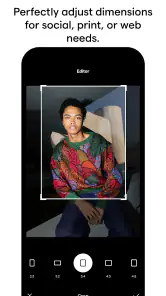
One of the more useful workflows is making two versions of the same image for different destinations. I might create a tighter crop for a profile image and a wider composition for a message or a post. Instead of trying to force one file to work everywhere, I use the original as the reference and make each version for its actual use. This is a better trade-off than accepting a crop that looks fine in one place but cuts off a face or important detail elsewhere.
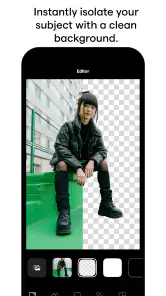
Background editing can also help with coordination. If one person wants the subject to remain prominent while another dislikes the empty edges created by a crop, adjusting the background provides a compromise. The subject does not have to be enlarged until it feels cramped, and the image can remain visually balanced. I would still inspect the edges carefully, because a background treatment should support the photo rather than distract from it.
Age, trust, and sensible supervision
The Everyone content rating makes the app broadly suitable for ordinary household photography, and the tools themselves are easy enough for younger users to understand. That does not mean every editing decision should be left without guidance. The important questions are less about operating the crop tool and more about which photos a child should edit, share, or keep private.
For a younger user, I would begin with pictures that do not reveal sensitive information, such as a bedroom, school details, an address, or another person who has not agreed to appear in a shared image. InstaSize makes visual changes straightforward, but it does not replace a conversation about consent and privacy. A child may understand how to make a collage long before understanding that a funny edit can still expose someone else’s face or personal surroundings.
Older children and teenagers can usually handle the editing process independently, especially when the goal is a simple crop or collage. I would still encourage them to check the final frame before sharing: are all faces visible, is anyone included by accident, and does the background reveal something that should stay private? These checks are useful because quick editing can make sharing feel more casual than it really is.
Trust also matters for adults using a shared device. Household members may have different expectations about which photos can be opened or edited. I would not assume that access to the phone means permission to browse every image. A respectful routine is to select the intended pictures first and avoid exploring unrelated folders while creating a collage.
In-app purchases range from $0.99 to $34.99 per item, so the free starting point should not be treated as the complete cost picture. In a family setting, I would make sure the person using the device understands when an option may involve a purchase before tapping through an upgrade or premium-looking choice. This is especially important when a child is editing on a phone connected to an adult’s payment method.
The app’s age rating and easy interface make it approachable, but they do not create household account boundaries. I see InstaSize as a tool that works well with clear family expectations, not as a substitute for supervision, device profiles, or purchase rules. That is an important distinction for anyone choosing an editor for a shared phone.
Where it beats the usual alternatives
Compared with the basic editor built into a phone’s gallery, InstaSize is more focused on combining images and shaping the space around them. A standard gallery tool is often quicker for a single rotation, exposure adjustment, or basic crop. If that is all I need, opening the built-in editor may be the more efficient choice. InstaSize becomes more useful when the task involves several photos or when the crop leaves an awkward area that needs attention.
Compared with a full professional editor, it is much less intimidating. Advanced apps are better when I need precise selections, layers, detailed color correction, or repeatable technical adjustments. They also make more sense for photographers who want to control every part of the image. InstaSize is not where I would go for that kind of work. Its advantage is reducing the number of decisions between an ordinary camera image and a shareable composition.
It also occupies a middle ground between a collage-only tool and a general photo editor. The collage function gives it a clear purpose, while cropping and background work make the result less rigid than a fixed template. That combination is valuable for household use because different people can approach the same set of pictures with different goals without needing several separate apps.
One non-obvious trade-off is consistency. A quick editor helps everyone finish a result, but it can also encourage people to accept the first arrangement that looks acceptable. I get better results when I pause after the initial layout and check the visual weight: one face should not be tiny while another dominates, and the most important subject should not sit against a distracting edge. The app makes experimentation easy, but the user still has to judge the composition.
Another useful habit is to crop before deciding on the final collage arrangement when one image has a lot of irrelevant space. This gives each panel a clearer subject and prevents the layout from being filled with empty areas. On the other hand, I keep some space in a portrait when I expect to adjust the background later. The best order depends on the photo, which is why I do not treat the workflow as a fixed recipe.
Who should use it, and who should skip it
I would recommend InstaSize to someone who regularly needs quick collages, clean crops, or a more flexible frame around a photo. It suits casual creators, families, students, and anyone who wants a finished image without studying a professional editing interface. It is also a sensible choice for a shared device where different people need to understand the basics quickly.
It is less suitable for a user who wants a complete photographic darkroom on a phone. If your priorities are raw-photo processing, exact color management, detailed retouching, or complex layer-based design, a more advanced editor will give you better control. Choosing InstaSize in that situation could feel limiting because its strength is convenience, not exhaustive technical depth.
I would also skip it for a household that expects separate personal workspaces or built-in family controls. The app can participate in a shared-device routine, but the boundaries have to come from the people using the phone and the device’s own account arrangements. That is fine for a family that communicates clearly, but it may not satisfy users who want automatic separation between adults and children.
Storage and organization are worth considering as well. Collages and alternate crops can quickly create several versions of the same memory. I avoid saving every experiment and keep the versions that serve a real purpose. This small discipline makes the app feel faster and keeps the phone’s photo library from filling with near-duplicates.
My household verdict
After using it as a quick photography workspace, I see InstaSize as a practical choice for homes that share images and devices casually. Its free entry, Everyone rating, broad device compatibility, and clear focus on collages, cropping, and background editing make it approachable for mixed experience levels. Instasize, Inc. has kept the central experience easy to understand, which is exactly what I want when someone hands me a phone and asks for a finished image in a few minutes.
The app is not a replacement for a professional editor, and it does not solve the social side of shared-device use. It will not decide which family photos are private, separate each person’s projects automatically, or prevent an accidental purchase. Those limitations do not make it a poor choice; they simply define the role it plays. I would pair it with clear household habits around consent, original files, and purchases.
Its strongest everyday benefit is the ability to turn a scattered group of photos into something coherent without making the user feel like an editor at work. When I need a quick family collage, a cleaner crop, or more balanced space around a subject, it gets me close to the result I want with little friction. For shared, casual photo projects, InstaSize is at its best when speed and clarity matter more than deep control.
With a 4.7 average and more than 50 million installs, it has the kind of established presence that makes sense for a familiar household tool. I would install it for relatives who want more than the basic gallery editor but less than a demanding professional suite. I would not choose it for advanced photography work or for a family specifically seeking built-in account separation. For everyone in between, it is a useful, approachable editor that earns its space by making common photo tasks feel manageable.
Pros
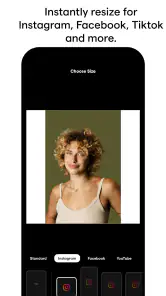
- Quickly resizes photos for Instagram and other social platforms.
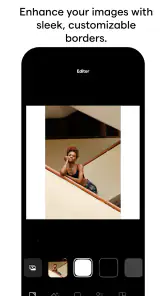
- Includes useful filters
- borders
- collages
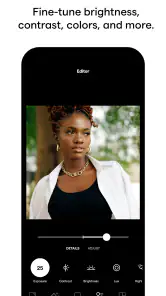
- and basic editing tools.
- AI features can enhance images and simplify creative edits.
- Supports multiple aspect ratios for posts
- stories
- and profile images.
- Simple interface makes common edits accessible to beginners.
Cons
- Many premium tools and effects require a subscription or paid purchase.
- AI editing results can vary depending on the photo and subject.
- Exported images may include compression that reduces fine detail.
- Frequent promotional prompts can interrupt the editing workflow.
- Some advanced features may require a newer
- more powerful device.

- Category
- Photography
- Version
- 5.6.4











