AI Image Generator: ImagineArt
- 9.48K
- 4.2
- Installs
- 10.00M
- Price
- Free

Screenshots
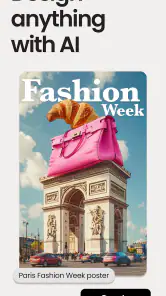
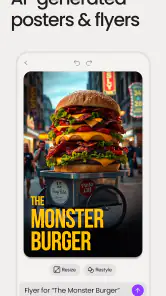
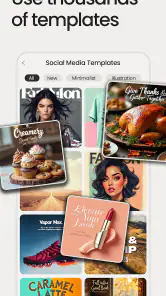
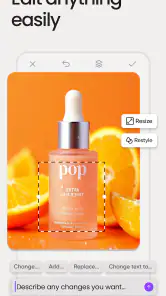
Analysis by Reviewed
I’d approach ImagineArt: AI Art & Design as a playful sketch partner, not a magic button that turns every idea into finished professional work. It’s an art and design app from ImagineArt, built around generating images and exploring creative directions. If you’re new to AI art, the most reassuring way to begin is with a small, clear idea: make a mood image for a personal project, test a visual style, or create a concept to share with a friend. You don’t need drawing experience to get started, but a little patience with wording and revisions makes the results more useful.
A low-pressure way to decide if it fits
For a first-time user, the best expectation is exploration rather than instant precision. Think of a generated image as a visual answer to a question you’re still working out: What mood suits this idea? Would a bold or delicate treatment feel better? That framing makes imperfect results useful, because they can help you choose a direction even when they are not ready to publish.
The most practical first goal is one image that helps you make a decision. You might be choosing a palette for a handmade card, looking for a theme for a personal project, or trying to explain an idea to someone else. Keeping the goal small also makes it easier to judge whether the app is worth returning to, without confusing a fun experiment with a finished design workflow.
Getting from a first idea to a usable image
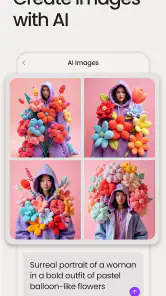
When I first downloaded ImagineArt: AI Art & Design, I was both excited and a little skeptical. Could an app really help me create art that looks like it was done by a seasoned artist? The answer is a resounding yes! The app uses advanced AI algorithms to interpret your input, whether it's a simple doodle or a detailed sketch, and enhances it with stunning artistic effects. It's like having a collaborative partner who brings out the best in your creativity.
What to expect when you open it
ImagineArt is a free app in the Art & Design category, and its Teen age rating makes it suitable for a broad audience while still signaling that it isn’t specifically aimed at young children. It has a 4.2 average from around 390,000 ratings, with roughly 9,500 written reviews, and has passed 10 million installs. The app first appeared on November 25, 2022; version 7.1.3 is the current release, and it requires Android 8.0 or later. Those figures suggest a widely tried tool, but they don’t guarantee that every generated image will match your taste or prompt.
Before settling into a longer project, check the in-app purchase details: optional items range from $5.99 to $799.99 each. That broad range is worth noticing before you tap through an upgrade screen. I’d treat the free starting point as a way to learn whether the app’s image-making approach suits you, and make a purchase only after checking exactly what the option offers and whether you expect to use it repeatedly.
First setup and a better first attempt
One of the first things that struck me about ImagineArt is its user-friendly interface. As someone who isn't particularly tech-savvy, I appreciated how intuitive the app is. The layout is clean, with easy-to-navigate menus that make finding tools a breeze. Whether you're selecting a brush, choosing a color palette, or adjusting the intensity of an effect, everything is just a tap away. It's designed to make the process of creating art as seamless as possible.
More From Our News Desk

Weather by Xiaomi Review: Clear at a Glance, Less Clear Up Close

X Under Pressure: Can It Recover When Posting Goes Wrong?

Clash of Clans Is Won Between the Battles

Android Auto Makes the Case for Quieter Car Software

MobiOffice: Transforming Mobile Productivity with Seamless Integration

EA SPORTS FC™ Mobile Soccer: Redefining Mobile Sports Gaming
For a first meaningful result, I’d avoid typing a long, tangled description. Start with a subject, a setting, and one clear visual direction, then see what the app makes of it. If the image misses the mark, change one element at a time rather than rewriting everything; that makes it easier to tell whether the subject, setting, or style was the part that needed adjustment. This small prompt-editing habit is more valuable than endlessly piling on adjectives, and it helps keep a casual experiment from turning into guesswork.
Making a first image useful
Once you have an output you like, pause before generating more. Ask what is working: the subject, the mood, the arrangement, or a particular color relationship. Naming that strength gives you a clearer next prompt and reduces the temptation to chase a completely different image each time. I’d keep a short note of the wording that produced the promising result, especially if you are testing several variations for the same project.
For a small everyday example, imagine planning a reading-corner refresh. You could explore an image that captures the atmosphere you want, then use it to decide whether the room should feel bright and botanical or warm and moody. The generated scene is a reference, not a reliable shopping plan: furniture details and proportions may not match your actual room. Its value is helping you articulate a preference before you spend time or money making changes.
Where the creative tools fit
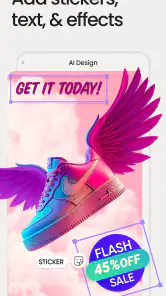
ImagineArt is packed with features that cater to both novice and seasoned artists. The app offers a variety of tools that allow you to experiment with different styles and techniques. From abstract designs to realistic portraits, you can explore a multitude of genres. The AI-driven suggestions are particularly impressive, often providing ideas that I wouldn't have thought of on my own. It's like having a little muse right there in the app!
The name points toward a broad creative toolkit, including ideas such as logos, tattoo concepts, and AI-generated artwork. I find that most useful at the early, exploratory stage. For example, a small-business owner could make a few visual directions for a logo discussion, or someone considering a tattoo could explore motifs before talking with an artist. Treat those images as starting references rather than ready-to-use final designs: a human designer or tattoo artist can refine proportions, lettering, originality, and practical details that an AI image may not get right.
There’s also a useful distinction between inspiration and production. A generated image can help you decide whether a soft, dramatic, or more graphic look fits your idea, but if you need precise text, consistent brand assets, or exact placement, a conventional design editor is often the better finishing tool. I’d use ImagineArt to discover a direction, then move to software with dependable layout and typography controls when the work needs to be exact.
Sharing, iteration, and everyday use
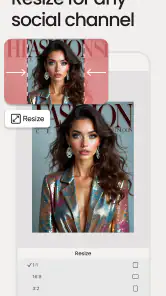
Another feature I love is the ability to share your creations directly from the app. Whether you want to showcase your art on social media or send it to a friend, ImagineArt makes it easy to connect with others and share your passion for art.
A realistic use is planning a birthday invitation or a themed get-together: I could try a few image concepts, send a favorite to a friend for a quick reaction, and then use a separate editor to add the event details. That division of labor matters because generated artwork and finished communication are different jobs. Before sharing, I’d check the image at the size and crop I intend to use; a composition that looks appealing on a phone screen may not leave enough clear space for text.
Compared with drawing apps, ImagineArt asks less of your hand skills but gives you less direct control over every mark. Compared with template-based design tools, it can be more open-ended and surprising, while templates are usually easier when you need aligned text, repeatable layouts, or a polished item quickly. I’d pick this app for visual brainstorming and experimentation, a drawing app for deliberate line-by-line work, and a layout-focused editor for finished posters or branding.
Small workflow choices that save frustration
If you are making several concepts for one purpose, vary only one decision at a time. For instance, keep the subject and setting steady while trying a different visual mood. That gives you a more meaningful comparison than generating unrelated images and trying to remember why one felt stronger. It also makes feedback from a friend more useful: they can react to a clear difference rather than to a completely new idea in every image.
For a logo conversation, I’d use the images to discuss broad qualities—such as whether the brand should feel playful or understated—not as proof that a final mark is ready. A logo needs to remain legible at different sizes and work in practical contexts; a detailed AI illustration may look appealing on a screen but be difficult to simplify. Bringing a few visual references to a designer can still make the conversation more focused, while leaving the craft and final checks to the person responsible for the identity.
Common snags and sensible limits
While ImagineArt is impressive, there's always room for improvement. One area where the app could enhance its offerings is by providing more tutorials or guides for beginners. Although the interface is user-friendly, additional resources could help users fully explore the app's capabilities. Additionally, offering more customization options for the AI effects could give users greater control over their final product.
Even when a first result looks attractive, I wouldn’t assume that small details are reliable. Hands, tiny lettering, repeated objects, and exact brand marks are the sorts of elements I’d inspect carefully before using an image publicly or printing it. If an output is close but not quite right, a fresh variation may be more productive than trying to force the original concept into a precise role. That’s a real trade-off: the app can help you explore quickly, but it may take several rounds to land on an image that feels intentional.
If you want a traditional canvas with predictable brushes, layers, and exact manual control, a dedicated drawing app will suit you better. If your main goal is placing accurate copy into a ready-made social graphic, a template editor is likely less frustrating. ImagineArt makes the most sense when you enjoy exploring possibilities and can accept that the first image may be a draft, not the answer.
Who will get the most from it
I’d recommend ImagineArt to curious beginners, hobby creators, and anyone who wants a quick visual starting point without first learning a full illustration workflow. It can also be handy for an experienced artist who wants to test an unexpected direction before drawing it by hand. The best results come when you know what decision you’re trying to make—such as choosing between a few moods or subjects—rather than expecting the app to complete an entire design brief without your input.
It’s less suitable for someone who needs exact, repeatable output on the first attempt, depends on precise typography, or prefers to build every part of an image manually. It also isn’t the tool I’d choose as the only step in a professional logo or tattoo process. Used as an idea generator, however, it can make that first blank-page moment feel much less intimidating.
My recommendation for a first session
I’d begin with a personal, low-stakes idea rather than a client deadline or a design that must be technically exact. Write down the subject and the feeling you want, generate an initial direction, and make a deliberate small change if it is not quite right. Once you have an image that helps you decide something, save or share it in the way that suits your next step, then finish any necessary text or layout elsewhere.
That approach also answers the practical question of whether a separate editor is needed: for pure visual exploration, you may be satisfied with the generated image; for invitations, labels, posters, or brand materials, a dedicated editor gives you more dependable control over wording and arrangement. Likewise, someone who only wants to sketch by hand may find an illustration app more satisfying, while a curious beginner can use ImagineArt to get past the blank page without needing to draw first.
Overall, ImagineArt: AI Art & Design is a must-try for anyone interested in exploring their artistic side. Whether you're a seasoned artist looking for a new tool or a beginner eager to dive into the world of digital art, this app offers something for everyone. It's a delightful blend of technology and creativity that makes art accessible to all. So why not give it a try and see where your imagination takes you?
AI Image Generator: ImagineArt Frequently Asked Questions
Does ImagineArt need an internet connection to generate images?
AI image generation commonly relies on online processing, so it is sensible to plan to use ImagineArt while connected to the internet. Check that your connection is available when you want to create or edit a project, especially if you are away from home. Once you have access to the app, its available tools and prompts can help you explore visual ideas.
Can I use ImagineArt to make a logo or tattoo concept?
Yes. ImagineArt’s description specifically highlights creating logos and tattoos, alongside AI art and other designs. This makes it worth considering if you want to explore concepts or visual directions before refining a project. Treat generated designs as starting points: review the result carefully and make any adjustments needed for your intended use.
What can I create with ImagineArt before deciding whether to download it?
ImagineArt is an Art & Design app for creating AI-generated images and designs. Its store summary highlights logos, tattoos, AI art, and additional creative projects, with a design editor for working on your results. It may appeal to users who want to explore visual ideas without starting every project from a blank canvas.
Is ImagineArt free to download, and are there optional purchases?
ImagineArt is free to download, so you can try the app without paying upfront. It also offers in-app purchases, with listed prices ranging from $5.99 to $799.99 per item. Consider checking the purchase options shown in the app before buying, particularly if you are comparing access to additional features or tools.
What is ImagineArt: AI Art & Design?
ImagineArt: AI Art & Design is a cutting-edge application that uses artificial intelligence to help users create stunning digital art and designs. Whether you're an aspiring artist or a professional designer, this app offers a range of tools and features that allow you to transform your creative ideas into reality with ease.
Pros
- User-friendly interface for beginners.
- Wide range of artistic styles available.
- Fast rendering of AI-generated art.
- Regular updates with new features.
- High-quality output resolution.
Cons
- Limited free version features.
- Requires internet connection to operate.
- Occasional glitches in output.
- Subscription model can be expensive.
- Limited customization options for AI.
- Category
- Art & Design
- Version
- 7.1.3











