Image Editor - Art AI Photo
- 14.00
- 4.1
- Installs
- 5.00M
- Price
- Free
Screenshots
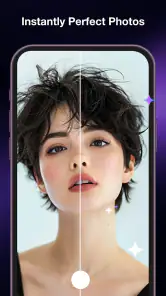
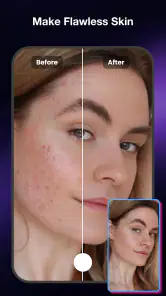
Analysis by Reviewed
I’d approach Image Editor - Art AI Photo as a quick way to give a picture a more expressive finish, not as a full replacement for a careful desktop editing workflow. Its appeal is straightforward: it is a free photography app from Zeronebula Studio, built around AI-assisted editing and artistic treatments. That makes it worth considering when a photo feels ordinary and you want to explore a different look without turning a casual edit into a project.
A good fit for a small, everyday editing task
Think of the moment when you have taken a few pictures during a walk, picked one to send to a friend, and noticed it feels flatter than the scene did in person. That is the sort of low-stakes job where I would try this app: make a copy, explore an expressive treatment, then decide whether the altered image still feels like the place and moment I remember. It is a more focused use than trying to make every photo look polished.
I would keep the original separate before experimenting, particularly with an image that matters to me. That gives me a clean reference and avoids making the creative version carry the burden of being the only record. It also makes the choice easier: if I like the edit’s mood but not its rendering of a key detail, I can go back to the starting point rather than trying to undo a chain of changes.
A creative shortcut, with a clear trade-off
In my view, the most useful way to judge this app is by the kind of decision it helps you make. It is less about painstakingly correcting every detail and more about trying a visual direction: should this snapshot feel softer, bolder, or more stylized? For a social post, a travel memory, or a picture you want to send to a friend, that quick creative nudge can be more valuable than a long list of precise controls.
The balance is important, though. AI-led effects can make an image feel finished quickly, but they can also take over its original character. I would treat the result as a starting point and compare it with the untouched photo before sharing. A striking filter is not automatically a better edit, especially when skin, colors, or small details begin to look unlike the scene you remember.
What the editing approach is good at
The app’s focus on AI photo editing and artistic effects suggests a workflow suited to experimentation. Rather than committing immediately to one polished version, I would make a few different interpretations of the same image and choose the one that still feels believable. This is particularly useful for photos with a clear subject and a simple background, where a change in mood can help the subject stand out without competing with too much detail.
For example, after taking a quick photo of a café table, I might use an artistic treatment to give it a more deliberate feel before sharing it. I would keep the framing and subject intact, then compare the transformed result against the original at normal viewing size. If the effect makes the cup or food look unnatural, I would choose a lighter treatment or keep the original. That comparison is a small step, but it prevents “more edited” from becoming “less convincing.”
You May Like

Clash of Clans Is Won Between the Battles

Android Auto Makes the Case for Quieter Car Software

MobiOffice: Transforming Mobile Productivity with Seamless Integration

EA SPORTS FC™ Mobile Soccer: Redefining Mobile Sports Gaming

How Microsoft OneDrive Became a Mobile Productivity Giant

How Google Translate Breaks Language Barriers Effortlessly
Another practical use is creating alternatives for different audiences. A playful treatment may suit a personal post, while a restrained look may work better when sending the same image to family or using it in a simple online profile. Keeping the original untouched and treating each edited version as an experiment gives you room to change your mind. It is a sensible habit with any editor, and especially useful when an effect changes the image’s overall style.
Where it sits beside familiar photo editors
Compared with a basic editor built around cropping, brightness, and color sliders, Image Editor - Art AI Photo is more appealing when the goal is visual transformation rather than technical correction. If you simply need to straighten a horizon or make a dim picture easier to see, a conventional editor may be faster and more predictable. If you want to explore an artistic direction, this app’s stated focus is a closer fit.
It is also different from a full professional editor, where precise selections, layered adjustments, and repeatable control are often central to the work. I would not choose this app for a product catalog, a carefully retouched portrait, or an image that must match a particular color standard. Those tasks benefit from tools that make fine adjustments easy to inspect and reproduce. Here, the stronger case is casual creativity: getting an image to feel more distinctive without needing to learn a complex editing routine.
That difference matters when choosing what to install. An app can be enjoyable for quick experimentation yet still be the wrong tool for exacting work. I would use this one when I am open to seeing what an artistic treatment does, and reach for a more traditional editor when I already know exactly which part of the image needs correction.
How to get a more natural result
My first recommendation is to start with a photo that already works. An effect can change the mood, but it cannot reliably rescue a missed focus or a confusing composition. Choose a clear subject, check that the image is not dominated by distracting clutter, and then experiment. Starting with a strong original makes it easier to tell whether the edit adds something useful.
Second, judge the result at the size where it will actually be seen. A dramatic treatment may look impressive when zoomed in, yet feel too intense as a small phone-screen image. I would also check the edges of the subject and any important details before sharing, since those are the places where a stylized edit can become distracting. If the image is meant to preserve a memory, keeping a clean original alongside the edited copy is a safer choice than replacing it outright.
A third useful habit is to decide on the purpose before editing. A picture for a private message can tolerate a more playful look than a headshot or a photo meant to represent a small business. That distinction helps avoid spending time on an effect that looks attractive in isolation but does not suit the context. For anything where accuracy matters more than expression, restraint is usually the better choice.
Who will enjoy it—and who may not
I can see this being a good fit for someone who edits on a phone, likes trying different visual moods, and wants a low-friction creative option. The free price makes it easier to explore without a purchase decision, and its Everyone content rating makes it broadly accessible. The app has a 4.1 average from around 2,600 ratings, with more than 5 million installs, so it has reached a substantial audience. Those figures are useful context, but they do not guarantee that its particular style will suit your photos or taste.
Someone who wants to produce quick, expressive variations for casual sharing is likely to get more from it than someone who prefers manual control. It may also suit a beginner who finds traditional editing panels intimidating, provided they are happy to judge results by eye rather than expecting exact, repeatable adjustments. The main question is not whether an AI effect can make a picture look different; it is whether the difference fits what you want to communicate.
I would skip it as my main editor if I regularly need meticulous retouching, dependable color matching, or precise control over individual parts of an image. I would also be cautious if I dislike automated transformations or want every change to be transparent and easy to recreate. In those cases, a conventional editor with direct controls is a better match. This app is most persuasive when the process itself—trying an artistic direction and choosing a favorite—is part of the fun.
Practical details before you try it
The current version is 1.1.5, and the listed minimum operating-system requirement is version 8.0. It is a photography app rather than a social network or a camera replacement, so I would think of it as one step in a simple workflow: take a picture with the camera you already use, experiment with the image here, then share or save the version that feels right. That keeps the app’s role clear and makes it easier to compare its output with your original.
The public review count is smaller than the number of ratings, so I would not treat a handful of written comments as a complete picture of everyone’s experience. A sensible way to decide is to try it with a photo you are comfortable experimenting on, rather than your only copy of an important image. That lets you assess whether the available creative direction matches your taste before making it part of your regular routine.
One question many people have is whether this kind of editor is better for portraits or scenery. I would not assume one category will always produce the best result: the source image and the treatment matter more than the label on the subject. A portrait may benefit from a subtle mood change but look artificial if the effect overwhelms facial details; a landscape may welcome a stronger transformation, yet still lose realism if its colors become implausible. Testing on a copy and checking the image at ordinary size is the practical answer.
A sensible way to test it
For a first try, I would pick a photo with a clear subject and a second image with a different kind of scene, rather than judging the editor from a single lucky result. A portrait and a landscape, for instance, can reveal whether the look I enjoy is broadly useful or only works on one composition. I would make the comparison on the same screen and at the same display size, so the effect—not a change in viewing conditions—is what I am evaluating.
I would also decide in advance what I want the edit to improve: mood, visual distinction, or simply a more finished feel. That gives me a practical stopping point. If I cannot explain what the treatment adds beyond novelty, I would keep the original. This is a useful check for anyone who tends to keep adjusting a picture because each new version looks exciting for a few seconds.
My recommendation
Image Editor - Art AI Photo is best viewed as a playful creative editor, not a precision retouching suite. I would recommend giving it a try if you want to explore artistic looks for everyday photos and are willing to compare the result with the original. Its free access, photography focus, and AI-oriented approach make that a reasonable experiment for casual users.
I would choose another tool for work that depends on exact corrections, consistent output, or careful control over small details. For everyone else, the most satisfying results will come from using a good source photo, editing with a clear purpose, and stopping when the treatment adds personality without erasing what made the moment worth capturing. That is where this app’s creative shortcut makes the most sense.
Image Editor - Art AI Photo Frequently Asked Questions
What can you do with Image Editor - Art AI Photo?
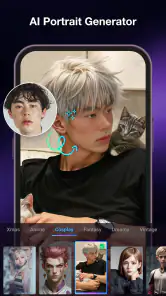
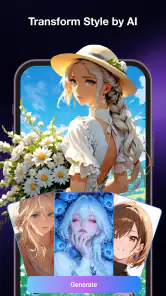
Image Editor - Art AI Photo is designed for editing pictures and creating artistic effects with AI-assisted tools. Depending on the version and features available on your device, you may be able to adjust images, apply filters or visual styles, and turn a photo into a more creative design. Check the app’s current listing and in-app options before downloading, since tools and results can vary by version.
Is Image Editor - Art AI Photo free to download and use?
The app may be available to download without an upfront charge, but that does not necessarily mean every feature is free. Some editing tools, effects, or AI functions may require a subscription, an in-app purchase, or may be limited by usage. Review the price information on the Google Play Store or Apple App Store, along with any trial terms, before confirming a purchase.
Does Image Editor - Art AI Photo need an internet connection?
Basic photo adjustments may work directly on your device, while AI-powered effects can require an internet connection to process images or retrieve creative styles. The exact requirements depend on the tool and app version. If you plan to edit while travelling or have limited data, check whether the specific features you want work offline and consider using Wi-Fi for uploads or downloads.
Can I use Image Editor - Art AI Photo without sharing my photos publicly?
Editing a photo does not automatically mean it will be published publicly, but the app may process images online when you use AI features. Before importing personal pictures, read the app’s privacy policy and the store’s data-safety details to understand how images are handled, stored, or shared. Avoid submitting sensitive photos unless you are comfortable with the stated processing practices.
What should I check before downloading Image Editor - Art AI Photo?
Check that the app is compatible with your phone, has enough storage space, and is offered by the developer you expect in the official app store. It is also worth reviewing recent user feedback, required permissions, privacy disclosures, and any subscription terms. AI-generated edits can differ from the original photo, so keep an unedited copy if you want to preserve the source image.
Pros
- Quick edits make it easy to create polished images without advanced skills.
- AI tools offer a convenient starting point for creative experiments.
- Useful for improving photos before sharing them on social media.
- Combines photo editing and artistic effects in one app.
- A simple option for users who want creative results on mobile.
Cons
- AI-generated results may not closely match the image or style you have in mind.
- Some features or content may require payment or a subscription.
- Editing options may feel limited compared with professional desktop software.
- Results can vary in quality
- especially with complex images.
- Export quality and available formats may not suit every project.
- Category
- Photography
- Version
- 1.1.5











