Home Interior Decor: AI Design
- 21.00
- 4.1
- Installs
- 100.00K
- Price
- Free

Screenshots


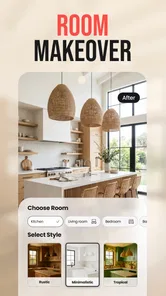
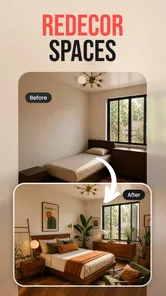
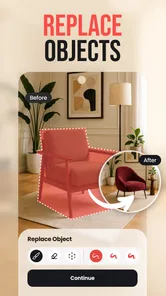

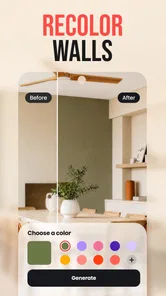

Analysis by Reviewed
I approached Home Interior Decor: AI Design as a practical visual planning tool rather than a complete replacement for an interior designer. Its main appeal is simple: you can use artificial intelligence to explore possible looks for a room before buying furniture, repainting walls, or committing to a larger renovation. In my experience, that makes it most useful during the uncertain middle stage of a decorating project, when you know you want a change but cannot yet picture the result.
This is a free House & Home app from GRIMLAX TRADE, S.L., with a Everyone age rating. It has reached over 100 thousand installs and holds a 4.2 average from around 500 ratings, which suggests that many people find the basic idea worthwhile. The app was released on October 15, 2025, and version 1.10.0 requires Android 10 or later. It also includes optional purchases ranging from $9.99 to $35.99 per item, so the important question is not only whether the visual results are attractive, but also how well the free experience fits your needs.
What the app feels like when you use it for a real room
The most natural way to use this app is to begin with a room that already exists. I would take a reasonably clear photo, avoid including people or personal documents, and use the result as a starting point for exploring decor directions. That workflow is more useful than asking for an imaginary room because the walls, windows, floor, and awkward corners already impose real limits. Even when an AI concept is not perfectly realistic, it can help reveal whether a warmer, lighter, darker, or more minimalist direction appeals to you.
For example, imagine a small living room that feels crowded after a move. Instead of immediately buying a new sofa, I would photograph the room and test a calmer arrangement with lighter colors and less visual clutter. I would then compare the generated idea with the actual measurements and the furniture I intend to keep. The app can support the inspiration stage, but it should not be treated as a measuring tool or a guarantee that every suggested object will fit.
That distinction is central to using AI design responsibly. A generated image can communicate mood, color balance, and style surprisingly well while still getting practical details wrong. Door openings, radiator positions, electrical outlets, ceiling height, and the true scale of furniture matter more than a polished preview. I found the app more valuable when I used it to narrow down choices, not when I expected it to produce a construction-ready plan.
The short description, “Home Interior Decor,” is accurate but undersells the decision-making value. A visual suggestion can be especially helpful when two people sharing a home have different tastes. Rather than arguing over whether a room should be rustic, modern, or colorful, you can compare visual directions and discuss specific elements. That turns a vague conversation into something more concrete.
Where AI visualization saves time
The strongest use case is early experimentation. Normally, comparing several styles means browsing furniture sites, saving dozens of images, and mentally translating those images into your own room. Here, the room itself becomes the reference point. I can explore a few directions without moving heavy furniture or spending money on paint samples and accessories first.
More From Our News Desk

Weather by Xiaomi Review: Clear at a Glance, Less Clear Up Close

X Under Pressure: Can It Recover When Posting Goes Wrong?

Clash of Clans Is Won Between the Battles

Android Auto Makes the Case for Quieter Car Software

MobiOffice: Transforming Mobile Productivity with Seamless Integration

EA SPORTS FC™ Mobile Soccer: Redefining Mobile Sports Gaming
There is also value in using the app before visiting a store. If I am considering a new dining table, I can first establish the atmosphere I want around it: bright and open, warm and traditional, or restrained and contemporary. That does not tell me which product to buy, but it gives me a clearer filter when I start shopping. The result is less impulsive than choosing a piece simply because it looks good in a showroom.
A less obvious workflow is to use the app for elimination rather than selection. I might discover that a dramatic dark wall makes my already shaded room feel too heavy, or that a heavily decorated style competes with a patterned floor. Those negative conclusions are useful. Good design tools do not need to produce a final answer every time; sometimes they prevent an expensive mistake.
What the images cannot settle for you
I would not rely on a generated scene to calculate a renovation budget, identify suitable materials, or confirm that a piece of furniture is available at a particular size. The app belongs to the inspiration and visualization side of home planning. For exact layouts, I would still use a room-measurement tool, graph paper, or a specialist planning program. For structural work, plumbing, electrical changes, or accessibility decisions, professional advice remains more appropriate.
Color is another area where caution helps. A phone display, room lighting, camera processing, and the AI rendering itself can all alter how a shade appears. I would treat a generated wall color as a direction, then inspect physical samples in the room at different times of day. This is one of the most important trade-offs: the app can help me choose between “soft warm neutral” and “cool pale gray,” but it cannot replace seeing the actual paint under my own lighting.
Trust, controls, and the moments that deserve care
When an app works with room photos, I pay attention to what I am uploading and what choices are visible before continuing. A home image may reveal more than decor. It can show family photographs, addresses on packages, valuables, children, documents, or a distinctive view from a window. My practical rule is to prepare the image first: crop out unnecessary areas, blur sensitive details, and use an empty room whenever possible.
I also prefer to review the app’s visible account and privacy controls before making repeated use of it. The useful questions are straightforward: can I use the core experience without creating an account, can I remove past projects, are there clear choices around notifications, and is there an understandable explanation of how uploaded images are handled? I would make those checks inside the current app experience and its privacy information rather than assuming that an AI tool treats images like ordinary offline photographs.
That caution is not a criticism unique to this product. It is a sensible habit for any service that analyzes images. The difference is that a room photo feels harmless until you notice what is in the background. A tidy preparation step protects privacy without reducing the quality of the design exercise.
The app’s free availability makes it easy to try before spending money, which I appreciate. At the same time, the optional purchases mean I would avoid assuming that every desirable generation, style, or workflow is included at no cost. Before confirming a purchase, I would check exactly what it unlocks, whether it is a one-time item, and whether the result is genuinely useful for my project rather than simply more visually dramatic.
In my view, the clearest sign of user control is the ability to make deliberate choices at each point: choose an image, decide what kind of transformation to request, review the output, and stop before sharing or paying. If the app presents a result that I do not like, I should be able to treat it as disposable inspiration rather than feeling pushed to continue. I would also keep personal photos separate from design images so that deleting or organizing projects stays simple.
How I would handle a sensitive room photo
For a bedroom, home office, or child’s room, I would take a few extra precautions. I would remove paperwork from desks, close storage containing personal items, and avoid including faces. If the room is connected to a recognizable exterior view, I would crop that part unless it is important to the design. These steps are quick, and they let me concentrate on the furniture, colors, and layout instead of worrying about unnecessary exposure.
I would also save only the images I actually need. Keeping every experiment can make it harder to know which version reflects the current plan, and it creates a larger archive of room imagery than necessary. A small set of labeled concepts—such as “lighter living room,” “warm dining area,” and “minimal bedroom”—is easier to compare and easier to manage.
Comparison with ordinary decorating alternatives
Compared with browsing inspiration boards, this app has one clear advantage: the ideas are connected to your own room rather than shown in someone else’s carefully photographed home. That makes the emotional response more honest. A style that looks appealing in a magazine may feel too busy or too dark when placed against your actual floor and windows.
Compared with a conventional room planner, the advantage is speed and visual atmosphere. Traditional planning tools are usually better for dimensions, object placement, and repeatable layouts, while an AI visualization app is better at helping me imagine a finished mood. I would use the two approaches together if the project mattered financially: first explore the visual direction here, then verify the practical arrangement elsewhere.
Compared with hiring an interior designer, the app is cheaper and more immediate, but it lacks the human ability to ask follow-up questions about lifestyle, maintenance, budget, storage, and long-term use. A designer can notice that a beautiful arrangement blocks a walkway or creates a cleaning problem. The app can inspire me, but I remain responsible for those judgments.
Compared with simply rearranging furniture at home, the app is less physically demanding and lets me test ideas before lifting anything. However, real movement still reveals things a picture cannot: how a chair feels beside a table, whether a walkway is comfortable, and whether a cabinet door opens fully. I would use the generated image to decide which experiment is worth trying in the real room.
Who will get the most from it
I think this app suits renters planning a refresh, homeowners preparing a room makeover, and anyone who struggles to visualize color combinations. It can also help people who are furnishing a new space and want a direction before buying several unrelated pieces. The free entry point is useful for a cautious first test, especially if you are still deciding whether AI-assisted design is helpful to you.
It is less suitable for someone who needs exact floor plans, product dimensions, contractor-ready documentation, or a guaranteed match to a particular catalog. I would also skip it as the main tool if my project involves structural changes or if I want a professional to manage the entire design process. In those cases, a specialist planner or human expert is the better choice, even if this app remains useful for collecting visual references.
Practical habits that improve the results
I get more value from a clean, well-lit photo than from a dramatic snapshot. I would photograph the room from a normal standing position, keep the main walls visible, and remove temporary clutter that is not part of the design. If the first concept feels wrong, I would change one design direction at a time instead of changing everything simultaneously. That makes it easier to understand whether the problem is the color, the furniture style, or the amount of decoration.
I would also create a small decision record outside the app. For each promising image, I would note what I actually like: the wall tone, the lighting impression, the amount of open floor, or the contrast between materials. Then I would translate those observations into real actions. This prevents the common mistake of copying an entire generated room when only one or two elements were genuinely appealing.
Another useful tip is to compare concepts against the items you already own. A design may look attractive because it replaces everything with coordinated pieces. Before accepting it, I would ask which existing sofa, shelves, lamps, or rugs can remain. The most practical result is often not the most visually perfect one; it is the version that improves the room without creating unnecessary waste.
My verdict after weighing usefulness against caution
Home Interior Decor: AI Design is a convincing starting point for visual exploration, especially when I need help turning a vague decorating idea into a concrete direction. Its value is not that it knows the one correct answer. Its value is that it gives me something to react to before I spend money or commit to a major change.
I like the combination of free access, an Everyone rating, and a focused home-decorating purpose. The 4.2 average and over 100 thousand installs also show that it has attracted a meaningful audience, while the current version indicates that the app is an actively presented product rather than an abandoned experiment. Still, those figures do not remove the need to check the experience for yourself, particularly before paying for optional items.
My recommendation is cautious but positive: try it with a cropped, non-sensitive room photo, use the free experience to test whether the visual approach helps, and compare every attractive concept with real measurements and your existing furniture. Keep account, image, and purchase choices deliberate. The best results come from treating AI as a design conversation partner, not as an authority.
If you want inspiration for a living room, bedroom, dining area, or home office, I think it is worth exploring. If you need precise planning, construction guidance, or a complete professional service, choose a more specialized alternative and use this app only as a source of visual ideas. That balance is what makes it useful: it can shorten the path from uncertainty to a workable decorating plan, provided I remain the person making the final decisions.
Home Interior Decor: AI Design Frequently Asked Questions
What devices can run Home Interior Decor: AI Design?
Home Interior Decor: AI Design is an app for home decorating ideas, and its listed minimum operating system is version 10. Before downloading, check that your device meets this requirement and has enough available storage for the app and the room images you plan to use. Keeping your operating system current can also help you get a smoother experience.
Who makes Home Interior Decor: AI Design, and is it suitable for all ages?
The app is developed by GRIMLAX TRADE, S.L. and is rated for Everyone, so its home-design focus is intended for a general audience. It has a 4.2 average rating from around 525 ratings, with 21 written reviews. Those reactions can offer a broad sense of how people respond to it, but your experience may depend on which design tools you use and what results you expect.
What is Home Interior Decor: AI Design used for?
Home Interior Decor: AI Design is an AI-powered decorating app that helps you visualize ideas for rooms and living spaces. You can usually upload or select a room image, choose a design style, and receive suggested layouts, furniture arrangements, color palettes, or decorative concepts. It is useful for inspiration before redecorating, although its results should be treated as creative guidance rather than exact architectural plans.
How does the AI room design feature work?
The app generally works by analyzing a photo of your room and generating a redesigned version based on the style or options you select. For better results, use a clear, well-lit image showing most of the space and avoid heavy obstructions. AI-generated designs can sometimes change room dimensions, windows, doors, or furniture inaccurately, so compare the result with your real space before purchasing anything.
Is Home Interior Decor: AI Design free to use?
The app is free to download, but it also offers in-app purchases priced from $9.99 to $35.99 per item. The free download does not necessarily mean every design tool or generation is included at no cost. Before purchasing, review the price and terms shown in the app, and consider whether the available features fit the way you plan to use it.
Pros
- Generates multiple room styles quickly from a single photo.
- Useful for exploring color palettes
- layouts
- and furniture combinations.
- Offers inspiration for rooms with different design themes.
- Simple interface makes it accessible to users without design experience.
- Can help visualize renovation ideas before making costly purchases.
Cons
- AI results may distort room dimensions or architectural details.
- Some furniture and decor suggestions may be unavailable to buy.
- The best designs may require a subscription or paid credits.
- Results can look repetitive when using similar prompts or photos.
- Uploaded room images may raise privacy concerns for some users.








