AI Cleaner - Phone Cleaner
- 5.99K
- 4.3
- Installs
- 10.00M
- Price
- Free

Screenshots

Analysis by Reviewed
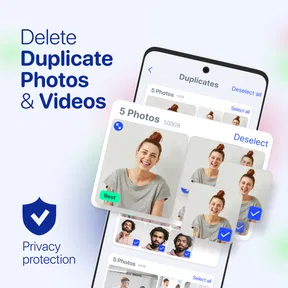
I judge a phone cleaner by whether it helps me make a better decision about crowded storage, not by how dramatic its performance claims sound. That is why the most interesting part of AI Cleaner - Phone Cleaner is its focus on finding duplicate photos: it can turn a tedious camera-roll search into a more manageable review, while leaving the final choice to me.
Why duplicate photos are a practical target
Photos are an easy kind of clutter to overlook. A camera roll can hold several takes of the same scene, repeated downloads, or screenshots that have outlived their purpose. Those files accumulate quietly, and scrolling through them one by one is a poor use of time. A cleaner that helps surface possible duplicates can make the task feel less like an afternoon project and more like a quick maintenance habit.
The important distinction is between a duplicate and a picture that merely looks similar. Two shots from the same moment may differ in focus, expression, or background detail. I would treat an automated match as a prompt to compare, not proof that one copy is disposable. That small change in approach makes photo cleanup safer and more useful.
How I would use its suggestions
I would begin with a small scan when I have a few minutes to look through the candidates, rather than starting a large cleanup while distracted. For each group, I would keep the clearest image and pause over anything personal or hard to recreate. If I am unsure, I would leave it alone and return later; the point is to reclaim space without turning a tidy-up into a regrettable deletion.
It also helps to separate cleanup from backup. Before removing a photo that matters, I would make sure I have another copy somewhere I trust. A cleaner can help identify files to review, but it should not become my sole method of protecting memories. This is especially worth remembering before clearing pictures from a trip, family event, or work project.
First Impressions
Right off the bat, AI Cleaner - Phone Cleaner feels sleek and user-friendly. The interface is clean, which is ironic considering its purpose, and everything is pretty intuitive. You don't need a PhD in tech to navigate through the options, which is always a win in my book.
Features that Stand Out
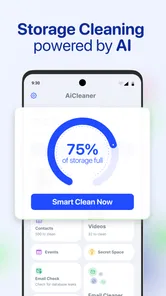
One of the coolest things about this app is its AI-driven technology. It analyzes your phone's storage and usage patterns to suggest what you can safely delete or optimize. No more guesswork or accidentally deleting something important. It’s like having a personal assistant for your phone!
More From Our News Desk

Weather by Xiaomi Review: Clear at a Glance, Less Clear Up Close

X Under Pressure: Can It Recover When Posting Goes Wrong?

Clash of Clans Is Won Between the Battles

Android Auto Makes the Case for Quieter Car Software

MobiOffice: Transforming Mobile Productivity with Seamless Integration

EA SPORTS FC™ Mobile Soccer: Redefining Mobile Sports Gaming
The junk file cleaner is another highlight. We all know how cached data can pile up, right? With just a tap, this app clears out all that unnecessary data. It's like spring cleaning for your device, and honestly, it's kind of satisfying.
Another nifty feature is the battery saver. The app identifies those sneaky apps that drain your battery in the background and gives you the option to shut them down. Plus, the CPU cooler feature is a lifesaver, especially if you're an intense mobile gamer like me.
A sensible photo-cleanup routine
The most useful way to approach duplicate-photo cleanup is in small batches. I would scan when I have time to review the candidates, then pause before removing anything sentimental, unusual, or difficult to replace. This matters after a holiday, family gathering, or a burst of screenshots: the camera roll may contain true duplicates alongside similar images that are not interchangeable.
There is also a useful trade-off between convenience and confidence. An automated suggestion can save time locating clutter, but the final decision still belongs to you. If you regularly keep multiple versions of a picture for editing or sharing, check those before deletion. For anything especially important, make sure you have a separate copy before cleaning; a cleaner should not become the only place you rely on to protect valued photos.
User Experience
Using the app is a breeze. After installation, I was prompted to do a quick scan, and within seconds, it presented me with a detailed report of unwanted files, apps, and other data that could be optimized. I appreciated the option to review what was going to be deleted before proceeding. It's like having the best of both worlds—speed and control.
I also noticed a significant improvement in my phone's performance after clearing out the clutter. Apps open faster, and there's less lag when switching between them. It’s like my phone got a new lease on life!
When a different approach makes more sense
Imagine running low on room just before a trip, with a camera roll full of repeated shots and screenshots you no longer need. A focused scan can make it easier to find candidates than scrolling through every album manually. I would still review the selections before confirming, then check the phone’s available storage afterward rather than assuming every suggested item should go.
Compared with the built-in storage tools on a phone, a dedicated cleaner may offer a more guided way to look for duplicates and junk. The built-in tools can be a better fit if you prefer to control cleanup manually or want to avoid adding another app. Likewise, if your storage is mostly occupied by large videos or apps you deliberately keep, photo cleanup will not solve the main issue; reviewing those files directly is the more relevant step.
AI Cleaner is a free tools app from GRIMLAX TRADE, S.L., with an Everyone age rating. Its average rating is 4.3 from around 154,000 ratings, and it has passed 5 million installs. The current version is 2.0, released on February 20, 2025, and it includes in-app purchases ranging from $4.99 to $79.99 per item. I would check the purchase details in the app before choosing any paid option, since the free starting point may be all a light user needs.
Make a cleanup session count
A useful way to avoid doing the same work twice is to clean in a deliberate order. I would start with obvious, low-stakes clutter such as old screenshots and repeated downloads, then move to camera photos that need more careful judgement. This keeps the quick decisions separate from sentimental ones and makes it easier to stop when I have recovered enough room.
After deleting selected items, I would revisit the storage view and decide whether the result addresses the actual problem. If the phone still feels full, the remaining space may be tied up in large videos, offline files, or apps I want to keep. That check is more helpful than repeatedly scanning the same photo groups, and it prevents a cleaner from becoming a ritual that does not solve the underlying issue.
Where it fits among phone-cleaning options
The main alternative is to use the phone’s own storage controls and inspect albums manually. That route gives me direct control and avoids relying on another tool, but it can take longer when there are many near-duplicates. A dedicated cleaner is more appealing when I want help finding candidates; manual review wins when I already know what I want to remove or need to manage a specific large file.
I would also be cautious about expecting a cleaner to make every device feel faster. Recovering space can be worthwhile when storage is tight, but it is not the same as repairing an older phone or changing how an app behaves. For me, the clearest reason to try this one is to make photo and junk-file maintenance less cumbersome, not to assume every performance complaint has a storage-related cause.
Best suited to photo-heavy routines
This app makes the most sense for someone who takes lots of pictures, accumulates screenshots, and would rather review a shortlist than inspect an entire camera roll manually. It can also suit a person who wants a guided starting point for routine cleanup but is willing to make the final keep-or-delete call themselves.
I would skip it if I rarely run out of room, already have a dependable way to organize photos, or prefer to keep cleanup entirely within the phone’s built-in settings. It is also a poor fit for anyone who expects an automated tool to decide which memories are expendable. The more personal the photos, the more valuable a careful human review becomes.
Why You Should Consider It
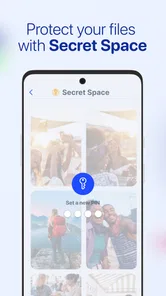
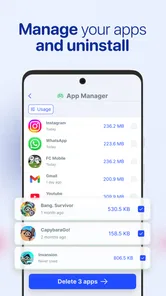
If you’re like me and tend to download a ton of apps (and forget to delete them), this app is a must-have. It keeps your device running smoothly without any hassle. Plus, with the added security features, you can rest easy knowing your personal data isn’t at risk.
What really sets this app apart is its AI capabilities. It learns your habits and suggests optimizations based on your usage. It’s like having a personalized cleaning service for your phone. Who knew cleaning could be this smart and efficient?
I see the strongest fit for people who take plenty of photos, dislike sorting them manually, and are comfortable reviewing suggestions before removing files. Someone who rarely fills their storage, already manages photos carefully, or prefers not to use a dedicated cleaner may gain little from installing it. The app is also not a substitute for deciding what matters: AI can help surface possible clutter, but personal judgement is still important when two pictures look alike and only one holds the moment you want to keep.
Final Thoughts
Overall, AI Cleaner - Phone Cleaner is a solid choice for anyone looking to boost their device's performance. It combines a clean interface with powerful features that make phone maintenance a breeze. Whether you're a tech novice or a seasoned pro, this app is sure to impress.
In the digital age where our phones are practically extensions of ourselves, keeping them optimized and running efficiently is crucial. With AI Cleaner - Phone Cleaner, you get just that—an easy, effective way to ensure your device is always at its best. So, if you haven't tried it yet, give it a go. Your phone will thank you!
AI Cleaner - Phone Cleaner Frequently Asked Questions
What does AI Cleaner - Phone Cleaner do with my files, and can I choose what to delete?
AI Cleaner - Phone Cleaner is an AI-powered phone cleaner intended to help clear storage, remove junk and identify duplicate photos. Before confirming any cleanup, review the items marked for deletion so you can keep files or photos you want. Taking a moment to check selections is especially useful when tidying a large photo gallery or clearing files you do not recognize.
Will I need to grant permissions before using AI Cleaner - Phone Cleaner?
A cleaner needs access to relevant parts of a device to identify storage items and duplicate photos, so you may see permission requests when using AI Cleaner - Phone Cleaner. Read each prompt and grant only the access you are comfortable with. If a permission is declined, some functions may be limited; you can review app permissions in your device settings.
Can I use AI Cleaner - Phone Cleaner without an internet connection?
Whether an app function works offline can depend on how that feature operates and on your device. AI Cleaner - Phone Cleaner is designed for phone cleanup, including storage and duplicate-photo tasks, but it is sensible to open the app and check which tools are available in your current connection conditions. Avoid relying on a cleanup feature until you have confirmed it works as expected.
Is AI Cleaner - Phone Cleaner suitable for beginners?
AI Cleaner - Phone Cleaner is a Tools app aimed at common phone-cleanup needs, such as clearing junk and finding duplicate photos. Its purpose is straightforward, but users should still look through suggested cleanup items before deleting them, particularly if they are unfamiliar with storage-management apps. A careful review of each selection helps beginners avoid removing something they intended to keep.
What should I check before installing AI Cleaner - Phone Cleaner?
Check that your device meets the app’s operating-system requirement and that you are comfortable with the permissions requested during use. Also consider whether you want a free cleaner that offers optional purchases. AI Cleaner - Phone Cleaner is rated Everyone, and its tools focus on storage cleanup and duplicate-photo removal, so think about whether those are the functions you need.
Pros
- Efficient junk file removal boosts device speed.
- User-friendly interface with easy navigation.
- Customizable cleaning schedules for convenience.
- Minimal ad intrusion enhances user experience.
- Supports multiple languages for global users.
Cons
- Limited features in the free version.
- Requires access to personal data for full use.
- Occasional false positives in junk detection.
- No integration with cloud storage cleaning.
- Battery consumption can be slightly high.