HD Camera: Professional Camera
- 1.47K
- 4.6
- Installs
- 10.00M
- Price
- Free
Screenshots
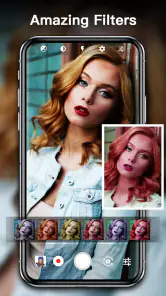
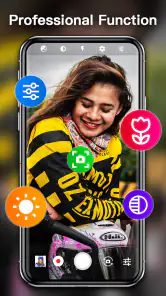
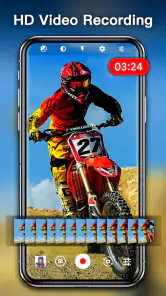
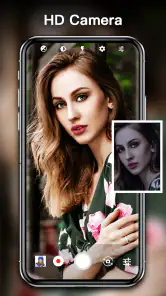
Analysis by Reviewed
I judge a camera app by how quickly I can get a usable shot, especially when I’m not in ideal conditions. HD Camera: Professional Camera is a free photography app from 天気, and its appeal is the promise of hands-on camera controls without asking you to carry a separate camera. It has a 4.6 average from around 130,000 ratings and over 10 million installs, so it has clearly found a broad audience. My impression is that it is most useful for people who want to adjust a phone photo before pressing the shutter, rather than simply rely on automatic capture.
Choosing the Right Camera for the Moment
The most useful way to think about this app is not as a universal replacement for the camera that came with your phone, but as another option to keep ready. When a subject is still and the light is tricky, the ability to adjust exposure, focus, ISO, and white balance can make the capture feel more deliberate. When a child is running toward you or someone is already laughing, opening extra controls can cost the moment. I would choose the camera based on the scene rather than trying to make one app handle every situation.
That distinction matters for people deciding whether the additional controls are worth learning. If you often photograph food, a pet resting by a window, a document, or a friend who is happy to pause for a portrait, a little time to compose can pay off. If you mostly take quick photos while walking or want the phone to make the decisions for you, the built-in camera may be a better everyday default. The free price makes experimentation accessible, but it does not make a more involved workflow necessary for everyone.
A Small Practice Routine That Pays Off
I would learn the controls by repeating a simple test rather than trying to master every option at once. Choose a stationary subject near a window, take one automatic shot, then make a modest exposure adjustment and compare the results in the gallery. On another attempt, try changing focus while keeping the rest of the setup steady. This gives a clearer sense of what each control changes than adjusting several things between shots, and it helps you decide whether the results are worth the extra taps on your phone.
The same approach is useful before an event where you do not want to troubleshoot in front of everyone. Check the framing, try a selfie, and see whether face detection behaves as you expect. If you plan to use effects, preview them on the sort of subject you usually photograph; a filter that looks pleasing on a landscape may not suit a face. I would keep the standard camera familiar as a fallback, especially if the event involves movement or brief expressions.
What to Expect from Capture and Editing
There is a practical difference between controlling a photo as it is taken and refining it later. This app is aimed at the first part of that process: exposure, focus, ISO, white balance, and live effects can shape what you capture. Gallery access helps with finding the result afterward, but I would not choose it as my main tool if my priority is detailed retouching, arranging images into a polished layout, or managing a large photo collection. A dedicated editor is the more natural companion for those jobs.
RAW support may appeal to people who already enjoy editing, but it is best treated as a choice for images that deserve extra work, not a setting to use automatically for every snapshot. A casual share is usually about getting a pleasing result quickly; an image you want to adjust later may justify a more flexible file. I would compare a few examples on the phone before building a routine around RAW, and consider how much time I actually want to spend editing after capture.
More From Our News Desk

Clash of Clans Is Won Between the Battles

Android Auto Makes the Case for Quieter Car Software

MobiOffice: Transforming Mobile Productivity with Seamless Integration

EA SPORTS FC™ Mobile Soccer: Redefining Mobile Sports Gaming

How Microsoft OneDrive Became a Mobile Productivity Giant

How Google Translate Breaks Language Barriers Effortlessly
Getting to Know the App
First things first, let's talk about what makes the HD Camera: Professional Camera stand out. As soon as you launch the app, you're greeted with a sleek and user-friendly interface that screams professionalism. Whether you're a seasoned photographer or just someone who loves capturing moments, this app caters to all levels of expertise.
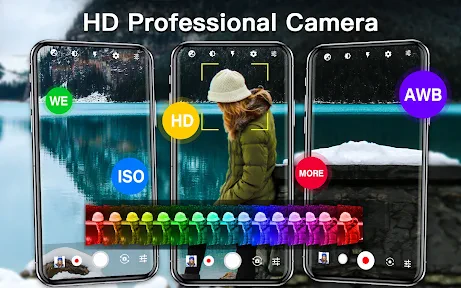
One of the standout features is its ability to mimic DSLR-like quality. With the app's advanced control over exposure, focus, and ISO settings, it almost feels like you're holding a professional camera in your hands. The manual controls are intuitive, making it easy for users to adjust settings on the fly.
Readability, Navigation, and Features That Shine
So, what exactly does this app offer? Well, the array of features is quite impressive. You can expect:
- Real-time filters and effects to enhance your photos instantly.
- Adjustable white balance settings to get that perfect shot every time.
- High-resolution picture and video capture.
- Seamless integration with your device's gallery for easy access to your snaps.
- Face detection technology that ensures your selfies are always on point.
These features are designed to offer you flexibility and creativity in your photography, allowing you to experiment with different styles and techniques. For a quick portrait, I’d leave the look simple and check the framing before trying filters; effects can change the feel of skin tones, so it is worth comparing the preview with the unfiltered result. When using exposure or white balance controls, I’d make one adjustment at a time. That makes it easier to see what helped, and avoids losing a fleeting moment while changing several settings.
Motor and Sensory Considerations
The app’s manual controls are valuable when I have time to compose a shot, but they also mean more on-screen decisions than a basic camera interface. If tapping small controls or making precise adjustments is difficult, automatic shooting on the phone’s built-in camera may be the more comfortable choice. I’d set up the framing first, then change only the control that addresses the problem—for example, exposure when a scene looks too dark—rather than trying to manage every setting at once.
For sensory comfort, real-time effects give a way to preview a different look, but a busy filter treatment may distract from the subject. I prefer to treat effects as optional finishing choices, not something that must be selected before every photo. Face detection can help when taking a selfie, though it does not replace checking that the person is in focus and the background is not competing for attention.
Performance and Usability
Performance-wise, the app runs like a dream. It doesn't lag, and switching between modes is smooth and responsive. I particularly appreciate the app's ability to save photos in multiple formats, including RAW, which is a huge plus for editing enthusiasts.
The usability aspect is another highlight. The learning curve is minimal, thanks to the app's intuitive design. Even if you're not tech-savvy, you'll find yourself navigating through its features with ease. The developers have done a fantastic job ensuring that users can focus more on capturing moments rather than fiddling with settings.
Situational Access and Everyday Use
Picture a family gathering indoors: people are talking, the light varies from one corner of the room to another, and nobody wants to wait while the photographer experiments. I’d use the app’s exposure control to respond to dim lighting, keep the composition straightforward, and take the shot before the moment passes. Later, gallery access makes it practical to find the image for sharing or editing. The trade-off is that manual adjustments take attention, so for moving children or a fast-changing scene, I’d favor the phone’s standard camera if it gets the picture more reliably.
Compared with the camera already installed on a phone, this app is appealing when I specifically want manual exposure, focus, ISO, or white balance choices in one place. The built-in camera is often the simpler option for quick snapshots, while a dedicated editing app is better when the main task is detailed work after capture. This sits between those approaches: it gives more ways to shape the shot at capture time, but it is not a substitute for a full editing workflow or a physical camera when handling and lens choice matter.
Remaining Barriers and Who It Suits
The app is rated for Everyone and supports Android 5.0 or later, which makes it relevant to people using a range of Android devices. Its current version is 1.7.3. Still, camera results and control behavior can depend on the phone itself, so I would test the controls in a quiet setting before relying on them for an important occasion. A useful low-pressure check is to photograph the same scene once with automatic settings and once after a small exposure or focus adjustment; that shows whether the extra control is genuinely helping on your device.
I’d recommend it to curious phone photographers who enjoy learning how exposure and focus change an image, and to selfie takers who want face detection and effects close at hand. I’d skip it if I mainly need the fastest possible point-and-shoot experience, have difficulty with touch-based fine adjustments, or expect a phone app to replace dedicated camera equipment. The free price lowers the risk of trying it, but the best choice is still the one that lets you capture the moment comfortably.
Inclusive Verdict
In conclusion, the app is a flexible option for people who want more say over a phone camera’s capture settings, while keeping familiar tools such as effects and gallery access nearby. Its controls can support experimentation, but they also add choices that may not suit every person or situation. I would start with simple adjustments, keep the standard camera available for hurried shots, and decide from everyday use whether the extra control feels helpful.
So, if you're ready to take your photography skills to the next level, give this app a shot. You won't be disappointed!
HD Camera: Professional Camera Frequently Asked Questions
Is HD Camera: Professional Camera free to download?
HD Camera: Professional Camera is free to download, so you can try it without an upfront purchase. The app is described as a professional camera and selfie camera, with “HD Camera” as its short description. Before installing, consider what you want from a camera app and whether its photography tools match the way you take pictures.
Is HD Camera: Professional Camera available for iPhone?
HD Camera: Professional Camera is an Android photography app, so it is intended for Android devices. If you are choosing a camera app for another platform, make sure you select an edition made for your device rather than assuming the Android app will work there. On Android, check your operating-system version and camera compatibility before downloading.
Does HD Camera: Professional Camera work on older Android phones?
HD Camera: Professional Camera is an Android photography app that requires Android 5.0 or later. If your phone runs that version or a newer one, it meets the stated minimum operating-system requirement. Keep in mind that the camera features available to you can depend on your device, so check that your phone’s camera works properly and has the capabilities you want before downloading.
Who develops HD Camera: Professional Camera, and is it widely used?
The developer is 天気, and the app is listed in the Photography category. It has more than 10 million installs, alongside a 4.6 average rating from around 130,000 ratings and approximately 1,500 written reviews. Those figures suggest that many people have tried it, though individual experiences can differ depending on the phone and what they expect from a camera app.
What are the key features of HD Camera: Professional Camera?
HD Camera: Professional Camera offers a range of features designed to elevate your photography experience. It provides manual control over ISO, exposure, and white balance, allowing for professional-quality shots. The app also includes various shooting modes such as panorama, night mode, and burst mode, as well as advanced filters and effects. Its intuitive interface makes it accessible for both beginners and professional photographers.
Pros
- High-quality image capture.
- User-friendly interface design.
- Wide range of manual controls.
- Supports 4K video recording.
- Multiple shooting modes available.
Cons
- Consumes a lot of battery power.
- App can be slow on older devices.
- Limited free features.
- Occasional ads interruptions.
- Large app size requires ample storage.

- Category
- Photography
- Version
- 1.7.3