Harris Teeter
- 3.53K
- 4.6
- Installs
- 1.00M
- Price
- Free

Screenshots

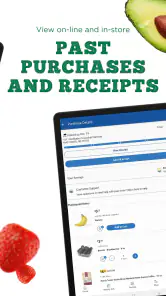

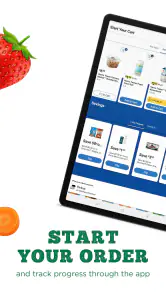
Analysis by Reviewed
I judge a grocery app by what it lets me do quickly when I’m busy, and how much effort it adds when plans change. Harris Teeter is a free Food & Drink app from The Kroger Co. that puts grocery ordering and shopping tools on a phone. Its average rating is 4.6 from around 10,000 ratings, and it has over a million installs. Those figures suggest it has found an audience, but the more useful question is whether its mix of planning, savings, and ordering fits your routine.
Quick tasks and speed expectations
For ordinary errands, the appeal is having shopping tasks together rather than switching between a paper list, coupon notes, and a store’s ordering page. The app’s interface feels straightforward to navigate, which matters when I only have a moment to check an item or prepare for a shop. I would still treat the experience as a way to organize a grocery trip, not a guarantee that every action will be instant: browsing a large shop and placing an order naturally take more attention than checking a short list.
For the quickest experience, I’d separate planning from checkout. Adding a few staples when I notice they are running low is less demanding than trying to build a full basket during a rushed break. A compact list also makes it easier to scan for omissions, while a large weekly order deserves a calmer review. This is less about expecting a particular loading speed and more about choosing a workflow that avoids repeated searching and backtracking.
When the shopping gets more involved
A useful routine is to look through weekly specials before building a list, then add the items that genuinely suit the meals you plan to make. That order helps avoid filling a basket just because something is promoted. Digital coupons can also make savings easier to keep track of, but they reward a little preparation: checking and clipping relevant offers before checkout is more dependable than trying to remember them while shopping.
For a busy weekday, I can see the value of making a list in advance and choosing curbside pickup or home delivery when available. It is particularly handy when a household needs a predictable set of staples and there is little time to walk the aisles. If you prefer to compare every product in person, though, ordering ahead may feel restrictive rather than convenient.
A heavier-use moment is the weekly shop for a household with different preferences. I’d start with the shared essentials, then add meal-specific ingredients and check the final basket with whoever else is eating. That makes the list useful as a coordination point, rather than simply a long inventory. It also exposes a trade-off: the more detailed the plan, the more worthwhile it is to review it before ordering, because a forgotten substitution or duplicate can matter more than it would on a quick top-up trip.
When time is especially tight, I would not try to compare every offer and recipe before placing an order. I’d make a short essentials list first, then browse promotions only if there is time. This keeps the app from turning a practical errand into a longer shopping session. For someone who enjoys exploring the aisles and changing dinner plans on the spot, that same structured approach may feel like an unnecessary constraint.
More From Our News Desk

Weather by Xiaomi Review: Clear at a Glance, Less Clear Up Close

X Under Pressure: Can It Recover When Posting Goes Wrong?

Clash of Clans Is Won Between the Battles

Android Auto Makes the Case for Quieter Car Software

MobiOffice: Transforming Mobile Productivity with Seamless Integration

EA SPORTS FC™ Mobile Soccer: Redefining Mobile Sports Gaming
Reliability, recovery, and practical limits
The app is rated for Everyone and supports devices running iOS 7.1 or later; its current version is 88.1.1. It was released on March 8, 2011, and the steady presence of ratings and reviews gives prospective users some context, though neither popularity nor an update number guarantees flawless performance on every phone. I would keep a backup note for a time-sensitive shop until I knew how reliably the app fit my own device and routine.
One sensible way to reduce friction is to prepare the list before you are in a hurry, then review it once before submitting an order. That gives you a chance to catch missing essentials and reconsider coupon-driven additions. If the app slows down or you lose your place, a saved note of the most important items can help you recover without rebuilding the whole plan from memory.
For an everyday scenario, imagine realizing after work that breakfast supplies are nearly gone and dinner ingredients are also needed. I’d check the list before leaving, add the missing basics, and decide whether a store visit or an order makes more sense for that evening. If the order route is being used, I’d verify the items and timing before treating the errand as finished. That small final check is useful because convenience depends on the order matching the plan, not merely on getting through the screens.
Reliability also means having a fallback that suits the stakes. For a routine shop, the app can be the main organizer once it has proven dependable on your phone. For an urgent item needed that night, I’d keep the essential details somewhere easy to access until the order or trip is settled. That is a sensible habit for any digital shopping workflow, especially when losing a list would create more hassle than writing it down once.
Discovering the App’s Features
One of the first things that caught my eye was the app’s user-friendly interface. It’s super intuitive, making it easy for anyone to navigate. You know how some apps make you feel like you need a manual just to get started? Well, this isn’t one of them. You can quickly browse through various sections like weekly specials, digital coupons, and even recipes. It’s a breeze to find what you’re looking for.
That mix is most useful when the sections support a decision rather than become separate destinations. I’d use a recipe as a prompt for dinner ideas, then compare its ingredients with what I already have before adding anything to the shopping list. Likewise, a special is valuable when it lines up with a planned meal or a regular staple. This approach saves time and keeps browsing tied to an actual need.
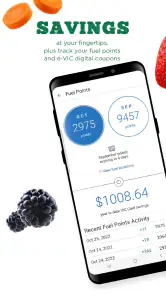
Now, let’s talk about the digital coupons. Who doesn’t love saving a few bucks, right? The Harris Teeter app makes it incredibly easy to clip coupons digitally. You can apply them directly to your account and use them during checkout. No more fumbling with paper coupons, which is a huge relief if you ask me.
The practical trade-off is that digital offers still take attention. I’d check the coupons before shopping and clip only the ones that fit the list, rather than treating every offer as a reason to buy. If I’m in a store, this preparation means fewer pauses to remember what I saw earlier. If I’m ordering, it creates a natural moment to review the basket before checkout. Either way, the benefit comes from being selective, not from collecting the most offers.
Shopping Made Easy
Another feature that stands out is the ability to create customized shopping lists. You can add items manually or directly from the weekly ads and coupons. It’s like having your shopping list and savings all in one place. Plus, if you’re like me and tend to forget things, the app’s reminders are a lifesaver. They gently nudge you so you won’t miss out on any essentials.
A useful, slightly less obvious habit is to keep the list organized around how I shop: recurring basics first, then items for the next few meals, with optional treats last. That makes it easier to spot the difference between a must-have and something I added while browsing. It also helps when another person is checking the list, since the order gives them a quick sense of what can be skipped if plans change.
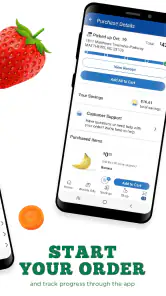
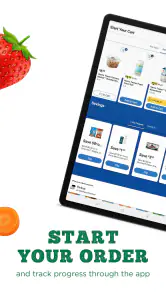
For those who prefer online shopping, the app offers a seamless integration with Harris Teeter’s online ordering system. You can shop directly from your phone, choose a pickup time, and voila, your groceries are ready when you are. It’s incredibly convenient, especially during those hectic weeks when time is of the essence.
Pickup and delivery are not interchangeable with walking into a shop. Ordering ahead is a better fit when the basket is predictable and the priority is reducing time spent on the errand. An in-person visit makes more sense when I want to inspect options, change my mind while browsing, or choose an alternative based on what I see. I’d decide based on the kind of shop that day rather than assuming one method is always faster.
Choosing between this and other grocery options
Compared with a paper list, the app brings offers, recipes, and ordering into the same store-focused routine; a handwritten note, by contrast, is quick to open and does not depend on navigating an app. Compared with a broad grocery marketplace, this is more useful when Harris Teeter is already where I shop, while the broader service may suit someone who wants to compare several retailers in one place. The right alternative depends on whether store-specific planning or cross-store choice matters more.
I’d also distinguish it from simply browsing a retailer’s site when I need to place one occasional order. The app makes more sense if I expect to return to the same shopping routine and want a list and offers close at hand. If I only need a one-off purchase, or I rarely shop at Harris Teeter, adding another app may not save enough effort to justify it. Keeping the tool aligned with a regular habit is what makes it worthwhile.
Final Thoughts
Overall, the Harris Teeter app is a solid choice for anyone looking to make their grocery shopping experience more efficient. It combines convenience, savings, and ease of use all in one neat package. Whether you’re shopping in-store or online, this app caters to all your needs without any hassle.
If you’re tired of the traditional way of grocery shopping and want something that offers more control and flexibility, give this app a try. It’s like having a digital grocery store at your fingertips, making your shopping trips not only quicker but also more enjoyable.
Who will get the most from it
I’d recommend it most to people who already shop at Harris Teeter and want one place to plan a visit, keep track of offers, and arrange an order. A practical example is a parent checking the pantry after dinner, adding breakfast basics to a list, then browsing specials before deciding what to buy for the week. The list can make an in-store trip more focused, while ordering can save the trip itself when pickup or delivery suits the day.
It is less compelling if you shop at several unrelated grocery chains and want one universal basket, or if your main priority is comparing products across competing retailers. A general delivery marketplace may be a better fit for that kind of cross-store search. Harris Teeter’s advantage is the tighter connection to its own grocery experience; that same focus is a limitation if you rarely shop there.
Small habits that make it more useful
I’d use the list as a planning tool, not just a place to collect items. Add routine staples first, then bring in a coupon or weekly-ad item only if it matches something you actually need. That makes the savings feature more practical and helps keep a promotion from steering the whole shop. For a shared household, checking the list together before ordering can also prevent duplicates and forgotten essentials.
Recipes can help turn browsing into a meal plan, but I would check the ingredients against what is already at home before adding everything. That extra step keeps the list grounded in your pantry rather than creating unnecessary purchases. If you are ordering, review the basket before choosing a pickup time so you can catch an item you meant to add while there is still time to adjust the order.
How I’d decide whether to keep it
My recommendation depends on where you shop and how you prefer to get groceries. If you value a store-specific list, digital coupons, and the option to order for pickup or delivery, it is a sensible free tool to try. If you would rather browse shelves, compare alternatives in person, or use one service across many stores, a paper list or a broader grocery app may fit better. The app is aimed at Everyone, but ease of use still depends on having a compatible device and a reliable way to complete your shopping online.
In the end, I see it as most useful when it reduces small bits of grocery admin: planning what is needed, keeping relevant offers together, and arranging a convenient way to get the order. I would not rely on any single app as the only record of a last-minute essentials list, but for a regular Harris Teeter shopper, it can make a familiar routine more organized without asking for much commitment.
Performance verdict
My overall view is that this is a practical organizer rather than an app I’d judge by raw speed claims. Its strongest performance comes from reducing repeated work: keeping a shopping list alongside store offers and giving regular shoppers an ordering route from the same phone. I’d expect the smoothest routine when the list is prepared ahead of time and the basket is familiar, not when I’m making every decision at the last minute.
The app is free and has a 4.6 average rating, with around 3,500 written reviews. Those numbers offer useful context about its audience, but they do not tell me how it will behave on a particular device or network. I’d try it with a small, ordinary shop first, see whether the list and ordering steps suit my habits, and then decide whether to make it part of my weekly routine. For a regular Harris Teeter customer, that low-commitment test is the clearest way to judge whether its convenience outweighs the need to keep a simple backup.
Harris Teeter Frequently Asked Questions
Is the Harris Teeter app free, and which devices can install it?
The Harris Teeter app is free to download and is intended for a broad audience, with an Everyone content rating. Its current version is 88.1.1, and it supports devices running iOS 7.1 or later. Before downloading, check that your device meets that minimum requirement so you can install and use the app without compatibility problems.
What is the Harris Teeter app and what does it offer?
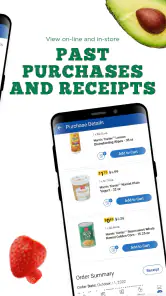
The Harris Teeter app is a convenient mobile application designed to enhance your shopping experience at Harris Teeter supermarkets. It offers a wide range of features including digital coupons, online shopping, and easy access to weekly deals. Users can also create shopping lists, view product details, and track their e-VIC rewards. It's an essential tool for anyone looking to save time and money while shopping at Harris Teeter.
How can I use the Harris Teeter app to save money?
The Harris Teeter app provides several ways to save money. Users can access digital coupons directly from the app, which can be applied at checkout. The app also highlights weekly deals and promotions, ensuring you never miss a discount. Additionally, by joining the e-VIC program through the app, you can receive personalized offers and discounts based on your shopping habits, further maximizing your savings.
Is the Harris Teeter app user-friendly for first-time users?
Yes, the Harris Teeter app is designed with user-friendliness in mind, making it suitable for first-time users. The interface is intuitive and easy to navigate, with clear sections for shopping lists, coupons, and weekly ads. The app also provides helpful guides and customer support options within the app to assist users in getting started, ensuring a smooth experience from the first use.
Can I shop online through the Harris Teeter app and how does it work?
Absolutely, the Harris Teeter app allows users to shop online for groceries with ease. Once you log into the app, you can browse products, add items to your cart, and select your preferred pickup or delivery option. The app provides a seamless checkout process, allowing you to pay securely online. This feature is perfect for busy individuals who prefer the convenience of online shopping.
Pros
- User-friendly interface enhances shopping experience.
- Loyalty program offers great savings.
- Wide variety of products available.
- Seamless integration with online shopping.
- Efficient customer service support.
Cons
- Requires stable internet for optimal performance.
- Limited payment methods accepted.
- Occasional app crashes reported.
- Some features need improvement.
- Location services required for store locator.
- Category
- Food & Drink
- Version
- 88.1.1











