Smith's
- 6.10K
- 4.4
- Installs
- 1.00M
- Price
- Free

Screenshots
Analysis by Reviewed
When I plan a grocery run at Smith’s, the useful part is being able to bring store offers and a shopping list into the same routine. That sounds like a small convenience, but it changes how I prepare: I can start with what I actually need, check whether a current offer fits, and head to the store with fewer things left to remember. Smith’s is most convincing as a practical companion for shoppers who already use its stores, not as a general shopping guide.
The value is in linking offers with a list
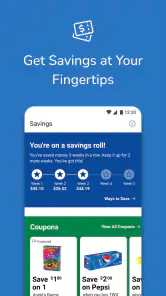
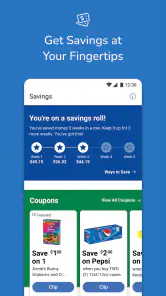
Coupons and ads are easy to browse and then forget; a list is easy to make without knowing whether the store has relevant offers. Smith’s brings those pieces together with rewards and store-finding tools, so I can use one app to prepare for a visit instead of treating each part as a separate task. The list remains the anchor: I start from the groceries I planned to buy, then see whether an offer is relevant.
That order is worth keeping. A discount can feel like a saving even when it persuades me to buy something I did not need. I get more from the app when I treat a coupon as a possible bonus on an existing purchase, not as a shopping prompt. The ads are useful for checking what the store is featuring, but they work best as context for a list rather than a substitute for one.
How I would use it before and during a visit
Before leaving home, I would add groceries to the list as they come up, then take a quick look at Smith’s offers and the current ad. That gives me a chance to notice a relevant deal without turning preparation into a long browsing session. If I am shopping for a particular meal, I can check the ingredients I need against what I already planned to buy and avoid relying on memory for the last few items.
At the store, a phone list is handy when plans change or I remember an item halfway through the trip. Store-finding tools also make sense when I need to locate a Smith’s before setting out. I would still check the terms shown for an offer before counting on it, particularly if I am choosing a different product or size than I first had in mind. That is a sensible safeguard, not a reason to avoid the app.
A midweek grocery run is where it fits
Picture a quick stop after work: I have already collected household requests in the list, and I open the app before leaving to review offers that might apply to those items. Once inside, I can use the list to keep the trip focused instead of trying to reconstruct a conversation or a glance into the refrigerator. If a deal matches something I need, it can influence which option I consider; if it does not, I can move on without letting the ad rewrite the plan.
For a household, the list can be a convenient shared reference in the everyday sense that one person can gather requests in one place. I would agree with the other shoppers about which list to use, though. Keeping parallel lists in different apps or notes can create the very confusion this workflow is meant to prevent. Smith’s is useful when it becomes the household’s chosen grocery list for Smith’s trips, not when it is one more place everyone must remember to check.
More From Our News Desk

Clash of Clans Is Won Between the Battles

Android Auto Makes the Case for Quieter Car Software

MobiOffice: Transforming Mobile Productivity with Seamless Integration

EA SPORTS FC™ Mobile Soccer: Redefining Mobile Sports Gaming

How Microsoft OneDrive Became a Mobile Productivity Giant

How Google Translate Breaks Language Barriers Effortlessly
Where a store app differs from a general shopping tool
Compared with a paper list, Smith’s can put store offers alongside trip planning, but paper still wins for someone who wants no phone involved while shopping. Compared with a general-purpose list app, Smith’s is more tied to Smith’s promotions and store tools; a neutral list is usually better for people who divide groceries among multiple chains. And compared with opening several retailer apps to compare offers, Smith’s keeps the focus on one store rather than attempting to show the whole market.
That focus is both the point and the limitation. If Smith’s is where I usually shop, bringing its ads, coupons, rewards, and list together can save small bits of effort. If my main goal is to find the lowest price across unrelated stores, I would choose a comparison approach instead and keep the grocery list somewhere independent. The right choice depends less on how many features an app names than on where I actually buy food.
Who is likely to appreciate it
I would point regular Smith’s shoppers toward the app, especially anyone who checks offers before going in or often forgets one or two items. It is free, developed by The Kroger Co., and sits in the shopping category. Its 4.4 average across around 35,000 ratings and more than a million installs indicate that it has reached a substantial audience, though popularity alone cannot tell me whether its workflow suits a particular household.
It is rated for Everyone, and the listed release date is December 19, 2012. Version 88.1.1 is listed with a minimum operating-system requirement of 7.1. Those details are useful when deciding whether it fits a device, while the day-to-day reason to install it remains simpler: I shop at Smith’s often enough to benefit from checking its store-specific information and keeping a list there.
When I would choose something else
I would not make Smith’s my main grocery tool if I rarely visit its stores, need one list that is deliberately independent of any retailer, or compare prices across a range of chains every week. In those situations, a general list app or a retailer-neutral price-comparison method is a better fit. A store-specific app only earns a place on my phone if I will use its store information often enough to justify another account of my shopping habits and another place to check.
There is also a small attention cost: checking ads and coupons takes time, and the app cannot make every offer relevant to what I need. I would set a short pre-shopping routine—review the list first, scan offers second, and stop once I have identified anything useful. This makes the app a tool for a planned trip rather than a reason to browse promotions whenever I open my phone.
What to check before relying on an offer
A practical question is whether a coupon applies to the exact item I intend to buy. I would read the offer details in the app rather than assuming that a similar product, alternate size, or substitute qualifies. If an item is unavailable or I change my mind in the aisle, I would check again before treating the replacement as discounted. This is especially helpful when the list is a plan rather than a fixed order, since real grocery trips often involve adjustments.
Another question is whether I need the app for every trip. I would use it when I have a Smith’s run coming up and want the current store information in reach; for a quick visit where I already know what I need, the list alone may be enough. That flexible approach keeps the app from becoming a chore. Its strongest contribution is making preparation easier, not requiring a full planning ritual for every bag of groceries.
Getting Started with Smith's
First off, downloading Smith's was a breeze, available for both Android and iOS users. The interface is sleek, modern, and incredibly intuitive, which means even if you aren't the most tech-savvy person out there, navigating through the app won't be a hassle. I found the onboarding process to be pretty smooth, with helpful guides popping up right when needed.
What the app is actually for
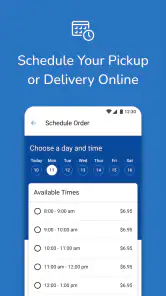
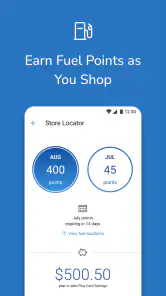
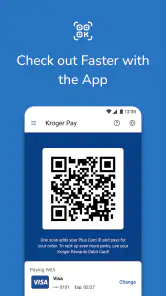
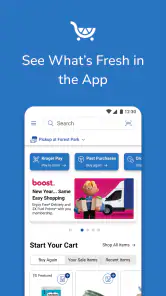
Smith’s is a free shopping app from The Kroger Co., aimed at people who shop at Smith’s and want store offers and trip planning together on a phone. Its central appeal is not broad lifestyle management; it is having coupons, weekly ads, rewards, store-finding tools, and a shopping list in one place. That focus makes the app most useful when a Smith’s visit is already part of your routine, rather than as a general-purpose shopping guide.
For a quick decision, the practical question is whether you want to check Smith’s offers before you shop and keep a list handy while you are there. If you mainly compare prices across several unrelated retailers, a dedicated comparison tool or each retailer’s own app may suit you better. Smith’s is built around its own stores, so its value depends on shopping there.
Features that Stand Out
The app offers a range of features that cater to different aspects of lifestyle management. From health tracking to financial planning, Smith's seems to have it all. One feature I particularly enjoyed was the personalized daily planner. It not only helps organize your day but also suggests activities based on your preferences and past behavior. Talk about having a digital assistant right in your pocket!
Moreover, Smith's health monitoring tools are quite comprehensive. It integrates seamlessly with wearable devices, allowing you to keep tabs on your fitness goals, sleep patterns, and even stress levels. I loved how it provides actionable insights, nudging me to make healthier choices without being too pushy.
Planning a useful grocery trip
The shopping list is most helpful when I use it as a bridge between browsing offers and making a real plan. Before leaving home, I can check what I need, review the current ad, and consider whether a coupon matches something I was already going to buy. That order matters: it keeps a discount from turning into a reason to add an unnecessary item. I would treat the app as a planning aid, not as a promise that every advertised deal belongs in my basket.
A realistic use case is a midweek grocery run after work. I can add the essentials as I notice them during the week, then scan the store’s offers before heading out. At the shop, the list helps me stay focused instead of trying to remember everything from a quick look at the refrigerator. For a shared household, it also gives one person a simple place to collect items others mention, though everyone should agree on where the current list lives to avoid maintaining competing notes.
User Experience and Design
One word: Impressive. The developers have truly put in the effort to make sure the app is not just functional but also a joy to use. The color scheme is easy on the eyes, and the layout is designed to make sure you find what you need quickly. I didn't experience any lags or crashes, which is often a concern with apps that pack tons of features.
The community aspect of Smith's is another highlight. You can connect with other users, share tips, and even participate in challenges. It's a nice touch that adds a social element to the app, making it more engaging and less of a solitary experience.
Trade-offs to keep in mind
The main limitation is its store-specific nature. If your usual grocery trip is split among several chains, you may still need other apps or a separate list to cover everything; Smith’s cannot replace a neutral tool for comparing the full market. Likewise, checking offers takes a little time, so I would not open the app expecting every trip to become cheaper automatically. The better habit is to look for relevant deals on items already on your list.
It is also sensible to confirm the details of an offer in the app before relying on it at checkout, especially if your plans change or you are shopping for a substitute. That small check is more useful than assuming a coupon applies to every size or variation of a product. The app’s strongest role is helping you prepare; it does not remove the ordinary need to make sure a deal fits what you are buying.
Who will get the most from it
I would recommend Smith’s to regular Smith’s shoppers who like to plan ahead, keep a running grocery list, and check store-specific offers without juggling several separate tools. Its 4.4 average from around 35,000 ratings and over a million installs suggest that many shoppers have made it part of their routine, while its Everyone age rating makes it suitable for a broad audience. It is free, and version 88.1.1 is listed for devices running iOS 7.1 or later.
If you rarely shop at Smith’s, prefer paper lists, or want one app to compare prices and manage trips across many grocery chains, I would skip it or use it only when you have a specific Smith’s visit coming up. For the right shopper, though, its value is the small practical connection between checking offers and remembering what to buy—not an all-purpose digital assistant.
Final Thoughts
In conclusion, Smith's is more than just an app; it's like having a personal assistant that's always ready to help streamline your life. Whether you're looking to boost productivity, improve health, or simply stay organized, Smith's has something for everyone. It's a must-have for anyone wanting to enhance their lifestyle in a meaningful way. So, if you haven't tried it yet, I'd say it's about time you do!
Smith's Frequently Asked Questions
What kind of app is Smith's, and who makes it?
Smith's is a shopping app from The Kroger Co. Its focus is helping shoppers save and plan with coupons, ads, rewards, store-finding tools, and a shopping list in one place. If you are looking for a single app to support everyday shopping preparation, these are the main features to consider before installing it.
What should I check about my phone before downloading Smith's?
Before downloading Smith's, check that your phone or tablet runs a compatible operating system. The app supports Android versions starting with 7.1, so older devices may not meet the requirement. Also make sure you have enough available storage and a working internet connection for downloading and using shopping features. Checking compatibility first can help avoid installation problems.
Is Smith's app free to download, and what should I know before installing it?
Smith's is a free shopping app from The Kroger Co. Its focus is helping shoppers save and plan with coupons, ads, rewards, store-finding tools, and a shopping list in one place. The app is rated for Everyone, so it is presented for a general audience. Check that your device meets the minimum operating-system requirement before downloading.
What is Smith's app and what does it offer?
Smith's app is a comprehensive tool designed to streamline your daily tasks, enhance productivity, and provide a seamless user experience. It offers features such as task scheduling, reminders, and integration with various third-party apps to ensure you stay organized and efficient. With a user-friendly interface, Smith's app is perfect for individuals seeking to optimize their workflow.
Is Smith's app available on both Android and iOS platforms?
Yes, Smith's app is available for download on both Android and iOS platforms. Users can find it on the Google Play Store for Android devices and the Apple App Store for iOS devices. This wide availability ensures that users can access the app's features regardless of their preferred mobile operating system.
Pros
- User-friendly interface with easy navigation.
- High security features to protect user data.
- Regular updates with new features.
- Efficient customer support available 24/7.
- Compatible with multiple devices and OS.
Cons
- Requires a stable internet connection.
- Occasional bugs in the software.
- Some features are paywalled.
- Large app size may affect storage.
- Limited offline functionality.

- Category
- Shopping
- Version
- 88.1.1