Fry’s
- 8.10K
- 4.2
- Installs
- 1.00M
- Price
- Free

Screenshots
Analysis by Reviewed
I like grocery apps best when they solve a real problem in my week, rather than give me another place to manage things. Fry’s makes the most sense when I already plan to shop at Fry’s: I can prepare a list, check offers, and keep rewards-related shopping tasks together. It is less compelling as an all-purpose grocery planner, especially for a household that shops at several chains.
When one grocery trip serves the whole household
I find the app most useful when several people contribute to the same shop. Imagine I’m heading to Fry’s after work while my partner is at home checking what we’ve run out of. A shared list can help us avoid duplicate buys and the familiar mid-aisle message asking whether we still need milk. It works best when we agree on a simple routine: one person adds items as they notice them, and whoever shops checks the list before leaving.
That shared approach is also a practical way to keep a shop organized without turning the app into a family-management system. I’d use it for groceries that need replacing, not as a place to track every household task. If more than one person is shopping, clear item names and quantities matter; a list can only coordinate what people actually enter.
Getting to Know Fry’s App
From the get-go, Fry’s app strikes you as a pretty straightforward tool, designed to make shopping less of a chore and more of a breeze. So, picture this: You’re standing in the aisle with a list in one hand and your phone in the other. But instead of flipping through paper notes, you’re scrolling through an app that’s got you covered on everything from the latest deals to your loyalty points. Yup, that’s Fry’s for you!
User Interface & Experience
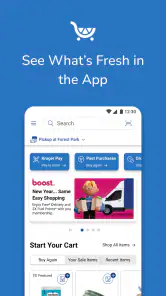
First off, navigating through the app is a walk in the park. The user interface is clean, and dare I say, intuitive enough that even my tech-challenged uncle could figure it out. You’ve got your tabs neatly organized at the bottom for easy access to weekly ads, digital coupons, and shopping lists. It’s like having a personal shopping assistant, minus the hourly rate.
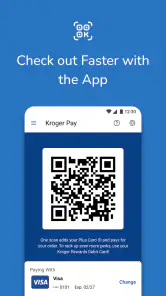
For a household using a shared device, I’d decide whose account is signed in before loading coupons or relying on rewards at checkout. The list can help people coordinate what to buy, but the account is a separate consideration: another person’s list access does not automatically mean they are using the same rewards setup. I’d check that the shopper has the right account ready before heading to the register, rather than sorting it out while paying.
Shopping Made Easy
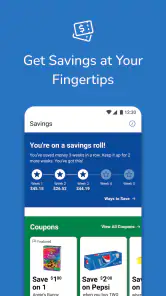
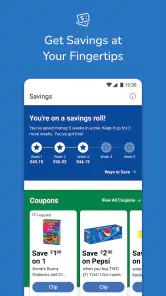
Now, let’s talk about the real MVPs of the Fry’s app – the digital coupons and weekly ads. I mean, who doesn’t love a good bargain? The app makes it super easy to load up on these money-saving gems. You just tap to add them to your account, and voila! Instant savings at checkout.
More From Our News Desk

Weather by Xiaomi Review: Clear at a Glance, Less Clear Up Close

X Under Pressure: Can It Recover When Posting Goes Wrong?

Clash of Clans Is Won Between the Battles

Android Auto Makes the Case for Quieter Car Software

MobiOffice: Transforming Mobile Productivity with Seamless Integration

EA SPORTS FC™ Mobile Soccer: Redefining Mobile Sports Gaming
My useful habit here would be to browse the ad first, then add only coupons connected to items I already planned to buy. That keeps a bargain from becoming a reason to fill the cart with extras. Before shopping, I’d also review the selected offers in the account I intend to use; the app’s savings tools are most helpful when the person at checkout has prepared them in advance.
Compared with a paper list and a quick look at printed offers, Fry’s brings planning and promotions together on the phone. That is convenient if you regularly shop at Fry’s and want one place for these tasks. A general-purpose notes app may be simpler for a household that only needs a shared checklist, while a broader grocery service may suit someone who shops across several retailers. I would not choose Fry’s as my only tool if my main goal were comparing offers across different stores.
Plus, if you’re the kind who likes planning meals ahead, the app’s recipe section is a gold mine. It not only gives you ideas on what to cook next but also lets you add ingredients directly to your shopping list. It’s like having your cake and eating it too, but without the calories!
Making the list work in real life
For a realistic weeknight workflow, I’d choose a recipe before leaving, add its ingredients to the list, and then check the cupboards for what we already have. That last step is easy to skip when a recipe creates a longer list, and it is where a little manual checking can prevent unnecessary purchases. I’d keep the shared list focused on the actual shop rather than adding every possible meal idea.
A small but useful habit is to write down enough detail to distinguish similar choices. “Apples” may be fine if anyone in the household can choose, but a specific variety or quantity can prevent a second message from the aisle. I’d also separate immediate needs from optional recipe ingredients in the wording of the list. That way, the shopper can make sensible substitutions without guessing what the person at home had in mind.
The same approach helps when two people shop at different times. Before one person leaves, they can check the current list and remove or clarify anything already bought. I would avoid keeping old, unfinished items mixed with the next shop: a list is useful only when the household treats it as current. This is not an elaborate system, just a little housekeeping that makes a phone list more reliable than scattered texts.
Accounts, offers, and checkout preparation
The app’s strongest advantage over a plain notes tool is its connection to Fry’s-specific shopping tasks. A list by itself can be shared in many ways, but it does not put the store’s weekly ad and digital offers beside that planning. I’d use the app when the trip is already going to Fry’s, then use a neutral checklist if the household is still deciding which retailer to visit.
There is a trade-off: promotions require attention before checkout. I would not assume that noticing an offer in an ad is the same as having it ready in the account the shopper will use. My practical sequence would be to review the planned items, select relevant coupons, and confirm the intended account before leaving home. That is less stressful than trying to sort out account details in a busy checkout line.
For a shared device, I would keep the account choice deliberate rather than letting different household members casually switch between logins. The list and the rewards account serve different purposes, and a person who helps add groceries may not be the person who handles checkout. If that distinction matters in your household, decide who prepares offers and who shops. It avoids treating shared planning as if it automatically means shared account access.
Keeping household use sensible
The app is free, is rated for Everyone, and comes from The Kroger Co. Its current version is 88.1.1, and it has an average rating of 4.2 from around 46,000 ratings, with more than a million installs. Those figures suggest a widely used option, but they don’t tell me whether it suits every household. In practice, I’d judge it by whether Fry’s is already where you shop and whether the people sharing the list are comfortable keeping coupons and rewards tied to the account used at checkout.
For younger household members, I’d treat the shopping list as a practical aid rather than assume it provides special family controls. An adult can decide what account is signed in and what offers are prepared; a child helping with the list can still be given a simple, specific task, such as adding fruit or cereal. The Everyone age rating makes the app suitable for a broad audience, but it does not replace an adult’s judgement about account access or purchases.
I also think it helps to separate “helping with the list” from “being responsible for the whole shop.” A younger person can suggest an item or check whether a familiar staple is running low, while an adult reviews the final list and account before paying. That keeps the app useful as a household aid without relying on controls or permissions I would not assume it provides.
Where it fits among grocery options
Against paper notes, Fry’s is more convenient when I want store offers and a shopping list in the same place, but paper still has a place if I want a quick, no-device backup. Compared with a general notes app, Fry’s is more tailored to shopping at its own stores; the notes app can be more flexible for errands across multiple shops. Broad grocery services can be a better fit for someone comparing several retailers, while Fry’s is the more direct choice for shoppers whose regular trip is already centered on Fry’s.
I would skip it if I rarely shop at Fry’s or if I simply need a shared checklist and do not care about store-specific coupons, ads, or rewards. I would also avoid making it the household’s only record of a complicated meal plan: its practical role here is getting a shop organized, not replacing a broader planning routine. For a regular Fry’s customer, though, the combination is useful precisely because it keeps the store-related steps close together.
Final Thoughts
So, would I recommend the Fry’s app? Absolutely! It’s practical, user-friendly, and quite frankly, a game changer for anyone looking to streamline their grocery shopping experience. Whether you’re a seasoned shopper or just someone who dreads the weekly grocery run, this app is worth giving a shot. It’s got all the bells and whistles to make shopping not just another task but something you might actually look forward to.
In conclusion, the Fry’s app doesn’t just save you money; it saves you time and energy too. And in today’s world, isn’t that what we all need a little more of? Happy shopping, my friends!
Who will get the most from it
I’d recommend Fry’s most to people who already shop there and want their weekly ad, coupons, rewards, and list close at hand. It’s also a good fit for a couple or housemates who can agree on one clear list and decide in advance which account the shopper will use. If you rarely shop at Fry’s, move between many grocery chains, or only want a bare-bones shared checklist, the app may add more steps than value; a notes app or the stores you visit more often may be a better match.
Fry’s has been available since December 19, 2012, and is free to install. For me, the clearest reason to keep it is not that it replaces every shopping tool, but that it combines useful Fry’s-specific errands in one place. I’d still do a quick list and account check before setting out, especially when someone else has prepared the offers. With that small bit of coordination, it can make a regular grocery run feel more planned and less improvised.
Fry’s Frequently Asked Questions
Who develops Fry’s, and what kind of app is it?
Fry’s is a shopping app developed by The Kroger Co. It brings together tools for planning a Fry’s shopping trip, including access to coupons, weekly ads, rewards, store information, and a shopping list. It is intended for shoppers who want to use these features from a mobile device, whether they are preparing at home or browsing offers before heading to a store.
What is Fry's app and what does it offer?
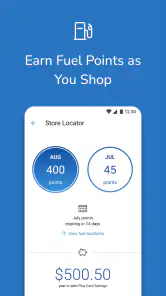
Fry's app is a mobile application designed to enhance your shopping experience at Fry's stores. It offers features such as digital coupons, personalized offers, and a shopping list for easier grocery planning. You can also access weekly ads, find store locations, and check product availability, making it a convenient tool for regular Fry's shoppers.
Is Fry's app available for both Android and iOS devices?
Yes, Fry's app is available for both Android and iOS platforms. You can download it for free from the Google Play Store for Android devices and from the Apple App Store for iOS devices. This ensures that users across different mobile operating systems can enjoy the features and conveniences offered by Fry's app.
How does Fry's app help in saving money while shopping?
Fry's app helps you save money by providing access to exclusive digital coupons and personalized deals based on your shopping habits. You can easily load these coupons to your account and redeem them during checkout. Additionally, the app keeps you informed about ongoing sales and promotions, helping you maximize your savings on every trip to the store.
Can I create a shopping list using Fry's app?
Yes, Fry's app allows you to create and manage a shopping list directly from your smartphone. This feature helps you organize your grocery needs efficiently. You can add items manually or choose from weekly ads and digital coupons, ensuring you don't miss out on any deals and stay on track with your planned purchases.
Pros
- User-friendly interface for easy navigation.
- Comprehensive product search and filter options.
- Exclusive deals and discounts for app users.
- Secure payment gateway with multiple options.
- Real-time inventory updates and notifications.
Cons
- Limited customer service response time.
- Occasional app crashes during peak hours.
- Some features require a stable internet connection.
- Limited product reviews and ratings.
- App updates can be large and data-consuming.
- Category
- Shopping
- Version
- 88.1.1













