Hair Styler App, AI Hairstyle
- 1.75K
- 3.8
- Installs
- 1.00M
- Price
- Free

Screenshots

Analysis by Reviewed
Before booking a salon appointment, I like to get a rough idea of how a change might frame my face. That is where Hair Styler App, AI Hairstyle is most useful: it turns a hairstyle idea into a quick visual experiment, so I can explore possibilities without committing to scissors or color. I see it as a playful planning aid rather than a substitute for a stylist’s advice.
A quick preview, not a salon consultation
The appeal is simple: the app uses a photo to show how different hairstyles could look on you. That makes the decision feel more personal than browsing inspiration pictures of other people. A cut that looks appealing on a model may feel quite different when you see a version placed against your own face, and even an imperfect preview can help you decide whether you are drawn to shorter hair, fringe, or a more dramatic change.
In practical terms, I would start with a clear, front-facing photo and use the same image while comparing options. Keeping the lighting and angle consistent makes it easier to focus on the hairstyle rather than differences between pictures. If a result looks strange, I would not treat that as proof the cut will look bad in real life; the preview is a visual prompt, not a precise consultation about hair texture, maintenance, or how a stylist would shape the cut.
Make the preview useful for a real decision
A small change in the source photo can affect how convincing a hairstyle preview feels. I would choose an image where the face is easy to see and hair is not hidden by a hat, heavy shadow, or an object near the head. That is not about making the picture look polished; it is about giving the visual comparison a fair chance. If the result seems poorly aligned, I would first try another photo before deciding the style itself is unflattering.
It also helps to decide what question I am trying to answer before browsing. “Would I like a shorter outline?” is easier to judge than “Which of these many looks is best?” I might compare one style that changes length, another that changes the face-framing shape, and a familiar option as a baseline. This makes the exercise less like collecting random edits and more like narrowing down what I want to ask a stylist.
I would keep expectations especially modest for changes that depend on details a static image cannot communicate well. A preview can suggest the overall silhouette, but it cannot tell me how a cut will move, feel after washing, or behave when I style it at home. I would use the image to identify a direction, then ask a professional whether that direction suits my hair and daily routine.
Transform Your Look with Just a Tap
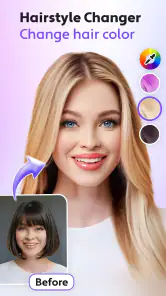
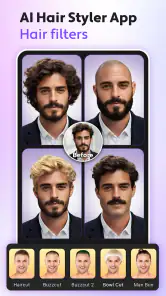
First off, the main feature that caught my attention is the app’s ability to use AI technology to simulate a variety of hairstyles. You simply upload a photo of yourself, and voila, the app works its magic to present you with a myriad of styles. It’s incredibly satisfying to swipe through the options and see what suits your face shape best. Whether it’s a chic bob, playful bangs, or even a daring pixie cut, the app gives you a realistic preview of how it would look on you.
More From Our News Desk

Weather by Xiaomi Review: Clear at a Glance, Less Clear Up Close

X Under Pressure: Can It Recover When Posting Goes Wrong?

Clash of Clans Is Won Between the Battles

Android Auto Makes the Case for Quieter Car Software

MobiOffice: Transforming Mobile Productivity with Seamless Integration

EA SPORTS FC™ Mobile Soccer: Redefining Mobile Sports Gaming
The AI Advantage
The AI Hairstyle really shines with its AI-driven approach to hairstyling. The technology is surprisingly accurate in adapting the styles to match your head shape, hair color, and even texture. It’s not just a one-size-fits-all deal here. Plus, the app updates its style gallery regularly, so there’s always something fresh to try. It’s like having an endless supply of hairstyle inspiration!
One useful way to get more from those previews is to compare a few distinctly different directions rather than scrolling through near-identical looks. Try a conservative change alongside a bold one, then save the options you genuinely might discuss with a stylist. That shortlist is more useful than a large collection of novelty edits: it gives you a starting point for a conversation about what suits your routine and what would need adjustment for your hair.
User-Friendly and Fun
Using the app is as easy as pie. The interface is intuitive, with all the features neatly organized. You don’t have to be a tech whiz to navigate through it. I particularly enjoyed the option to save and share your favorite looks. It’s perfect for when you’re feeling indecisive and need a second opinion from friends before taking the plunge at the salon.
A realistic moment for it is the evening before an appointment: I could test a few shorter styles, save one or two, and send them to someone whose taste I trust. Their reaction may help me notice that I keep choosing the same length or that a fringe is the part I am actually curious about. I would still bring the image to a hairdresser as a reference, not as an exact instruction, since a photo edit cannot settle questions about upkeep or what is workable with my current hair.
For that conversation, I would bring a small selection rather than a phone full of every experiment. One image can show the shape I like, while another can point out what I do not want, such as a particular fringe or a very short outline. I would also describe how much time I am willing to spend styling my hair. The pictures are useful prompts, but the practical details are what help turn a visual idea into a cut that fits real life.
Compared with searching image boards or scrolling through salon portfolios, this app’s advantage is that the preview is centered on your own photo. Those alternatives can be better for seeing real cuts on real hair, especially if you want examples of how a style grows out or looks in different lighting. I’d use both: the app to narrow down a direction, then real reference photos to make the salon discussion more concrete.
That distinction matters most when I am considering a style that relies on texture, layering, or a precise finish. An edited preview can be a useful first filter, but photographs of people with similar hair can show details that a generated look may smooth over. I would not ask the app to settle whether a cut is technically achievable; I would use it to make the first decision—whether the general shape appeals to me—then rely on real examples and professional advice for the rest.
And let’s not forget the fun factor. Who doesn’t love a good virtual makeover session? It’s a great way to kill time and have a laugh while you’re at it. Plus, you get to experiment with styles you’d never dare to try in real life.
Who will get the most from it—and where it falls short
This photography app is best for curious people who want a low-pressure way to explore a haircut before making a decision, or for anyone who enjoys playful edits and sharing possible looks. It is less suitable if you need a reliable prediction of the exact result, want professional advice about your hair, or prefer browsing authentic examples over AI-generated previews. In those cases, a stylist’s consultation or a collection of real haircut photos is a better next step.
I also see it as a particularly good fit for someone who is undecided between broad options rather than someone who already has a precise technical request. If I know only that I want a change, seeing different shapes against my own face can help me form a preference. If I already know the exact cut I want, a stylist’s portfolio and a direct conversation are likely to be more useful than experimenting with simulated alternatives.
It is not the right tool for judging color or cut decisions that depend on subtleties of natural hair. A preview may make a dramatic transformation feel easy, while the real result could involve a different routine or a compromise based on hair condition and texture. I would treat any particularly appealing result as a question to investigate, not a promise. That mindset keeps the app enjoyable without letting a convincing image set unrealistic expectations.
The app is free to download and is rated for Everyone. It comes from AI Photo Generator, AI Chat, has an average rating of 3.8 from around 13,000 ratings, and has passed over 1 million installs. Version 2.9.1 is the current release, with Android 7.0 or later required; optional in-app purchases range from $2.99 to $49.99 per item. I would try the free experience first and decide whether any paid option is worthwhile only after seeing how useful the previews are for my own decisions.
For someone weighing whether to pay, I would first ask whether the basic preview has already helped me make a clearer choice. If I am only curious about a couple of styles, paying before I know how well the results work for my photo would be hard to justify. If I find myself returning to the app to compare ideas, I can consider whether an optional purchase offers enough value for my own use. The listed purchase range is broad, so I would check the specific item and its cost in the app rather than assume every option is priced the same.
As a photography app, its appeal is also different from a full photo editor. I would choose a general editing tool if my goal were to adjust lighting, retouch an image, or create a finished portrait. Here, the point is narrower: to see a hairstyle idea against a personal photo. That focus makes it handy for decision-making and playful experimentation, but it does not replace a broader editor or a real-world reference search.
Worth a try if you want ideas before you commit
All in all, the Hair Styler App, AI Hairstyle is a game-changer for anyone looking to switch up their hair game. It’s practical, innovative, and most importantly, fun. Whether you’re prepping for a special occasion or just in the mood for a change, this app is definitely worth a try. So go ahead, unleash your inner stylist and transform your look at the touch of a button. Trust me, you’ll be hooked!
My more measured recommendation is to approach it as a way to get unstuck, not as a verdict on what you should do next. A few thoughtful comparisons can help turn a vague wish for change into a clear preference to discuss, and that is a worthwhile result even if the preview is not an exact match for the eventual haircut. If you want professional judgment or dependable examples of how a style behaves on real hair, pair the app with a stylist’s advice and real reference photos. For a quick, personal visual starting point, it earns a place in the decision process.
Hair Styler App, AI Hairstyle Frequently Asked Questions
Can I use the app to change hair color as well as try a haircut?
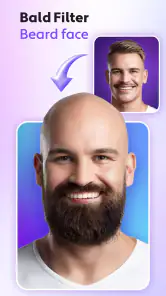
Yes. Hair Styler App, AI Hairstyle is presented as a hair color changer as well as an AI haircut app and hair editor. Its store summary also mentions a buzz cut filter, so the appeal is not limited to previewing a different cut. It is aimed at people who want to explore hair-related looks through photos before deciding what style they might prefer.
Do I need a photo to try the hairstyle tools?
The app is designed around trying hairstyles on a photo, so having a suitable image ready is a sensible first step. Choose a clear picture in which your hair and face are easy to see; that gives the editing tools a better starting point for a preview. This is a virtual styling aid, rather than a replacement for discussing a real cut or color with a stylist.
Is Hair Styler App, AI Hairstyle suitable for children and families?
The app has an Everyone content rating, which makes its stated content classification suitable for a broad audience. Its focus is photo-based hair styling, including hair color and haircut ideas. Parents may still want to review the app’s purchase options with younger users before installation, especially if a child may tap through paid features while exploring the available styling tools.
Is Hair Styler App, AI Hairstyle free to download, and what might cost extra?
Hair Styler App, AI Hairstyle is free to download, and its store summary describes it as a hair color changer, AI haircut app, fun hair editor, and buzz cut filter. In-app purchases are available, with prices ranging from around $2.99 to $49.99 per item. The app is rated for Everyone, so users can consider both the free download and optional purchases before installing.
What is the AI Hairstyle app and how does it work?
The AI Hairstyle app is a cutting-edge application that uses artificial intelligence to help users experiment with different hairstyles before actually committing to a new look. By simply uploading a photo, the app analyzes facial features and suggests various hairstyles that suit the user’s face shape. It offers a virtual try-on experience, allowing users to see potential new hairstyles in real-time.
Pros
- Wide variety of hairstyle options.
- Realistic AI-generated previews.
- User-friendly interface.
- Allows hair color customization.
- Quick hairstyle simulation.
Cons
- Limited free features.
- In-app purchases required.
- Occasional app crashes.
- Requires camera access.
- High battery usage.
- Category
- Photography
- Version
- 2.9.1












