Greeting Cards All Occasions
- 2.66K
- 4.5
- Installs
- 1.00M
- Price
- Free

Screenshots

Analysis by Reviewed
Have you ever found yourself in a pinch, needing a card for a special occasion but lacking the time or resources to get one? Enter Greeting Cards All Occasions, a nifty app that promises to solve this modern dilemma with just a few taps on your smartphone. It’s like having a greeting card shop right in your pocket, and trust me, it’s a game-changer.
First Impressions and Ease of Use
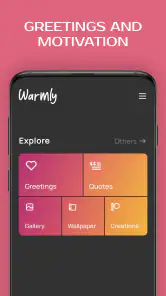
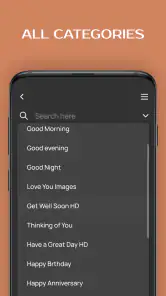
Installing the Greeting Cards All Occasions app is a breeze. Once downloaded, you’re greeted with a user-friendly interface that’s both intuitive and charming. The home screen features a neat layout where you can easily navigate through various categories such as birthdays, anniversaries, holidays, and more. It’s clear that the developers have put a lot of thought into making this app accessible to everyone, regardless of tech-savviness.
A Wide Range of Options
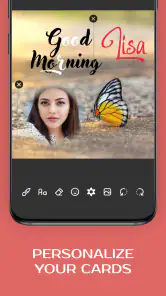
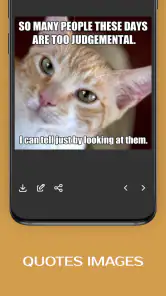
The app boasts an impressive collection of cards for literally every occasion you can think of. Whether it’s a traditional holiday or a quirky celebration day that only you and your friends know about, chances are you’ll find a card that fits the bill. I was particularly impressed with the customization features. You can add your own text, choose from a variety of fonts, and even insert images. It’s like being a card designer without needing any design skills!
That flexibility is most useful when I know the recipient well but don’t have time to start a design from scratch. I’d choose a card with a fitting visual, then make the message specific: a shared memory, a simple private joke, or a warm line that would sound odd on a generic card. My practical tip is to write the message before choosing fonts or adding a photo. The words are the point; decoration should support them, not become a last-minute distraction.
For a realistic everyday example, imagine remembering a friend’s birthday while waiting for a bus. A digital card can help me send something more considered than a hurried text, without making a trip to a shop. It is also handy for relatives who live far away or for occasions where a physical card would arrive too late. But if the person values handwritten notes, keeps cards as mementos, or is not comfortable receiving things through social media, I would choose paper or another delivery method instead.
Choosing a Card That Feels Personal
When I’m deciding whether a design fits, I think about the recipient before I think about the occasion. A birthday card for a close friend can carry a playful image and a familiar joke; a note to a colleague or distant relative may work better with a calmer look and a straightforward message. The occasion categories help narrow the starting point, but they cannot make that judgment for me. That small pause is what keeps a ready-made design from feeling like a ready-made sentiment.
I also find it useful to treat customization as a light touch rather than a demand to decorate everything. A photo can make a greeting more recognizably mine, especially when it relates to a shared memory, but adding an image just because the option is there can distract from the message. If I’m short on time, I’d rather send a clear, thoughtful line on a suitable design than spend too long adjusting details that the recipient may barely notice.
More From Our News Desk

Weather by Xiaomi Review: Clear at a Glance, Less Clear Up Close

X Under Pressure: Can It Recover When Posting Goes Wrong?

Clash of Clans Is Won Between the Battles

Android Auto Makes the Case for Quieter Car Software

MobiOffice: Transforming Mobile Productivity with Seamless Integration

EA SPORTS FC™ Mobile Soccer: Redefining Mobile Sports Gaming
Quality and Creativity
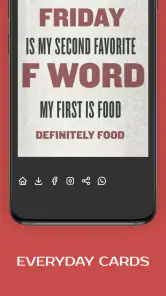
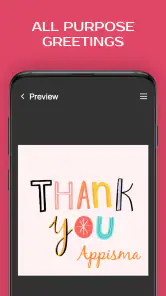
One thing that stands out is the quality of the card designs. The app collaborates with talented artists to bring unique and creative designs to the table. Each card is crafted with attention to detail, ensuring that whatever sentiment you’re trying to convey is done so beautifully. Plus, the app is regularly updated with new designs, keeping things fresh and exciting.
For repeat use, variety matters less than finding a card that actually sounds right for the relationship. I’d browse by occasion, then pause before sending to check the tone: a playful design can be wrong for a sensitive message, while an understated choice can feel more sincere. New designs may give regular users fresh options, but I wouldn’t treat constant novelty as the reason to keep the app. Its recurring value is practical: it can save time when a date catches me off guard.
Compared with a physical card, this approach is quicker and easier to personalize with text or an image, but it does not have the same tactile feel or keepsake quality. Compared with making a card in a general-purpose design tool, the occasion-focused collection can make the first choice simpler; a more flexible design app may still suit someone who wants precise control over layout and visuals. I’d use this app for a quick, personal greeting, not for a highly polished invitation or a card that needs to be printed to exact specifications.
Sending and Sharing Made Simple
Once your card is ready, sending it off is as simple as pie. You can choose to send your card via email, social media, or even as a text message. The app seamlessly integrates with your contacts, making it easy to share your heartfelt messages with just a few taps. And let’s not forget, sharing a digital card is much more environmentally friendly!
Before sending, I’d double-check the recipient and the message, especially when sharing through a social channel: convenience should not mean sending a personal greeting to the wrong audience. If I’m unsure which route the recipient prefers, email or a direct message is a safer starting point than posting publicly. The app is best for people who are comfortable with digital greetings and want a quick way to add a little care to one; someone who sends only a few cards a year may prefer to make one when needed rather than keep another app in their routine.
One practical question is whether a digital card can replace every kind of greeting. For me, it cannot. It is a useful alternative when timing matters, when the person is far away, or when I want to send a quick note from wherever I happen to be. It is less suitable when the card itself is meant to be part of the gift, when someone enjoys displaying handwritten messages, or when a private conversation would mean more than a designed image. The best choice depends on what the recipient will appreciate, not on how quickly I can send something.
There is also a sensible cost question for frequent users. The app is free to download, while optional in-app purchases range from $1.49 to $9.49 per item. I’d try the free experience first and only consider a purchase if a particular option genuinely improves the cards I send. That keeps the app from turning a small convenience into an unnecessary recurring expense. Appisma’s greeting-card app has an average rating of 4.5 from around 17,000 ratings, and it has been installed over a million times. Those figures suggest it has found an audience, though they do not tell me whether its style will suit every recipient.
Keeping It Useful Without Making It a Chore
The app does not replace the part of card-giving that takes thought: remembering the person, choosing an appropriate tone, and making the message sound like me. I’d pair it with whatever calendar or reminder habit I already use rather than expecting a card maker to keep track of important dates. When a reminder appears, I can decide whether this is a digital-card moment or whether I should plan for a paper card instead. That division keeps the app useful without turning it into another place I feel obliged to check.
For someone who sends greetings often, having a focused place to begin may be more convenient than opening a broad design tool and building every card from a blank canvas. For an occasional sender, the advantage is smaller: a general messaging app may be enough for a quick note, while a physical card may be more meaningful for a milestone. I would not install this expecting a full graphic-design workspace or a substitute for personal contact. Its appeal is strongest when I want a card-shaped gesture without a lengthy design process.
How It Holds Up Over Time
The first-week appeal is obvious: a quick way to browse occasion cards and make a message feel more personal. The longer-term test is whether I remember it when a birthday or holiday approaches. I’d keep it if I regularly send digital greetings, since having an occasion-focused option ready can reduce the scramble. If I prefer handwritten cards, or use a broader design app for every creative task, it may not earn lasting space on my phone.
Maintenance is light in the sense that the basic idea does not require a complicated routine, but a useful habit still helps: note important dates somewhere reliable, then open the app when I’m ready to create and send. I would not assume a card has been delivered simply because I tapped send; checking the chosen channel is a small but worthwhile final step. The app is rated for Everyone, runs on Android 5.0 and later, and its current version is 5.2.8. It has been available since December 20, 2015, so it is an established option rather than a brand-new novelty.
Another small trade-off is that a digital greeting can arrive quickly but still be easy to overlook among other messages. If the occasion is important, I’d send it early enough to leave room for a follow-up or a call, instead of treating the card as the whole gesture. For a casual birthday wish, a fast send may be perfectly adequate; for a condolence or a major life event, I’d take more time over the wording and consider whether a card is the right medium at all. The app can help with the format, but it cannot judge the moment for me.
As a recurring tool, I think it makes most sense for people who send cards throughout the year and are happy to do so digitally. It can also suit someone who often remembers occasions late, provided they are willing to personalize the message rather than choose the first design and move on. If I only send greetings once in a while, I would not feel that I needed to build a habit around it. I could use it when a need comes up, then leave it alone until the next occasion.
The main source of fatigue is the risk that a convenient digital card starts to feel like a substitute for attention rather than an expression of it. Reusing the same sort of greeting without tailoring the words can make the gesture feel routine. I’d avoid that by making each note specific, and by choosing another approach when the occasion calls for more time, a physical keepsake, or a conversation. The app’s collection can help me get started, but the personal detail still has to come from me.
Who Will Get the Most From It?
I’d recommend trying it if you enjoy sending digital greetings, have friends or family who are comfortable receiving them, and want a shortcut from “I should send something” to a finished card. It is particularly handy for people whose social circles are spread across different places, or whose schedules make shopping for a card difficult. The combination of occasion-focused designs and personal text gives the greeting more shape than a plain message, without asking me to create a full design from scratch.
I’d skip it, or at least keep it as an occasional tool, if physical cards are part of how you show care, if you need exact print control, or if your usual messaging app already does everything you want. I’d also be cautious about using a playful template for an emotionally serious occasion just because it is easy to find. The most reliable approach is to start with the relationship and the moment, then decide whether this app’s digital format fits. That is a better test of lasting value than how many designs catch my eye on the first visit.
In a world where everything is going digital, Greeting Cards All Occasions offers a modern twist on a timeless tradition. It’s convenient, creative, and a joy to use. Whether you’re someone who loves sending cards or just needs a quick solution for a forgotten occasion, this app is definitely worth checking out. So next time you feel the need to spread some love or cheer, remember there’s an app for that!
Greeting Cards All Occasions Frequently Asked Questions
Can I send cards directly from Greeting Cards All Occasions?
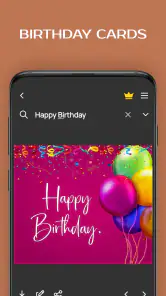
The app is presented as a greeting-card maker for creating and sending wishes, including photo cards, birthday cards, and eCards. That makes it a convenient option if you want to prepare a greeting on your phone. Before choosing a card, consider how you want to share it and check the options shown in the app for the particular design you create.
Is Greeting Cards All Occasions suitable for children and families?
Greeting Cards All Occasions has an Everyone content rating, and its focus on making cards for occasions can appeal to people preparing greetings for friends and family. The rating is a useful general guide, but parents may still want to explore the app themselves and decide whether its features and any purchase options are appropriate for their children.
Who develops Greeting Cards All Occasions, and what kind of app is it?
Greeting Cards All Occasions is an events app from Appisma, focused on making greeting cards for different occasions. Its store description highlights photo greeting-card creation, birthday cards, and wish eCards. If you want a mobile way to prepare a personal greeting rather than choose a physical card, its central purpose is easy to understand before you install it.
What features does Greeting Cards All Occasions offer?
Greeting Cards All Occasions provides a vast selection of customizable greeting cards for every occasion, including birthdays, holidays, weddings, and more. Users can personalize messages, choose from various templates, and even add photos. The app also offers reminders for special dates, ensuring you never miss sending a card.
Is Greeting Cards All Occasions free to use?
The app is free to download, and in-app purchases range from $1.49 to $9.49 per item. The app offers a free version with basic features, allowing users to create and send a limited number of greeting cards. However, for access to premium templates, unlimited card sending, and ad-free experience, users can opt for a subscription plan. The pricing details are available within the app.
Pros
- Easy to use interface.
- Wide variety of card templates.
- Customizable text and images.
- Regular updates with new features.
- Fast sharing options.
Cons
- Contains in-app ads.
- Limited free features.
- Requires internet connection.
- Occasional app crashes.
- Slow customer support response.
- Category
- Events
- Version
- 5.2.8