Gocrypto: Crypto Trading
- 5.18K
- 4.5
- Installs
- 10.00M
- Price
- Free

Screenshots
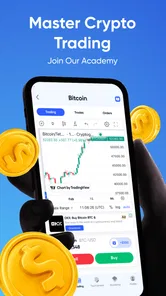

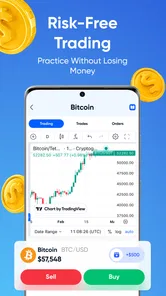


Analysis by Reviewed
I would use Gocrypto: Crypto Trading to practise making sense of crypto-market decisions, not as a shortcut to making money. That distinction matters: a simulated trade can help me notice how I react when prices move, but it does not put real financial consequences behind the choice. If I were curious about crypto yet hesitant to open an exchange account, practising first would be appealing. I would still treat every result as an exercise, not proof that I can predict the next move.
Decide what you want to practise first
Before opening a simulator, I find it useful to name one question I want to explore. Can I stick to a plan when a price changes quickly? Do I understand why I would enter a position, and what would make me reconsider? Picking one asset to watch and writing down a reason for the decision gives the session a purpose beyond tapping through screens. Afterwards, I can compare what happened with what I expected and see whether I followed my own reasoning.
This approach also helps me decide whether a simulator suits my situation. If I want a low-pressure introduction to crypto terminology and market choices, practice can be a sensible first step. If I need to buy or sell actual assets, I would instead look at a dedicated exchange and investigate its fees, custody arrangements, and availability where I live. Those are different tasks, and treating them as interchangeable can lead to misplaced confidence.
Getting Started with Gocrypto
Diving into the crypto market can be daunting, especially for newbies. But Gocrypto simplifies this process with its intuitive interface and easy navigation. From the moment you open the app, it feels like the developers had user experience at the top of their priority list. Setting up your account is a breeze, and within minutes, you're ready to explore the vast world of cryptocurrencies.
Starting with a useful question
The most productive way to open a trading simulator is with a small question, such as whether I can stick to a plan when a price changes quickly. I would pick one asset to watch, write down why I think its price might move, and decide in advance what would make me reconsider. That turns a practice session into a test of judgment rather than a string of taps. A simulated gain is less useful than noticing that I changed my mind as soon as the market became uncomfortable.
This is where the app’s business focus makes sense for me: it is a hands-on way to explore a market concept, not a replacement for financial advice or a route to guaranteed returns. Crypto prices can move sharply, and learning the vocabulary does not remove that risk. If I were making decisions with money I could not afford to lose, I would pause the experiment and seek more careful guidance instead.
Features That Stand Out
One of the first things I noticed about Gocrypto was its comprehensive dashboard. It offers real-time data and analytics, which are crucial for making informed trading decisions. Whether you're keeping tabs on Bitcoin, Ethereum, or the latest altcoin, the app provides up-to-date information at your fingertips. I particularly appreciated the customizable alerts that notify you of price shifts in your favorite currencies. It’s like having a personal trading assistant!
More From Our News Desk

Weather by Xiaomi Review: Clear at a Glance, Less Clear Up Close

X Under Pressure: Can It Recover When Posting Goes Wrong?

Clash of Clans Is Won Between the Battles

Android Auto Makes the Case for Quieter Car Software

MobiOffice: Transforming Mobile Productivity with Seamless Integration

EA SPORTS FC™ Mobile Soccer: Redefining Mobile Sports Gaming
For a more thoughtful workflow, I would avoid watching every alert as if it demanded action. I’d choose a small watchlist, set alerts around questions I actually want to investigate, and compare what happened with my original reasoning later. That keeps notifications from turning into noise. It also helps separate “the price moved” from “I have a sound reason to act,” a distinction that is easy to lose when crypto charts are constantly available.
Another feature that deserves a shoutout is the app’s integrated learning resources. For those new to crypto trading, Gocrypto includes a variety of tutorials and articles that cover everything from the basics to advanced trading strategies. It's a fantastic way to boost your knowledge without leaving the app.
I’d use those materials in short loops: read one explanation, try to apply the idea in a simulated decision, then return to the lesson if the result does not make sense. Keeping a simple note of the idea, my choice, and what I learned makes progress easier to judge than relying on memory. It also gives the learning section a practical role, rather than making it a collection of reading that never affects how I approach a trade.
Trading Made Easy
The actual trading process on Gocrypto is as seamless as it gets. With just a few taps, you can execute trades and manage your portfolio. The app supports a wide range of cryptocurrencies, allowing you to diversify your investments easily. I found the transaction speeds to be impressive, ensuring that you never miss out on a trading opportunity due to slow processing times.
A realistic everyday use would be checking in during a lunch break, reviewing one simulated position, and deciding whether the original plan still holds. I would then leave the app alone rather than repeatedly checking the same movement throughout the afternoon. That habit makes the exercise more useful: it tests whether a decision can stand without constant attention. For someone who wants a structured introduction to market behavior, this is a better fit than opening a live exchange and learning under pressure.
The trade-off is that simulated practice cannot reproduce every feeling or consequence of handling real money. A decision that seems easy when no actual funds are at stake may feel very different in a live account. I would therefore treat any apparent success as a prompt to ask what process worked, not as proof that the same approach will earn money elsewhere. If I want to buy or sell actual crypto, I would choose a dedicated exchange and carefully check its fees, custody arrangements, and regional availability instead.
Turning a practice session into a useful habit
One way I would keep the exercise honest is to make a brief record before and after a decision. Beforehand, I’d note the reason for acting and what evidence would change my mind; afterwards, I’d write whether I followed that plan. This separates decision quality from the outcome of a single move. A result can go my way for reasons I did not anticipate, while a loss in a simulation can still reveal that I made a disciplined choice.
I would also avoid changing several things at once. If I am testing whether alerts help me notice a move, I would not simultaneously follow a long list of unfamiliar assets or switch strategies halfway through. Keeping the experiment narrow makes it easier to see what actually affected my judgment. This is especially useful for a newcomer, because a busy screen can make activity feel like learning even when there is no clear takeaway.
For someone sharing the app with a friend who is also learning, a useful handoff is to explain the reasoning rather than compare who got the better simulated result. Asking each other what would invalidate a trade idea can uncover assumptions that a quick win might hide. I would not treat another user’s confidence as evidence, though; crypto opinions can sound persuasive without being well supported.
Where the flow can break
The app’s usefulness depends on what I want from it. Its real-time presentation and practice-oriented framing suit a newcomer who wants to explore decisions without immediately committing funds. Someone looking for a live brokerage, reliable long-term portfolio planning, or a complete guide to the risks of each crypto asset may need other tools alongside it. A simulator can make the mechanics feel approachable, but it cannot make a volatile market predictable.
I would also keep the learning workflow deliberately narrow. Following too many coins or reacting to every notification can turn an educational session into restless chart-watching. Choosing one topic at a time—such as how a planned exit feels, or whether a price alert changes my reasoning—gives me a clearer takeaway. This is a small but important trade-off: less activity can produce more useful practice.
There is another point where the process can fail: when practice starts to feel like permission to take a larger risk later. A simulated portfolio cannot show me how I would handle fear about losing money I need, or whether I can tolerate the practical consequences of a real transaction. I would not use a run of good practice outcomes to justify putting money into crypto. Before any live decision, I’d step away from the simulator and do separate research into the asset and the risks.
Who it suits, and what to expect
Gocrypto is a free business app from Gocrypto: Crypto Trading & Investment Simulator. It has a 4.5 average from around 127,000 ratings and has been installed over 10 million times, which suggests it has found a broad audience. The app is rated Mature 17+, so it is not aimed at younger users. It was released on June 17, 2024, and version 1.2.5 requires Android 8.0 or later. I’d check that requirement against my device before installing, especially if I use an older phone.
Compared with a conventional exchange, the appeal here is the lower-pressure learning context; an exchange is the more relevant choice when I am ready to handle real transactions and their financial consequences. Compared with reading articles or watching videos alone, a simulator can make market decisions feel more concrete, though reading remains better for building context and checking claims carefully. I would use Gocrypto as one part of a learning routine, not as my only source of financial understanding.
It is best suited to people who want to rehearse choices, get more comfortable with market language, or test whether they can follow a plan before considering any live activity. It is less suitable for someone who wants a place to hold actual crypto, dependable investment recommendations, or a complete portfolio-management service. If I were already comfortable with exchanges and primarily needed a tool for tracking real holdings, I would choose a service built for that job rather than expecting a simulator to fill the gap.
Before starting, I would ask myself whether I want practice or access to live buying and selling. If it is practice, I would set a narrow goal, use the learning material to understand unfamiliar terms, and review my decisions rather than chase a perfect result. If it is live investing, this is not the tool I would rely on by itself. That distinction answers the most important practical question: the app can help me rehearse a process, but the user still needs to decide what kind of financial tool the situation calls for.
What I would check before relying on it
I would start by confirming that the app’s simulated activity matches the kind of practice I want, then pay attention to whether I can explain each choice without leaning on a favorable outcome. If I do not understand a term in a lesson, I would look for a clear explanation before acting on it. A few minutes spent checking an idea is more valuable than making frequent decisions simply because the interface makes them easy.
Someone deciding whether to install it may also wonder whether it replaces an exchange or whether practice results establish trading skill. My answer to both is no: I would treat it as a learning aid, not a route to live transactions or a reliable predictor of future performance. The app’s strongest role is helping me think through decisions in a lower-stakes setting; outside that role, I would use a tool designed for the specific task and verify important financial information independently.
There is a practical device question too. I would check that my Android version meets the stated minimum before downloading, particularly if I keep an older phone as a spare. And because the audience rating is Mature 17+, I would not assume it is appropriate for children just because it presents trading as practice. Those checks are simple, but they help set expectations before I build a routine around the app.
Final Thoughts
Overall, Gocrypto: Crypto Trading is a stellar app for anyone looking to delve into cryptocurrency trading, whether you're a beginner or a seasoned trader. Its user-friendly interface, coupled with powerful features and robust security, makes it a top choice in the crowded crypto trading app market. If you're on the hunt for an app that offers both efficiency and ease of use, Gocrypto might just be your perfect match. Happy trading!
My recommendation is more specific: I’d try it if I wanted a guided-feeling place to explore crypto decisions without treating practice as profit. I’d skip it if my main goal were buying assets, managing real holdings, or getting dependable investment advice. Used with that boundary in mind, it can be a approachable starting point for learning how market choices fit together, while leaving the harder financial decisions for tools and research suited to them.
Gocrypto: Crypto Trading Frequently Asked Questions
Can I use GoCrypto without previous cryptocurrency experience?
GoCrypto is presented as a crypto trading simulator, with real-time simulations and challenges that can help users explore trading concepts. If you are new to cryptocurrency, you can approach those activities as practice rather than as a promise of profits or a substitute for learning how markets work. The app is free to download, so you can decide whether its simulator experience suits your learning goals.
What should I know about GoCrypto’s age rating before installing it?
GoCrypto is rated Mature 17+, so it is intended for older teens and adults rather than younger children. That rating is worth considering if you are choosing an app for a family device or for someone under 17. GoCrypto is a business app focused on crypto trading simulations and challenges, so its subject matter may be more appropriate for users who are ready to engage with financial concepts.
Is GoCrypto a real-money exchange or a trading simulator?
GoCrypto is described as a crypto trading simulator, with real-time simulations and challenges for users to explore. That distinction matters before downloading: a simulation is intended to let you practise trading scenarios rather than make actual cryptocurrency purchases through the app. Treat the experience as a way to learn and experiment, not as a place to hold digital assets or expect real investment returns.
What age group is GoCrypto intended for, and which devices support it?
GoCrypto has a Mature 17+ content rating, so it is intended for older teens and adults rather than younger children. It is a mobile app for Android, with a minimum operating system requirement of Android 8.0. Checking your device’s software version and considering the age rating before installing can help you decide whether the app is suitable for you.
What is GoCrypto and how does it work?
GoCrypto is a mobile application designed for cryptocurrency trading, offering users a platform to buy, sell, and manage their digital assets efficiently. The app provides real-time market data, user-friendly interface, and analytical tools to help traders make informed decisions. Whether you're a beginner or a seasoned trader, GoCrypto aims to simplify the trading process with its intuitive design and robust features. It is also presented as a crypto trading simulator, using real-time simulations and challenges to help users practise trading concepts.
Pros
- User-friendly interface for beginners
- Supports multiple cryptocurrencies
- Real-time market data updates
- Advanced trading tools
- Secure transactions
Cons
- Limited customer support options
- Occasional app crashes
- Higher fees than some competitors
- Lacks educational resources
- No demo account for practice











