Glassdoor | Jobs & Careers
- 27.73K
- 4.7
- Installs
- 10.00M
- Price
- Free

Screenshots

Analysis by Reviewed
When I’m considering a job change, I want more than a list of openings: I want clues about the workplace, pay and people behind the company name. That’s the appeal of Glassdoor | Jobs & Community. It brings job searching together with workplace information, so I can investigate an employer before deciding whether an application is worth my time. I find it most useful as a research companion, not as a guarantee that every review or estimate will match my own experience.
Starting with the cost—and what free can still require
Glassdoor is free to download and use, so I can explore it without making a purchase decision first. That is a practical advantage when I’m already using other job-search tools and don’t want to pay just to compare employers. Free access doesn’t automatically make the app valuable, though; the return is the time it saves and the questions it helps me ask before applying.
There’s no need to treat a free app as an all-in-one replacement for every part of a job search. I’d use Glassdoor alongside a general job board or an employer’s own careers page, then judge whether its workplace context changes my shortlist. If it doesn’t add useful perspective for the roles I’m pursuing, I can simply stop opening it without having paid for access.
How I’d put the information to work
The strongest payoff comes when I have a specific decision to make: whether to apply, what to ask in an interview, or how to think about an offer. I wouldn’t browse reviews endlessly for a perfect answer. Instead, I’d write down a few concrete concerns—such as workload, management style or compensation—and use the app’s material to decide which ones need a direct follow-up with the employer.
A useful habit is to keep a short comparison note for each serious option: what the listing says, what recurring themes appear in employee feedback, and what I still need to verify. This prevents one vivid review from taking over my judgment and makes it easier to compare two companies on the same points. The app is most valuable when it turns scattered impressions into a focused checklist, not when I expect it to make the choice for me.
A realistic way to use it between other commitments
Imagine I’m commuting home and spot a role that sounds promising, but I’m not ready to apply on a small screen. I can save it, then later look into the employer, check whether the compensation context seems relevant to the role, and note questions for a recruiter. If the workplace comments raise a concern, I can investigate it during the interview instead of either dismissing the job immediately or applying on impulse.
That slower sequence is particularly useful when I’m comparing several similar openings. The job title alone may make them look interchangeable, while differences in reported culture or benefits could change which one deserves more effort. I’d still confirm details with the hiring team, but having a short list of questions makes that conversation more purposeful than relying on a vague sense that one company “seems better.”
More From Our News Desk

Weather by Xiaomi Review: Clear at a Glance, Less Clear Up Close

X Under Pressure: Can It Recover When Posting Goes Wrong?

Clash of Clans Is Won Between the Battles

Android Auto Makes the Case for Quieter Car Software

MobiOffice: Transforming Mobile Productivity with Seamless Integration

EA SPORTS FC™ Mobile Soccer: Redefining Mobile Sports Gaming
Researching employers, not just openings
Ever been on the hunt for a new job and wished you had a crystal ball to see what working there would actually be like? Well, the Glassdoor | Jobs & Community app might just be the next best thing. Let me take you through my experience with this app, which has become my go-to resource whenever I’m job hunting or even just daydreaming about the next career step.
The first thing that struck me about the app is its sleek and user-friendly interface. It’s designed to be intuitive, which is perfect when I’m juggling multiple job applications. As soon as I opened the app, I was greeted with a clean layout that made navigation a breeze. No clutter, just the information I needed at my fingertips. It’s like having a knowledgeable friend guiding me through the job market.
What the research tools help me judge
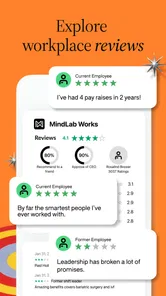
One of my favorite features of this app is the company reviews. These are written by actual employees, giving me an insider look at what it’s like to work at a particular company. I can tell you, having access to honest reviews has saved me from a couple of potentially disastrous job choices. It's like getting the scoop straight from the horse's mouth!
I read reviews as patterns to investigate, not as a final verdict. A practical approach is to compare comments from different roles or locations and look for recurring specifics rather than reacting to one dramatic account. A complaint about a manager may say little about another team; repeated remarks about workload or communication deserve closer attention. Reviews are useful prompts for questions to ask in an interview, but they can’t predict exactly what my own manager or day-to-day work will be like.
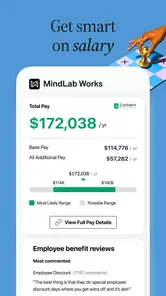
Another feature I find incredibly useful is the salary insights. I mean, who doesn’t want to know if they’re being offered a fair deal? With the salary information provided, I can negotiate with confidence, armed with data that’s tailored to my industry and location. Plus, the app provides information on benefits as well, so I get a more complete picture of what’s on the table.
I use salary information as a starting point, not a promise. Before comparing a figure with an offer, I try to keep the role, location, seniority and benefits in view; otherwise, a superficially similar number can lead me to the wrong conclusion. If the range raises questions, I can turn those into a specific conversation about compensation and benefits rather than treating an estimate as a fixed market rate.
Making a job search manageable
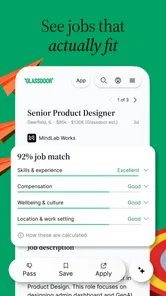
Let’s not forget the job listings themselves. The app allows me to filter jobs based on location, industry, and even specific companies. I can save jobs to apply later, which is super handy when I’m browsing during my lunch break. Plus, the daily job alerts mean I don’t miss out on new opportunities. It’s like having a personal job scout who’s always on the lookout for me.
One useful way to make this workflow less noisy is to separate exploration from action. I might save an interesting opening while I’m browsing, then return later to check the employer’s reviews and pay context before spending time tailoring an application. Alerts can help surface possibilities, but I’d keep the search filters focused enough that new notices remain relevant instead of becoming another inbox to clear.
For example, if I have a short break between errands, I can save a role that looks promising without trying to apply on the spot. Later, I can compare it with similar openings and use the company information to prepare a few grounded questions for an interview. That small pause helps me avoid applying simply because a listing caught my eye, while still keeping promising options in reach.
Community advice and its limits
What sets Glassdoor apart from other job apps is its community feature. Here, I can connect with other professionals, exchange advice, and even get tips on interviews. It’s a space where I feel supported and part of a wider community all striving for the same goal—finding that dream job.
Moreover, the community discussions often provide insights that aren’t available in the standard job listings or reviews. It’s like a hidden treasure trove of career advice, and it’s always interesting to hear different perspectives from people in the same boat as me.
I’d use those conversations to broaden my thinking, not to outsource a decision. Advice from someone in another industry or at a different career stage may be encouraging without being directly applicable. When I see a useful interview tip, I can adapt it to the role I’m pursuing; for legal, financial or other high-stakes career decisions, I’d look for more authoritative guidance than a community discussion.
Where it fits among job-search options
Compared with a conventional job board, Glassdoor’s distinguishing value is the combination of openings with employer and compensation context. A job board focused mainly on vacancies may be better when I simply want the broadest possible listing search or an application workflow. Glassdoor is more compelling when I’m weighing whether a company and role deserve my attention. I’d use both when the decision matters: one to find opportunities, the other to investigate them.
It also isn’t a substitute for talking to people who know the workplace or for checking details directly with a recruiter. Employee reviews reflect individual experiences, and a company’s circumstances can change. I wouldn’t reject an otherwise promising role on the strength of one post, nor would I accept an offer because a salary estimate looks reassuring. The best use is to arrive at conversations better prepared.
Who is likely to get the most out of it
I’d recommend trying the app if you’re actively comparing employers, preparing for interviews, or quietly exploring whether your current role has better-paid alternatives. It can also help someone early in a search turn a vague list of companies into a shortlist worth researching. The combination is especially useful when I need to balance pay, benefits and workplace impressions instead of choosing a job based on title alone.
If you already have a trusted source for company research and only need a simple way to submit applications, the extra employer context may not change your routine much. Likewise, someone who wants a definitive account of a workplace may find reviews frustrating: they’re perspectives, not an audited report. I’d skip relying on the app alone if I need guaranteed accuracy, direct recruitment support or a complete picture of a specific team.
Who should skip it, and how I’d decide
I’d be less enthusiastic about using Glassdoor as my main tool if I’m applying for roles where listings are scarce, highly specialized or mostly handled through a professional network. In those situations, direct contacts, specialist recruiters or an employer’s own site may produce more relevant leads. The app can still help me investigate a company once I know its name, but its employer context is less useful if it doesn’t help me find realistic options.
It may also frustrate anyone who wants a single authoritative answer about culture or pay. Reviews and estimates can help me frame a question, but they don’t settle it. My practical test is simple: after checking an employer, do I have a better question to ask, a clearer reason to apply, or a sounder reason to move on? If not, I shouldn’t keep browsing just because there’s more material to read.
My verdict on the value
In a nutshell, the app has proven to be a useful tool in my job-search routine. It brings together listings, company reviews, salary context and community discussion in one place, which can make research feel less scattered. Since it’s free, I see little downside to testing it as a supplement to other job-search tools; the real value depends on whether its information helps me ask better questions and choose where to apply.
I’d keep it in my rotation for the investigation stage, while checking important details with employers and comparing opportunities through more than one source. If you want to look beyond the vacancy itself before investing time in an application, I think it’s worth trying. If all you need is a basic application portal, a simpler job board may suit you better.
Glassdoor | Jobs & Careers Frequently Asked Questions
Can I use Glassdoor to compare potential employers before applying?
Yes. Glassdoor can help you research companies and get a sense of workplace culture before deciding where to apply. You can read employee reviews and look at salary reports and interview insights alongside job listings. These perspectives can help you prepare questions and compare opportunities, though individual experiences may differ, so consider several sources when making a career decision.
Can I use Glassdoor to search for jobs that match my interests?
Glassdoor is designed to help people explore job opportunities, and its job-search features let you look through listings using different criteria. That can make it easier to focus on roles that seem relevant to your goals rather than browse without direction. You can also research employers as you search, helping you consider the workplace as well as the position itself.
Is Glassdoor useful if I am not actively looking for a job?
It can still be useful if you want to learn about employers, workplace culture, salaries, or interview experiences before making a career move. Glassdoor combines job listings with company information, so you can explore what working at different organizations may be like even when you are not ready to apply. Its value depends on how much career research you want to do.
Can I browse Glassdoor without creating an account?
Glassdoor is intended to help people explore job opportunities and learn about employers, and browsing can include looking through job listings and company information. Some features may ask you to sign in or create an account, particularly when you want to save jobs, personalize your search, or contribute information. If you prefer to explore first, you can start by searching and see which actions require an account.
What is Glassdoor and how does it work?
Glassdoor is an app designed to help users find jobs and research companies. It provides access to millions of job listings, company reviews, salary reports, and interview insights. Users can search for jobs based on various criteria, read anonymous reviews from current and former employees, and gain insights into company cultures and salary expectations. This makes it an invaluable tool for job seekers and professionals looking to make informed career decisions.
Pros
- User-friendly interface
- Access to company reviews
- Salary transparency
- Networking opportunities
- Job alert notifications
Cons
- Limited job listings
- Subscription cost
- Occasional outdated info
- Profile visibility issues
- In-app ads