Geo Tracker - GPS tracker
- 2.60K
- 4.6
- Installs
- 10.00M
- Price
- Free

Screenshots
Analysis by Reviewed
I judge a GPS app not only by whether it can draw a route, but by whether I can understand and use it when the surroundings are unfamiliar. Geo Tracker is a travel and local app from Ilya Bogdanovich, built around recording trips and reviewing where I have been. Its focus makes it useful for people who want a trail record as much as turn-by-turn help, though I would not treat it as a substitute for every kind of navigation or safety tool.
Readable route information, with a learning curve
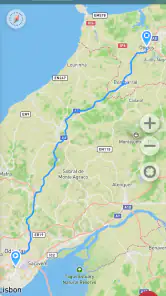
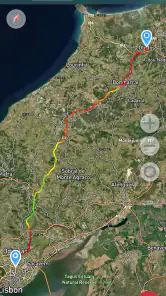
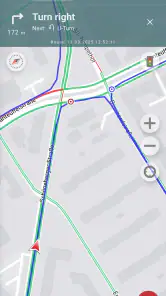
When I open a tracking app outdoors, I want to see my position and route without digging through menus. Geo Tracker’s map-centered approach is a natural fit for that job: I can follow the line I have travelled and use saved routes to make a return visit easier. It is more appealing to me as a trip recorder than as a general-purpose city guide, where searching for businesses or choosing transit options matters more.
The app has been available since January 2013 and is now at version 5.5.0.4522. That long-running focus is reassuring, but the experience still depends on being comfortable reading a map and interpreting a track. If you are new to GPS apps, I would try a short, familiar walk first. That gives you a low-pressure chance to learn what the route display means before relying on it somewhere remote.
Your Personal Guide
Imagine having a personal guide that fits right in your pocket. That's exactly what Geo Tracker - GPS tracker feels like. With its user-friendly interface and precise tracking, the app transforms your smartphone into a robust GPS tool. Whether you're hiking in the wilderness or just exploring a new city, it keeps you on track with real-time location updates. I found the interface quite intuitive, even for someone who's not exactly tech-savvy.
Features that Stand Out
This app is packed with features that make navigation a breeze. One standout feature is the ability to save your routes. Picture this: you're on a thrilling mountain bike trail, and you stumble upon a path that's too good not to revisit. Simply save it on the app, and it's ready for your next adventure. Additionally, the app allows you to share your location with friends and family, which is perfect for safety during solo travels.
What really blew my mind was the offline maps feature. You can download maps of the areas you plan to explore, ensuring you're never lost even without internet access. Trust me, this is a game-changer, especially when you're off-grid.
Planning around access and attention
A useful way to prepare is to open the area map before leaving reliable coverage and make sure the route you care about is saved. On a walk through a park or a familiar set of streets, I can start a recording, take a detour, then compare the return track with the way out. That is a different workflow from asking a navigation app for a destination and following spoken turns; here, the value is in keeping a record I can revisit.
More From Our News Desk

Weather by Xiaomi Review: Clear at a Glance, Less Clear Up Close

X Under Pressure: Can It Recover When Posting Goes Wrong?

Clash of Clans Is Won Between the Battles

Android Auto Makes the Case for Quieter Car Software

MobiOffice: Transforming Mobile Productivity with Seamless Integration

EA SPORTS FC™ Mobile Soccer: Redefining Mobile Sports Gaming
For someone with low vision, map labels and route lines can be difficult to distinguish, especially outdoors in glare. A person who finds small touch targets or frequent screen interaction tiring may also prefer to prepare the route beforehand and check the phone only at safe pauses. I would not assume that tracking alone is an emergency feature: sharing a location can help others follow a trip, but it is not a replacement for telling someone where you are going or carrying appropriate safety equipment.
Why I Love It
Honestly, the peace of mind that comes with knowing you're always on the right path is invaluable. Geo Tracker - GPS tracker not only helps you navigate but also records your journey, giving you a detailed analysis of your travels. It's like having a digital diary of your adventures.
Another thing that caught my attention is its compatibility with Google Maps and other mapping services. This means you can seamlessly integrate it with your preferred mapping tool, which is a big plus in my book.
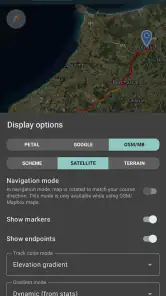
And did I mention the customization options? You can adjust the tracking intervals and choose different map styles according to your preference. It's these little touches that make the app feel personal and tailored to your needs.
Making a saved track useful later
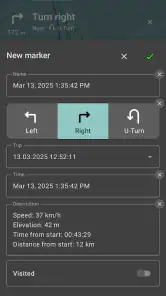
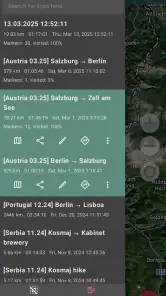
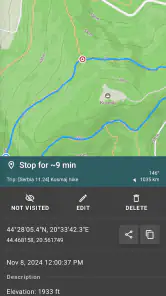
I get the most value from a recorded route when I treat it as a reference, not as an instruction sheet. After a walk, I can look at the shape of the track and its statistics to remember where I turned, how the outing unfolded, or which section I might want to repeat. That makes the app handy for building a personal collection of walks and rides, especially when the route is memorable but not easy to describe in words.
A small habit helps keep that collection meaningful: I would save or share a track soon after finishing, while I still remember which fork led to the viewpoint or where I took a useful shortcut. A bare line on a map can be ambiguous months later, particularly if several outings began in the same place. If I use a track for a future trip, I would review it beforehand and check the surrounding area rather than assuming the old line guarantees that the path is still open or suitable.
Everyday trade-offs and who it suits
There is a practical trade-off between detailed recording and battery use: longer outings mean the phone is working as a GPS logger for longer, so I would begin with a charged device and avoid expecting a tracking app to solve battery limitations. Adjusting the tracking interval can also be a thoughtful choice. For a leisurely walk where a broad outline is enough, less frequent points may be sufficient; for a winding ride where turns matter, I would favor a closer record and accept that this asks more of the phone.
Compared with a standard map app, Geo Tracker is most compelling when I want to preserve my own route and inspect trip statistics afterward. A conventional navigation app is usually the better choice for finding an address, comparing ways to reach it, or getting guided directions through a busy town. For a day hike, a cycling loop, or exploring unfamiliar streets without a fixed destination, the track-first approach feels more useful. It is less suitable if what I need is a full travel planner rather than a record of movement.
It also suits people who already know why they want a track: a cyclist reviewing a training loop, a walker keeping a record of a favorite route, or a traveller documenting a day spent exploring without a fixed itinerary. I would be more cautious about recommending it to someone whose main need is quick, hands-free guidance from one address to another. A route logger rewards a little attention before and after a trip, while turn-by-turn tools are designed to answer immediate “where next?” questions.
Situational access and practical limits
The phone itself can shape the experience as much as the app. On a bright day, glare can make a map harder to read; in cold weather, gloves or stiff fingers can make repeated screen taps awkward. In those situations, I would set up what I can before setting off, keep the phone safely accessible, and stop somewhere sensible before checking the route. That is not a cure for every access barrier, but it reduces the pressure to interpret a small screen while walking or riding.
There is also a difference between following a saved track in a familiar park and relying on a map when conditions are changing. A track records where someone went; it does not by itself tell me whether a path is currently passable, whether a detour is safe, or whether the route fits my mobility needs. I would use local judgement and other suitable information for those decisions. For trips with a companion, agreeing on a meeting point and sharing the plan in plain language can be more dependable than expecting everyone to interpret the same map line.
Cost, audience, and remaining barriers
The app is free to install, with in-app purchases listed from $1.99 to $43.99 per item, and it is rated for Everyone. It has a 4.6 average from around 104,000 ratings, with over 10 million installs. Those figures suggest a widely used tool, but they do not tell me whether its map presentation will suit every person. I would test it on a short trip before building a complicated outing around it.
One everyday example: I might walk a new route to a café across a large park, record the path, and later use the saved track to take the same pleasant detour with a friend. If I need step-by-step directions to the café, I would use a conventional navigation app for that part. Geo Tracker’s strength is capturing the route I actually took, not replacing every map task. That distinction also matters for users who prefer spoken instructions or need larger, simplified visual controls: the track may be valuable, while map interaction remains a barrier.
Before a longer outing, I would answer a few practical questions for myself. Is the map area ready to use where I am going? Have I chosen a tracking interval that balances route detail with the length of the trip? Do I have enough battery for the phone to record the whole outing? And, if I plan to share my location, does someone know what to expect and when they should check in? Thinking through those points makes the app more useful without confusing it with a dedicated safety service.
Choosing it for the right kind of outing
Geo Tracker is a particularly natural choice when the journey itself is the point: wandering a new neighborhood, mapping a favorite cycling loop, or keeping a record of a hike to revisit later. It gives those activities a continuity that a standard destination-focused map may not provide. I can keep the route as a personal reference instead of relying on memory to retrace every turn.
For commuting, finding a shop, or navigating a complicated public-transit journey, I would reach for a conventional maps app first. Those tasks depend on search and directions more than on preserving the path I took. Someone who needs spoken guidance, minimal screen use, or a strongly simplified interface may also find a different navigation option more comfortable. Geo Tracker’s appeal is clearest when a person is happy to engage with a map and values the record afterward.
Final Thoughts
In the world of GPS tracking, Geo Tracker stands out as a reliable and versatile tool. Whether you're an avid adventurer or just someone who frequently loses their way, this app is a must-have. Its blend of functionality and ease of use makes it a top contender in the navigation app market.
So, if you haven't tried it yet, I highly recommend giving it a go. Who knows, it might just become your new favorite travel companion!
My recommendation is strongest for people who enjoy walking, cycling, or exploring and want a personal record they can return to. I would choose another option when route guidance, accessible spoken directions, or destination planning is the priority. For everyone else, a short test close to home is the sensible first step: it shows whether the map and recording style work for you before you depend on them farther away.
Geo Tracker - GPS tracker Frequently Asked Questions
Can I use Geo Tracker to record a walk, bike ride, or road trip?
Geo Tracker is built around recording GPS tracks, so it can be useful for keeping a record of a walk, bike ride, hike, or road trip. During a journey, it logs the route using your phone’s GPS and provides statistics to review afterward. It is best suited to people who want to document where they went, rather than use the app as a substitute for careful trip planning.
Can I review my route and trip statistics after recording?
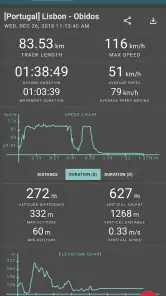
Yes. Geo Tracker is intended not only to record a route but also to let you analyze trip statistics afterward. The app can show details such as distance, speed, and elevation, helping you review how a journey unfolded. If you are trying it for the first time, a short test trip is a practical way to see which information is most useful for your activities.
Is Geo Tracker free to download, and are there in-app purchases?
Geo Tracker is free to download, so you can try its GPS route-recording features without paying upfront. The app also offers in-app purchases, with prices ranging from $1.99 to $43.99 per item. Consider checking the purchase options in the app before buying, especially if you only need basic route recording and want to understand which features are included at no cost.
What permissions and phone settings should I check before using Geo Tracker outdoors?
Because Geo Tracker records routes using your device’s GPS, make sure location access is enabled and that the app is allowed to use it while you are recording. GPS performance can also depend on your phone’s settings and surroundings, so it is sensible to check location services before setting off. A quick test near home can help you get comfortable with starting and stopping a track.
What is Geo Tracker and how does it work?
Geo Tracker is a GPS tracking application designed to help users record their travel routes, monitor their journey, and share it with friends. By using your device's GPS, it accurately logs your path and provides detailed statistics like speed, distance, and elevation. This app is ideal for outdoor activities such as hiking, cycling, or road trips, offering an easy way to retrace your steps and relive your adventures.
Pros
- Accurate GPS tracking in real-time
- User-friendly interface for easy navigation
- Offline maps available for remote areas
- Detailed trip statistics and history
- Customizable tracking settings
Cons
- Consumes significant battery power
- Limited social sharing options
- Ads in free version can be intrusive
- Requires constant internet for live tracking
- Occasional GPS signal loss in dense areas
- Category
- Travel & Local
- Version
- 5.5.0.4522