Genius Scan - PDF Scanner
- 24.32K
- 4.9
- Installs
- 10.00M
- Price
- Free

Screenshots





Analysis by Reviewed
Let me take you on a journey through the remarkable world of Genius Scan - PDF Scanner, an app that has dramatically transformed the way I handle documents. If you've ever found yourself in a pinch needing to scan a document on the go, this app is the lifesaver you've been waiting for.
Why Genius Scan is a Must-Have
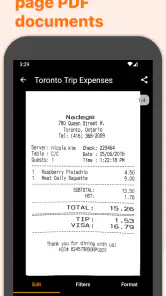
Firstly, let me say that the ease of use of Genius Scan is unparalleled. From the moment you open the app, you're greeted with a clean and intuitive interface that makes scanning documents a breeze. Whether it's a single-page receipt or a multi-page contract, Genius Scan handles it with aplomb.
Features that Stand Out
One of my favorite features is the smart page detection and perspective correction. Imagine this: you're trying to scan a document on a slightly uneven surface, and yet the app manages to adjust and straighten the page as if by magic. It's like having a personal assistant who ensures every scan is picture-perfect.
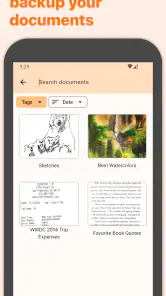
Another noteworthy feature is the ability to organize your scans in a way that suits you. You can create different folders, tag documents, and even search through your scans with ease. It's a game-changer for someone like me who deals with a chaotic influx of paper documents daily.
Security and Sharing Made Easy
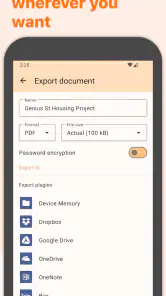
Security is a big deal these days, and Genius Scan doesn’t skimp on it. With options to encrypt PDFs and set passwords, your documents remain secure and private. Plus, sharing is seamless. Whether you need to send a document via email, upload it to the cloud, or simply save it on your device, the app supports a wide array of sharing options.
The app's integration with popular cloud services like Dropbox, Google Drive, and OneDrive ensures that your documents are always backed up and accessible from anywhere. This feature is particularly useful for those of us who juggle multiple devices and need access to documents on the fly.
The Little Things Matter
It's the little things that often make the biggest difference, and Genius Scan nails it with features like batch scanning and the ability to export in various formats including JPEG and PDF. These seemingly minor features save a ton of time and make the app incredibly versatile.
And let's not forget the frequent updates and responsive customer support. It's reassuring to know that the developers are committed to improving the app continuously, which means users are always getting the best possible experience.
In conclusion, if you’re looking for a reliable, feature-rich, and user-friendly scanning app, Genius Scan - PDF Scanner is definitely worth your time. It’s not just an app; it’s a tool that enhances productivity and makes document management a hassle-free experience. Give it a try, and I promise, you'll wonder how you ever managed without it!
Pros
- Easy to use interface.
- High-quality scans.
- Quick processing time.
- Works offline.
- No watermarks on scans.
Cons
- Limited free version.
- Occasional app crashes.
- Ads in free version.
- Battery intensive.
- Lacks advanced editing features.

- Category
- Business
- Version
- 7.33.3











