Game Booster Power GFX Lag Fix
- 703.00
- 4.3
- Installs
- 1.00M
- Price
- Free

Screenshots
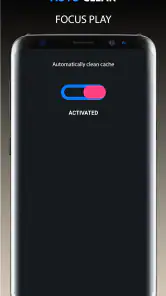
Analysis by Reviewed
If you’re trying a game booster for the first time, I’d treat it as a way to prepare your phone for a gaming session, not as a guaranteed fix for every stutter. Game Booster Power GFX Lag Fix is a free Android tools app from TOLAN, and its focus is helping you manage a device before you play. It’s rated for Everyone, has an average rating of 4.3 from around 59,000 ratings, and has passed one million installs. Those numbers suggest plenty of people have tried it, but your results will still depend on your phone and the game.
What to expect from a booster
The useful question is not whether an app can make any phone run every game perfectly; it cannot. A booster is most relevant when your device feels sluggish because other activity is competing for resources. It is less likely to solve lag caused by a weak network, a game server, or hardware that simply cannot keep up. I’d use it as a small part of troubleshooting rather than a substitute for lowering a game’s own graphics settings or checking a poor connection.
Start with one simple test
After installing, open the app and take a moment to understand the controls before launching a game. For a fair comparison, try the same game in similar conditions both before and after using the booster. Keep the game’s graphics and network connection consistent, and notice whether the problem is a brief hitch, a steady slowdown, or online delay. This gives you a more useful answer than relying on a general feeling that the phone is “faster.”
Make the first session practical
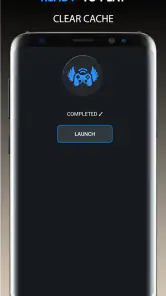
A sensible first use is to close distractions you do not need, run the app’s boost, then play a familiar section of a game that usually gives your phone trouble. If the difference is noticeable, you have a reason to include that step in your routine. If nothing changes, avoid repeatedly tapping optimization controls in the hope of forcing an improvement; check the game’s settings and connection instead. This low-effort test helps you decide whether the app earns a place on your home screen.
Why Game Booster Power GFX Lag Fix is a Gamer’s Best Friend
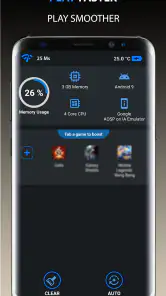
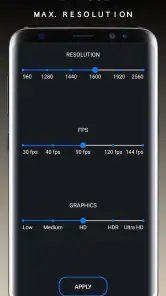
So, what’s the deal with Game Booster Power GFX Lag Fix? Well, this app is all about optimizing your device to deliver smoother gaming experiences. I’m talking about cleaning up RAM, optimizing CPU settings, and boosting GPU performance. It’s like giving your phone a shot of adrenaline right when it needs it the most.
First Impressions and Ease of Use
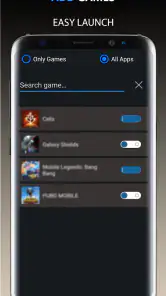
When I first opened the app, I was greeted with a sleek, intuitive interface. There’s no clutter, just straightforward options to get your device ready for gaming. The app walks you through each step, ensuring even the most tech-challenged among us can navigate it without breaking a sweat.
Features That Stand Out
One of my favorite features has to be the auto-boost function. Imagine not having to fiddle with settings every time you want to play; the app does it all for you. Plus, the real-time performance monitoring is great for those who like to see the nitty-gritty of what’s happening behind the scenes.
More From Our News Desk

Weather by Xiaomi Review: Clear at a Glance, Less Clear Up Close

X Under Pressure: Can It Recover When Posting Goes Wrong?

Clash of Clans Is Won Between the Battles

Android Auto Makes the Case for Quieter Car Software

MobiOffice: Transforming Mobile Productivity with Seamless Integration

EA SPORTS FC™ Mobile Soccer: Redefining Mobile Sports Gaming
Another highlight is the temperature monitoring. We all know how heated gaming can get—literally. This app keeps an eye on your device temps, ensuring things don’t get too hot to handle.
Performance: Does It Really Make a Difference?
Now for the golden question: does it actually work? In my experience, the answer is a resounding yes. Games that previously stuttered and lagged ran much smoother after the app worked its magic. Of course, it might not turn an old device into a powerhouse, but it certainly helps eke out better performance where possible.
Reading the signs without overreacting
For a more useful temperature check, look at readings during a normal session and after a longer one rather than judging from a single moment. A warm phone is not automatically a problem, and monitoring is most helpful when you notice a pattern: performance drops as the device heats up, for example. If that happens, a break or a cooler playing environment may help more than another boost. I also wouldn’t treat a performance meter as proof that every change it reports will be visible in gameplay.
Who will get the most from it
I’d recommend trying it if you play on an Android phone that sometimes slows down when you have several apps open, or if you want a repeatable pre-game routine without hunting through system menus. A practical everyday example: before a short game during a commute, you can boost first, then see whether the opening minutes feel steadier than usual. It is a weaker fit if your main issue is unreliable mobile data, if your game already runs smoothly, or if you expect software to overcome a phone’s hardware limits.
How it fits beside built-in tools
Compared with using Android’s own battery and app controls, a booster offers a gaming-focused place to start, which can be more convenient than manually closing apps each time. The trade-off is that built-in settings may be clearer when you want to diagnose one specific problem, such as a game restricted by battery management. I’d use this app for a quick preparation step, then turn to the game’s graphics options or the phone’s system settings if the same slowdown keeps returning. It is not a replacement for either.
Small habits that make the test fair
Try not to change several things at once. Run the same game, in the same area, with the same graphics settings, and compare a session with the booster to one without it. If the first attempt feels better, repeat the comparison another time before making it part of your routine; a quiet background workload or a stronger connection can also explain a one-off improvement. That simple check helps separate a genuine benefit from coincidence.
Version and device fit
The current version is 212, and the app requires Android 6.0 or later, so it is intended for Android rather than iOS. It is free to install, which makes a cautious trial easy, but I’d still judge it by whether it improves your own games instead of by popularity alone. If you prefer not to use a separate utility, the game’s built-in graphics controls and Android’s existing settings are reasonable alternatives.
My final take
If you’re someone who’s fed up with lag ruining your gaming experiences, Game Booster Power GFX Lag Fix might just be worth checking out. It’s easy to use, packed with useful features, and best of all, it actually delivers on its promises. Consider this app a must-have in your gaming arsenal!
Game Booster Power GFX Lag Fix Frequently Asked Questions
Is Game Booster Power GFX Lag Fix available for iPhone and iPad?
Game Booster Power GFX Lag Fix is an Android app, so iPhone and iPad users should not expect to install this Android version on iOS. If you use an Apple device, look for a game-optimization app designed specifically for iOS instead. Android users can check the compatibility details for their device before downloading.
Who develops Game Booster Power GFX Lag Fix, and what kind of app is it?
Game Booster Power GFX Lag Fix is a Tools app developed by TOLAN. Its short description is “Game Booster,” and its stated aim is to move your game play experience to the next level. It is intended for Android users who want to try a utility focused on gaming, rather than a game to play by itself.
Does Game Booster Power GFX Lag Fix cost anything to download?
Game Booster Power GFX Lag Fix is free, so you can try it without paying an upfront purchase price. It is a Tools app from TOLAN, intended to help move your game play experience to the next level. As with any app, check the download page and the app’s on-screen details before installing so you know what to expect while using it.
What Android version do I need to install Game Booster Power GFX Lag Fix?
The app requires Android 6.0 or later, so check your device’s software version before downloading. It is available for Android, and its compatibility still depends on how well your particular device handles the games and settings you use. Meeting the minimum operating-system requirement means the app can be installed, but it does not guarantee that every game will run smoothly.
What is Game Booster Power GFX Lag Fix and how does it work?
Game Booster Power GFX Lag Fix is a mobile application designed to optimize the performance of your device while playing games. It works by freeing up RAM, closing background apps, and adjusting system settings to ensure smoother gameplay and reduced lag. This app is especially useful for devices that struggle with high-performance games, providing an enhanced gaming experience by improving frame rates and reducing stutters.
Pros
- Optimizes game performance efficiently
- Simple user interface for easy navigation
- Improves device battery life
- Reduces game lag and stuttering
- Compatible with most Android games
Cons
- May not work on all devices
- Contains in-app advertisements
- Limited features in free version
- Requires internet for full functionality
- Can occasionally crash on older devices
- Category
- Tools
- Version
- 212









