Crosshair & Nickname Generator
- 72.00
- 4.5
- Installs
- 500.00K
- Price
- Free
Screenshots
Analysis by Reviewed
I’m usually cautious about gamer tools that promise a quick burst of customization: they can be fun for an evening and then disappear from my home screen. Crosshair & Nickname Generator is most useful when I treat it as a small workshop for trying ideas, not as something that will improve every match by itself. It brings crosshair styling and nickname ideas together, which makes it convenient when I’m refreshing a profile or setting up a new game.
Why the first session feels rewarding
The appeal is immediate: I can experiment with the look of a crosshair and generate names without turning the process into a project. For someone who already knows the kind of visual style they like, that quick feedback makes it easy to compare a few possibilities. The app is free, rated for Everyone, and developed by TOLAN; it has a 4.5 average from around 5,500 ratings and more than 500,000 installs. Those figures suggest it has found an audience, though they don’t tell me whether a particular design will suit your game or screen.
A practical first-week routine is to make a small shortlist rather than keep changing settings after every match. I’d try one understated crosshair and one more visible option, then check them in the actual game before settling on either. A preview can help me judge the design, but the game itself is the real test: scenery, movement, and a busy screen can make a choice that looked clear in a tool feel distracting during play.
Small tests that make customization useful
One easy mistake with crosshair styling is to judge a design against a plain preview rather than the situations where it has to remain visible. I’d test a candidate in more than one kind of scene if the game allows it: a bright backdrop can wash out one color, while a dark or crowded view can swallow another. The point is not to find a universally perfect design, but to avoid choosing one that only looks good in a quiet menu.
I’d also decide in advance what I want the crosshair to do. A small, restrained mark may feel less intrusive during exploration, while a larger or more contrasting one can be easier to pick out quickly. Those are personal preferences, not guaranteed advantages, and the game’s own visual settings matter. If a design makes me watch the crosshair instead of the action, I’d simplify it rather than keep adding detail.
The same deliberate approach helps with names. I’d generate several possibilities, then read them as if a teammate had to say one quickly over voice chat. Names that look clever on a screen can become hard to pronounce, easy to confuse, or tiring after a week. Keeping a short list gives me room to compare without treating the first amusing suggestion as a final identity.
From novelty to a useful gaming habit
I look at long-term value less as a reason to open the app every day and more as a way to make occasional setup decisions easier. A useful habit might be returning only when a game, screen, or profile gives me a clear reason to reconsider a crosshair or name; that keeps experimentation purposeful instead of turning it into another chore. The next section looks at what makes that kind of occasional return worthwhile.
More From Our News Desk

Weather by Xiaomi Review: Clear at a Glance, Less Clear Up Close

X Under Pressure: Can It Recover When Posting Goes Wrong?

Clash of Clans Is Won Between the Battles

Android Auto Makes the Case for Quieter Car Software

MobiOffice: Transforming Mobile Productivity with Seamless Integration

EA SPORTS FC™ Mobile Soccer: Redefining Mobile Sports Gaming
Customization at Your Fingertips
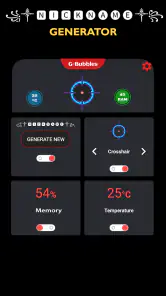
The first thing that caught my eye about the Crosshair & Nickname Generator is its sheer simplicity. As soon as I downloaded it, I was greeted with an intuitive interface that made navigation a breeze. No steep learning curves here, folks! The app offers a plethora of options for creating unique crosshairs and nicknames, allowing you to express your personality in your favorite games.
Crafting the Perfect Crosshair
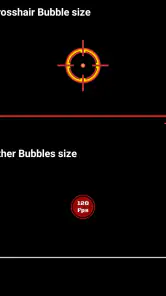
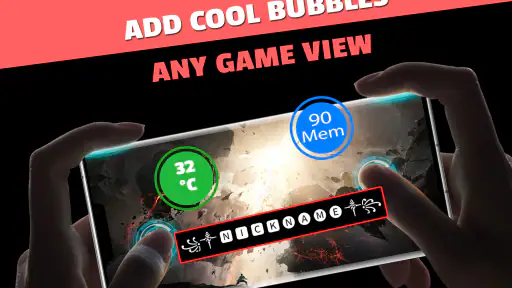
One of the standout features of this app is its crosshair customization. You can tweak everything from the color and shape to the size and opacity. Whether you prefer a minimalist dot or an elaborate target, this app has got you covered. I spent hours tinkering with different designs, and it was incredibly satisfying to see my creations come to life in-game. Plus, the app provides real-time previews, so you know exactly what you're getting.
For a more deliberate test, I’d keep other settings steady while comparing designs. If I change the color, shape, and size all at once, I can’t tell which adjustment helped. Testing one change at a time is a useful trade-off: it takes a little longer, but makes it easier to settle on something comfortable instead of chasing novelty. I’d also favor legibility over decoration if the crosshair competes with the action.
Nickname Generator Extraordinaire
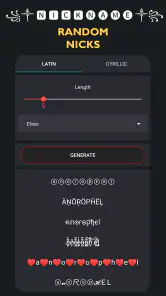
Let’s talk nicknames. Coming up with a unique and cool nickname can be a daunting task, but this app simplifies the process. With just a few taps, I was able to generate a variety of quirky and interesting names. The app uses a smart algorithm to mix and match words, ensuring that you get something truly distinctive. Whether you want something fierce or funny, the Crosshair & Nickname Generator has something for everyone.
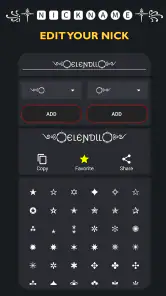
Nickname ideas are especially handy when I’m joining a new lobby, starting a fresh profile, or simply stuck staring at an empty name field. I’d use the generator as a brainstorming partner rather than assume every result will fit: a name that sounds amusing to me may be awkward to read aloud or already unsuitable for a particular game’s naming rules. Before adopting one, I’d check its spelling, readability, and whether the game accepts its characters. That quick check saves the annoyance of building an identity around a name I later have to change.
Making it work beyond the preview
Another aspect worth mentioning is how easily the app integrates with various games. I didn’t have to jump through hoops to get my crosshair and nickname set up. The app provides clear instructions on how to implement your new designs in popular games, ensuring a smooth transition. This seamless integration is a huge plus for gamers who want to focus on playing rather than fiddling with settings.
In everyday use, I’d open it when I’m already setting up for a session, not in the middle of one. For example, before meeting friends online, I could settle on a nickname, prepare a crosshair style, then follow the relevant game instructions and verify the result before the group joins. That small bit of preparation is more dependable than making several changes under time pressure. Since games handle customization differently, I’d follow the instructions for the title I’m actually playing rather than assume one setup transfers everywhere.
Questions worth settling before you rely on it
Does a generated crosshair automatically become part of every game? I wouldn’t plan on that. The app can help me create a design and offers guidance for putting it to use, but each title has its own way of handling customization. I’d check the instructions for the game I play and confirm the result there; a preview alone is not proof that the design has been applied correctly.
Will a nickname suggestion be available in the game I want? Not necessarily. A game may have its own character limits, permitted symbols, or naming rules, so I’d treat the generated result as a starting point and check it before committing. This is especially useful when a profile name is difficult or inconvenient to change later.
And is it useful if I only play one game? It can be, particularly if I enjoy adjusting the reticle or want help getting past a blank nickname field. But if that game already has the exact options I need and I’m comfortable using them, its own settings may be the faster route. The app is most valuable when its two creative tools save me effort, not simply because they are available.
Where the routine can wear thin
The app’s lasting value depends on whether I enjoy occasional tinkering. Once I have a crosshair I can see comfortably and a nickname I’m happy to use, there may be little reason to revisit it for a while. That isn’t necessarily a flaw; it means the app is a focused utility rather than a daily destination. The downside is that people expecting it to keep producing meaningful upgrades may find the early novelty fades after their initial experiments.
There is also a point where more options can become their own distraction. If I keep making tiny adjustments without testing them in the game, I can spend time optimizing an image rather than playing. I’d set a stopping point: compare a few candidates, pick the one that stays clear in real play, and leave it alone until there is a practical reason to reconsider. This makes the tool easier to use without turning customization into a habit I have to maintain.
Nickname generation has a similar limit. A stream of suggestions can get me unstuck, but quantity does not guarantee a name that feels personal or will age well. If I’m choosing a handle I expect to use for a long time, I’d combine an idea from the app with my own preference and check how it looks in the game’s interface. For a temporary profile or a playful session, I’d be less fussy.
How it compares with familiar alternatives
Compared with making a nickname up from scratch or adjusting a game’s own options, this tool puts both kinds of experimentation in one place and lowers the effort of getting started. The trade-off is that a dedicated in-game setting may be a better choice for players who want to tune their aim within a specific title, while a notes app or personal list can be enough for someone who only needs to save a name idea. I’d choose this app when I want quick creative prompts and visual variations, not when I need deep game-specific coaching.
That difference is useful to keep in mind when deciding whether to install it. A game’s own controls are usually the more direct place to make a final adjustment, because that is where I can judge how the setting behaves during play. A general-purpose customization tool is better at helping me explore possibilities before that point. For names, a blank note gives me complete control, but it cannot offer the same quick prompt when I have no ideas at all.
Who should keep it installed?
I can see it suiting casual and competitive players who like personalizing their presentation, people who regularly create new profiles, and anyone who enjoys testing a few visual options before a match. It’s less compelling for players who never change their settings, already have a reliable crosshair workflow, or want a tool that actively tracks performance. The app is a tool for customizing choices, not a substitute for practice or for learning a game’s own controls.
It is also a better fit for someone who likes making small choices before play than for a player who wants every tool to have a daily purpose. A person who changes games often may appreciate having a convenient place to revisit styling ideas and name prompts. Someone who settles into one title and one setup may use it only at the beginning, then leave it untouched. Both are reasonable outcomes; the value depends on whether occasional creative help is worth keeping close.
For ongoing maintenance, I’d keep only a couple of preferred designs in mind and revisit them when a game or display makes the current one hard to read. That makes the app useful as an occasional reference rather than another routine that demands attention. It runs on Android 6.0 or later, is currently at version 95, and is free to try, so the barrier to testing it is low; whether it earns lasting space depends on how often you actually want fresh crosshair or nickname ideas.
My long-term take
In conclusion, the Crosshair & Nickname Generator is a must-have for any gamer looking to add a personal touch to their gaming experience. With its user-friendly interface, extensive customization options, and seamless integration, it’s a tool that delivers on its promises. So, if you’re ready to stand out in your next gaming session, give this app a try. You won’t be disappointed!
A sensible way to decide
I’d give it a try when I have a concrete reason: a new game, a fresh profile, or a crosshair that has become difficult to pick out. I wouldn’t install it expecting a permanent stream of improvements or a shortcut to better aim. Its recurring value is modest but real when I return for a specific task, and modest value can be enough for a free tool that saves a little time and gets creative choices moving.
My final recommendation is conditional rather than universal. If you enjoy tweaking your gaming look and sometimes need a nudge for a name, this is an easy tool to explore and then keep available for occasional use. If your settings already work, you dislike customization, or you need detailed training and game-specific analysis, I’d stick with the game’s own controls or another tool built for that job. The best outcome here is not endless tinkering; it is finding a usable choice, taking it into the game, and getting back to playing.
Crosshair & Nickname Generator Frequently Asked Questions
Is Crosshair & Nickname Generator free to download?
Yes. Crosshair & Nickname Generator is a free tools app for gamers, so you can try its crosshair and nickname features without paying to download it. The app is intended to help with gaming customization rather than replace the games themselves. If you are deciding whether it suits your needs, consider whether you want a tool for personalizing a crosshair and creating an in-game name.
What devices can run Crosshair & Nickname Generator?
The app is available for Android devices running Android 6.0 or later. It is categorized for everyone, making it suitable for a broad audience. Before downloading, check the operating system on your device to make sure it meets that minimum requirement. The app is developed by TOLAN and is presented as a gaming-focused tool for creating crosshairs and nicknames.
What is the Crosshair & Nickname Generator app?
The Crosshair & Nickname Generator app is a utility designed for gamers who want to customize their gaming experience. It allows users to create unique crosshairs and generate creative nicknames for their in-game profiles. Whether you're playing first-person shooters or any game that requires personalization, this app provides the tools to stand out.
How does the crosshair customization work?
The app offers a wide range of crosshair customization options. Users can choose different shapes, colors, and sizes to fit their gaming preferences. The intuitive interface makes it easy to adjust settings, preview changes, and implement the perfect crosshair for any game, enhancing precision and gameplay experience.
Can I use the nickname generator for any game?
Yes, the nickname generator is versatile and can be used for any game that requires a unique username. It offers a variety of suggestions based on themes, characters, and symbols, helping players to create memorable and distinct in-game identities. It's perfect for both casual and competitive gaming environments.
Pros
- Easy to use interface
- Wide variety of crosshair designs
- Customizable nicknames
- Compatible with most games
- No ads or in-app purchases
Cons
- Limited crosshair color options
- Nickname generator lacks creativity
- Occasional app crashes
- No offline mode
- Requires frequent updates
- Category
- Tools
- Version
- 95









