Gallery - Photos & Videos
- 229.00
- 4.7
- Installs
- 1.00M
- Price
- Free

Screenshots

Analysis by Reviewed
I approach Gallery - Photos & Videos as a straightforward place to browse the pictures and clips already on my phone, rather than as a full photo-editing studio or a complicated library system. It is a free photography app from Fittnes Game Team, and its basic promise is refreshingly simple: make it easier to find something, share it, or remove it. If you are opening it for the first time, that modest scope is useful to keep in mind; the best first test is whether it helps you reach a recent photo without extra fuss.
What to expect from a simple gallery
Gallery has a 4.7 average from around 22,000 ratings, and it has been installed over a million times. It is rated for everyone, with a minimum operating-system requirement of version 8.0. Those figures suggest a broadly approachable utility, but I would judge it by a more personal question: does its layout make your own camera roll easier to scan? A gallery can feel quick with a small collection and less tidy once screenshots, downloads, and family photos all mix together.
The app’s short description is simply “Gallery,” and that fits its practical role better than grand claims would. I would start by opening it and checking how your existing photos are presented. Before deleting anything, tap a picture you recognize and confirm that you can return to the collection afterward. That small first check gives you a feel for browsing without risking a meaningful file.
Getting set up without second-guessing
For a first-time user, the most reassuring approach is to treat the first session as a tour, not a cleanup project. Open the app, look through the visible groups, and try returning to the main collection after opening an image. That simple loop tells you whether the browsing pattern feels natural on your phone. If the app asks for access to your media, consider what you want it to do before continuing; viewing and managing local pictures requires access to the items you intend to browse.
I would also avoid making several changes at once. If you are unsure how a control behaves, test it on an image you would not mind losing or changing, rather than on a favorite family photo. When you reach the first screen, take a moment to notice whether screenshots and camera pictures appear together or in separate groups. That observation helps you decide whether the app’s organization matches your habits before you start relying on it.
Organizing Your Memories
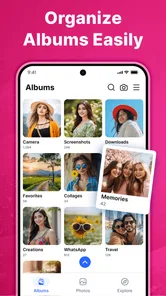
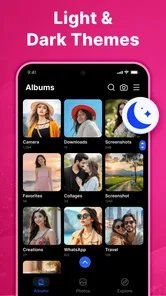
When you first open Gallery - Photos & Videos, it feels like a breath of fresh air. The interface is clean, intuitive, and honestly, just makes you want to organize your photos. The app automatically categorizes your media into albums, making it super easy to find exactly what you're looking for. Whether it's a night out with friends or a collection of cute cat videos, everything has its own little home.
Features That Make a Difference
What really sets this app apart are its features. One standout aspect is the smart AI that tags and sorts your photos based on location, people, and even events. I was genuinely impressed when it recognized my cousin's face and grouped all her pictures together. It's like magic!
More From Our News Desk

 MX Player
 and the Small, Private Rituals of Mobile Viewing
A practical video player reveals how mobile viewing has become private, portable, and woven into the spare minutes of ordinary life.

 Piano Fire: Edm Music & Piano
Piano Fire Tested: How Well Does It Recover When a Run Breaks?
A rhythm game lives or dies by recovery as much as reflexes. Piano Fire makes a brisk, colorful loop, but its rough edges matter most after a missed note or interrupted run.

 Ludo King®
Ludo King Turns Quick Matches Into a Lasting Social Ritual
A close look at how quick matches, private rooms and familiar rivalries turn this digital Ludo game into a small, durable social ritual—and where that community has limits.

 YouTube Music
 Turns Video Discovery Into Listening Power
A capable music service with an unusually strong route into discovery, YouTube Music shows how Google can turn a video habit into control over what listeners hear next.

 Netflix
 Is Building a Daily Habit Beyond Its Biggest Shows
A familiar streaming app is gaining new weight as Netflix pushes games, live programming, and discovery into the same daily habit. The growth is real, but so are the limits.

 Ramp Car Games: GT Car Stunts
Ramp Car Games: The Risk-and-Reward of Every Jump
A stunt racer built around one deceptively rich decision: how much speed to carry into a jump, and how much control to keep for the landing.
Latest News



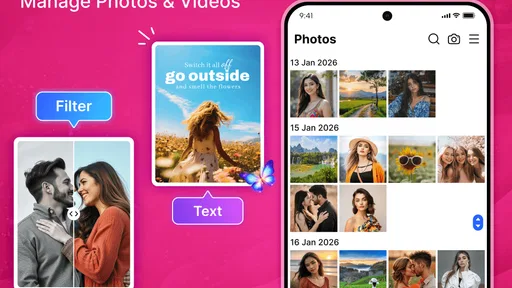
Another feature I loved was the editing tools. Sometimes, you just want to tweak a photo a bit before sharing it. With a variety of filters, cropping options, and adjustment tools, you can perfect your pictures within the app. Plus, the option to create slideshows with music is a cherry on top for those who love to reminisce with style.
Testing a first useful action
Once you have had a look around, choose one recent picture and use it for a small, low-stakes task: open it, check that it is the image you meant to find, and share it with a person you trust. This is a more useful first success than trying to reorganize an entire camera roll. It tests the path from browsing to sharing while leaving the rest of your collection untouched.
Before sending, inspect the whole image rather than only the subject. A photo of a receipt, a school event, or a family gathering may include an address, a child’s name, or other details in the background. I make this check a habit because the easiest item to share is not always the one I intended to share. If the image is important, keep a separate copy through your usual backup routine rather than assuming that a gallery app is also an archive.
Safe and Secure
Privacy is a big deal these days, and Gallery - Photos & Videos takes it seriously. The app offers a secure vault where you can store sensitive photos and videos away from prying eyes. Just set up a pin code or fingerprint lock, and you're good to go. It's a reassuring touch for those of us who value our privacy.
For a first visit, I would avoid treating any newly discovered album as a backup. A gallery is primarily a way to view and manage media on the device; it is not a substitute for keeping another copy somewhere safe. If you plan to clean up, select a disposable screenshot first and check what happens after deletion. That practical test helps you understand the difference between removing an item from view and permanently losing a file, which matters far more than a polished-looking screen.
Common points of confusion
The word “album” can mean different things in different photo apps. Sometimes it describes a collection created by the phone or another service; sometimes it is simply a way the gallery groups files for browsing. I would not assume that moving or deleting an item in one view has the same effect everywhere. Start with one unimportant image and check how it appears afterward before applying the same action to a whole group.
It is also easy to mistake a tidy-looking screen for a tidy library. If your camera roll contains screenshots, downloads, and photos from messaging apps, a gallery can make them easier to browse without changing the underlying files or deciding what deserves to stay. My practical advice is to use browsing and deletion as separate steps: first identify the items, then remove only those you are confident you no longer need.
Sharing and everyday routines
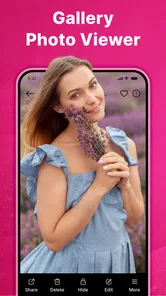
Sharing memories with friends and family is a breeze. The app allows you to share photos and videos directly to social media or through messaging apps. The integrated sharing options are seamless, and you don't have to jump through hoops to show off your latest adventures.
A useful everyday routine is to find one photo from a recent event, share it with the right person, then decide whether the remaining shots need sorting. For example, after a child’s school performance, I might send one clear image to family and leave the rest in the collection until I have time to review them. This avoids rushed bulk deletion and makes the gallery useful even when I only have a minute.
That kind of quick task is where a dedicated gallery can earn a place in a daily routine. If someone asks for a picture while you are standing together, you can focus on finding and sending that one image instead of beginning a larger cleanup. For a bigger batch, such as choosing several holiday photos, take more time to review each selection; convenience should not turn into accidental oversharing.
Where it fits beside other photo apps
Compared with the photo app that comes with a phone, a separate gallery is most valuable when its browsing and album presentation feel clearer to you. Compared with cloud-focused photo services, a simple gallery is better suited to quick on-device viewing and basic actions than to managing a long-term online archive across devices. I would choose based on the job: use this app when you want a direct way to look through local media, and prefer a dedicated editor when detailed retouching is the main goal.
The trade-off is that a familiar built-in gallery may already handle the same everyday tasks. If it opens quickly and its albums make sense to you, installing another viewer may not improve your routine. The reason to keep a separate gallery is personal: perhaps you prefer the way it presents your collection, or want its browsing and sharing workflow. I would compare the two with the same small task—find a recent photo and share it—rather than choosing based on promises alone.
Cloud photo services solve a different problem. They can be the better fit when your priority is keeping an online library accessible across devices, while a local gallery is handy for looking through media on the phone. A dedicated editor is better if you regularly need precise retouching, layers, or a more deliberate creative process. In my view, this app makes most sense as a practical viewer and manager, not as the single tool responsible for every part of a photo life.
Who will get the most from it
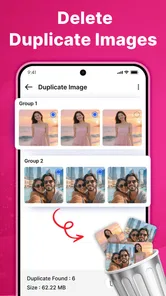
I would recommend trying it if you often need to locate a recent picture, send a clip to someone, or remove an obvious duplicate or throwaway screenshot. It is especially appealing to someone who wants a simple first step into managing photos rather than a complex catalog with lots of decisions. Its free price makes trying that everyday workflow low-commitment, and the everyone content rating makes it broadly suitable for general use.
On the other hand, I would skip it as a primary solution if your main concern is professional editing, a carefully maintained cross-device archive, or a highly customized filing system. People with years of mixed media may also need patience: an app can display and group items, but the user still has to decide what is worth keeping. If you rely on a particular backup service or phone gallery already, keep that in place until you have tested this one and know it suits you.
A sensible first step
The app is a natural fit for someone who wants a simple place to browse, share, and delete photos, and who prefers trying a lightweight workflow before committing to a more involved organizer. It may not be the right choice for someone who expects a complete archive, professional editing controls, or a replacement for a backup service. The current version is 2.0.0.5, and my advice is to begin with one familiar image, try the action you use most, and keep anything important backed up separately.
One useful next step is to decide on a small recurring task rather than trying to “organize everything.” You could use the app to find a picture for a message, review a few screenshots at the end of the week, or pick a short set of images to share after an outing. Keeping the task modest makes it easier to notice whether the album presentation and controls genuinely save you effort. If they do, you can gradually make it part of your routine; if they do not, returning to the phone’s existing gallery is a perfectly reasonable choice.
If you are wondering whether to install it alongside your current photo app, I would do so only if you have a specific browsing or sharing frustration to solve. Try both with the same small collection and compare which one helps you locate the right image with less hesitation. You do not have to move your entire photo habit over on day one. That gradual test is also the safest way to learn how its deletion and album behavior fit your expectations.
All in all, Gallery - Photos & Videos is a solid app for anyone looking to tidy up their photo collection and keep everything organized. With its user-friendly interface, smart features, and focus on privacy, it’s definitely worth a download. So next time you're stuck searching for that one picture, let this app do the hard work for you. Trust me, you won't regret it!
Gallery - Photos & Videos Frequently Asked Questions
Is Gallery - Photos & Videos suitable for organizing a large photo collection?
Gallery - Photos & Videos is a photography app for browsing and managing pictures and videos. Its stated focus is on viewing, sharing, and deleting photos, so it may be useful for everyday collection management. If you are looking for specific organization tools, such as albums or sorting options, consider whether those features match the way you prefer to arrange your library.
Can Gallery - Photos & Videos replace the gallery app already on my phone?
It may serve as another option for viewing and managing photos and videos on your device. The app’s summary highlights viewing, sharing, and deleting photos, which covers several common gallery tasks. Whether it can replace your existing gallery depends on which features you rely on, so it is sensible to compare its available tools with your current app before making a switch.
Is Gallery - Photos & Videos free to download?
Yes. Gallery - Photos & Videos is free, so you can download it without paying for the app. It is a photography app for browsing and managing pictures and videos, with a store summary focused on viewing, sharing, and deleting photos. Its content rating is Everyone, making it suitable for a broad audience.
Which devices can run Gallery - Photos & Videos?
Gallery - Photos & Videos requires Android 8.0 or later. Before downloading, check the operating system version on your device to make sure it meets that requirement. The app is listed as version 2.0.0.5, and compatibility with the required Android version is the main consideration when deciding whether it can run on your phone or tablet.
What features does the Gallery - Photos & Videos app offer?
The Gallery - Photos & Videos app offers a variety of features to organize and manage your media efficiently. Users can sort photos and videos into albums, apply basic editing tools, and enjoy a secure vault for private media. The app also supports cloud backups, ensuring your precious memories are always safe and accessible.
Pros
- User-friendly interface
- Fast photo loading
- Seamless cloud sync
- Variety of editing tools
- Easy photo organization
Cons
- Limited free storage
- Occasional ads
- No advanced editing features
- Requires internet for cloud sync
- Battery drain on prolonged use