Gallery - Photo, Video & Home
- 5.00
- 3.6
- Installs
- 500.00K
- Price
- Free

Screenshots





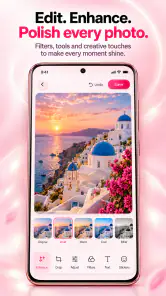

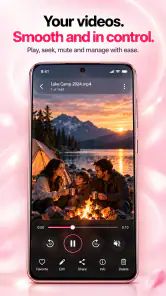
Analysis by Reviewed
Gallery - Photo, Video & Home is best understood as a practical place to browse and tidy the pictures and clips already on your device, rather than a full creative studio. I’d consider it if my camera roll had become difficult to navigate and I wanted basic media editing alongside everyday viewing. Its appeal is straightforward: keep photos and videos together, make them easier to revisit, and bring the gallery experience into a home setting. The trade-off is that a simple promise like this depends heavily on the details of how you browse and organise, so people who need highly specialised editing or rigorous archive tools should compare it with dedicated alternatives.
A straightforward home for a crowded camera roll
Where the app’s appeal lies
As a photography app from Thebes Ads PTE LTD, Gallery is focused on the part of photography many people deal with most often: finding, reviewing, and making small changes to images after taking them. That makes it different in emphasis from a camera app, which is mainly about capture, and from an editing suite built around filters, layers, or elaborate retouching. The useful question is not whether it can replace every photo tool, but whether it makes a personal collection less of a chore to live with.
That everyday role matters when a phone holds a mix of family pictures, screenshots, downloaded images, short videos, and duplicate-looking shots. A gallery can be more valuable as a dependable sorting and viewing space than as a place to create polished posts. I would use this one as a first stop for looking through saved media and making simple adjustments, then turn to a specialist editor only when a photo needs more deliberate work.
The “Gallery at Home” idea also gives the app a use beyond quick phone checks: it suggests a way to revisit personal media in a home environment. That can suit someone who wants photos to feel less buried in a device and more like a collection worth returning to. I would treat it as a viewing convenience, though, not as a substitute for a carefully backed-up photo archive.
Useful ways to work with photos and videos
A practical workflow is to deal with media while the reason for keeping it is still fresh. After a trip, for example, I’d open the gallery, scan the day’s pictures, remove obvious throwaways if the available controls support that, and make modest edits to the few images I’m likely to share. Even without turning the process into a formal album project, that short review can make a large camera roll less intimidating later.
Another useful habit is separating “find it now” from “keep it forever.” A gallery is a convenient front door for browsing, but it should not be the only place a user relies on to preserve important memories. Before clearing space or changing devices, I’d confirm that valued images are safely copied elsewhere. This is especially sensible for people who record family events or work-related material: convenient browsing and dependable long-term storage are different jobs.
For videos, the main benefit is having clips beside still photos rather than treating them as a separate collection to hunt through. That can make it easier to relive an occasion in context: a few pictures, followed by the short clip that captures the sound or movement the stills cannot. I would not expect a gallery to offer the precision of a dedicated video editor, but keeping ordinary playback and quick review close at hand is useful.
The strongest reason to try it is the combination of everyday browsing and light media work in one photography app. If I only need to look through a collection, organise my habits, and make simple edits, switching between several specialist apps can feel unnecessary. Gallery’s broad purpose is appealing for that middle ground, particularly for a person who wants a familiar, uncluttered starting point rather than a tool with a steep learning curve.
What to expect from editing and organisation
The app is presented as a place to organise photos and videos and edit media, but those phrases do not by themselves tell me how deep either side goes. I would approach its editing as a convenience for routine corrections rather than assume it can replace an advanced editor. If my goal is to adjust a picture quickly before sending it to a friend, an all-in-one gallery is sensible. If I need fine control over colour, selective edits, layers, or a repeatable professional workflow, I would choose an editor designed specifically for that job.
The same distinction applies to organisation. A gallery helps make a collection usable, but organisation is also a habit: reviewing new images, keeping meaningful shots, and avoiding the accumulation of every accidental capture. I’d set aside a few minutes after a busy weekend rather than wait until the camera roll feels unmanageable. Small, regular clean-ups are easier than a major sorting session, and they help any gallery app feel more effective.
One non-obvious trade-off is that an all-in-one gallery can reduce app switching while still leaving users with separate decisions about storage and sharing. A photo that is easy to view is not automatically backed up, and an edited image may not be the version a person intended to keep as the original. For important pictures, I’d preserve the unedited file where possible and check what happens when edits are saved. That cautious approach is worthwhile in any gallery, including this one.
Everyday scenario: sorting a family weekend
Imagine coming home with pictures from a family gathering, a handful of short videos, and several near-identical shots. I’d use Gallery to review the whole batch in one place, pick out the images that tell the story, and make quick adjustments before sharing them. Later, the home-oriented viewing angle can make those moments easier to revisit than scrolling blindly through a mixed feed of screenshots and unrelated downloads.
The key is to keep the workflow modest. I would not spend the evening trying to perfect every frame inside a general gallery. I’d shortlist the strongest pictures, leave the rest alone until I know they are not needed, and use a more capable editor for any image that deserves extra care. That approach plays to the app’s likely role as a day-to-day media hub without expecting it to be an archival system or a complete creative suite.
How it compares with familiar alternatives
Compared with a phone’s default gallery, Gallery - Photo, Video & Home stands out in its stated mix of organising, editing, and home viewing. Whether that mix feels better will come down to the interface and the way it handles a person’s own collection. A default gallery may already be the easiest option because it is familiar and built into the phone experience. I would switch only if this app makes browsing or revisiting media meaningfully more comfortable for me.
Compared with cloud-photo services, a gallery app is a more immediate way to look at media on a device, while cloud services are often chosen for cross-device access and backup routines. Those are not interchangeable benefits. If I regularly move between phones or need a dependable remote copy, I would keep a trusted backup service in the picture rather than assume a gallery alone covers that need.
Against specialist editors, the advantage is convenience and the disadvantage is depth. A dedicated editor is usually a better fit when a user wants precise creative control; Gallery is more appropriate when the task is simply to browse and make a quick change. I see that as a reasonable division of labour rather than a flaw, as long as expectations stay realistic.
Who should consider it, and who should pass
I’d recommend giving Gallery a look if you want a general-purpose photography app, prefer having videos and photos together, and value the idea of revisiting media at home. It is also a sensible candidate for someone who edits casually and does not want every small correction to become a separate app session. Its audience is broad: the content rating is Everyone, and the app is free to start using, with in-app purchases listed at $9.99 per item.
People who are content with their built-in gallery may have little reason to add another app unless Gallery offers a viewing or organisation experience they specifically prefer. Likewise, anyone who depends on sophisticated editing, extensive archive management, or a carefully controlled backup workflow should look for tools built around those needs. The most important question is whether the app’s everyday convenience is worth making it part of your routine.
The app has a 3.6 average from around 685 ratings, with 5 written reviews, and has passed 500K+ installs. I treat those figures as context rather than a guarantee of fit: gallery preferences are personal, and a rating cannot tell me how well a particular interface suits my habits. It is on version 22.0, and its listed minimum operating system is 7.0, so compatibility is worth checking against the device in question before settling on it.
A balanced verdict
My view is that Gallery - Photo, Video & Home makes the most sense as a convenient everyday home for media, not as a promise to solve every photography problem. Its combination of browsing, organisation, editing, and home viewing gives casual users a clear reason to try it. The most useful benefit is the chance to make ordinary moments easier to find and revisit, especially when a camera roll has become a jumble.
I would keep expectations measured around editing and long-term preservation, and I would not move away from a familiar default gallery without a practical reason. But if you want a free, approachable place to manage everyday photos and clips, this is a reasonable option to test. Give it a real task—such as sorting a recent outing or finding a particular video—and judge it by whether that task feels simpler. If it does, the app has earned a place on your phone; if you need deeper editing or stronger archive habits, a specialist tool will be the better choice.
Gallery - Photo, Video & Home Frequently Asked Questions
What is Gallery - Photo, Video & Home?
Gallery - Photo, Video & Home is a media gallery app designed to help you browse and manage photos and videos stored on your device. It may also include a home screen for quickly accessing albums or media categories. The exact tools and layout can vary by app version and device, so check the store listing and screenshots to confirm which features are currently available.
Can I use Gallery - Photo, Video & Home to edit photos or videos?
A gallery app may offer basic tools such as cropping, rotating, or adjusting media, but editing capabilities are not guaranteed by the name alone. Before downloading, review the app’s description and feature list to see whether the functions you need are included. For advanced edits, you may still prefer a dedicated photo or video editor, and you should keep original files if the app changes them.
Does Gallery - Photo, Video & Home upload my photos to the internet?
Whether your media stays on your device depends on the app’s design, permissions, and any online or backup features it provides. Check the app’s privacy policy and the permissions requested during installation, especially if it asks for network access or account details. Avoid granting access that does not make sense for the features you intend to use, and do not assume that a gallery app automatically provides cloud backup.
What permissions does Gallery - Photo, Video & Home need?
To display and organize your media, a gallery app generally needs permission to access photos and videos. Depending on your operating system and the app’s features, it may request broader file access, notifications, or other permissions. Read each permission prompt and choose limited access when available if that meets your needs. You can usually review or change permissions later in your device’s settings.
Is Gallery - Photo, Video & Home free, and is it available for my device?
Pricing, advertisements, in-app purchases, and device compatibility can change over time, so check the official Google Play or Apple App Store listing before installing. Confirm that the app supports your operating system version and that your device has enough storage. The store page is also the best place to verify the developer, recent updates, user feedback, and any limitations that may apply to the free version.
Pros
- Quickly browse photos and videos in a familiar gallery layout.
- Useful sorting options make it easier to find recent or older media.
- Built-in photo tools let you make simple edits without another app.
- Video playback keeps clips accessible alongside your pictures.
- A practical option for organizing media stored on your device.
Cons
- Editing features may be limited compared with dedicated photo editors.
- Large libraries can take time to load or scan.
- The app may request broad access to photos and videos.
- Some features or screens may include ads or promotional prompts.
- It is not a substitute for cloud backup if your device is lost or damaged.

- Category
- Photography
- Version
- 22.0











