Freed Audiobooks
- 7.82K
- 4.6
- Installs
- 10.00M
- Price
- Free
Screenshots
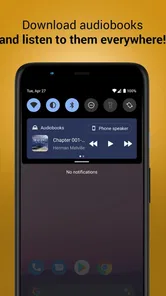
Analysis by Reviewed
I usually reach for an audiobook when I want a story but my hands and eyes are busy. That’s the appeal of Freed Audiobooks: it turns spare moments into listening time without asking me to settle in with a screen. It’s a free Books & Reference app from Sanity Audio Apps, and its 4.6 average across around 134,000 ratings suggests it has found a sizeable audience. My overall impression is that it is most useful when you want to browse and listen simply, rather than manage a complicated reading setup.
Where I’d look first when something feels off
The first friction with any audiobook app is often not the sound but choosing a book that suits the moment. A long novel can be a poor fit for a short commute, while a narrator’s style that works for one listener may not work for another. I’d sample a little listening before committing to a title, then give myself enough time to settle into the narration. That small check helps avoid mistaking a mismatch in voice or pacing for a problem with playback.
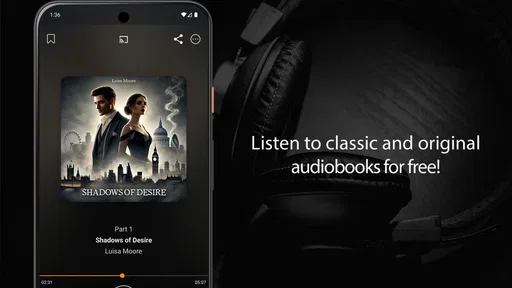
Search is useful when I already have a title or author in mind, but browsing is better when I’m undecided. I’d use a specific search for a planned listen and explore genres when I want a new pick. The app is described as offering free audiobooks, but it also has optional in-app purchases ranging from $0.99 to $16.99 per item, so I’d check the details shown for an item before assuming every choice has the same terms.
Simple checks before starting a listening session
Before leaving home, I’d make sure a book is downloaded if I expect to listen without a connection. Offline listening is especially handy on a train or during travel, but it only helps if the download is ready beforehand. I’d also open the chosen book once while connected, confirm that I’m at the intended place, and keep the app available long enough for any preparation to finish.
For a first session, I’d try a short stretch with the phone’s normal audio controls and the headphones or speaker I plan to use. This is a practical way to catch low volume, a disconnected headset, or a route to the wrong speaker before settling into a longer listen. The app is rated for Teen audiences, and it runs on Android 5.0 and later; those are useful basics to check when deciding whether it fits a device and household.
Making the listening workflow dependable
Bookmarking is a small but meaningful aid when I rotate between books. I’d mark my stopping point before switching titles, rather than relying on memory after a busy day. For a household chore, I might listen to one chapter, bookmark the spot, and return to it on the next walk. That habit matters most when a book has several characters or a plot that is easy to lose track of after interruptions.
Recovering from a pause or interrupted session
If playback stops unexpectedly, I’d first check the simple things: whether the phone is still sending audio to the device I’m using, whether the selected book is available offline, and whether reopening the app restores the session. If I’ve switched books, I’d use the bookmark rather than repeatedly skipping around. These steps won’t solve every technical issue, but they help distinguish a listening-position mix-up from a connection or device problem.
More From Our News Desk

Weather by Xiaomi Review: Clear at a Glance, Less Clear Up Close

X Under Pressure: Can It Recover When Posting Goes Wrong?

Clash of Clans Is Won Between the Battles

Android Auto Makes the Case for Quieter Car Software

MobiOffice: Transforming Mobile Productivity with Seamless Integration

EA SPORTS FC™ Mobile Soccer: Redefining Mobile Sports Gaming
When I’m listening in a car, I’d set up the book before driving and avoid searching or changing titles while on the road. For a walk, I’d download the book first if coverage is unreliable and test the volume somewhere safe. These are ordinary precautions, but they make the app’s offline option more useful and reduce the chance that a dropped connection interrupts the story at the worst moment.
When another audiobook option may suit you better
This app makes sense for listeners who want a straightforward way to discover and play audiobooks, especially if free listening is a priority. It is less compelling for someone whose routine depends on a highly structured personal library, extensive listening statistics, or a particular title they cannot find. In those cases, a paid audiobook service or a library app may be a better match, depending on the books available and the listening tools that person values.
Compared with reading an ebook, listening leaves the eyes free but makes it harder to skim back through a paragraph or quickly check a name. Compared with radio or podcasts, an audiobook gives me a longer, more continuous story, though it asks for more attention and a deliberate choice of title. For an everyday routine, I’d use it for a walk, tidying the kitchen, or a familiar commute—not for work that needs close concentration or a situation where missing a detail would matter.
The catalog’s size and the fit of its narrators will shape whether it becomes a regular habit. I’d start by searching for a known author, then browse a genre I already enjoy, rather than judging the whole app by the first suggestion. With over 10 million installs, it is clearly a widely used option, but popularity cannot guarantee that it has the exact book or narration I want. The current version is 1.16.76, and the app is free to install; purchases are available for some items.
My practical verdict
After trying the app as a way to fit books around ordinary tasks, I see its strongest case in convenience: browsing, bookmarking, and offline listening support a low-effort routine. Its limitations are the usual ones worth thinking about before settling on any audiobook app: a title may not suit your taste, listening is less convenient than text when you need to reread, and item-level purchases mean it is sensible to check what you are choosing. I’d recommend it to a curious listener who wants to explore audiobooks without paying just to install an app, while a reader seeking a specific paid catalog or advanced library management should compare alternatives first.
Choosing a book for the time you actually have
I find it helps to decide what kind of listening window I have before browsing. If I only have time for a brief walk, I’d choose something easy to re-enter rather than a dense story with a complicated cast. For a longer stretch of chores, a novel or a nonfiction book can make the time feel less fragmented. That is not a special feature of the app, but it is a useful way to get more from its search and browsing without ending up with a title that does not suit the day.
A realistic routine might be to look for a book in the evening, listen to a little while connected, and download it before heading out the next morning. On a commute, I’d use the bookmark when I reach my stop, even if I expect to resume soon. That extra pause costs almost nothing and gives me a clear recovery point if a call, announcement, or change of transport breaks the session. It also helps when I want to switch from fiction to nonfiction without losing track of either book.
Making browsing less hit-or-miss
When I’m browsing without a specific title, I’d narrow the choice by mood or subject instead of opening one book after another at random. A short sample is valuable because the narrator is part of the book’s appeal, not just a delivery mechanism. I listen for pace, clarity, and whether the voice remains comfortable after a few minutes. A narration that sounds fine in a quick preview may feel tiring over a longer session, so I would not treat the first result as an automatic choice.
There is also a practical trade-off between finding a familiar author and exploring something new. Searching a known name gives me a quick test of whether the app has something relevant for my tastes. Browsing a genre is better for discovery, but it asks me to spend more time deciding. If I repeatedly find myself browsing without starting anything, I’d make a small shortlist of titles to try rather than treating every listening session as a new search exercise.
What to expect from a free-first approach
The free-to-install model makes it easy to try the app without making an upfront commitment, which is helpful if I am not yet sure audiobooks suit my routine. I would still pause at any item that presents a purchase choice and check its terms before proceeding. The presence of optional purchases means “free to install” should not be read as a promise that every book or listening choice is included on identical terms. That distinction is especially useful for parents or anyone sharing a device who wants to keep an eye on selections.
For someone who only listens occasionally, a simple app with free choices may be more appealing than a subscription built around a large paid catalog. For a listener who wants a particular recent release or expects to finish several specific titles, a dedicated paid service or a library’s audiobook offering may be a better place to look. I’d compare the books I actually want, not just the size of a catalog or the general appeal of a free option. The best value depends on whether the available listening matches my habits.
Comfort, attention, and the listening environment
Audiobooks work well for tasks that leave enough attention for a story: walking a familiar route, folding laundry, or preparing a simple meal. They are a poor companion to anything where a missed instruction could cause trouble, and I would keep the volume low enough to stay aware of surroundings outdoors. In a noisy place, raising the volume may not be the best fix; waiting for a quieter moment or using a more suitable listening setup can be safer and more comfortable.
I also would not assume that listening is always easier than reading. If I need to study a passage closely, compare details, or jump back to a particular paragraph, an ebook or printed book is more practical. Audio is strongest when I want continuity and can follow the story without stopping to inspect the text. Thinking about that difference helps set fair expectations: this app can make books fit around movement, but it does not turn every reading task into a better listening task.
When a problem may be outside the app
If sound disappears, I’d avoid immediately reinstalling or changing several settings at once. I’d first check whether the phone is playing audio through its speaker, headphones, or another connected device, then test a familiar audio source. If other audio is also silent, the issue may be the phone or listening equipment rather than the book app. If other audio works, I’d return to the selected title and connection checks before trying more disruptive steps.
Likewise, an offline session depends on having the content ready on the device. If I expected a download to be available but cannot start it, I’d reconnect and allow the preparation to finish before assuming something is wrong with playback. When using mobile data is not convenient, doing this at home or on a stable connection is a sensible habit. I would also check that I have enough room on the device for downloads generally, rather than starting a long trip with several unfinished preparations.
If a story seems to resume at an unexpected point, I’d check whether I switched titles or moved the playback position before concluding that the app lost my place. A bookmark is a deliberate marker, so using it consistently is more dependable than relying on memory across interruptions. If the issue keeps happening after those basic checks, I’d note what I was listening to and what changed—such as a device switch or loss of connection—before seeking help. A clear description makes troubleshooting more useful than simply reporting that “the audio broke.”
Vast Library at Your Fingertips
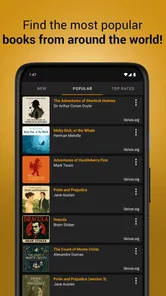
One of the first things that struck me about Freed Audiobooks is its extensive library. Whether you're a fan of the classics, a mystery enthusiast, or someone who loves self-help books, there's something for everyone. It's like having a library that's open 24/7, right in your pocket! The app offers a plethora of genres and authors, ensuring that you'll never run out of options.
Easy Navigation and User Experience
Navigating through the app is a breeze. The interface is user-friendly and intuitive, making it easy to find what you're looking for without any hassle. I appreciate how the app keeps things simple, allowing users to focus on the content rather than getting lost in complicated menus. Plus, the search functionality works like a charm, helping you find specific titles or authors in seconds.
Another feature I love is the bookmarking capability. You can easily mark where you left off, making it super convenient to pick up right where you stopped, even if you've switched to another book in between. It's these little touches that enhance the overall experience.
Quality Audio and Performance
When it comes to audiobooks, the quality of narration can make or break the experience. I'm happy to report that the audio quality on this app is top-notch. The narrators are professional and engaging, bringing stories to life in a way that keeps you hooked. Whether you're listening through headphones or your car's audio system, the sound is crystal clear and immersive.
Performance-wise, the app is smooth and responsive. I haven't encountered any glitches or crashes, which is a huge plus. It's been reliable for me, even during long listening sessions, which is crucial for any audiobook app.
Offline Listening and Accessibility
Another standout feature is the offline listening option. You can download books to your device and listen to them without an internet connection. This is perfect for when you're traveling or in areas with spotty Wi-Fi. Plus, the app's accessibility features ensure that everyone, including those with disabilities, can enjoy a seamless audiobook experience.
In conclusion, if you're looking for a way to make your daily routine more enjoyable, Freed Audiobooks is a fantastic option. With its vast selection, high-quality audio, and user-friendly design, it's a must-have for any book lover. So why not give it a try? You might just find your next favorite book waiting to be discovered!
Freed Audiobooks Frequently Asked Questions
Who is Freed Audiobooks designed for?
Freed Audiobooks is a Books & Reference app for people who enjoy listening to audiobooks on a mobile device. Its short description, “Freed Audiobooks,” and its store summary, “Freed audiobooks to listen to!”, make its focus clear. It may appeal to listeners who want audiobook content in an app, while the Teen content rating is useful to consider before choosing it for a younger user.
Who develops Freed Audiobooks, and when was it released?
Freed Audiobooks is developed by Sanity Audio Apps and was released on July 26, 2016. Knowing the developer and release date can help you identify the app and understand its history before installing it. Its current version is 1.16.76, so it has continued to receive version updates since its original release.
Can I use Freed Audiobooks on my Android device?
Freed Audiobooks is an app for Android, and it supports devices running Android 5.0 or later. Before downloading, check your device’s operating system version to make sure it meets that requirement. The app is in the Books & Reference category, so it may suit listeners who want to browse and listen to audiobook content from their phone or tablet.
Is Freed Audiobooks suitable for younger listeners?
Freed Audiobooks has a Teen content rating, which is worth considering when deciding whether it is appropriate for a younger listener. Parents and caregivers may want to review the app together with the intended user and consider the kinds of books they plan to explore. The rating gives a general guide, while individual listening choices can vary.
Who develops Freed Audiobooks, and is it widely used?
Freed Audiobooks is developed by Sanity Audio Apps. It has a 4.6 average rating from around 134,000 ratings and has been installed over 10 million times, suggesting that it has reached a broad audience of audiobook listeners. Those figures can help with a first impression, though the best way to judge whether the app fits your needs is to explore its features yourself.
Pros
- Extensive library of audiobooks.
- User-friendly interface.
- Offline listening feature.
- Regular updates with new titles.
- Compatible with both Android and iOS.
Cons
- Contains in-app advertisements.
- Limited free content access.
- Requires internet for downloads.
- Occasional app crashes reported.
- No customization options for playback.