Podcast Go
- 3.21K
- 4.2
- Installs
- 5.00M
- Price
- Free

Screenshots
Analysis by Reviewed
I find Podcast Go most useful when I want listening to fit around the day rather than become another screen-based task. It is a free news and magazines app from Sanity Audio Apps, and its mix of discovery and offline playback suits people who dip into shows during commutes, chores, or quiet evenings. The experience is not perfect, but it gives casual listeners a practical way to explore podcasts without paying upfront.
What the free option means
The app is free to install, with in-app purchases listed at $2.99 per item. That makes it easy to try before spending anything, though I would not treat the existence of purchases as proof that every feature is free or that a purchase is necessary. If you prefer to avoid paying, start with the free experience and decide whether it covers your routine before considering any optional item. I appreciate that distinction: the entry cost is clear, while the value of a paid add-on depends on what you personally need.
Everyday listening, with a few useful trade-offs
For a typical morning, I might queue a news episode while getting ready, then save another show for the train where reception can be unreliable. The practical trick is to download episodes while connected, rather than assuming a show will be available offline at the moment I need it. A little planning turns downloads into a useful travel habit; forgetting to prepare can leave the feature less helpful than it sounds.
Where it earns its place
Podcast Go has a 4.2 average from around 68,000 ratings, and it has passed 5 million installs. Those figures suggest it has found an audience, but they do not tell me whether its approach fits everyone. The app is rated Teen, runs on Android 5.0 or later, and version 2.23.55 is the current version. For me, the important point is that it is an established Android listening option, not a promise that every podcast habit or device setup will feel seamless.
Compared with using a general music app, a dedicated podcast player makes it easier to focus on shows, keep episodes together, and build a listening routine. Compared with a highly elaborate podcast service, Podcast Go’s appeal is its straightforward toolkit: search, recommendations, playlists, playback-speed adjustment, notifications, sleep timing, and offline downloads. I would choose it when those basics are what I actually use, rather than paying or navigating extra layers for features I may never touch.
A routine that keeps the queue useful
I get more from this kind of player when I treat the queue as a short-term plan, not as a permanent archive. If I find a show through recommendations, I can sample an episode, then either add it to a playlist for later or leave it behind. That distinction is especially helpful for news: a timely episode can be useful on the day I find it, while an evergreen interview may deserve a place in a longer listening list. Separating those intentions keeps a growing catalogue from feeling like an obligation.
For a realistic weekday, I might browse while having breakfast, choose one episode for the commute, and download it before leaving home. Once I’m out, I can rely on the saved episode rather than repeatedly checking whether mobile reception is holding up. Later, a sleep timer can make a quieter show part of a bedtime routine without requiring me to remember to stop playback. These are small conveniences, but they work best when I set them up deliberately instead of expecting the app to organize my habits for me.
More From Our News Desk

Weather by Xiaomi Review: Clear at a Glance, Less Clear Up Close

X Under Pressure: Can It Recover When Posting Goes Wrong?

Clash of Clans Is Won Between the Battles

Android Auto Makes the Case for Quieter Car Software

MobiOffice: Transforming Mobile Productivity with Seamless Integration

EA SPORTS FC™ Mobile Soccer: Redefining Mobile Sports Gaming
Discovery without losing control
Recommendations are useful as a starting point, but I would not let them make every listening decision. I use search when I already know a subject or show I want, and browse suggestions when I have time to explore. If a recommendation catches my eye, sampling one episode is a better test than subscribing to everything that looks interesting. This is a simple way to avoid turning discovery into a backlog, particularly if several new shows release episodes faster than I can listen.
Notifications are another setting worth handling with intention. They can help me notice a new episode from a show I follow closely, but alerts for every programme can interrupt the day and make a podcast habit feel like another inbox. I would enable them only for the few shows where timing matters, then use playlists or the queue for everything else. That workflow preserves the convenience of updates without letting discovery dictate when I listen.
What changes the value calculation
The free starting point is the clearest reason to try it: I can see whether its search, playback controls, playlists, and downloads fit my habits before deciding whether an optional purchase matters to me. The listed $2.99-per-item in-app purchases make the paid side something to assess individually, not a reason to assume the whole experience requires a subscription or a purchase. I would avoid spending until I know exactly which limitation I am trying to solve and whether the relevant item addresses it.
That matters because a podcast player earns its place through repeated use, not through a long feature list. If I only listen occasionally, the no-cost entry may be enough. If I listen every day, a smoother routine can be worth more than a collection of tools I rarely touch. My practical test would be to use the app for a week of ordinary listening: find a few shows, save episodes for one offline trip, and see whether the queue stays manageable. Then I can judge value against my actual behavior rather than a hypothetical ideal setup.
Where the trade-offs show up
Offline listening is convenient, but it shifts a little responsibility to me: I have to choose what to save before leaving a reliable connection. That can be an advantage for planning, but it is less forgiving if I decide at the last minute that I want an episode on a long ride. I would make a quick download check before a trip and avoid treating a saved episode as a substitute for organizing the rest of my listening.
The simple toolkit is also a limit for people who want a highly tailored podcast system. Search, playlists, speed controls, notifications, and a sleep timer cover a lot of common needs, but listeners with a very particular organizational workflow should compare players before moving their whole routine. Likewise, someone who already listens comfortably through a music service may not gain enough from switching to justify maintaining another app. Podcast Go makes the strongest case when podcasts are a regular part of the day and the basics are genuinely useful.
It is an Android app, with a minimum operating-system requirement of Android 5.0, so I would check device compatibility before planning a switch. Its Teen content rating is also a useful reminder that podcast subjects can vary; a broad catalogue is not the same as a guarantee that every show is suitable for every listener. I would preview unfamiliar programmes, especially when choosing something for shared listening or a younger family member.
Who gets the most from it
I would recommend trying Podcast Go if you want a focused place for podcasts, regularly listen while doing something else, and value being able to prepare episodes for offline moments. Commuters, people doing household tasks, and listeners who like to alternate between news and longer-form shows are likely to get practical use from its core tools. The 4.2 average and around 3,200 written reviews give some sense of how other users have responded, but I would still make my own decision based on whether the app fits my routine.
I would be more cautious if I rarely listen to podcasts, want music and spoken audio in one place, or depend on advanced library management. Someone who already has a dependable player and an established queue may have little reason to move. The app is free to install, so trying it is a low-commitment way to compare, but switching only makes sense if its discovery and listening workflow solve a real annoyance for you.
Discovering a World of Podcasts
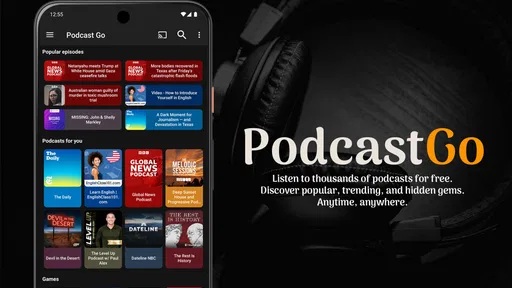
First off, let’s talk about the sheer variety available on Podcast Go. The app boasts a collection of over 800,000 podcasts, covering every imaginable topic—from true crime and comedy to educational series and news. It’s like having a world of knowledge and entertainment right at your fingertips. The search function is smooth as butter, letting you hunt down your favorite shows or discover new ones with ease. I found a couple of hidden gems just by browsing through the recommendations, which was a pleasant surprise.
User-Friendly Interface
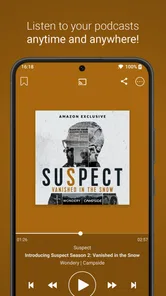
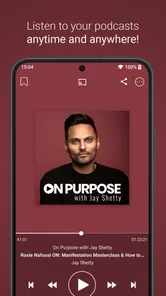
Now, if you’re like me, an app’s interface can make or break the experience. Thankfully, Podcast Go doesn’t disappoint. Its interface is clean, intuitive, and, dare I say, a feast for the eyes. Navigating through the app feels natural, with everything laid out logically. You’ve got your standard play, pause, and skip forward/backward buttons, but what really stands out is the sleep timer feature. It’s a godsend for those of us who like to drift off to a soothing podcast at night.
Download and Listen Offline
One of the standout features has to be the ability to download episodes for offline listening. Whether you’re on a flight, in a dead zone, or just conserving data, this feature is a lifesaver. I took a couple of episodes offline during a weekend trip, and it truly enhanced my travel experience.
Customization and Personalization
Let’s not forget about the customization options. Podcast Go allows you to tailor your listening experience to your heart’s content. You can adjust playback speed, set up playlists, and even receive notifications for new episodes. The app really goes the extra mile in ensuring it caters to individual preferences.
Choosing it over familiar alternatives
When I compare it with the podcast section of a music app, the main question is whether I want my spoken audio kept separate. A dedicated player can make it easier to return to shows, manage episode choices, and keep a travel download ready without mixing it into a music queue. On the other hand, the music app may be simpler if I already use it every day and only play an occasional podcast. Convenience is personal: fewer apps can be better than a dedicated library if listening is rare.
Against a more feature-heavy podcast service, I would weigh flexibility against friction. A listener who wants detailed organization and a carefully managed catalogue may prefer a tool built around that level of control. Podcast Go’s appeal, as I see it, is that its everyday functions are accessible without turning listening into a project. Before changing apps, I would try recreating one ordinary routine—finding a show, saving an episode, and returning to it later. If that feels easier here, the switch has a reason; if not, familiar habits are a perfectly good alternative.
Questions I would settle during a trial
A few practical questions are best answered by using the app with my own shows. Can I locate the programmes I actually follow? Do the recommendations introduce something I want to keep listening to? Does my saved-episode routine work for the places where I lose reception? These checks reveal more than browsing a catalogue once, because they test the app against the exact listening situations that matter to me.
I would also pay attention to how the queue feels after several days. If I keep postponing episodes, I would clear out samples and reserve playlists for shows I genuinely intend to hear. If downloads are part of my commute, I would check them before leaving rather than discovering an episode was not prepared when I am already offline. Those small habits answer the most important everyday question: does this player reduce effort, or does it add another list to maintain?
Wrapping It All Up
In conclusion, Podcast Go is a solid choice for podcast enthusiasts and casual listeners alike. It combines a vast library, user-friendly design, and essential features that enhance the overall experience. Whether you’re in it for the information, entertainment, or a bit of both, this app has got your back. So, if you’re on the hunt for a new podcast platform, give Podcast Go a try—you might just find your new favorite way to tune in.
My verdict is to start with the free install if you are curious, then judge it by a real commute, a short playlist, and one prepared offline session. The optional paid items are a separate decision: I would consider one only when I know what I want from it and can see that it provides that value. With 5 million-plus installs and a Teen rating, it is an established option for Android listeners, but popularity is not a substitute for fit. If its straightforward listening tools match your day, it is worth keeping; if you need a more specialized setup or prefer one app for music and podcasts, I would skip the switch and stay with the alternative that already works.
Podcast Go Frequently Asked Questions
Can I listen to Podcast Go without creating an account?
Podcast Go is designed around finding and listening to podcasts, with options to stream episodes or download them for offline playback. You can explore its listening features and podcast library on Android, where the app is available. Before downloading, consider whether you prefer a straightforward podcast app and whether its browsing and subscription tools fit the way you like to keep track of shows.
What kind of podcasts can I find on Podcast Go?
Podcast Go offers podcasts across a range of genres, including comedy, news, sports, and education. That variety makes it useful if you like switching between different subjects rather than following only one kind of show. You can browse for podcasts that interest you, then subscribe and organize your listening. The available selection is most useful when it matches the topics and styles you enjoy.
What Android requirements should I check before downloading Podcast Go?
Podcast Go is an Android app from Sanity Audio Apps, and it requires Android 5.0 or later. Before installing, check your device’s Android version and make sure you have enough storage for the app and any episodes you plan to download. The app is free to download, so you can try it without paying upfront.
What is Podcast Go and how does it work?
Podcast Go is a user-friendly application that allows you to listen to your favorite podcasts on Android devices. It provides an extensive library of podcasts across various genres, including comedy, news, sports, and education. The app lets you stream or download episodes for offline listening, and it features a simple interface that makes it easy to browse and manage your podcast subscriptions.
Is Podcast Go available for iOS devices?
Podcast Go is currently available only for Android devices. iOS users might need to look for alternative podcast apps on the Apple App Store. However, the developers are continually working to expand their platform reach, so an iOS version may be available in the future. Keep an eye on their website or app store listings for any updates.
Pros
- User-friendly interface for easy navigation.
- Wide variety of podcast genres available.
- Download podcasts for offline listening.
- Customizable playback speed settings.
- Integrated sleep timer feature.
Cons
- Contains ads in the free version.
- Limited features without premium upgrade.
- Occasional playback glitches reported.
- No option for video podcasts.
- Requires internet for streaming content.












