FoxEyes - Change Eye Color
- 794.00
- 4.2
- Installs
- 5.00M
- Price
- Free
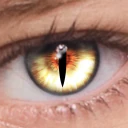
Screenshots
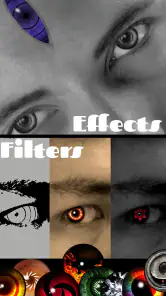
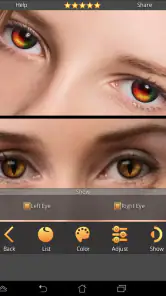
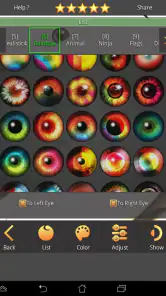
Analysis by Reviewed
When I consider an appearance-editing app, I care about two separate things: whether it can make a playful change to a photo, and whether I feel comfortable choosing what to share. FoxEyes is a beauty app from GameSmileStudio built around trying different eye looks. It is best approached as a creative photo experiment, not as a reliable preview of how colored contact lenses will look in real life.
That distinction matters because an edited image can be entertaining without being an accurate guide to a real-world choice. I’d use the result to see whether a color feels interesting in a particular picture, then make any contact-lens decision separately and with appropriate advice. If your main concern is privacy, it also makes sense to think about which photo you select and where you choose to share the finished image.
A sensible way to judge trust
I don’t treat a polished-looking edit as proof of how an app handles personal photos. A face image can feel more private than an ordinary picture, so my practical approach is to choose an image I’m comfortable experimenting with and to pause before sharing anything beyond the app. That is a useful habit with any photo editor, especially one designed for close-up facial changes.
There are visible choices to make while using the app, such as which photo to work on and what result to keep or share. Those choices are meaningful, but they should not be mistaken for a complete picture of data handling. I avoid assuming anything about storage, deletion, account requirements, or permissions unless those details are clearly presented in the app’s own settings and prompts.
In everyday use, that means keeping the first test low-stakes: try a non-sensitive selfie or a photo you already use for casual editing, inspect the result, and decide whether it is something you want to save or send elsewhere. If an app asks for access that does not seem relevant to the task, I would stop and review the request rather than tapping through automatically. That cautious routine is more useful than guessing what happens behind the scenes.
Choices before sharing
The image itself is the part I would handle most carefully. Eye edits draw attention to the face, so a picture that seems harmless in a private test may feel different once it is posted publicly. I’d review the whole image for identifying details, not just the eye color, and consider whether the people in it are comfortable with it being shared.
Sharing can be convenient, but it is also the point where control over a picture may become less straightforward. I prefer to inspect the finished image first and use the sharing destination I actually intend, rather than treating a one-tap option as a reason to publish immediately. For a quick joke between friends, a private message may fit better than a public post; for a more polished edit, I’d save time to check the crop and overall appearance before sending it.
More From Our News Desk

Weather by Xiaomi Review: Clear at a Glance, Less Clear Up Close

X Under Pressure: Can It Recover When Posting Goes Wrong?

Clash of Clans Is Won Between the Battles

Android Auto Makes the Case for Quieter Car Software

MobiOffice: Transforming Mobile Productivity with Seamless Integration

EA SPORTS FC™ Mobile Soccer: Redefining Mobile Sports Gaming
Your Eyes, Your Choice
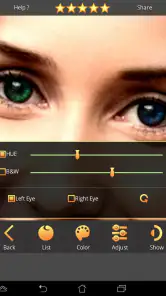
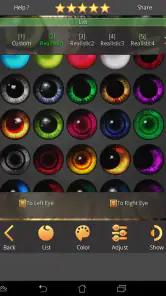
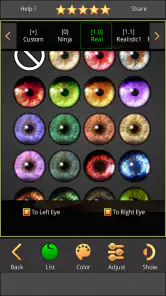
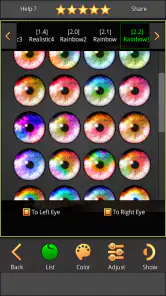
Let’s dive right into it. The first thing you’ll notice about FoxEyes is how incredibly easy it is to use. You just snap a selfie or upload a photo, and boom, you’re ready to begin your transformation. The app offers a wide array of colors to choose from, ranging from subtle browns and blues to more exotic hues like violet and emerald green. It’s like having a digital makeup artist at your fingertips!
Features Galore
What sets this app apart from others is its versatile set of features. Not only can you change your eye color, but you can also adjust the size of your eyes to create a more dramatic effect. The app’s advanced facial recognition ensures that the changes look natural and blend seamlessly with your original photo. Plus, with the ability to adjust the intensity of the color, you can keep it as realistic or as fantastical as you like.
For the most convincing result, I’d begin with a clear, well-lit photo where both eyes are visible and not covered by hair, glasses, or a strong shadow. That gives the edit a better chance of looking aligned rather than pasted on. I’d also try a restrained intensity first, compare it with a bolder setting, and only then decide which version suits the photo. This small sequence helps separate the appeal of a dramatic color from the quality of the actual blend.
Eye size is a separate creative choice, and I would use it lightly when aiming for a believable portrait. A noticeable size adjustment can shift the whole expression, even if the color itself looks plausible. For a playful profile image or a deliberately stylized picture, that exaggeration may be the point; for a natural-looking test, keeping the shape closer to the original is usually the safer approach.
Getting more from a quick edit
A useful workflow is to treat each edit as a comparison rather than trying to perfect everything at once. I’d choose one color, make a subtle adjustment, and look at the full portrait before changing anything else. Then I’d test a more unusual shade separately. This makes it easier to tell whether I like the color, the intensity, or the eye-size effect, instead of having several changes blur together.
Lighting can change the impression of a shade, so I wouldn’t judge a color from a tightly cropped view alone. A hue that looks striking around the iris may feel out of place against the skin tone or the mood of the photo when viewed at normal size. Checking the whole image on the phone before sharing is a simple way to catch that mismatch.
Another practical point is to use an original photo with enough resolution for the eye area to remain clear. If the source is blurry, the edit may draw attention to the very detail that is already indistinct. When I only have a casual snapshot, I’d treat the outcome as a fun effect rather than a careful beauty preview. A sharper image gives the app a fairer chance to produce a result I’d want to keep.
Another standout feature is the sharing option. Once you’ve perfected your new look, you can easily share your images on social media platforms straight from the app. It’s a great way to surprise your friends or maybe even freak them out with your new eye color!
I’d still look at the export as a final decision, not an automatic next step. Before sending an image, check that the eyes look right at the size people will actually see, and that the rest of the photo is something you are comfortable posting. If the image includes another person, it is considerate to get their agreement before sharing an edited version of their face.
Where it fits among beauty editors
Compared with a general photo editor, FoxEyes is more focused: it gives attention to eye color and eye size instead of asking you to work through a broad set of unrelated adjustments. That focus makes it appealing when you want a quick, specific transformation. A general-purpose editor is a better choice if you need to retouch several parts of a portrait, adjust the overall lighting, or make a more complete composition.
It also differs from trying colored contacts in person. A photo edit is fast and reversible as an experiment, while real lenses involve comfort, fit, and eye health that a screen cannot assess. I would use the app to explore visual ideas, not to decide whether a particular lens is safe or suitable. If you want a realistic preview under different lighting or from several angles, an edited single photo has obvious limits.
Compared with a social camera filter, a photo-based workflow can be more deliberate: you can begin with a picture you have already chosen and spend time tuning its appearance. The trade-off is that the outcome depends heavily on that source image. A live filter may be more convenient for a spontaneous moment, while this kind of focused edit makes more sense when you want to examine one portrait and compare possible eye looks.
Who will enjoy it, and who may not
I can see this being a good fit for someone curious about how a different eye color changes a familiar selfie, or for a person making a playful portrait for friends. It suits casual experimentation particularly well because the central idea is immediately understandable: choose a photo, try a color, and see whether the change works for you. The broad range from natural-looking shades to vivid ones also gives room for both understated and deliberately unreal results.
It is less suited to anyone who expects a full beauty suite or precise professional retouching. The app’s appeal is its narrow focus, so someone who wants skin adjustments, background tools, detailed layer control, or a complete portrait workflow would likely be happier in a broader editor. Likewise, if you are uncomfortable selecting a face photo for an editing app, there is no need to force yourself to use it; the feature is only worthwhile if the process feels acceptable to you.
A realistic everyday use might be getting ready for a themed party and wanting to see whether a vivid eye color complements an outfit in a photo. I’d take a clear selfie in similar lighting, test a subtle version and a more dramatic one, then compare both at full-image size. That gives a quick visual reference without pretending the edit predicts how contacts will look in person. The same approach works for choosing a fun profile picture, provided you are happy with the image’s privacy and audience.
Practical questions before installing
The basic workflow is straightforward: you can take a selfie or select a photo, then experiment with color and eye size. That makes the app approachable for a first-time user, though the quality of the result still depends on the photo. For a more useful test, choose a picture where the eyes are clear and the face is not heavily shadowed, then make one adjustment at a time.
FoxEyes is free, and it is rated for Everyone. It has an average rating of 4.2 from around 24,000 ratings, with more than 5 million installs. Those figures suggest that it has reached a broad audience, but they do not tell me whether a particular edit will suit your photo or whether you will like the controls. I’d treat them as context, not as a substitute for trying the specific workflow that matters to you.
The app was released on March 23, 2016, and its current version is 2.9.2.1, with Android 5.0 as the minimum operating system. If you are using an older device, checking compatibility before installing can save time. It is also available on Android and iOS, so the idea is not limited to one mobile platform.
A measured recommendation
One of the coolest things about FoxEyes is how it brings out the creative side in you. It’s not just about changing your eye color; it’s about exploring a different version of yourself. Playing around with different looks can be a fun way to express your personality or even test out a new look before committing to colored contact lenses in real life.
I’d keep that last use case firmly in the realm of inspiration. A screen edit can help you decide whether you enjoy the idea of a color, but it cannot reproduce the practical experience of wearing lenses or guarantee that the shade will appear the same outside the photo. If you are considering contacts, treat the edit as a starting point for style ideas rather than a basis for eye-care decisions.
The app is lightweight and doesn’t take up much space on your phone, which is always a bonus. Plus, it’s available for both Android and iOS, so no one misses out on the fun.
My recommendation is cautious but positive: use it when you want a quick, focused way to play with eye color in a portrait, and take a moment to inspect the picture before sharing it. Its focused controls make it easier to approach than a full editing suite for this one task, while the dependence on a suitable photo and the limits of a flat image keep it from being a serious real-life lens preview. If those expectations fit, it can be an enjoyable little experiment.
Ease of use and creative freedom make FoxEyes a must-try app. If you’re looking for a simple yet effective way to experiment with your appearance, then this app is definitely worth downloading. So why not give it a go and see what eye-catching looks you can create?
FoxEyes - Change Eye Color Frequently Asked Questions
Can FoxEyes - Change Eye Color edit a photo I already have?
FoxEyes - Change Eye Color is intended for changing the appearance of eyes in photos, so it can suit someone who wants to experiment with an existing image rather than change their real eye color. You can use it to explore different looks, from a new shade to a more striking effect. The result will depend on how clearly the eyes appear in the image.
Is FoxEyes - Change Eye Color suitable for beginners?
Yes. The app is described as easy to navigate, and its first-use tutorial guides you through selecting the eye area and applying an effect. That makes it approachable if you have little experience with photo editing. You can start with a simple color change, then explore other options as you become more comfortable with the tools and see what works on your photo.
What devices can run FoxEyes - Change Eye Color?
FoxEyes - Change Eye Color is a beauty app for Android, and it requires Android 5.0 or later. Before downloading, check your device’s operating system version to make sure it meets that requirement. The app is free to download and is rated for Everyone, so its stated age rating is suitable for a broad audience.
Who develops FoxEyes - Change Eye Color, and is it widely used?
FoxEyes - Change Eye Color is developed by GameSmileStudio and has been available since March 23, 2016. It has over 5 million installs and an average rating of 4.2 from around 24,000 ratings, offering a useful snapshot of its reach and overall reception. Those figures can help you decide whether it is worth trying, though your experience will depend on the photos and edits you want to make.
What features does FoxEyes - Change Eye Color offer?
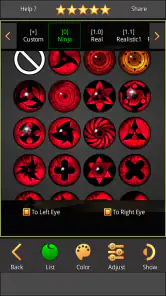
FoxEyes - Change Eye Color provides a variety of features including the ability to change your eye color using a realistic color palette, add special effects like cat eyes or zombie eyes, and adjust the intensity and brightness of the colors. The app also offers tools for enhancing eye makeup and correcting red-eye in photos, making it comprehensive for both fun edits and practical photo enhancements.
Pros
- Realistic eye color effects
- User-friendly interface
- Wide range of eye colors
- Supports photo editing
- High-resolution outputs
Cons
- Limited free features
- Contains ads
- Occasional app crashes
- Requires in-app purchases
- No video editing support
- Category
- Beauty
- Version
- 2.9.2.1













