SelfComic: Sasuke Ninja Photo
- 77.00
- 4.3
- Installs
- 1.00M
- Price
- Free
Screenshots
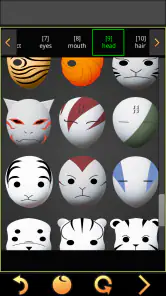
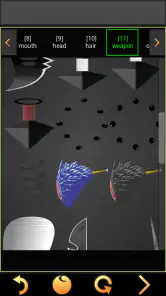
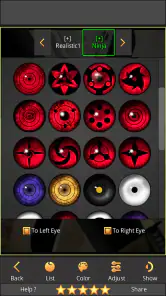
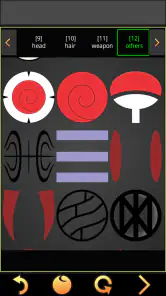
Analysis by Reviewed
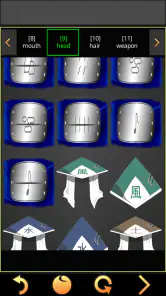
I’d treat SelfComic as a playful photo-editing tool for a particular mood, rather than an all-purpose editor. Its appeal is the chance to turn a familiar selfie into a ninja-themed comic image, with stickers that suggest weapons, clothes, and visual effects. If I wanted a quick joke for a group chat or a themed picture to share with friends, that focused idea would be more useful than a large editor full of tools I might never touch.
Where a themed editor fits
For a casual project, I’d start with a clear photo, choose a sticker that reads well at phone-screen size, then add a short line of text if I wanted the result to feel like a panel. Keeping the composition simple is a practical tip: a busy background and several large stickers can compete with the face instead of making the image funnier. I’d also save a clean copy of the original photo before experimenting, so I could try a different arrangement without losing the picture I started with.
This is the kind of app I’d open when a friend sends a selfie and the group is already joking about anime or ninja characters. It can turn that moment into a small creative activity: each person suggests a costume detail or a line for the speech bubble, and the finished image becomes the punchline. For a polished profile portrait, a precise retouch, or a collage with lots of layout control, I’d choose a general photo editor instead. SelfComic’s narrower theme is its charm, but it also sets a limit on the kinds of images it suits.
Connectivity and everyday use
The experience is best judged as a mobile creative task, not as a tool that needs constant attention. A quick edit between errands or while sitting with friends is a natural fit, especially when the aim is one amusing image rather than a carefully finished project. Sharing can depend on the services available on your device and the connection at the time, so I’d finish the edit first and treat posting as a separate step. That way, a slow network is less likely to interrupt the creative part.
If sharing does not go through, I’d avoid rebuilding the image immediately. First I’d check whether the photo is still available in the app, then try the share action again when the connection is steadier. For anything I care about keeping, I’d make sure I have a copy saved where I can find it before switching apps. This is a sensible habit with any quick-edit workflow, particularly when the final image matters more than sending it at that exact moment.
Who should give it a try
I’d recommend it most to anime fans, younger users making playful pictures with family, and anyone who enjoys turning ordinary photos into a small visual gag. Its age rating is Everyone, and the app is free, so it is easy to consider for a casual trial. It is less suited to someone who wants broad editing controls, a neutral collection of effects, or a dependable work pipeline for client images. The best reason to choose it is not that it replaces those tools; it is that its ninja styling gives a simple photo a clear, specific character.
For context, SelfComic is a comics-category app from GameSmileStudio. It was released on Jul 16, 2019, and version 1.3.0.0 requires Android 5.0 or later. It has a 4.3 average from around 4.5K ratings, with over 1M installs. Those figures suggest that plenty of people have tried it, but I’d still decide based on whether the themed stickers match the kind of pictures I actually make.
More From Our News Desk

Weather by Xiaomi Review: Clear at a Glance, Less Clear Up Close

X Under Pressure: Can It Recover When Posting Goes Wrong?

Clash of Clans Is Won Between the Battles

Android Auto Makes the Case for Quieter Car Software

MobiOffice: Transforming Mobile Productivity with Seamless Integration

EA SPORTS FC™ Mobile Soccer: Redefining Mobile Sports Gaming
Making a small edit work well
One useful way to approach a themed editor is to decide on the joke before adding decoration. I’d pick a photo with a clear expression, then use the ninja styling to reinforce that expression rather than cover it. A surprised face might call for one dramatic effect, while a relaxed pose could work better with a costume detail and a short caption. This keeps the image readable when it is viewed as a small chat preview, where tiny details can disappear.
I’d also consider the crop before settling on sticker placement. A sticker near the edge may look fine while editing but become cramped if the image is later cropped by a social app. Leaving a little breathing room around the face and any text makes the finished picture more flexible to share. This is a simple trade-off: filling the frame can feel more energetic, but a less crowded composition is usually easier to understand at a glance.
When a broader editor is the better choice
Compared with the usual general-purpose photo editors, SelfComic is appealing because it narrows the decision-making. I don’t have to sort through unrelated filters or build a style from scratch; the ninja premise gives the picture a direction. That is a real advantage for a quick gag, especially when a group is brainstorming together. The flip side is that someone looking for natural color correction, careful blemish cleanup, several kinds of collage, or a consistent style across many unrelated photos will probably be happier in a broader editor.
It also differs from making a comic entirely by hand. A dedicated drawing or layout tool gives more control over panels, lettering, and pacing, but it asks for more time and effort. SelfComic is better suited to a single photo that needs a quick character and a punchline, not a multi-panel story with precise visual continuity. I’d choose according to the finished result I want, rather than expecting one small themed app to cover both jobs.
A realistic moment for using it
Imagine a family gathering where someone takes a goofy selfie after a long day. I’d open the picture, try one or two outfit or effect stickers, and ask the others which version makes the expression funnier. If a speech bubble helps the joke, I’d keep its text short enough to read without zooming. The best part is that the process can be collaborative even though the edit itself is simple: one person chooses the image, another suggests the line, and everyone gets to vote on the final arrangement.
That sort of use also makes the app’s limits easier to accept. It does not need to become a permanent photo archive or a serious creative workspace; it can be a tool for a moment. If I were making something for a public account or a keepsake, I’d check the image carefully at full size and keep the original separate. For a disposable joke in a private chat, I would spend less time polishing and more time making sure the visual idea lands.
My take on its staying power
The main trade-off is focus: a ninja look can make a photo instantly more playful, but it will not fit every occasion, and repeating the same visual theme may eventually feel limiting. I’d get the most from it by using it for occasional jokes, themed messages, or a one-off picture with friends rather than expecting a fresh general-purpose editing experience every day. If that sounds like your kind of small creative break, SelfComic: Sasuke Ninja Photo is worth trying; if you need fine control or a versatile toolkit, another editor will likely serve you better.
Let me dive into the ninja world with one of the coolest apps I've had the chance to play around with recently: SelfComic: Sasuke Ninja Photo. If you’re a fan of anime or just love goofing around with photos, this app is definitely one to try. Imagine combining your love for comics with your selfies. Sounds fun, right? Let's break it down.
What is SelfComic: Sasuke Ninja Photo?
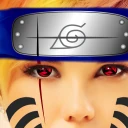
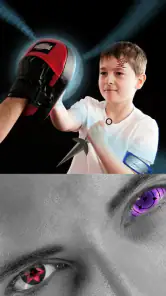
Okay, picture this: you’ve just taken a selfie, but it’s no ordinary selfie — it’s transformed into a comic strip! SelfComic: Sasuke Ninja Photo allows you to edit your photos with awesome ninja-themed stickers and filters, giving them a manga-style makeover. It’s like stepping into the world of your favorite ninja anime, and who wouldn't want that?
The Cool Features
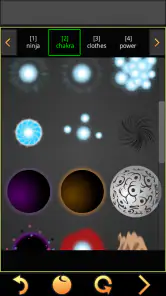
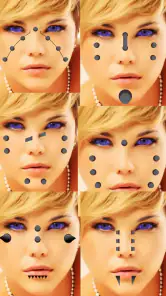
So, what makes this app stand out from the crowd? First off, it has a super user-friendly interface, which means you don’t have to be a tech genius to figure it out. Just snap a pic or upload one from your gallery, and let the magic happen. The app comes loaded with a variety of stickers and filters, all ninja-themed, of course.
One of my favorite features is the ability to add speech bubbles. You can insert your own text, making your photos not just cool but also hilarious. It’s like creating your own mini comic strip starring you and your friends. Plus, the app frequently updates its library with new stickers, so there’s always something fresh to try out.
Seamless Sharing
In today's social media-driven world, sharing is caring. The developers of SelfComic have made it incredibly easy to share your creations. Whether it's Instagram, Facebook, or even sending it directly to a friend, the app integrates smoothly with most social platforms. Just a tap, and your comic-style photo is out there for the world to see.
Why You'll Love It
If you’re someone who enjoys personalizing your photos, this app is a goldmine. It brings a unique twist to the mundane task of photo editing by adding a playful element. The ninja theme is not only popular but also executed beautifully, making your photos look like they’ve jumped straight out of a manga.
Moreover, SelfComic: Sasuke Ninja Photo appeals to both kids and adults alike. It’s a great way to bond with younger siblings or just indulge your inner child. Plus, with its easy-to-use features, it’s perfect for those quick edits on the go.
Final Thoughts
In conclusion, SelfComic: Sasuke Ninja Photo is a fantastic app for anyone looking to add a bit of flair to their photos. It’s fun, innovative, and most importantly, easy to use. Whether you’re a die-hard anime fan or someone who just loves being creative, this app is a must-try. So go ahead, embrace your inner ninja, and turn those selfies into something extraordinary!
SelfComic: Sasuke Ninja Photo Frequently Asked Questions
Is SelfComic: Sasuke Ninja Photo suitable for children?
SelfComic: Sasuke Ninja Photo is rated Everyone, making it suitable for a general audience. Its focus is on editing photos with anime ninja-themed stickers, such as weapons, clothing, and effects. As with any photo-editing app, parents may wish to review how a child uses the app and what images they choose to edit or share.
What devices can install SelfComic: Sasuke Ninja Photo?
The Android version requires Android 5.0 or later. SelfComic: Sasuke Ninja Photo is a photo-editing app in the Comics category, so it may appeal to users who want to add anime-inspired ninja elements to their pictures. Check your device’s operating system before downloading to make sure it meets the minimum requirement.
What is SelfComic: Sasuke Ninja Photo?
SelfComic: Sasuke Ninja Photo is an innovative app that allows users to transform their photos into comic-style images with a ninja theme. By utilizing advanced filters and editing tools, users can easily create and customize their photos to resemble scenes from popular ninja comics, particularly focusing on the Sasuke character. The app’s summary highlights hundreds of stickers covering weapons, clothes, and effects, giving users plenty of themed elements to try.
How user-friendly is the app for beginners?
SelfComic: Sasuke Ninja Photo is designed with a user-friendly interface, making it accessible for beginners. The app includes step-by-step tutorials and tips to guide new users through the process of editing their photos. Its intuitive layout ensures that users can easily navigate between different features and tools, even if they have no prior experience with photo editing apps.
Does the app require an internet connection to function?
While SelfComic: Sasuke Ninja Photo can be used offline for basic photo editing, some features, such as cloud storage and downloading additional filters, require an internet connection. Users can enjoy the core functionalities without being connected, but accessing the full range of options will need internet access.
Pros
- User-friendly interface for easy navigation.
- High-quality images and illustrations.
- Wide range of ninja-themed stickers.
- Regular updates with new content.
- Offline use is supported.
Cons
- Contains in-app purchases.
- Limited free content available.
- Ad interruptions can be frequent.
- Requires a stable internet connection for downloads.
- Some features need improvement.
- Category
- Comics
- Version
- 1.3.0.0