

SelfComic: Super Saiyan Photo
- 39.00
- 4.2
- Installs
- 500.00K
- Price
- Free

Screenshots
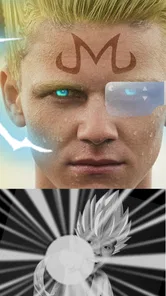
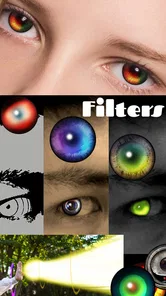
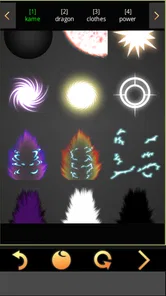
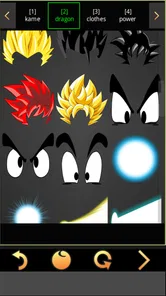
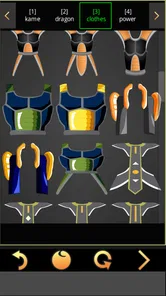
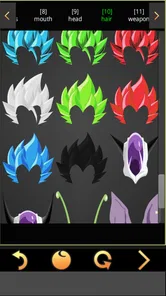
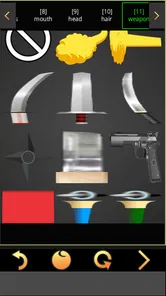
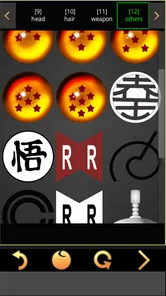
Analysis by Reviewed
I see SelfComic: Super Saiyan Photo as a playful, narrowly focused photo app rather than a general editor. Its appeal is easy to understand: it lets you turn a familiar selfie into an anime-inspired Saiyan portrait, so the fun is in experimenting with a dramatic new look, not in polishing a photo for every occasion. I’d recommend it to someone who wants a quick, silly, shareable transformation, while anyone looking for a full photo-editing toolkit should choose a broader alternative.
The distinction matters before you install it. A themed photo app is most rewarding when you already have a clear idea of the image you want to make; it is less useful when you open an editor simply because a picture needs fixing. I’d approach this one as a small creative activity: choose a suitable face photo, test a few dramatic looks, and keep the result if it makes you smile. That expectation makes its narrow focus feel intentional rather than incomplete.
A focused idea, not an all-purpose editor
For comic-inspired selfies, a dedicated effect can be more enjoyable than assembling a similar look from generic filters and stickers. The theme gives the edits a common visual direction, which is helpful if your goal is a recognizable transformation rather than a perfectly corrected photograph. The trade-off is that the same focus gives you fewer reasons to return when you want an ordinary portrait adjustment or a different kind of fantasy effect.
I would not use it as the only photo app on my phone. It makes more sense alongside a general editor: use this app for the character-style image, then turn to another tool if the picture needs routine cropping or broader finishing touches. Keeping those jobs separate is a practical way to avoid expecting a playful effect app to do work it was not designed around.
The Transformation Experience
The moment you open the app, the interface is pretty straightforward, making it super easy to navigate. You’re greeted with a simple menu that allows you to either take a new photo or choose an existing one from your gallery. The app quickly processes your image and gives you a plethora of Saiyan-inspired transformations to choose from. I must say, the variety is impressive. Whether you want a basic aura or the full-on Super Saiyan hair and electricity, SelfComic: Super Saiyan Photo has got you covered.
That focused approach is also the main trade-off. Unlike a general selfie editor, which might offer portrait retouching, filters, and everyday adjustments, this app is built around one comic-book fantasy. That makes it easier to get to the point when you want a Saiyan makeover, but it is not where I’d go to crop a family picture, improve lighting, or make a polished profile photo. I’d treat it as a novelty editor for a specific mood rather than a replacement for the editing tools already on a phone.
Choosing a photo that works
The source image has a big influence on whether a dramatic overlay feels convincing. I’d begin with a well-lit, front-facing selfie where the face is easy to distinguish from the background. That is not a guarantee that every effect will sit perfectly, but it gives the transformation a fair chance and makes it easier to compare options. A busy background, an angled pose, or hair already covering much of the face can compete with the added character details.
More From Our News Desk

 Gmail
GmailGmail in a Busy Inbox: Who Benefits Most?
From first account to crowded workday, Gmail earns its place through dependable search and flexible sorting—but its best fit depends on how much inbox maintenance you can tolerate.

 Prime Video
Switching to Prime Video: What Changes in Your Viewing Routine
Prime Video can make a compelling second home for streaming, but switching means learning a different catalog, rental layer, and route from browsing to playback.

 Universal TV Remote Control
Universal TV Remote Control Works Best as a Reliable Backup
A phone remote earns its place through quick setup and reliable habits. Here is how to get more from Universal TV Remote Control—and where its limits show.

 Weather - By Xiaomi
Weather by Xiaomi Review: Clear at a Glance, Less Clear Up Close
Xiaomi’s weather app makes everyday forecasts quick to scan, but its calm surface can leave useful details and recovery paths harder to find than they should be.

 X
XX Under Pressure: Can It Recover When Posting Goes Wrong?
A resilience-focused review of X, examining setup, mistaken posts, interruptions, weak connections, and the gaps that matter when recovery needs to be dependable.

 Clash of Clans
Clash of Clans Is Won Between the Battles
Its raids are quick; its community is a long-term project of coordination, teaching, rivalry, and shared responsibility—with all the friction that entails.
Latest News



There is a useful trade-off between taking a fresh picture and selecting one from the gallery. A new selfie lets you deliberately choose a pose and lighting that suit the effect; a saved photo is more convenient when you already have a good expression you want to reuse. I’d avoid making repeated edits to a previously transformed image, because the added effects can become harder to judge against one another. Starting from the original makes comparisons clearer and keeps the result from looking needlessly crowded.
Customization Galore
One of the most exciting features of this app is the level of customization it offers. You can adjust the intensity of the aura, the color of the hair, and even add some epic effects like lightning or energy blasts. It’s almost like having your own little anime studio right in your pocket. I spent a good amount of time just playing around with different combinations, and it’s safe to say that no two photos will look the same.
A useful way to get more from those choices is to start with a clear, front-facing photo and make one change at a time. That makes it easier to judge whether the hair, aura, or extra effects are working with the pose, instead of piling on everything and losing the face in visual noise. I’d also keep an untouched copy of a photo if I plan to reuse it elsewhere; the transformation is meant to be expressive, not a subtle correction. This small workflow helps the final image feel deliberate rather than like a collection of effects.
For a cleaner result, I’d decide what should draw the eye before adding effects. If the hair is already the main feature, a restrained aura can keep the face readable; if the energy effect is the joke, simpler styling may give it room to stand out. This is a matter of taste, not a rule, but it helps when several bold elements start competing. I’d also preview the picture at the size where I expect to share it, because details that look exciting full-screen can merge together in a small thumbnail.
User Experience
When it comes to user experience, the app runs smoothly without any noticeable lags or crashes, which is always a plus. The editing process is quick, and the final output is surprisingly high quality. I was particularly impressed with how well the effects blended with the original photo, making the transformation look natural and seamless. Sharing your new Saiyan look is also a breeze, with direct sharing options to social media platforms.
For a realistic everyday use, I can picture opening it while chatting with friends, choosing a recent selfie, and trying a couple of looks before sending the funniest result to a group conversation. That is a better fit than using it for a formal headshot: the charm is in the exaggerated, unmistakably anime style. If you are making an image for a public profile, I’d check the crop and how the effects sit around the face before sharing, since a playful effect can become distracting at small display sizes.
It also works best when the goal is a single finished image, not a whole batch of polished portraits. For a casual group chat, I might make one version for each friend from their own chosen photo, letting everyone pick the style they like rather than deciding for them. That keeps the activity light and avoids treating another person’s face as raw material without their say-so. If you are preparing a picture for a wider audience, I’d ask before using somebody else’s image and check that the exaggerated look suits the setting.
Sharing is convenient when you want to send a result straight into a conversation, but I would still pause before posting publicly. A playful transformation can reveal the original face and may be recognizable even after the effects are added. I’d think about the audience, the person in the image, and whether the photo is appropriate outside a private chat. That little check is especially worthwhile with children’s pictures or images of friends who did not make the edit themselves.
The app is free, and it comes from GameSmileStudio. It has a 4.1 average from around 2.3 thousand ratings, with over 500 thousand installs, which suggests that plenty of people have tried this specific photo concept. Its Everyone age rating makes the basic premise accessible to a broad audience, though I’d still choose photos thoughtfully when sharing images of children or other people. The app’s current version is 1.0.26 and it supports Android 5.0 and up, so compatibility is worth checking before installing on an older device.
Those details make it a low-commitment option to try if the theme appeals to you, but a broad audience rating does not mean every sharing choice is automatically appropriate. I’d treat the age label as a guide to the app’s general content, not as a reason to post someone else’s edited photo without asking. On an older phone, checking the Android requirement first is a simple way to avoid starting an installation that cannot work on the device.
One practical question is whether it is suited to a quick edit or a longer creative session. I found its appeal strongest in short bursts: pick an image, compare a few transformations, and save or share the one that lands. The effects give you room to play, but the theme is specific enough that repeated use may feel limited if you want new styles for every photo. If you mainly want broad filters and routine touch-ups, a conventional editor is the more sensible choice; if the Saiyan look is the whole point, the focused selection is an advantage.
That also makes the app a better fit for occasional fun than for a daily editing habit. If I were choosing between this and a standard photo editor, I’d decide based on the result I need, not on which app has more tools. A general editor is the practical pick for correcting a batch of everyday pictures, while this one is the more direct route when the specific character makeover is the reason for editing. Neither approach is better in every situation; they solve different problems.
One limitation is worth keeping in mind before you spend time arranging an image: the original app description makes a strong case for the theme, but not every user will find the same amount of variety compelling over time. A few enjoyable combinations can be enough for a joke or a themed post; someone who wants a new visual style for every outing may soon prefer an editor with a wider range of effects. I would judge it by whether the Saiyan look makes you want to create something, not by how many unrelated editing jobs it can handle.
However, like any app, it has its quirks. While the free version offers a decent number of features, some of the more intricate effects are locked behind a paywall. This might not be a dealbreaker for some, but it’s worth noting if you’re looking for a completely free experience.
That is the main point I’d check during an initial session: enjoy the options you can use, but don’t build your plan around an effect before seeing whether it is available to you. If you only want a simple transformation, the free starting point may be enough to decide whether the concept suits you. If a particular elaborate look is essential, the possibility of paid content could change the value calculation, especially for someone who only expects to edit one picture.
Who Will Enjoy It Most
I’d point anime fans, friends making playful group images, and anyone who enjoys turning a normal selfie into a character portrait toward this app. It is also an easy choice for someone who wants a themed result without learning a complex editor. On the other hand, skip it if you need precise retouching, a wide range of unrelated styles, or a consistently realistic finish. The concept is intentionally over-the-top, and that is exactly why it works for the right audience.
It is particularly suited to people who like to make images for a specific moment: a themed conversation, a lighthearted birthday message, or a joke among friends who understand the reference. In those cases, the result does not need to pass as a natural photograph; the obvious exaggeration is part of the point. I would not choose it for a professional portrait, a careful family album edit, or a project where consistent, subtle treatment matters more than a recognizable comic-book effect.
If you are unsure whether the app is for you, I’d ask one simple question: would you enjoy making this kind of image even if you only use it now and then? If the answer is yes, its focused design may be a plus, because it keeps the experience centered on that one playful idea. If you expect a large library of unrelated looks or dependable tools for every photo, a broader editor will better match your expectations and save you from switching apps later.
Final Thoughts
In the realm of photo editing apps, SelfComic: Super Saiyan Photo definitely stands out for its fun and creative approach. It’s perfect for anime fans or anyone looking to add a little flair to their photos. Whether you’re a die-hard Dragon Ball enthusiast or just someone looking to have some fun with your selfies, this app offers a unique and enjoyable experience. So why not give it a shot and see what kind of Saiyan you can become?
My verdict is positive, with a clear qualification: this is a themed plaything for photos, not a replacement for a capable all-purpose editor. I’d try it when I wanted a bold, recognizable transformation and had a suitable selfie ready, then use another app for careful corrections or a more restrained look. If that distinction matches what you want, the narrow scope is part of the charm. If it does not, you will probably be happier with a broader tool.
SelfComic: Super Saiyan Photo Frequently Asked Questions
What is SelfComic: Super Saiyan Photo and what does it do?
SelfComic: Super Saiyan Photo is a fun and entertaining app designed for anime enthusiasts, particularly fans of the Saiyan characters from the Dragon Ball series. The app allows you to transform your ordinary photos into dynamic, anime-style images by adding super Saiyan features such as spiky hair, glowing eyes, and energy auras. This app is perfect for those wanting to create unique and personalized anime avatars or simply to have fun with their photos.
Is SelfComic: Super Saiyan Photo free to use or does it require a purchase?
SelfComic: Super Saiyan Photo offers both free and premium features. You can download the app and use basic functionalities at no cost. However, there are in-app purchases available that provide access to a wider range of features and customization options. This includes more hairstyles, effects, and the ability to remove ads, enhancing your overall experience with the app.
What platforms is SelfComic: Super Saiyan Photo available on?
SelfComic: Super Saiyan Photo is available on both Android and iOS platforms, making it accessible to a wide range of smartphone users. You can download it from the Google Play Store for Android devices or the Apple App Store for iOS devices. Ensure that your device meets the minimum system requirements to enjoy the app seamlessly.
How user-friendly is SelfComic: Super Saiyan Photo for beginners?
SelfComic: Super Saiyan Photo is designed to be user-friendly, even for beginners. The app features a straightforward interface with easy-to-navigate menus and clear instructions. Users can quickly learn how to apply different effects to their photos. Additionally, the app provides tutorials and tips to help new users get started, making it accessible for people of all ages and technical abilities.
Does SelfComic: Super Saiyan Photo offer any social media integration?
Yes, SelfComic: Super Saiyan Photo offers seamless social media integration. After transforming your photos into super Saiyan characters, you can easily share your creations directly on popular social media platforms like Instagram, Facebook, and Twitter. This feature allows users to showcase their creativity and engage with friends and followers by sharing their unique anime-style images.
Pros
- Easy to use interface.
- High-quality photo effects.
- Quick photo processing.
- Multiple character options.
- Regular updates.
Cons
- Limited free features.
- In-app purchases required.
- Ads can be intrusive.
- Occasional app crashes.
- Large download size.













