FlightAware Flight Tracker
- 3.77K
- 3.8
- Installs
- 10.00M
- Price
- Free

Screenshots
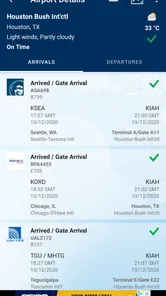
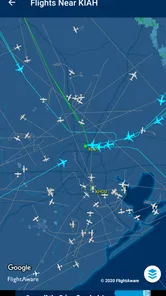
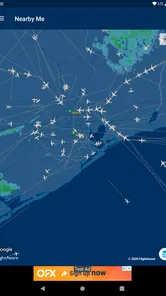
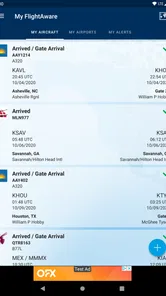
Analysis by Reviewed
When a flight plan changes, the hardest part is often not finding a plane on a map; it is figuring out whether the information matters to your day. I find FlightAware Flight Tracker most useful as a practical way to follow a particular flight and keep an eye on its progress, rather than as a reason to watch every aircraft overhead. That focus makes it handy for travelers, airport pickups, and anyone who enjoys following aviation without needing a specialist tool.
Following a flight, not just watching the map
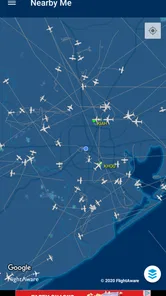
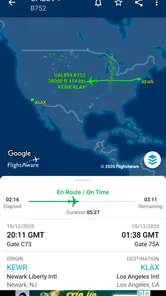
The central appeal is live flight tracking. Instead of relying only on a traveler’s texts or checking an airline page repeatedly, I can look up a flight and follow its journey. The map gives that information a useful visual context: it helps me understand where the aircraft is, while flight details make the trip easier to follow. The app is made by FlightAware, a developer focused on flight tracking, and it sits naturally in the travel and local category.
For a useful routine, I would search by flight number when I have it, then set a notification for the flight I care about. That is more focused than leaving the map open and trying to spot one aircraft among many. It also answers a common practical question: do I need to keep checking the app? Not if I have set an alert for a flight; notifications can make monitoring less hands-on. I still treat the app as a source of situational awareness, not a substitute for checking directly with an airline or airport when a decision depends on the latest official instruction.
A realistic airport pickup
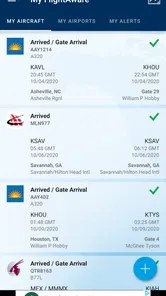
Imagine a friend is flying in while you are still at home or finishing an errand. Rather than drive to the airport based on the original arrival time and wait, I can follow the flight, notice a delay or cancellation update, and adjust when I leave. Once the trip is underway, the map provides a satisfying sense of progress; when plans change, a notification can be more useful than repeatedly refreshing a screen. This is the kind of small workflow where tracking feels worthwhile: it can help me time a pickup, but it cannot remove airport traffic, baggage delays, or the uncertainty of a changing travel day.
Compared with using only an airline’s app, FlightAware is appealing when I want a broader flight-tracking view rather than a tool centered solely on my own booking. An airline app may be the better choice for managing a reservation or following instructions tied to that ticket. A general map app, meanwhile, is better for road directions to the terminal, not for watching an aircraft’s trip. I see FlightAware as a complement to those tools: use it to follow the flight, and use the airline or airport for travel arrangements and on-the-ground decisions.
Take Off with FlightAware
Let me tell you, right off the bat, FlightAware Flight Tracker is like having a personal air traffic control tower in your pocket. Once you install it, the app opens up to a world of live flight tracking. Seriously, you can track any commercial flight across the globe. It's mind-boggling and slightly addictive, to be honest!
Interface and Usability
The app's interface is sleek and intuitive. No rocket science here, folks. The main screen shows a map dotted with planes, and you can pinch, zoom, and swipe to navigate through the map effortlessly. It feels like you're playing a game, minus the high scores. The search function works like a charm. Just key in the flight number or the airline, and voilà, you have all the info you need.
More From Our News Desk

Weather by Xiaomi Review: Clear at a Glance, Less Clear Up Close

X Under Pressure: Can It Recover When Posting Goes Wrong?

Clash of Clans Is Won Between the Battles

Android Auto Makes the Case for Quieter Car Software

MobiOffice: Transforming Mobile Productivity with Seamless Integration

EA SPORTS FC™ Mobile Soccer: Redefining Mobile Sports Gaming
That map is fun to explore, but I would not make browsing the default way to find a flight when time matters. Searching with a flight number is a more direct starting point, especially if several aircraft are visible in the area. If I do not have that number, the airline search offers another route in. Once I have the flight I want, keeping the view centered on that trip is less distracting than scanning the map for a matching plane. This is a modest but useful trade-off: the map is engaging, while search is the practical shortcut.
A small habit makes the app easier to use when plans are moving quickly: I would identify the exact flight before the day of travel, rather than trying to work it out while already on the road. Flight numbers are more precise than a passenger’s name or a destination alone, particularly when several flights share a route. After finding the right trip, I can set an alert and leave the map for occasional checks. That approach keeps the app useful without turning every quiet moment into another refresh.
Features That Soar
Now, let's dive into the features. The app provides real-time updates, including gate changes, delays, and cancellations. It’s like having an insider at the airport whispering updates in your ear. Plus, you can set up notifications for your flights or any flight you’re interested in. It's a lifesaver when you're picking someone up from the airport.
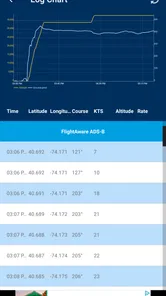
But wait, there’s more! The app also gives you historical flight data. Ever wanted to know how often a flight is delayed? FlightAware's got your back. And for all the aviation geeks out there, you can access detailed information about the aircraft, including its age, altitude, and speed. It's like an aircraft encyclopedia.
What the extra detail is good for
Historical information is most useful when I am comparing a route over time, not when I need to decide whether to leave for the airport right now. Aircraft details have a different appeal: altitude and speed make a live flight more legible, while the aircraft’s age adds context for people who enjoy the equipment as much as the destination. I would treat these as optional layers of interest. They add depth for aviation fans, but a casual traveler can ignore them and still get value from tracking a flight.
There is a practical way to use that history without overreading it. If I am choosing between travel options, past performance can help me ask better questions about a route, but it cannot predict the outcome of a particular trip. I would use it as background when comparing flights, then rely on current updates for the day itself. The same distinction applies to the aircraft information: it can satisfy curiosity, but it is not a substitute for the details that matter to a passenger, such as the airline’s instructions or the terms of a booking.
There are limits to keep in mind. A flight-tracking map is not the same thing as a guaranteed minute-by-minute promise about arrival, and notifications do not make changing plans disappear. I would check the airline’s own channel before acting on a gate change or other airport instruction. The app is also less compelling if I only need directions, a boarding pass, or help managing a booking; those jobs belong more naturally to maps and airline apps. Its strength is following aircraft and flight progress, so it makes most sense when that is the question I need answered.
When tracking is the right tool
The most useful distinction is between following a flight and managing a journey. If I am the passenger, an airline app is usually the place I would go for a boarding pass, reservation details, and instructions connected to my ticket. If I am meeting someone, or simply want to know how a flight is progressing, FlightAware gives that question its own space. Keeping both roles separate helps avoid the frustrating assumption that a tracker can handle every airport task.
It is also worth considering how much detail you actually want. Someone who only needs to know whether a relative has landed may prefer the airline’s simpler status screen, especially if they already use it for the booking. Someone who wants a live map, aircraft context, or a way to follow a flight they are not booked on has more reason to open FlightAware. The broader tracking perspective is an advantage for that person, but it can feel like extra information to anyone who only wants a quick yes-or-no answer.
Why You’ll Love It
Now, you might be wondering, "Is this app really for me?" Well, if you travel often, have friends or family who do, or are simply fascinated by aviation, the answer is a resounding yes. The app makes tracking flights a breeze and provides peace of mind, especially in today's unpredictable travel climate.
It is free to download, rated for everyone, and has an average rating of 3.8 from around 45,000 ratings, with more than 10 million installs. The current version is 5.15.0, and it requires Android 8.0 or later. Optional in-app purchases range from $0.99 to $5.99 per item, so I would check what is offered in the app before assuming every extra is included. Those details make it approachable for a quick trial, though the rating also suggests it may not be a perfect fit for every user.
For a passenger, a useful everyday scenario is checking a connecting flight while deciding whether to call family, arrange a pickup, or simply wait for a more definite update. For the person doing the pickup, the same information can help avoid leaving too early, while still leaving room for road traffic and the time it takes to get through the airport. I would make the flight the focus, not try to turn the app into a complete travel planner. That modest expectation is what makes its tracking tools feel practical rather than overwhelming.
New users may also wonder whether they need to pay before trying the basic idea. The app is free to download, while optional purchases are offered in the app; I would start with the flight lookup and tracking workflow before deciding whether any extra is worthwhile. The age rating is Everyone, so it is broadly suitable for families, though children will still get the most from it when an adult explains what the map and flight details mean. On Android, the stated minimum operating system is version 8.0, a detail worth checking before installing on an older device.
One of the coolest experiences I had was tracking a friend’s flight while sipping coffee at home. I got to see the plane's journey across continents and felt a strange sense of connection. It's little experiences like this that make the app special.
That personal use is where I think the app earns its place: it turns a vague wait into something I can follow, without requiring me to be at the airport. For someone who rarely flies and has no reason to monitor another person’s trip, it may be more app than they need. For a frequent traveler, a family member coordinating a pickup, or a curious plane-watcher, the mix of live progress, notifications, and historical context gives it a clear purpose.
I would skip it if my main needs were road navigation, booking changes, or a single simple arrival check that an airline app already handles well. I would also avoid treating a notification as a promise that the airport situation is settled: plans can shift, and the airline remains the sensible place to verify passenger instructions. But when I want to follow a specific aircraft’s progress, compare a route’s past pattern, or make a pickup less of a guessing game, this is a focused tool with a clear job.
In conclusion, FlightAware Flight Tracker isn’t just an app; it’s an experience. Whether you’re a frequent flyer, a concerned friend, or an aviation enthusiast, this app is a must-have. So, next time you find yourself staring at the sky, remember, you could be tracking that plane with just a few taps.
FlightAware Flight Tracker Frequently Asked Questions
Can I check whether an airport or flight is experiencing delays before I travel?
FlightAware Flight Tracker can help you follow flight progress and review information such as departure and arrival times and delays. This can be useful when deciding when to leave for the airport or checking whether someone’s arrival may be affected. Flight details can change, so use the app as a way to stay informed and check it again before making time-sensitive plans.
Can I look up a flight if I only know its route or airport?
FlightAware Flight Tracker is designed for following flights and viewing their status and travel details. It can be useful for checking a flight you are taking or keeping an eye on another traveler’s journey. Before downloading, consider how you expect to search for and follow flights, then explore the app’s available lookup options to see which fit your routine.
Can I use FlightAware Flight Tracker to check a flight before heading to the airport?
Yes. FlightAware Flight Tracker is designed to help you follow flight progress and check details such as departure and arrival times, delays, and gate information. It can be useful when planning a journey to the airport or keeping track of someone else's arrival. Flight details can change, so it is sensible to check the app again before making time-sensitive travel plans.
What is FlightAware Flight Tracker and how does it work?
FlightAware Flight Tracker is a comprehensive tool that allows users to track flights in real-time. It provides detailed flight information including departure and arrival times, delays, and gate information. By leveraging a global network of data sources, the app ensures users have the most up-to-date information available. Whether you are tracking a commercial, private, or cargo flight, FlightAware offers accurate and timely updates to keep you informed.
Is FlightAware Flight Tracker free to use?
Yes, FlightAware Flight Tracker is free to download and use, with in-app purchases available for users who want additional options. Its free access makes it easy to try the core flight-tracking experience before deciding whether to purchase anything. The app is listed as Everyone-rated, and its current version is 5.15.0, so check your device's software compatibility before installing.
Pros
- Real-time flight tracking available.
- Comprehensive flight data and statistics.
- User-friendly interface design.
- Global coverage for flights.
- Customizable alerts and notifications.
Cons
- Requires internet connection.
- Free version has limited features.
- Some data may be delayed.
- Can be overwhelming for casual users.
- Ad-supported interface.











