Pingo by Findmykids
- 1.12K
- 4.7
- Installs
- 10.00M
- Price
- Free

Screenshots
Analysis by Reviewed
If you’ve ever had to coordinate a school pickup while your child is walking home, you know how quickly a simple “Where are you?” can turn into a chain of unanswered calls. Pingo by Findmykids is built for that kind of everyday uncertainty: it gives parents a way to check a child’s location and stay in touch, including when the child uses a phone or a compatible smartwatch. I see its value less as a substitute for trust or conversation and more as a practical backup for families who have agreed that location sharing makes sense.
What free access means in practice
Pingo is a free social app from LETEM LTD, and it has a 4.7 average from around 328,000 ratings, with more than 10 million installs. It is rated for everyone and first appeared on March 7, 2018. The current Android version is 2.10.3-google and requires Android 8.0 or later. Those details make it easy to judge whether the app fits a household’s devices, but the main cost question is simpler: downloading it is free.
I would not treat “free” as a promise that every possible use or service is included at no cost. The confirmed price is free, so I can recommend trying the app without an upfront purchase; I would still check the terms shown in the app before relying on any optional service. That distinction matters for parents comparing it with paid family-safety tools: begin with what you can use at no charge, then decide whether it meets your needs rather than assuming extra capabilities are part of the same deal.
Keeping family check-ins practical
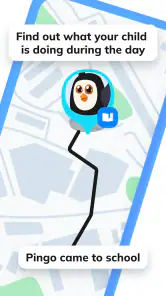
Pingo is designed to make parenting in the digital age a tad easier. From the moment I installed it, I felt like I had unlocked a new level of parenting. The app allows you to track your child's location in real-time, which is a total game-changer for those of us who are constantly juggling more tasks than we have hands. The interface is intuitive, and even those of us who aren't tech-savvy can navigate it with ease. Simply put, it’s like having a personal assistant dedicated to your child's safety.
Useful routines, not constant surveillance
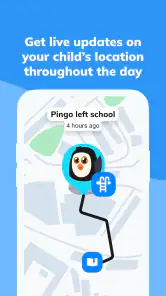
One of the standout features is the ability to set up geofencing alerts. Imagine being notified the instant your child leaves school or arrives at a friend's house. It's like a virtual leash that gives them freedom while keeping you informed. Real-time location tracking isn’t just a buzzword here; it's a practical tool that provides real relief.
A useful way to make location alerts less intrusive is to agree on a small number of places and check-in expectations together, rather than watching the map all day. For example, a parent can use arrival or departure alerts around school as a prompt to follow up only if the normal routine changes. That makes the tool part of a shared plan, not a silent test of whether a child is behaving. It also helps prevent a flood of notifications from turning into background noise.
When a quick alert matters
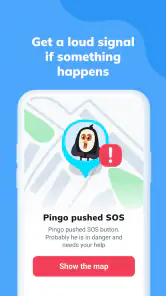
Additionally, the app offers an SOS button, which is a feature every parent will appreciate. With a long press, your child can send an alert directly to your phone, notifying you that they need help. It’s an added layer of security that ensures you’re always a tap away from knowing if they’re in trouble.
More From Our News Desk

Weather by Xiaomi Review: Clear at a Glance, Less Clear Up Close

X Under Pressure: Can It Recover When Posting Goes Wrong?

Clash of Clans Is Won Between the Battles

Android Auto Makes the Case for Quieter Car Software

MobiOffice: Transforming Mobile Productivity with Seamless Integration

EA SPORTS FC™ Mobile Soccer: Redefining Mobile Sports Gaming
For a child, an emergency button is useful only if they know where it is and have practiced what to do afterward. I’d walk through the steps calmly before they travel alone, and make sure the adults who may respond know how to receive the alert. It is a sensible backup, not a guarantee that someone can intervene immediately, so it should sit alongside clear family plans for getting help.
Messages and device habits
Beyond tracking, Pingo facilitates direct communication. You can send and receive messages, making it easy to reach out to your child at any time. Whether it’s reminding them to come home for dinner or just checking in to see how their day is going, this app bridges the communication gap effortlessly.
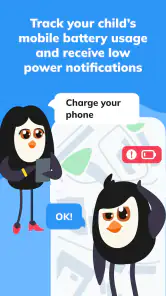
Moreover, the app allows you to monitor your child's device usage. In a world where screen time can easily get out of hand, this feature is a godsend. You can see which apps they’re using and for how long, helping you manage their digital diet with ease.
That combination is handy in a specific situation: if a child is late after an activity, a parent can first check their location, then send a short message instead of repeatedly calling. For families already managing screen-time conversations, app-use visibility can give those discussions something more concrete to refer to. I would use it as a starting point for a conversation, not as a reason to police every minute or assume that a usage pattern tells the whole story.
Making location sharing workable for a child
Before relying on a location app, I would explain what the parent will check and why. A simple agreement—such as checking during the walk home or when a pickup is delayed—can make the purpose understandable without turning every movement into a family discussion. Children may be more willing to carry a phone or smartwatch when the arrangement feels predictable and they know they can message a parent directly.
It also helps to agree on what counts as a reason to call. A map may show that a child is still near an activity, but that alone cannot tell you whether they are waiting for a friend, speaking with a teacher, or dealing with a changed plan. I would use the location as a cue to ask a calm question, rather than treating an unexpected dot on the map as proof that something is wrong.
How it compares with simpler options
Compared with ordinary calls and messages, Pingo brings location checks, alerts, SOS, and device-use monitoring into a parent-focused setup. A phone’s built-in location sharing may be enough for a family that only wants to see where everyone is; Pingo is more relevant when parents also want child-oriented check-ins and the other tools described here. A basic smartwatch can support contact and location routines too, but choosing one depends on the child’s device and the family’s preferences. I would not add another app if the existing arrangement already works reliably and everyone is comfortable with it.
The trade-off is that location tools depend on a child having an appropriate connected device and on family members being willing to use the app consistently. A map can reduce uncertainty, but it cannot explain why someone has stopped moving or replace a direct conversation. Families should also agree on who can check the location and when; without that understanding, a safety tool can feel like surveillance and undermine the trust it is meant to support.
What to consider before depending on alerts
Alerts are most useful when they answer a small, practical question: has the usual school-to-home transition happened, or should I check in? If a family creates too many alert points or expects the app to explain every delay, the notifications can become another source of stress. I’d start with the one routine that causes the most uncertainty, see whether the alerts help, and only then decide if more are worthwhile.
There is also a difference between having a tool available and having a dependable family routine. The child needs to know how to use the phone or watch, the parent needs to know what kind of message is useful, and both sides should know what to do if the normal plan changes. Pingo can bring those check-ins together, but the family still has to make the plan clear and keep it realistic.
Who is likely to get the most from it
I can see Pingo working best for parents of children who are beginning to travel short familiar routes more independently, or for households coordinating school, activities, and pickups across busy schedules. Picture a child leaving an after-school activity while a parent is still commuting: an arrival alert or a quick message can help the parent decide whether everything is on track without interrupting the child repeatedly. It is less compelling for families whose children do not carry a phone or smartwatch, for parents seeking only a one-time way to find a lost device, or for older teens who do not agree with ongoing location sharing. In those situations, a direct call or a mutually chosen built-in sharing option may be a better fit.
It can also suit households where more than one adult shares pickup duties and needs a common way to coordinate a child’s routine. In that case, it is worth deciding in advance who will respond to a notification and who should contact the child, so two adults do not both send messages or assume the other person has followed up. The value is not simply seeing a location; it is reducing confusion around a specific responsibility.
On the other hand, I would skip it for a family that wants a child to have more independence without location monitoring, or where the child is old enough to object and there is no agreement about sharing. A basic call or a planned arrival message may be enough in those homes. The best choice is the least intrusive option that reliably solves the actual coordination problem.
A measured recommendation
In conclusion, Pingo by Findmykids is more than just a tracking app; it’s a comprehensive tool that enhances your ability to keep your children safe in a modern world. While no app can replace the vigilance of a caring parent, Pingo certainly comes close by providing an extra set of eyes. If you're looking for a way to stay connected with your kids while giving them the space they need to grow, this app is definitely worth a try. It’s one of those rare finds that delivers on its promises, making parenting just a little bit easier and a whole lot less stressful.
My recommendation is to try it when your family has a clear, shared reason for location check-ins and wants more than ordinary messaging alone. Since access is free, there is no upfront purchase to weigh, but the real value depends on whether the location, alert, SOS, communication, and device-use tools fit your routine. If you mainly want a map, prefer not to monitor a child’s device, or cannot agree on boundaries for sharing, skip it and choose a simpler approach. Used with consent and sensible expectations, it can make everyday coordination calmer without pretending to replace parental judgement.
Pingo by Findmykids Frequently Asked Questions
Can I use Pingo by Findmykids to stay in touch with my child as well as locate them?
Yes. Pingo by Findmykids is described as a parent tracker and location app, and it also includes a built-in chat feature for communicating with your child. That can make it useful for both checking a child’s location and keeping in touch. Before relying on it, discuss with your family when location checks and messages are appropriate, so everyone understands how you plan to use the app.
Can Pingo by Findmykids help me know when my child enters or leaves a familiar area?
Pingo by Findmykids supports alerts for when a child enters or leaves designated safe zones. This may help parents keep track of arrivals and departures without checking the map continuously. Families should decide together which places matter and how alerts will be used. Keep in mind that location features are most useful when the child’s phone or compatible watch is being carried and available.
What age group is Pingo by Findmykids intended for?
Pingo by Findmykids is a parent tracker app intended to help families keep track of children through a phone or a compatible smart watch. Its content rating is Everyone, while the family’s own needs and conversations should guide how and when a child uses it. Parents can explain what location sharing means and agree on how the app will be used before installing it.
What is Pingo by Findmykids and how does it work?
Pingo by Findmykids is a smartphone application designed to help parents monitor their children's location in real-time. By using GPS technology, it allows parents to track their kids' movements and receive alerts if they enter or leave designated safe zones. The app also supports communication through a built-in chat feature, making it easier to keep in touch with your child.
Is Pingo by Findmykids safe to use for tracking my child?
Yes, Pingo by Findmykids is safe to use. The app prioritizes user privacy and security, ensuring that your child's location data is protected. It uses encrypted communication channels to prevent unauthorized access and adheres to privacy regulations. Parents can control who has access to their child's information, providing peace of mind while tracking their whereabouts.
Pros
- User-friendly interface for navigation.
- Real-time location tracking available.
- SOS feature for emergencies.
- Customizable geofencing alerts.
- Compatible with both Android and iOS.
Cons
- Requires internet for full functionality.
- Subscription needed for premium features.
- Battery consumption can be high.
- Limited offline features.
- Some features need parent setup.
- Category
- Social
- Version
- 2.10.3-google












