Find a Grave
- 785.00
- 3.8
- Installs
- 500.00K
- Price
- Free

Screenshots

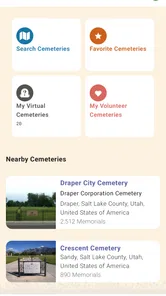
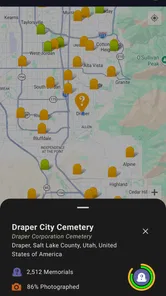
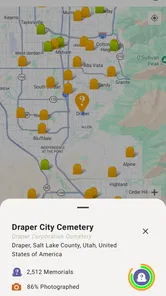
Analysis by Reviewed
I use cemetery-search tools differently depending on what I need: sometimes I’m checking a family name before a visit, and sometimes I’m following a historical curiosity. Find a Grave is most useful when I want to connect a person’s name with a burial place and clues left by other researchers. It is a free Books & Reference app from Ancestry.com, and its focus is specific: finding and exploring cemetery memorials rather than building a complete family tree.
Readability and navigation in a focused search
The first practical question is whether I can make progress without already knowing every detail. A name and a likely location give me a sensible starting point, while dates and cemetery details can help narrow a search when a name is common. I would treat the result as a lead, not a final answer: spelling variations, uncertain dates, and repeated names can all complicate family research. Comparing the memorial with family documents before adding it to a tree helps avoid attaching the wrong person.
The app has a 3.8 average from around 2.7 thousand ratings, and it has been installed over 500 thousand times. It is rated for Everyone, runs on Android 8.0 or later, and its current version is 3.2.0. Those details make it approachable for a broad audience, though the usefulness of any search still depends on what has been recorded and contributed for the person or cemetery I’m investigating.
Motor and sensory considerations
Search is the core interaction, so this is not an app that asks me to master a complicated workflow before I can look someone up. Still, a cemetery record can involve names, dates, places, and photographs, which means careful reading matters. I’d take my time with similar names rather than rely on a quick glance, especially when I’m researching several relatives in one sitting. For someone who finds small text or screen glare tiring, using the phone’s own display settings and taking breaks may make longer sessions more comfortable; I wouldn’t assume the app itself provides a particular accessibility control.
The app’s community contributions are valuable, but they also call for judgement. A photograph or added detail can give a search useful context, yet user-submitted information should be checked against other records where accuracy is important. If I’m documenting family history for relatives, I’d keep a note of where each clue came from instead of treating every memorial detail as independently verified.
Situational access: research at home or in a cemetery
For a realistic use, I might check a relative’s memorial at home, note the cemetery name, then use the app’s GPS feature when I’m there to help locate the gravesite. That can be more convenient than arriving with only a surname and a large cemetery to search. I would still plan for the realities of a visit: a phone needs to be usable outdoors, and GPS is a guide rather than a promise that every grave will be easy to identify. If mobility, weather, or travel makes an in-person visit difficult, browsing records and photos from home can still be a meaningful way to research.
Planning a visit without making the phone the whole plan
For a cemetery trip, I’d use the app to prepare before leaving rather than rely on a live search as my only source of direction. I would write down the person’s full name and the cemetery information I found, then keep those notes available in case the screen is hard to read outdoors or the connection is unreliable. That is not a claim that the app has an offline mode; it is simply a sensible backup for any phone-based visit. A companion can also help by checking a name or comparing a memorial photograph with the marker, which is useful when several graves look alike.
More From Our News Desk

Weather by Xiaomi Review: Clear at a Glance, Less Clear Up Close

X Under Pressure: Can It Recover When Posting Goes Wrong?

Clash of Clans Is Won Between the Battles

Android Auto Makes the Case for Quieter Car Software

MobiOffice: Transforming Mobile Productivity with Seamless Integration

EA SPORTS FC™ Mobile Soccer: Redefining Mobile Sports Gaming
This preparation matters most in a large or unfamiliar cemetery, where a location clue may get me close without identifying the exact headstone. I’d allow time to ask cemetery staff or consult signs if the grounds are confusing. The app can narrow the task, but it cannot replace local directions, clear signage, or a careful visual check. If a visit is difficult for someone in my family, I can still use the memorial details to have a more informed conversation at home rather than treating physical access as the only meaningful way to take part.
Discover and Explore
What strikes you first about this app is its vast database. With millions of records, Find a Grave allows you to search and explore cemetery records from around the world. It's like carrying a cemetery directory in your pocket. Whether you're on a mission to locate a long-lost relative or just curious about who lies beneath, this app has got you covered.
Easy Navigation
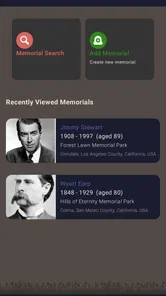
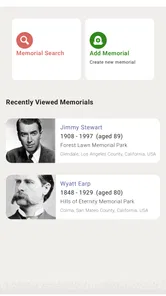
One of the standout features is its user-friendly interface. Even if you're not a tech-savvy person, you'll find navigating through the app a breeze. The search function is straightforward, allowing you to filter through names, dates, and cemetery locations with ease. Plus, the GPS feature makes it super convenient to locate gravesites if you're planning a visit.
Community Contributions
What makes this app even more engaging is the community aspect. Users from all over the globe contribute by uploading photos, adding new graves, and providing additional details. It’s like being a part of a global detective team, piecing together historical puzzles. You can also contribute by adding information and photos, making it a collaborative effort to preserve history.
Using contributions with care
Contributing makes the most sense when I have a clear, specific correction or useful context, rather than a guess. Before adding a memorial or photo, I’d double-check names and cemetery details against what I know, and keep any uncertain family connection separate. That small habit protects both the accuracy of the record and other people’s research. For someone who simply wants a private family tree, a dedicated genealogy app may be a better main workspace; this app is strongest as a cemetery-record resource alongside it.
Why You'll Love It
If you're someone who loves a good story, this app is a gateway to countless tales waiting to be discovered. Each grave tells a story, and with the detailed records available, you can uncover fascinating histories and anecdotes. It's like walking through a library of lives, each one unique and compelling.
Who it suits, and where it falls short
I’d recommend it to family-history beginners who want a practical place to start, to relatives preparing for a cemetery visit, and to history readers curious about particular people or burial places. It is less suitable if you need a complete genealogy workspace, guaranteed answers for every ancestor, or a substitute for official records. Compared with general web searches, its cemetery focus can make relevant memorials easier to find; compared with a family-tree service, it does not replace the broader job of organizing relationships and sources.
A useful everyday example is helping an older relative identify a burial place mentioned in a family story. I’d search the name with whatever location clue we have, then check whether the dates and relatives listed make sense before sharing a likely match. If more than one result appears, I’d show the options rather than present the first one as certain. This makes the app a good conversation starter across generations, while keeping the distinction between a promising lead and a confirmed family connection clear.
It can also suit someone doing local history who is not building a family tree at all. A memorial may provide a starting point for understanding who is buried in a cemetery or finding a photograph connected with a name. But if the goal is to document land ownership, military service, or a complete biography, cemetery information alone is only one piece of the research. I’d pair it with relevant records and keep track of which source supports each conclusion instead of expecting one focused app to answer every historical question.
When a search comes up empty, I’d try a spelling variant, a maiden name, or a broader location before deciding the person has no memorial. If I find several plausible matches, I’d compare dates and family links rather than choose the first result. These are simple steps, but they turn browsing into more careful research and make the app useful even when the first search is inconclusive.
Choosing it alongside other research tools
Against a general search engine, this app gives cemetery memorials a more direct place in the search process, which can save time when burial information is exactly what I need. A general web search is still better when I’m looking for news articles, local history pages, or records outside cemetery memorials. A family-tree service is the more natural choice when I need to map relationships, organize a large research project, or keep sources together. I see this app as a useful specialist companion: it can supply a clue about a burial, while another tool helps me assess the person’s wider life and family connections.
There is a trade-off in that specialization. A cemetery-focused result can feel reassuring because it gives a concrete place and often community-added context, but a record’s presence does not establish every biographical detail. Conversely, a missing result does not settle whether someone was buried in a particular area. I would not use search visibility as a measure of how well documented a family is; coverage can vary, and careful follow-up remains part of the job.
For anyone wondering whether it costs anything to try, the app is free. That makes it easy to test on a small question first: look up one relative, compare the memorial with a family document, and see whether the search style fits your needs. Its Everyone content rating also signals a broad intended audience, though the subject of cemeteries and death may still feel uncomfortable for some younger users or families. I’d decide based on the person using it and the context, not on the rating alone.
In a world where everything is going digital, Find a Grave stands out by connecting us to the past in a meaningful way. Whether you're tracing your family tree or simply exploring, this app offers a unique experience that bridges the gap between the digital and the historical.
An inclusive verdict
What I value most is that the app can support different kinds of engagement: a quick lookup, patient reading at home, or preparation for a cemetery visit. Its straightforward search lowers the effort of getting started, while the need to inspect names and community-added details means it rewards a careful pace. The free price and Everyone rating make it easy to try, but the experience is still shaped by screen comfort, search precision, and the records available for a particular person.
For people with limited dexterity, low vision, hearing differences, or fatigue, I would judge the experience by the particular task rather than assume it works equally well for everyone. Looking up one memorial at home is a different demand from handling a phone while walking across uneven ground and checking a screen in bright daylight. System-level display adjustments, a larger screen, written notes, and help from a companion can make some situations easier, but they do not remove the need to assess what feels safe and manageable. If outdoor navigation is the main purpose and a person needs highly tailored mobility guidance, a dedicated navigation aid may be a better choice for that part of the visit.
My practical recommendation is to use it when the question is specifically about a cemetery, burial place, or memorial, and to treat each result as a research clue that may need corroboration. It is a poor fit as a stand-alone answer engine, a complete family archive, or a guaranteed way to locate every grave. The most inclusive way to approach it is to let people participate at the level that suits them: searching, reading at home, checking family notes, or contributing only when they can do so confidently.
In conclusion, Find a Grave isn't just an app; it's a journey into the past, a tool for discovery, and a community of history enthusiasts. So why not give it a try? Download it now and start your adventure through the annals of history. Who knows what fascinating stories you'll uncover?
Find a Grave Frequently Asked Questions
Can I use Find a Grave to research a family member before downloading it?
Yes. Find a Grave is intended for looking up memorials and grave information, so it can be useful when you are tracing family history or trying to learn more about a relative’s burial place. You can search for a person by name and explore available memorial details. The app is listed in the Books & Reference category, making it a practical option for personal and historical research.
What is Find a Grave and how does it work?
Find a Grave is an app designed to help users locate the graves of famous and non-famous individuals across the globe. It provides detailed information about cemeteries and burial sites, allowing users to search for specific graves by name, location, or cemetery. The app also enables users to contribute by adding new memorials, photos, and biographical information, thereby expanding the database. It's an invaluable tool for genealogists, historians, and those interested in exploring their family history.
Is the Find a Grave app free to use?
Yes, Find a Grave is free to use. Users can download the app from both the Google Play Store for Android devices and the Apple App Store for iOS devices without any cost. While the core functionalities, such as searching graves and viewing memorials, are free, some additional features may require in-app purchases or a premium subscription for enhanced user experience and advanced search options.
What features does Find a Grave offer to enhance the user experience?
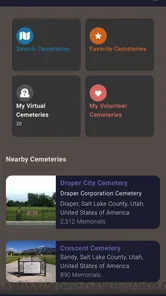
Find a Grave provides several features to enhance user experience. Users can search for graves by name, date of birth, date of death, and cemetery location. The app also allows users to upload photos and add biographies to memorials. Additionally, users can create virtual cemeteries to organize and keep track of their favorite memorials. The app's GPS functionality helps users locate graves easily when visiting cemeteries, making it a comprehensive tool for grave enthusiasts and researchers.
How accurate is the information on Find a Grave?
The accuracy of information on Find a Grave can vary as it is largely user-contributed. While the app strives to provide accurate and up-to-date information, errors may occur due to incorrect submissions by users. The community-driven nature of the app allows users to edit and correct inaccuracies, ensuring data is continually improved. Users are encouraged to verify information with official cemetery records if accuracy is crucial for their research or personal interest.
Pros
- Comprehensive database of graves.
- User-friendly interface.
- Frequent updates and additions.
- Community-driven content.
- Useful for genealogy research.
Cons
- May contain incomplete data.
- Requires internet connection.
- Limited offline features.
- Some ads present in app.
- Occasional search inaccuracies.












