Filterly - AI Photo Enhancer
- 424.00
- 4.0
- Installs
- 500.00K
- Price
- Free

Screenshots



Analysis by Reviewed
I usually approach AI photo apps with some skepticism because the first session can be impressive while the long-term value quickly disappears. Filterly - AI Photo Enhancer makes a strong first impression by focusing on a familiar, low-effort idea: take a selfie, choose a visual direction, and see how an automated edit changes the result. It is a free photography app from Asana Rebel, and the experience is clearly aimed at people who want attractive results without learning a full photo editor.
After spending time with it, my opinion is mixed in a useful way. Filterly is enjoyable when I want to experiment, prepare a profile image, or give an ordinary selfie a different mood. It is less convincing as a permanent replacement for a camera app or a detailed retouching tool. The important question is not whether the effects can look entertaining; they can. The better question is whether I would still open it after the novelty of the first few transformations fades.
Why the first week feels so appealing
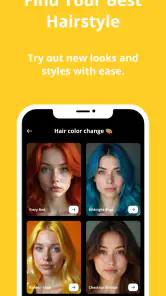
The opening appeal comes from immediacy. Instead of starting with sliders, curves, masks, or a long list of technical controls, I can begin with a personal photo and explore the app's AI-based styles, retouching options, and aging effects. That makes the learning curve gentle. Someone who normally avoids editing software can understand the basic purpose almost immediately.
That simplicity also suits quick decisions. If I need a more polished selfie for a social profile, a playful variation for a group chat, or a visual experiment to share with friends, Filterly gives me a reason to keep trying different looks. The process feels closer to browsing creative possibilities than completing a complicated editing task.
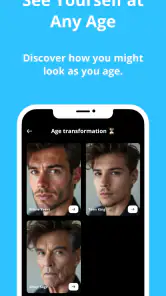
The aging effects are particularly effective as a conversation starter. They are not necessarily the reason I would use the app every day, but they add a form of curiosity that ordinary brightness and contrast tools do not provide. I can take the same face and view it through a more imaginative lens. That makes the app feel different from a standard beauty camera during the first few sessions.
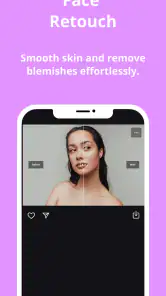
Its retouching side is more practical. A small adjustment can help a selfie look tidier without requiring me to understand exactly which facial or lighting control should be changed. This is useful when I want a presentable result quickly, especially on a phone where detailed editing can feel slow and awkward.
Still, I would not treat the first result as automatically finished. AI editing can make a face look too smooth or shift the character of a photo more than intended. My best results came from comparing several variations rather than accepting the most dramatic option. The strongest image was often the one that made a modest change, because it remained recognizably mine.
A practical first-week routine is to begin with one well-lit selfie, save the original separately, and test only a few styles at a time. Using a clear source image makes it easier to judge what the app is changing. If I start with a dark, blurry, or heavily angled photo, it becomes difficult to tell whether an interesting result is genuinely useful or simply hiding the source image's weaknesses.
Where it fits beside ordinary alternatives
Compared with the editing tools already built into a phone's gallery, Filterly is more playful and more focused on identity-based transformations. A standard gallery editor remains better for cropping, exposure correction, and small color fixes. I would open that built-in option when the photograph is basically good and only needs cleanup.
Compared with a conventional selfie camera, Filterly is more suited to transforming an existing image than to making a live decision while taking a picture. A camera app is usually the better choice when I want to frame several shots quickly or see the effect before pressing the shutter. Filterly makes more sense when I already have a selfie and want to explore what it could become.
It also differs from a professional editor. Detailed desktop or mobile software offers greater control and repeatability, especially for someone who needs consistent portraits or precise retouching. Filterly's advantage is not depth; it is approachability. I can get an expressive result without building the edit manually.
The app's free entry point lowers the barrier to trying it, but the presence of in-app purchases means I would pay attention to which creative options remain available without spending. The listed purchase range runs from $4.49 to $94.99 per item, so the financial commitment can become much more significant than the casual first impression suggests. I would explore the free experience first and only consider paying if a particular workflow becomes genuinely useful.
What remains useful after the novelty fades
The month-to-month value depends on whether I have recurring reasons to work with selfies. For someone who regularly updates social profiles, creates personal content, or enjoys visual experiments, the app can remain a convenient source of variations. It is especially useful when I want several different directions from one portrait instead of manually rebuilding each version in a traditional editor.
For everyone else, usage may become occasional. I might return when I need a new profile image, want to compare a few styles, or feel like trying an aging effect with friends. That does not make the app unsuccessful; it simply places it in the category of tools I use for specific moments rather than daily maintenance.
One of the more useful ways to keep it relevant is to separate experimentation from publishing. I can create several versions privately, then choose the one that still looks natural at a small size. A dramatic image may look exciting in a full-screen preview but lose its appeal as a tiny avatar. This simple check prevents the app from turning every photo into an overprocessed statement.
Another worthwhile workflow is to create a small personal reference set. I can keep the original and the edited version together, then notice which styles actually suit my face, lighting, and usual social context. Over time, this reduces random browsing. Instead of testing every option repeatedly, I can return to the types of edits that produce a believable result.
That is where Filterly's lasting value is strongest: it can shorten the distance between an ordinary selfie and a shareable image. It does not need to become a daily habit to be useful. If it saves me from spending too long on a profile picture every few weeks, that may be enough.
However, I would not expect it to replace a broader photo library. The app's identity is tied closely to faces and visual transformations, so it is not the tool I would choose for landscapes, food photography, product pictures, travel albums, or careful color correction. A general-purpose editor has more value across different kinds of photos.
How much work it adds to a normal photo routine
The maintenance burden is fairly low at the beginning because the core interaction is easy to understand. I do not need to build a complex editing system or remember a long sequence of adjustments. For a casual user, that is a real advantage: I can return after a gap and still understand what I want to do.
The burden appears in the selection process. AI tools can produce enough variations to make choosing harder, especially when several results are attractive but only subtly different. If I keep generating versions without a clear purpose, the app can turn a quick edit into a browsing session. I have found it more efficient to decide first whether I want a natural improvement, a noticeable style change, or a playful transformation.
File organization is another consideration. Because the app is useful for creating multiple versions of one selfie, it is easy to end up with near-duplicates. I would recommend keeping the original, selecting only a small number of edited candidates, and deleting experiments that have no practical use. Otherwise, the creative freedom becomes clutter in the phone gallery.
I also would not use the strongest retouching setting simply because it is available. A better maintenance habit is to inspect the face at normal viewing size and then zoom out. If the edit only looks convincing when enlarged, it may not work well as a profile image or shared photograph. Subtlety is more durable than an aggressive effect.
People who care about a consistent personal image should be selective as well. Using a different dramatic style every time can make a profile feel disconnected. Filterly is more valuable when I treat its styles as a controlled set of options rather than a reason to change my appearance completely for every upload.
Where fatigue starts to appear
The main source of fatigue is repetition. Once I have tried the styles that immediately catch my attention, the remaining options may feel like variations on the same basic idea. That is common with novelty-driven photography apps, and Filterly is not immune to it. The first-week experience is about discovery; later use requires a concrete reason to return.
Another possible frustration is the gap between an appealing preview and a result I would actually publish. AI effects are good at creating a quick visual impression, but a striking transformation is not always flattering, believable, or suitable for everyday use. I have to judge the finished image rather than the excitement of the change.
The app may also be a poor match for users who want exact control. If I need to correct one specific area while preserving every other detail, a manual editor is likely more dependable. Filterly's appeal comes from letting the system suggest or perform much of the work. That convenience naturally involves less precision.
Cost can become part of the fatigue too. Free access makes experimentation easy, but in-app purchases can affect how freely I explore. I would not assume that an enjoyable first session means I need a subscription-like commitment or a large purchase. Before paying, I would ask whether I have a repeatable use for the available tools rather than buying simply to unlock more novelty.
Privacy-minded users may also want to think carefully before making a face-focused app part of their routine. I would personally review the app's current permissions and privacy explanations in the relevant store before uploading sensitive images. That is sensible for any AI photography service, especially when the content involves personal portraits or photos of other people.
There is also a social limitation. A transformation that is funny among friends may not be appropriate for a professional profile, application, or formal introduction. I would keep playful aging effects and exaggerated styles separate from images intended to represent me seriously. The app can serve both purposes, but the user has to make that judgment.
Who should keep it installed
I think Filterly is a good fit for people who enjoy selfies but do not want to learn a complex editor. It is also suitable for users who want quick AI-assisted experimentation, occasional profile-picture refreshes, or visual effects that go beyond ordinary filters. Its Everyone age rating makes it broadly approachable, although parents should still guide younger users around sharing edited portraits online.
It is less suitable for professional photographers, serious content creators who need repeatable settings, and anyone seeking a complete photo workflow. Those users will probably get more lasting value from software with layered editing, batch processing, detailed color tools, and stronger control over the final image.
I would also skip it if I rarely take or share selfies. In that case, the app may be entertaining once but difficult to justify as a regular part of a phone's limited storage and attention. A general gallery editor would probably cover the occasional correction more efficiently.
The app has reached over 500 thousand installs and holds a 4.0 average from around 8.3 thousand ratings, which suggests a reasonably established audience without making it a universal solution. Its current version is 3.1, and it runs on Android 7.0 or later. Those details make it accessible to many Android users, including people with older devices, though the smoothness of AI processing can still vary with the phone and the image being edited.
My long-term verdict on Filterly
After the initial excitement, I would keep Filterly installed only if I had a recurring need for polished selfies or enjoyed returning to creative portrait experiments. Its strongest quality is the balance between low effort and noticeable change. I can move from an ordinary image to something more distinctive without committing to a technical editing session.
Its weakness is equally clear: the experience is not endlessly deep. Once the most interesting transformations have been explored, the app needs a real use case to earn regular attention. It is not a universal photography companion, and it should not be judged as one.
My recommendation is to try the free version with a few carefully chosen photos, compare subtle and dramatic results, and judge the app by the images you would genuinely use. Do not measure its value by how much it can change a face; measure it by whether it helps you make a better final choice with less effort.
For me, that makes Filterly a worthwhile occasional tool rather than an essential daily app. I would recommend it to a friend who wants fast AI styling, retouching, and aging experiments, especially if that friend enjoys refreshing profile photos. I would point a precision-focused editor toward a different option. Its lasting value comes from purposeful, restrained use—not from endlessly chasing the next effect.
Pros
- Enhances blurry or low-resolution photos quickly
- Simple interface suitable for beginners
- Useful for restoring old or damaged-looking pictures
- Offers AI-powered improvements with minimal manual editing
- Convenient for preparing images for social media
Cons
- Results can look overly smooth or artificial on some faces
- High-resolution exports may require a paid plan
- Processing quality depends on the original photo
- Some enhancements take longer with large images
- Privacy details should be checked before uploading personal photos

- Category
- Photography
- Version
- 3.1











