Fender Play: Music Lessons
- 2.88K
- 4.4
- Installs
- 1.00M
- Price
- Free

Screenshots

Analysis by Reviewed
Learning an instrument can be exciting for five minutes and frustrating for the next fifty. I have used Fender Play: Music Lessons with that reality in mind, paying attention not only to the lessons themselves but also to how comfortably different people can read, move, listen, and practice. This is an education app from Fender Musical Instruments Corporation for guitar, bass, and ukulele, and its central idea is simple: replace the uncertainty of searching random tutorials with a guided path.
The app is free to install, with optional purchases ranging from $4.99 to $149.99 per item. It is rated for Everyone, runs on Android versions from 9 onward, and the current version is 8.0.1. Those details make it approachable for many households, although the purchase structure matters if you are trying to keep learning completely free. In my experience, its best quality is not that it makes playing effortless; it gives beginners a clearer next step.
How the learning experience feels in everyday use
I find the experience most useful when I treat a lesson as a small practice plan rather than something to watch from start to finish: choose one movement, look closely, then put the screen aside and try it. That keeps attention on the instrument and makes it easier to notice what needs work. The next section looks at how this approach holds up in an ordinary practice session.
Readable navigation for a beginner who does not know what to choose
The first problem a new player usually faces is not finger strength. It is decision fatigue. Search for guitar lessons online and you quickly find conflicting advice, unfamiliar terminology, and videos aimed at people who already know how to tune, hold the instrument, or read chord diagrams. Fender Play is more useful when you want a defined route rather than an enormous pile of disconnected material.
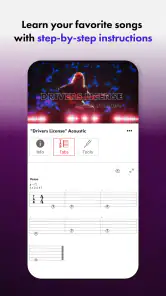
I found the lesson format easier to approach because the teaching is broken into step-by-step video instruction. That matters for someone who needs to pause, replay, or watch a movement more than once. A learner can concentrate on one small action instead of trying to absorb an entire song or technique in one sitting. The same structure also helps a parent or friend support a new player without having to design a curriculum from scratch.
The interface is most comfortable when you treat it as a practice guide, not as a reference encyclopedia. Before opening a lesson, I would decide what I want from the session: a chord change, a rhythm pattern, a bass exercise, or a ukulele starting point. That small decision prevents aimless browsing and makes the app feel less overwhelming. The most inclusive part of the design is the reduction of choice at the moment a beginner needs direction.
There is still a learning curve in the language of music. Terms such as chord, fret, strum, picking, and rhythm are not automatically obvious to everyone. Video demonstration helps, but a learner who prefers written explanations may need to pause frequently and make personal notes. I would not describe the experience as completely frictionless; it is clearer than random online searching, but it still expects active attention.
More From Our News Desk

Weather by Xiaomi Review: Clear at a Glance, Less Clear Up Close

X Under Pressure: Can It Recover When Posting Goes Wrong?

Clash of Clans Is Won Between the Battles

Android Auto Makes the Case for Quieter Car Software

MobiOffice: Transforming Mobile Productivity with Seamless Integration

EA SPORTS FC™ Mobile Soccer: Redefining Mobile Sports Gaming
The app has earned a 4.4 average from around 13 thousand ratings, and it has passed one million installs. Those figures suggest that it has reached a substantial beginner audience, but they do not tell me whether every learner will find the presentation comfortable. A rating cannot replace personal fit, especially for people who need unusually large text, very slow pacing, or highly detailed written instructions.
Video teaching and different learning speeds
Video is both the app’s strongest teaching tool and one of its main accessibility trade-offs. Seeing a hand form a chord can communicate something that a paragraph cannot. For a person who learns visually, this is a major advantage. I can watch the angle of a wrist, the position of a finger, or the movement of a pick and then try to copy it immediately.
On the other hand, video requires the learner to divide attention between the screen and the instrument. That can be tiring for someone with limited concentration, visual processing difficulties, or an instrument positioned outside the most comfortable viewing angle. I recommend watching a short portion first, stopping it, and then practicing without trying to follow every second live. This turns the lesson into a sequence of manageable demonstrations rather than a test of multitasking.
A useful personal workflow is to keep a small practice note beside the device. I write down the chord or movement being taught, the point where my hand becomes tense, and one thing to repeat next time. This is not a built-in feature, but it makes the app more usable for learners who need external structure. It also prevents the common mistake of replaying a lesson repeatedly without knowing what actually needs improvement.
People with hearing differences should think carefully about whether video-led instruction meets their needs. The visual demonstrations remain valuable, but music lessons also depend on hearing timing, tone, and rhythm. Someone who cannot reliably hear those elements may need another teaching method, an instructor, visual rhythm support, or a combination of tools. I would not assume that a video lesson alone provides an equivalent experience for every hearing profile.
Motor considerations: useful demonstrations, real physical demands
No lesson app can remove the physical requirements of guitar, bass, or ukulele. Pressing strings, reaching between frets, holding an instrument steadily, and repeating unfamiliar movements can be uncomfortable at first. Fender Play can show a technique clearly, but it cannot adjust the instrument to a learner’s hand, diagnose pain, or guarantee that a posture is safe for a particular body.
I found the step-by-step approach helpful for reducing unnecessary movement. Instead of attempting a full performance immediately, I could isolate a hand position and repeat it slowly. That is especially useful for someone with limited dexterity or reduced endurance, because short practice blocks are easier to control than a long session built around finishing a song.
My practical advice is to lower the ambition of the first session. Choose one movement, practice it for a few minutes, relax the hand, and check whether the tension is coming from effort or from an awkward position. If pain appears rather than ordinary beginner fatigue, stop and seek advice from a qualified teacher or health professional. The app is a learning aid, not a substitute for individual physical assessment.
The three-instrument focus is another strength for households with different interests. A person who is not drawn to guitar may connect with bass or ukulele instead. Ukulele can feel less intimidating for some beginners because of its size, while bass may appeal to someone who prefers groove and timing over chord-heavy playing. I would still avoid choosing an instrument solely because it looks physically easier; comfort depends on the individual instrument, setup, posture, and the player’s hands.
For users who have difficulty tapping small controls accurately, the best approach is to prepare the lesson before picking up the instrument. Start the video, place the device securely, and keep the number of interruptions low. This is a simple but important adjustment: repeatedly reaching from the instrument to the screen can be more tiring than the lesson itself. A stand or stable surface can also reduce unnecessary handling, although the app does not provide that equipment.
Sensory load and the challenge of practicing around other people
Music practice is not a neutral sensory activity. Strings can be bright and sharp, a beginner’s strumming can sound repetitive, and video audio may compete with the instrument in the room. Someone sensitive to sound may find the first sessions more demanding than the app’s calm lesson format suggests. I would begin at a comfortable volume and keep the first practice block short enough to end before irritation builds.
The visual side deserves similar attention. A lesson that looks clear on one screen may feel crowded when the device is farther away or when the learner must constantly shift focus between the instructor and the fretboard. I prefer positioning the screen where I can glance at it without twisting my neck. If the learner has low vision or visual fatigue, checking the device’s own display and text settings may help, but I would not promise that every element of the app will adapt perfectly.
There is also a social sensory factor. Practicing in a shared home can create pressure, especially for a person who dislikes being heard while making mistakes. Headphones may make the lesson audio more private, but they do not make the acoustic sound of the instrument disappear. A quieter practice corner, a predictable time, or a short agreement with housemates can make the experience more welcoming than simply pushing through discomfort.
One non-obvious advantage of a structured lesson path is that it gives practice a clear stopping point. Instead of endlessly repeating a difficult section because an online video keeps recommending more material, I can decide that one exercise is enough for today. That boundary is valuable for learners who become overwhelmed by open-ended tasks. It also helps children and adults who need a visible sense of completion before they can move on to another activity.
Situational access: where the app fits and where it does not
Fender Play works best when the learner has an instrument nearby, a reasonably stable viewing position, and enough quiet to hear the lesson. It is well suited to a short home routine after work or school. For example, I can imagine a beginner arriving home, setting the phone or tablet on a stand, reviewing one demonstration, and practicing the movement before dinner. The value is not the length of that session; it is the repeatable routine.
It is less convenient in places where sound is restricted or attention is constantly interrupted. A commute, a busy family room, or a shared office may be suitable for watching a demonstration, but not for meaningful playing. This distinction is important. The app can travel with you, but the instrument practice still depends on your surroundings.
For a learner with inconsistent energy, the lesson structure can support flexible practice. On a good day, you might work through a new technique. On a difficult day, you can replay a familiar explanation and practice only the easiest part. I like this better than a system that treats every missed session as failure. Progress on an instrument is rarely linear, and a useful app should leave room for maintenance as well as advancement.
Families should also consider supervision and shared devices. The Everyone age rating makes the app broadly suitable from a content perspective, but younger learners may still need help holding the instrument correctly, understanding the vocabulary, and managing optional purchases. The free entry point is convenient, yet adults should pay attention before approving anything that moves beyond the free experience.
The purchase range is wide enough that cost can become a deciding factor. A learner who only wants to sample the teaching style may be satisfied with the free starting point, while someone seeking a complete guided program may encounter paid options. I would test the initial experience with a specific goal before committing money. That is more sensible than paying simply because the app comes from a familiar instrument brand.
Where traditional alternatives may serve you better
Compared with random video tutorials, Fender Play offers a stronger sense of sequence. The usual alternative gives you unlimited variety but leaves you responsible for judging whether the advice is appropriate and what to learn next. That freedom is excellent for experienced players and curious experimenters. For a complete beginner, it can create more confusion than progress.
Compared with a private teacher, the app is less personal. A teacher can notice that your thumb is misplaced, adapt an exercise to your hand, change the pace immediately, and answer a question in the exact language you understand. Fender Play cannot provide that same individual correction. Its advantage is convenience and repeatability, especially when regular lessons are too expensive, too far away, or difficult to schedule.
Compared with printed method books, video has a more immediate physical explanation. A book can be easier to annotate, easier on the eyes for some readers, and available without screen distractions. It may also suit someone who prefers to study quietly before touching the instrument. I would choose a book alongside the app if written reference material helps you remember concepts better than video alone.
Compared with a live group class, the app offers more privacy and control over repetition. That is a genuine benefit for shy beginners or people who need extra time. The trade-off is the loss of shared motivation and real-time feedback. If accountability is the main reason you struggle to practice, a teacher, friend, or class may be a better addition than another lesson library.
Remaining barriers before you commit
The biggest barrier is expectation. The app can organize learning, but it cannot make the instrument sound polished immediately. Fingers may hurt, chord changes may be slow, and rhythm may feel unstable. A beginner who expects instant results could mistake normal practice difficulty for a problem with the app.
Another barrier is dependence on video attention. Learners who need comprehensive text, very explicit visual contrast, or alternative presentation formats should try the opening lessons carefully. If the demonstrations are difficult to follow on your device, the problem may persist even if the teaching itself is good. I would not buy an instrument or a long-term plan until I knew the presentation worked for my eyes, ears, and concentration.
Internet-based learning can also be inconvenient when the practice location has poor connectivity or when the device battery is low. Rather than discovering that during a planned session, I would open the intended lesson beforehand and check that the setup is comfortable. This small preparation is particularly useful for people who have limited energy and cannot afford to waste their best practice window on technical frustration.
The app is not the right choice for someone who wants advanced, highly individualized coaching from the first day. It is also a weaker fit for a player who already knows the basics and mainly wants niche theory, detailed improvisation feedback, or a teacher responding to personal technique problems. In those situations, a specialist instructor or a focused written resource may provide more value.
Finally, the brand name should not decide the purchase by itself. Fender Musical Instruments Corporation is the developer, but a recognizable instrument company does not automatically make every lesson suitable for every learner. I would judge the app by the clarity of its teaching, the comfort of its format, and whether its instrument choices match your goals.
My inclusive verdict for different learners
I recommend Fender Play to beginners who want a guided starting point for guitar, bass, or ukulele and who learn reasonably well from demonstrations. It is particularly useful when the main obstacle is not motivation but uncertainty: not knowing what to practice, how long to spend on it, or which basic movement should come next. The free entry point makes it practical to explore before deciding whether the paid path fits your budget.
I am more cautious for people who need highly customized pacing, extensive written explanations, individualized posture correction, or sensory accommodations that must be guaranteed rather than improvised. Those learners may still benefit from the app as one part of a broader setup, but I would pair it with a teacher, a trusted reference, or personal adjustments to the practice environment.
My strongest recommendation is to use it in small, deliberate sessions. Choose one lesson, prepare the screen and instrument before starting, pause whenever the movement becomes unclear, and write down one concrete target for next time. That workflow makes the video format more manageable and gives learners with different energy, attention, or motor needs more control.
Overall, I see Fender Play as a friendly starting framework rather than a complete replacement for a teacher. It lowers the confusion around beginning, supports several popular instruments, and gives visual learners something useful to imitate. Its limits become clear when a learner needs personal correction or a presentation tailored to a specific disability. If your needs fit the format, it can turn an intimidating first step into a routine you can actually repeat.
Fender Play: Music Lessons Frequently Asked Questions
Can I learn at my own pace with Fender Play?
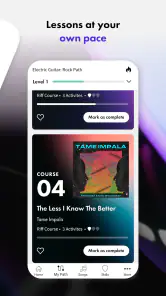
Fender Play is organized around guided learning paths and step-by-step video lessons, which makes it easier to work through material at a pace that feels comfortable. You can focus on a lesson, practice its techniques, and return to topics as needed. This format suits learners who want some structure without having to keep up with a live class.
Does Fender Play teach music theory as well as songs and playing techniques?
Yes. Alongside song tutorials and technique exercises, Fender Play includes music theory content. That combination can help learners connect practical playing with a better understanding of how music works. The balance of each type of material depends on the learning path and lesson you choose, so it can be useful whether you are mainly interested in playing songs or building broader musical skills.
Who makes Fender Play, and which devices can run it?
Fender Play is an education app from Fender Musical Instruments Corporation. It is available for Android and iOS, with a minimum operating system requirement of version 9. The app is rated for Everyone, so its intended audience is broad; as with any learning app, the most useful experience depends on having a compatible device and an instrument you want to practice.
What is Fender Play: Music Lessons?
Fender Play is an online learning app for guitar, bass, and ukulele players. It offers structured video lessons, guided learning paths, song tutorials, technique exercises, and music theory content. During testing, the app felt designed for beginners and developing players, with lessons organized by skill level and musical style rather than presented as an unstructured library.
Is Fender Play suitable for complete beginners?
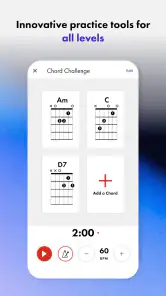
Yes. Fender Play is particularly approachable for people who have never played an instrument before. The lessons generally begin with fundamental topics such as tuning, holding the instrument, reading chord diagrams, and playing simple rhythms. More experienced musicians can also use the app to improve technique or learn songs, although advanced players may find some of the introductory material too basic.
Pros
- Clear
- step-by-step lessons for guitar
- bass
- and ukulele players.
- Short videos make it easy to practice around a busy schedule.
- Lessons cover multiple genres
- from rock and blues to pop and country.
- Interactive song tutorials help connect technique practice with real music.
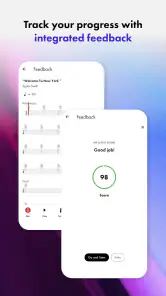
- Progress tracking encourages consistent practice and skill development.
Cons
- Full access requires a paid subscription after the trial period.
- Some advanced players may find the lesson pace too basic.
- The app depends heavily on a stable internet connection for video streaming.
- Limited instrument support may disappoint users seeking piano or vocal lessons.
- Song and lesson availability can vary by region and subscription plan.
- Category
- Education
- Version
- 8.0.1












