Fender Guitar Tuner
- 9.36K
- 4.6
- Installs
- 5.00M
- Price
- Free

Screenshots
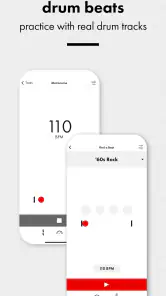
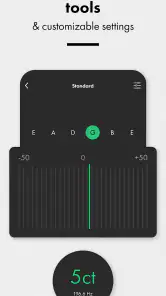
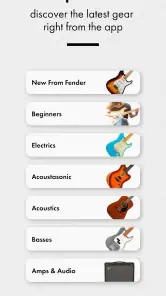
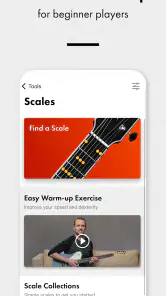
Analysis by Reviewed
I reach for a phone tuner when I want to get playing without setting up extra gear, and Fender Guitar Tuner is aimed squarely at that everyday job. Fender Musical Instruments Corporation makes this free music and audio app for guitar, bass and ukulele players. Its appeal is straightforward: tune by listening through your device, then use a metronome when it is time to work on timing. The useful question is whether that quick, all-in-one approach fits your playing routine.
Quick tuning, with realistic expectations
For a single instrument in a reasonably quiet room, a phone tuner is usually the fastest option: open it, play a string, and make small adjustments while watching the reading. I would still tune deliberately rather than rushing through all the strings. Pluck one string at a time, let its sound settle, and mute it before moving on; ringing neighboring strings or background noise can make a reading harder to follow. That simple habit matters more than trying to tune as quickly as possible.
The chromatic mode is especially handy when I am not using a familiar standard tuning. It lets me check the note I have actually played instead of relying only on a preset expectation. That makes it useful for experimenting, but it also means I need to know which notes I am aiming for. If I am learning a new tuning, I keep a reference nearby and change strings gradually, rather than turning a string a long way based on a guess.
When practice gets busy
A realistic use is a short practice session before work or a lesson: check the instrument, set a manageable tempo on the metronome, and spend the remaining time playing instead of searching through separate tools. Having tuning and timekeeping together can reduce small interruptions, especially if I am switching between tuning and rhythm exercises. It is a practical convenience, not a replacement for listening closely to the instrument or developing a steady internal pulse.
In a noisier room or when several people are tuning at once, I would not assume a phone microphone will be as dependable as a dedicated clip-on tuner. Move away from other instruments if you can, and check the note again after the surrounding sound dies down. For a loud rehearsal, a clip-on device may be easier to read and less affected by the room; for quiet practice, the app avoids carrying another piece of equipment.
Who will get the most from it
I would recommend it to beginners who want one approachable place to check tuning and keep time, and to experienced players who need a convenient backup or quick practice companion. Guitar is the obvious fit, but bass and ukulele players can also use the app. Someone who relies on unusual setups, needs a tuner visible at a glance on a crowded stage, or prefers physical controls may be happier with dedicated hardware instead.
It is free to download, with optional in-app purchases priced from under a dollar to a few dollars per item. The app is rated for Everyone, and its current version is 4.15.6; it requires iOS 11 or later. Its 4.6 average from around 66,000 ratings, alongside over 5 million installs, suggests it has reached many players, though popularity alone cannot tell you whether it suits your instrument or surroundings.
More From Our News Desk

Weather by Xiaomi Review: Clear at a Glance, Less Clear Up Close

X Under Pressure: Can It Recover When Posting Goes Wrong?

Clash of Clans Is Won Between the Battles

Android Auto Makes the Case for Quieter Car Software

MobiOffice: Transforming Mobile Productivity with Seamless Integration

EA SPORTS FC™ Mobile Soccer: Redefining Mobile Sports Gaming
On a phone, I also think about practical friction: keep the microphone area unobstructed, avoid placing the device against a noisy amp, and lower the room noise when a note seems to jump around. If the app does not settle on a pitch, I would first mute other strings, pluck again, and check that the instrument itself is not still ringing. These small adjustments are a sensible first recovery step before assuming the tuner has stopped responding.
Choosing between a phone and a dedicated tuner
The usual alternatives each solve a slightly different problem. A clip-on tuner senses vibration at the instrument, which can be a real advantage beside an amp or in a room where other musicians are playing. A pedal tuner is more convenient for a guitarist who already has a pedalboard and needs a clear tuning check between songs. The phone app is strongest when portability and low setup effort matter more than a hands-free display.
I would treat it as a useful everyday tool rather than the only tuner I own if I regularly perform in loud spaces. At home, the phone is already nearby, and combining tuning with a metronome means fewer things to find before practice. For a beginner, that can make starting less of a chore. For a working player, it is a backup that can save a trip to the gear bag when a quiet room is available.
One less obvious benefit of chromatic tuning is that it encourages checking what the instrument is actually producing. That is useful when a string has been deliberately tuned away from standard, but it also puts more responsibility on the player: the display can identify a note without deciding whether that note is the one the song requires. I would write down the target tuning first, particularly when changing more than one string, and make modest adjustments so I can catch a mistake before the instrument is far out of its usual setup.
For a shared practice space, I would make tuning a short, orderly step rather than trying to follow the screen while everyone plays. Ask for a brief pause, tune one string at a time, then check the instrument again once the room quiets. This is not a special setting; it is a practical workaround for the limits of listening through a phone microphone. If interruptions are impossible, a clip-on tuner is likely the less frustrating choice.
Storage and battery demands are not something I would judge from the tuner’s core purpose alone, so I would not install it expecting it to replace every music tool on a device. Its practical footprint is that of a single-purpose companion with two jobs, tuning and keeping time. If you are trying to keep your home screen minimal, that pairing is more compelling than adding a separate tuner and metronome, while someone who already owns reliable hardware may gain little from another app.
Hey fellow musicians and wannabe rockstars! 🎸 If you're like me, always on the hunt for tools to elevate your guitar game, then you might have stumbled upon the Fender Guitar Tuner. Today, I'm diving deep into this app, which promises to keep your strings in check and your tunes on point. So grab your guitar, and let's see if this app hits all the right notes or if it's just another digital wannabe.
First Impressions
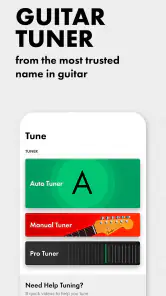
First things first, when you hear the name Fender, you immediately think of legendary guitars and rock history. So, naturally, I had high expectations. The app is available for both Android and iOS, making it accessible for pretty much everyone. As soon as I downloaded it, the sleek and user-friendly interface caught my eye. It’s not cluttered, which is a blessing because, let’s be honest, nobody wants to wrestle with their phone more than their guitar.
Features That Stand Out
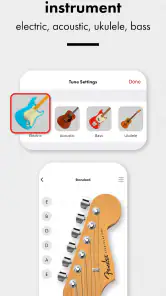
One of the standout features of the Fender Guitar Tuner is its accuracy. I mean, this thing is precise. Whether you're tuning an electric, acoustic, or even a bass guitar, it’s got you covered. The app supports a variety of tunings too, ranging from standard to open tunings, like open G or DADGAD. It’s like having a personal guitar tech in your pocket.
Another cool feature is the chromatic tuning option, which is a lifesaver if you’re experimenting with different styles or genres. Plus, the app provides a handy guide for beginners, offering tips and tricks to ensure you’re getting the best sound possible. And if you're like me, who sometimes forgets the standard tuning, this guide is a godsend.
Usability and Performance
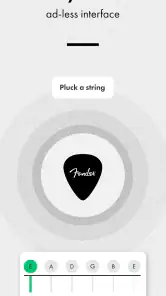
Using the app is a breeze. Just pluck a string and watch the magic happen as the tuner does its thing. I found it really intuitive, even for someone who’s not the most tech-savvy. The app also responds quickly, with minimal lag, which is crucial when you're in the middle of a jam session. The metronome feature is an added bonus, helping you keep time and improve your rhythm skills.
For speed, the main variable is often the note reaching the phone clearly, not how quickly I can tap through the app. I get the best result by holding the device within easy reach, leaving its microphone area clear, and giving each pluck enough space to ring. If the reading wanders, I do not keep turning the tuning peg in response to every flicker. I wait for a steadier indication, make a small change, and listen to the string as well as watching the display.
That routine is especially helpful when I am tuning a bass, whose lower notes can take a little more patience to settle by ear and on a screen. I avoid striking the string unusually hard, since a forceful attack can make the pitch sound different from its settled note. After tuning, I play a familiar chord or a short passage and check whether the instrument still sounds right as a whole. A tuner can help with individual notes; the final musical check belongs to my ears.
Reliability in everyday practice
When the app seems slow or inconsistent, I would first look at the conditions around it: room noise, a ringing neighboring string, or a hand covering the phone’s microphone can all get in the way of a clean reading. Muting strings that are not being checked is a small but worthwhile habit. If a note still will not settle, I stop, pluck it again, and give the sound a moment rather than repeatedly closing and reopening the app.
For a quiet lesson at home, this makes a dependable enough routine: check tuning before starting, keep the phone nearby for the metronome, and return to the tuner if the instrument needs attention later. In a group rehearsal, I would be more cautious. Other instruments can make it difficult to isolate a note, and the screen may be inconvenient when I need to keep both hands on the guitar. The app is not necessarily failing in that situation; the environment is simply less suited to microphone-based tuning.
Device fit and practical limits
The app is listed for Android and iOS, but the stated minimum operating-system requirement is iOS 11 or later. I would check that my device meets the requirement before relying on it for a lesson or rehearsal. Even on a compatible phone, a clear view of the display and an accessible microphone matter more than an elaborate setup. A stand can keep the screen visible during practice, although I would still avoid putting the phone right beside a speaker or other strong source of sound.
Fender Guitar Tuner is free, with optional in-app purchases ranging from $0.99 to $4.99 per item. The Everyone age rating makes it suitable for a broad audience, including younger learners using it with an instrument. The app has around 9,400 reviews as well as its average rating, and Fender Musical Instruments Corporation is the developer. Those details provide useful context, but my decision would still come down to whether I want a phone-based tuner and metronome rather than a separate piece of gear.
Final Thoughts
Overall, the Fender Guitar Tuner app is a solid choice for guitarists of all levels. Whether you're a beginner trying to learn the ropes or a seasoned player looking for a reliable tuning companion, this app delivers. It’s accurate, easy to use, and packed with features that make tuning your guitar a hassle-free experience.
My performance verdict is practical rather than dramatic: this is a quick way to get into a quiet practice session, and the metronome makes it useful after the instrument is tuned. Its weakest moments are predictable ones—competing noise, an obstructed microphone, or the need to glance at a phone while playing. If you need stage-ready visibility or vibration sensing, choose dedicated hardware; if you want a convenient pocket option for guitar, bass, or ukulele, the app is an easy one to try. Its current release is version 4.15.6, and its roughly 9,400 written reviews give another measure of how many players have taken the time to share feedback.
So, if you’re looking to get your guitar in tune and sound like a pro, give the Fender Guitar Tuner a try. It might just become your new best friend in the world of music. Rock on! 🤘
Fender Guitar Tuner Frequently Asked Questions
Can I use Fender Guitar Tuner with a bass or ukulele, not just a guitar?
Yes. Fender Guitar Tuner is described as a tuner for guitar, bass, and ukulele, so it may be useful if you play more than one of those instruments. Its chromatic tuner is intended to help with a range of pitches, while the app’s broader instrument support makes it more flexible than a guitar-only option. Check that the instrument you want to tune is selected before using it.
Does Fender Guitar Tuner include a metronome for practice?
Yes. The app’s store summary describes it as a chromatic tuner with a metronome, so it can serve both tuning and basic rhythm-practice needs. Having those tools together can be convenient when you want to tune before playing or keep time during a session. The app’s metronome is also mentioned among the features associated with its in-app purchase options.
Is Fender Guitar Tuner free, and can I use it without buying anything?
Fender Guitar Tuner is free to download, and its basic tuning features are available without paying upfront. Optional in-app purchases are offered for users who want additional features. In-app purchases range from $0.99 to $4.99 per item, so review the available options in the app before confirming a purchase if you prefer to keep your spending limited.
Is Fender Guitar Tuner suitable for children and families?
The app has an Everyone content rating, making it suitable for a general audience, including families considering a music tool for younger players. Its purpose is to help tune instruments and support practice, rather than provide entertainment content. Since optional purchases are available, parents may still want to review purchase settings on the device before letting a child use the app.
What should I check before installing Fender Guitar Tuner on my phone?
Before downloading, make sure your device runs the required operating system and has a working microphone, since the tuner listens to instrument sound through the device. It is also sensible to consider where you will place the phone while tuning so it can pick up the strings clearly. The app is free to install, with optional purchases available for additional features.
Pros
- Highly accurate tuning results
- Wide range of tuning options
- User-friendly interface
- Supports multiple instruments
- Offline mode available
Cons
- Ads can be intrusive
- Limited free features
- Occasional app crashes
- In-app purchases required for full access
- Not available on all devices
- Category
- Music & Audio
- Version
- 4.15.6












