FedEx Mobile
- 35.76K
- 3.7
- Installs
- 10.00M
- Price
- Free

Screenshots
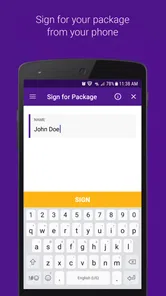
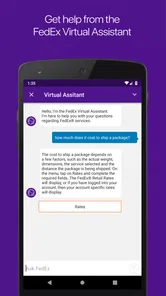
Analysis by Reviewed
I tend to judge a delivery app by what it’s like after the first exciting package check: does it still help when I’m sending something, planning around a delivery, or sorting out a change of plan? FedEx Mobile is most useful when FedEx is already part of your routine. It brings shipment tasks and tracking into one place, and that practical focus is why I can see it earning a spot on a phone beyond the first week.
Useful from the first delivery
In the first few days, the clearest benefit is having shipment status close at hand instead of searching through messages or switching between a carrier’s website and other tools. I’d start by adding the shipment I care about and choosing only the alerts that affect my plans. A notification that a parcel is out for delivery can help me decide whether to stay nearby; repeated updates that don’t change what I’ll do can become noise.
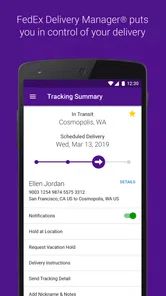
A realistic use is a workday when I’m expecting a delivery but can’t be home all afternoon. I can check its progress during a break, then consider whether a hold at a FedEx location makes more sense than hoping to catch the doorbell. That option is valuable because it turns tracking into a decision, not just a stream of status messages. I would still check the details before changing plans, since an app can show shipment progress but cannot make a delivery convenient if my schedule is already fixed.
When a delivery needs a plan B
That kind of flexibility matters most when the parcel is important enough to plan around but not so urgent that I need to rearrange my whole day. Before choosing a hold, I’d check the location’s hours and whether its services fit what I need; the app’s location information can help with that comparison. A nearby option may be less convenient than home delivery if getting there means a special trip, so I’d weigh the time saved waiting against the time spent collecting it.
For a household, a useful routine is to check the tracking status once at a natural pause rather than react to every update as it arrives. If the delivery is still moving through the network, there may be no reason to change plans. If the status suggests action, I can look at the available choices then. This keeps the app helpful without letting an expected parcel take over the day.
Value that depends on your habits
The month-to-month case is stronger for people who both receive and send parcels. Tracking is an occasional need for some households, while creating labels, arranging a pickup, and finding a nearby location can matter regularly to a small seller or someone who sends returns and gifts. Keeping those tasks together may save small amounts of time each time they come up, which adds up more naturally than relying on novelty.
For a person who only wants to compare delivery companies, this is not a general shipping marketplace: it is FedEx’s own business app, made by FedEx. A retailer’s order page may be enough when all you need is a rough delivery update, while the carrier app is the more direct place to handle FedEx-specific tasks. I’d choose based on what I actually do. If most of my parcels travel with other carriers, a multi-carrier tracker may be more convenient; if FedEx shipments are common, a dedicated app can keep the relevant actions close together.
More From Our News Desk

Weather by Xiaomi Review: Clear at a Glance, Less Clear Up Close

X Under Pressure: Can It Recover When Posting Goes Wrong?

Clash of Clans Is Won Between the Battles

Android Auto Makes the Case for Quieter Car Software

MobiOffice: Transforming Mobile Productivity with Seamless Integration

EA SPORTS FC™ Mobile Soccer: Redefining Mobile Sports Gaming
The difference becomes clearer when I’m sending something rather than waiting for it. A small seller who handles a few orders between other responsibilities may value having label creation and pickup scheduling close to the shipment itself. Someone sending one occasional birthday parcel might find that setting up an account and learning another app’s layout is more effort than using an existing shipping counter or website. The right choice depends less on whether the tools sound useful and more on whether I will reach for them repeatedly.
Where it fits among shipping options
Compared with checking an order page, the carrier app is aimed at the shipment after it has entered FedEx’s network and can put FedEx-specific actions alongside tracking. That makes it a better fit when I need to manage the delivery rather than simply confirm that an online purchase is on its way. A retailer’s page can still be the easiest starting point for an order because it gathers purchase information in one place; I would use the FedEx app when I need a closer look at the carrier side.
Compared with a multi-carrier tracker, the trade-off is focus versus breadth. A general tracker can be tidier for someone juggling parcels from several couriers, while a dedicated FedEx app is more relevant when I expect to use FedEx’s own shipping and delivery options. I wouldn’t install both just because I can: I’d decide which one reduces the most daily friction, and keep the other only if it provides a distinct task I actually use.
Tracking Made Easy
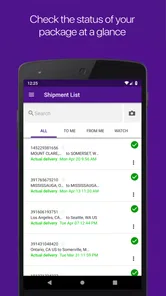
First things first, the app's primary function is to provide real-time tracking for all your shipments. As someone who frequently orders online, this feature has been a lifesaver. The app updates you on the status of your package, from the moment it leaves the warehouse to when it arrives at your doorstep. I found the interface to be very user-friendly, allowing me to quickly access tracking information without any fuss.
Maintenance and everyday friction
To make the app useful over time, I’d treat notifications and saved shipment details as things to review rather than set-and-forget conveniences. Keep alerts that prompt an action, and turn down the ones that merely repeat information you can check when needed. That small bit of housekeeping helps prevent a delivery app from becoming a source of constant interruption.
There is also a practical trade-off in choosing a carrier-specific tool. It can make FedEx shipments easier to manage, but it will not replace the places where I handle orders from other companies or carriers. I would keep it if its shipping and delivery tools save me effort every month; if I open it only once in a long while to look at a tracking number, the retailer’s updates or a broader tracking option may be enough. The app is free, rated for Everyone, and has a 4.0 average from around 287,000 ratings, so it is easy to try without making it a permanent fixture.
One simple maintenance habit is to remove the mental clutter around completed shipments. I’d focus on current parcels and avoid treating an old tracking entry as a to-do item once delivery is finished. That makes a quick check genuinely quick, especially during a busy week when several packages arrive close together. The app is most convenient when I can tell at a glance which shipment needs attention and which one is already settled.
User Experience
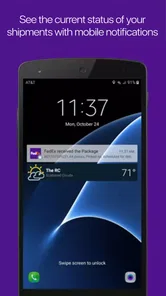
Let's talk about the usability of the app. The FedEx Mobile app is designed with the user in mind. The layout is intuitive, and even if you're not tech-savvy, navigating through the app is a breeze. One thing I particularly appreciate is the ability to customize notifications. You can set up alerts for when your package is out for delivery or has been delivered, so you’re always in the loop.
For someone who is new to carrier apps, the practical question is whether it can handle a shipment they already know about. I’d begin with the tracking number from the order confirmation, then use the status to decide whether I need to do anything else. That keeps the first visit focused: there is no need to explore every menu just to answer the basic question of where a parcel is and whether I should adjust my plans.
Extra tasks, with a useful trade-off
For a small business, making a label and arranging a pickup from a phone can be handy when the package is ready but a trip to a counter would interrupt the day. I’d still double-check the shipment information before completing a label: convenience is only a win if the address and parcel details are right. Finding a FedEx location is another practical fallback, especially when dropping something off or collecting a held delivery fits better than waiting at home.
These tools also explain who may not need the app. If I rarely ship anything and most orders arrive through other carriers, installing a dedicated FedEx app may add little beyond another place to check. If I regularly send FedEx parcels, though, label creation and pickup scheduling give it a purpose beyond watching a tracking screen. It’s less about having every possible shipping service in one app and more about whether these particular tasks match my routine.
A useful workflow for a seller is to prepare the parcel first, confirm the recipient and shipment details carefully, and only then finish the label or pickup task. Doing the checks before the final step matters because phone convenience can make it tempting to move quickly through forms. I would treat the app as a way to handle routine logistics, not as a reason to skip the same care I’d use when preparing a shipment at a desk.
Additional Features
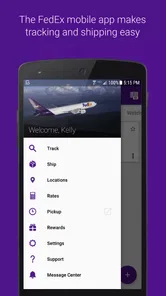
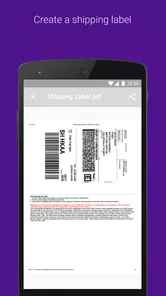
Besides tracking, the app offers other features that I found incredibly useful. For instance, if you're someone who ships packages frequently, you can create shipping labels directly from the app. Plus, there's the option to schedule a pickup, saving you a trip to the FedEx office. Not to mention, the app provides easy access to FedEx locations, complete with hours of operation and services offered.
Another cool feature is the ability to hold a package at a FedEx location if you know you won’t be home. This added flexibility ensures that you never miss a delivery, which is a game-changer for busy folks like me.
Those options are most valuable when they solve a specific problem, not simply because they are available. If I’m already heading near a FedEx location, checking its hours and services can help me combine errands instead of making a separate trip. If pickup scheduling saves a small business from stepping away from work, it has a clearer recurring payoff. On the other hand, if home delivery works reliably with my schedule, changing the delivery arrangement may add steps without improving the outcome.
Who will get the most from it
I see the strongest fit for people who regularly receive FedEx parcels and want a direct way to follow them, or for people who send often enough to use labels, pickup arrangements, and location details. It can also suit anyone whose day is shaped by whether a delivery arrives at home or needs a different plan. Those routines give the app a repeated job, which is the best reason to keep it installed.
I’d skip it if I mainly want a single screen for every carrier, if my retailer already gives me all the updates I need, or if I send parcels so rarely that I would have to relearn the process each time. In those situations, a broader tracker, an order page, or an in-person shipping option may be simpler. The app’s specific focus is a strength only when FedEx is a meaningful part of my shipping life.
Long-term fit
When deciding whether to keep it installed, I’d ask two simple questions: do FedEx deliveries show up often enough to justify dedicated tracking, and will I use the shipping tools rather than merely notice they exist? If the answer to either is yes, the app has a recurring role. It first appeared on November 22, 2011, and version 9.27.1 supports OS 11 and later; its scale—over 10 million installs—suggests it serves a broad audience, though that alone cannot tell me whether it suits a particular household.
Its maintenance burden seems modest in the everyday sense: I need to decide which alerts matter, check the details before changing a delivery, and keep my attention on active shipments. The bigger cost is not upkeep but fragmentation. If I already check a retailer’s page, email, and another tracking app, adding one more destination can make parcel management feel scattered. I would let a regular FedEx task justify that extra stop rather than assume another app automatically makes tracking simpler.
My lasting impression is that this works best as a practical FedEx companion, not an all-purpose delivery organizer. I’d keep it for frequent shipments, useful delivery alerts, and occasional changes such as arranging a hold. I’d skip it if my shipping is rare or spread across carriers and I already have a simpler way to follow orders. That distinction makes the choice straightforward: its value comes from fitting a recurring habit, not from opening it just to see what it can do.
Security and Support
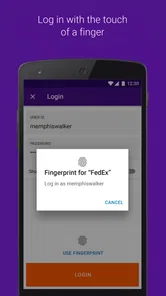
Security is a top priority, and the app doesn’t disappoint. It employs secure login features to protect your information. I felt confident knowing that my personal data and package details were safe. Moreover, if you encounter any issues or have questions, the customer support section is just a tap away. The support team is responsive and helpful, which adds to the overall positive experience.
FedEx developed this free business app, and its broad adoption—more than 10 million installs—makes it an established option for people who already rely on the carrier. Its 4.0 average across around 287,000 ratings gives me a useful sense of how widely it has been tried, but I’d still judge it by whether its tasks match my own shipping pattern. It is intended for Everyone, so its audience is not limited to business users; the business category reflects the shipping work it can support as well as personal deliveries.
In conclusion, the FedEx Mobile app is more than just a tracking tool; it's a comprehensive package management solution. Whether you're sending or receiving, the app simplifies the entire process. With its user-friendly interface, reliable tracking, and additional features like label creation and package holds, it's no wonder that this app has made its way into my daily routine. If you haven't tried it yet, give it a go—you might find it as indispensable as I do!
FedEx Mobile Frequently Asked Questions
What is FedEx Mobile, and who makes it?
FedEx Mobile is a business app developed by FedEx for people who want to take package-related tasks with them while they are on the go. It brings tools for tracking shipments, creating shipments, and finding FedEx locations into a mobile app. It is free to download, and its content rating is Everyone, making it suitable for a broad audience.
What can I check before downloading FedEx Mobile?
FedEx Mobile is free to download and is rated for Everyone. It is available on Android and iOS, with Android 11 or later required on Android devices. The app has an average rating of 4.0 from around 287,000 ratings, and more than 10 million installs. These details can help you decide whether it suits your device and needs.
Can I use FedEx Mobile without creating an account?
FedEx Mobile is designed to make package tasks accessible while you are on the go, including checking shipment progress and finding nearby FedEx locations. Some actions, such as creating or managing shipments, may require signing in or providing shipment details. Having an account can make it easier to keep track of your shipments and use account-related options in the app.
Which devices can install FedEx Mobile?
FedEx Mobile is a business app developed by FedEx, and it is available for Android and iOS devices. On Android, the app requires Android 11 or later; the current version is 9.27.1. The app is free to download and is rated for Everyone. Check that your device meets the operating system requirement before installing, then download it through your device’s app store.
What features does FedEx Mobile offer to users?
FedEx Mobile provides users with a comprehensive suite of features designed to make shipping and tracking packages easier. Users can track their shipments in real-time, receive push notifications for updates, create shipments, and even find the nearest FedEx locations. Additionally, the app offers access to delivery options and estimated delivery times, ensuring a seamless shipping experience.
Pros
- User-friendly interface enhances experience
- Real-time tracking for accurate updates
- Push notifications for timely alerts
- Manage deliveries with ease
- Secure login ensures data protection
Cons
- Limited features for international shipments
- Occasional app crashes
- Requires stable internet connection
- No dark mode option
- Battery drain with prolonged use











