Face, Body Editor - Retouch Me
- 194.00
- 3.9
- Installs
- 1.00M
- Price
- Free
Screenshots
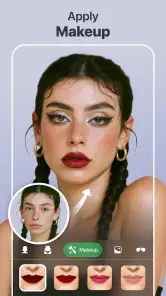
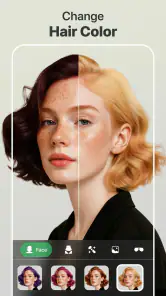
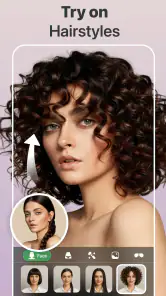
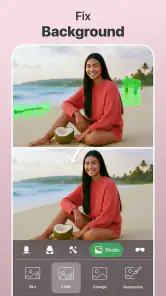
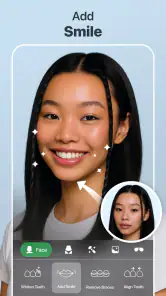
Analysis by Reviewed
I usually approach photo retouching apps with some caution. The first few edits can feel impressive, but the real test is whether the app remains useful after the novelty wears off. Face, Body Editor - Retouch Me caught my attention because it brings several common portrait adjustments into one photography app: face retouching, body shaping, slimming, skin cleanup, and general photo correction. After spending time with it, I see a tool that is easy to understand and potentially handy for quick personal edits, but one that works best when used with restraint.
The app is free to install, and its store summary focuses on body tuning, shape editing, slimming, face retouching, and removing blemishes. That combination makes its purpose clear from the beginning. This is not a full replacement for a professional desktop editor, nor is it mainly a camera app. It is designed for people who already have a picture and want to make a targeted change without learning a complicated editing workflow.
Face, Body Editor - Retouch Me is published by GOOD RETOUCH LP and belongs to the photography category. It has reached over a million installs, which suggests that the idea is easy for many people to understand: choose a portrait, adjust the areas you care about, and save a more polished version. The important question for me is not whether the app can create a striking before-and-after image. It is whether those tools are practical enough to become part of a normal editing habit.
What the first week feels like
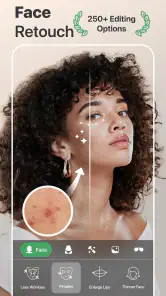
During the first few sessions, the strongest advantage is focus. Instead of presenting a huge collection of unrelated filters, the app centers attention on appearance edits. That matters when I am working on a portrait and already know what I want to change. A small blemish, an uneven-looking area, or a body proportion that feels distracting can be approached directly rather than buried among dozens of general effects.
The store short description, “Face, Body Editor,” is brief, but it accurately sets expectations. The experience is built around portraits rather than landscapes, food photos, or elaborate graphic compositions. If I open it with a clear goal, such as cleaning up a temporary skin mark or making a subtle adjustment to a profile picture, the concept makes sense immediately.
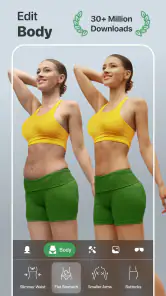
My best first-week results came from treating the controls as correction tools rather than transformation tools. A light touch usually keeps the photograph believable. Strong slimming or reshaping can make nearby lines, clothing, furniture, and backgrounds look unnatural. This is a common problem with body editors, but it is especially important here because the app’s central appeal encourages experimentation. The preview may look exciting while editing, yet the saved image deserves a second look at normal size.
A useful workflow is to begin with the smallest change that solves the problem, then pause before adding another adjustment. I would first correct a visible distraction, inspect the edges around the subject, and only then consider whether any face or body tuning is still necessary. This prevents the familiar spiral where one edit creates a new imbalance and another edit is used to hide it.
The app is also approachable for someone who does not normally edit photos. The intended tasks are familiar, and the results are easier to understand than the more technical controls found in advanced editors. That makes it suitable for a quick social profile update, a casual portrait, or a photo I want to share with friends without spending a long time learning curves, masks, and layers.
Where it fits into an everyday photo routine
A realistic example would be taking a group photo before going out. Later, I might notice a temporary blemish, a stray detail on the face, or a pose that makes one part of the body look less balanced than it did in person. I could use this app for a small cleanup, save the result, and leave the rest of the picture alone. That is a sensible use because the goal is not to redesign the person; it is to remove one distraction from an otherwise good memory.
Another practical situation is preparing a consistent set of profile images. I might have several portraits taken under different lighting conditions and want them to feel reasonably similar. The app can be useful for making modest corrections across those images, although consistency depends on applying a similar level of editing each time. If I push one portrait much further than the others, the set will look less natural rather than more professional.
The first-week appeal comes from this immediacy. I do not need to start with a blank canvas or understand a complicated retouching system. I can concentrate on the person in the image and make a focused change. That simplicity is valuable, especially on a phone, where I am more likely to edit for a minute or two than sit down for a detailed project.
What I would check before paying for anything
The app is free, but it includes in-app purchases ranging from $0.99 to $99.99 per item. That is a wide range, so I would not assume that every tool or export option is included in the free experience. Before committing to a purchase, I would test the complete workflow with a copy of a non-important photo: import it, make the intended adjustment, inspect the result, and see which step requires payment.
This matters because the value of a retouching app depends on the features I actually use, not on the number of tools visible in the interface. Someone who only wants occasional blemish cleanup may have a very different opinion from someone who expects repeated body-shaping edits. I would also avoid buying immediately during the first burst of enthusiasm. A few trial edits can make almost any appearance app seem essential; a week of real use gives a better idea of whether the paid options solve a recurring problem.
Does it earn a place after the novelty fades?
The month-to-month value is more limited than the first-week excitement. Face and body editing is not something everyone needs every day, and many users will naturally use the app in bursts: before updating a profile photo, after a holiday, or when preparing a particular set of portraits. That does not make it a bad app. It simply means its lasting value depends on whether those occasions occur often enough to justify keeping it installed.
For me, the strongest recurring use is controlled cleanup. Blemish removal and small portrait corrections solve problems that appear repeatedly without requiring a complete change in appearance. If I regularly post photos, maintain professional profiles, or send portraits to family, those small improvements can justify returning to the app. The value is less convincing when the main attraction is dramatic reshaping, because that kind of edit is easier to overuse and harder to keep consistent.
A useful monthly habit would be to create a personal editing limit. I would decide in advance that I am correcting distractions, not changing recognizable features. That rule makes the app more sustainable because I spend less time chasing an idealized result. It also reduces the risk that every new photo becomes a project requiring multiple adjustments.
The current version is 8.30, and the app supports an operating system starting with version 9. For a compatible phone, that makes it accessible to a broad range of devices. Still, compatibility alone does not guarantee a smooth long-term experience. Photo editing can become frustrating if I repeatedly need to redo work, compare several versions, or remember which intensity produced a natural result. The app is most useful when it shortens that process rather than creating another routine to manage.
The maintenance burden is mostly visual judgment
The biggest maintenance burden is not learning the interface. It is learning when to stop. Face and body editors give me the freedom to keep adjusting, but a convincing portrait often needs fewer changes than I initially expect. I have to inspect the background, clothing edges, hair, hands, and facial proportions after every significant edit. A result that looks acceptable while zoomed in may look distorted when viewed as a whole.
I recommend keeping the original image untouched and saving an edited copy. That simple habit makes comparison much easier and prevents a temporary experiment from becoming the only version. It is also useful to view the result away from the editing screen, where the controls and preview can influence my judgment. If the change is only attractive because I am staring at the edited area, it may be too strong.
Lighting creates another maintenance issue. A face retouch that works on a softly lit portrait may look artificial on a sharply lit photo. Likewise, body adjustments can be more noticeable when the subject stands near straight architectural lines. I would therefore judge each photograph on its own rather than applying one favorite setting automatically to every image.
For repeated work, I would use a simple three-pass method. First, identify the one issue that bothers me most. Second, make the smallest correction that addresses it. Third, inspect the complete image at ordinary viewing size. If the photo already feels balanced at that point, I would stop. This approach is more reliable than editing every available area simply because the controls are there.
Where fatigue begins
The first source of fatigue is repetition. After editing several similar portraits, the differences between subtle and excessive changes can become difficult to judge. That is when I am most likely to keep adjusting out of habit rather than necessity. The app can make editing convenient, but convenience can also encourage unnecessary editing.
The second source is inconsistency between photos. If I use one level of retouching on a close-up and another on a full-body picture, the person may appear noticeably different from one image to the next. This is particularly relevant for social profiles or photo collections. The app helps with individual images, but I still need to manage the visual relationship between them.
The third source is the emotional side of appearance editing. A tool that can slim, reshape, and retouch may be useful for correcting a distracting detail, but it can also make me focus too heavily on perceived flaws. I would skip this app, or use it very sparingly, if the editing process makes me reject ordinary photos that were already meaningful. A good result should support the purpose of the picture, not replace it.
There is also a practical trade-off between this focused editor and broader alternatives. A general photo editor is usually better when I need exposure correction, color grading, cropping, text, layers, or detailed control over the whole image. A dedicated beauty camera may be faster for applying a live effect before taking a photo. Face, Body Editor - Retouch Me makes more sense when I already have a portrait and want appearance-focused adjustments without the complexity of a full desktop-style workflow.
That distinction helps prevent disappointment. I would not choose it for designing a poster, repairing a heavily damaged scan, or making precise professional composites. I would choose it for a quick portrait correction where the subject is the main concern and the editing goal is easy to describe in one sentence.
Who is likely to keep using it?
It is a good fit for casual portrait editors, social media users, and anyone who wants a straightforward way to clean up a photo before sharing it. It may also suit people who find advanced editing apps intimidating but still want more control than a basic filter provides. The free entry point makes it reasonable to try, especially if I only need occasional corrections.
I would be more cautious if I needed exact, repeatable professional retouching. Photographers working for clients usually need careful control, dependable consistency, and a workflow designed around high-quality finishing rather than quick mobile adjustments. In that situation, a more advanced editor may be worth the extra learning time. I would also look elsewhere if my main interest is color, lighting, or composition, since the app’s identity is centered on the face and body.
The age rating is Everyone, which fits the app’s general-purpose photography focus. Even so, the responsible choice is still to use it thoughtfully, particularly when editing other people’s portraits. I would ask before making noticeable changes to someone else’s appearance and avoid presenting a heavily altered image as though it were an untouched photograph.
My long-term verdict
After the initial novelty fades, I do not see Face, Body Editor - Retouch Me as an app everyone needs open every day. I see it as a specialized utility that earns its place when I frequently work with portraits and want fast, appearance-focused corrections. Its lasting value comes from small, repeatable improvements rather than dramatic transformations.
The average rating is 3.9 from around 3.1 thousand ratings, with roughly 194 written reviews, which gives the app a reasonably established user base without suggesting universal satisfaction. My own view is similarly balanced: the concept is useful, the focus is clear, and the learning curve is friendly, but the results depend heavily on restraint and the free-to-paid boundary should be checked before I invest in a regular workflow.
GOOD RETOUCH LP has made a tool that is easy to understand and convenient for a narrow but common job. I would keep it installed if I often prepare profile photos, share portraits, or want a quick blemish cleanup without opening a more complicated editor. I would skip it if I rarely edit people, dislike appearance-focused tools, or need detailed control over color and composition.
My recommendation is to treat it as a light-touch portrait assistant, not a complete photo studio. Try it with ordinary pictures, compare every result with the original, and wait before paying for features you may only use once. Used that way, it can remain useful beyond the first week because it solves a specific recurring problem without demanding a large editing routine. Its best long-term quality is not how much it can change, but how quickly it can help me make a modest correction and move on.
Pros
- Easy-to-use tools for quick face and body adjustments
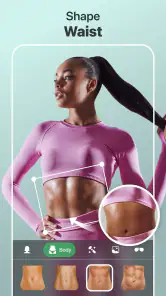
- Includes reshaping options for waist
- legs
- and facial features
- Useful filters and retouching effects for polished portraits
- Supports creative edits beyond basic cropping and brightness
- Suitable for enhancing photos for social media posts
Cons
- Some advanced editing tools may require a subscription or payment
- Results can look unnatural when adjustments are applied too strongly
- Ads may interrupt editing for users on the free version
- Privacy concerns may arise when uploading personal photos
- Precise edits can be difficult on smaller phone screens
- Category
- Photography
- Version
- 8.30











