Fable: Track & Discuss Books
- 1.50K
- 4.7
- Installs
- 1.00M
- Price
- Free

Screenshots






Analysis by Reviewed
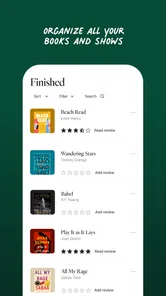
When I want to remember a book recommendation, keep track of a story I’m curious about, or find people who enjoy the same things, I don’t necessarily need another place to read or stream. I need a useful home for the ideas around what I’m reading and watching. That is the part of Fable: Books & TV I find most interesting: it brings books, shows, and reader conversations into one app, so discovery and discussion can sit alongside my entertainment habits.
That focus also sets a sensible expectation. Fable is a free Books & Reference app from Fable Group Inc., not a replacement for every bookstore, reading app, or streaming service. Its appeal is strongest when I want to organize what I’m interested in and share reactions with other fans. If I’m looking for a straightforward ebook reader or a single service with a particular show, I may be better served by a dedicated alternative.
Quick sessions suit the way I browse
Fable is built around exploring and organizing interests, which makes it a natural fit for brief moments: checking a title someone mentioned, browsing for something to read next, or returning to a conversation. I would approach it as a discovery and community companion rather than assuming that every visit needs to become a long reading or viewing session. That distinction matters because browsing apps feel most useful when they help me make a decision, not when they try to replace the places where I consume every book or show.
A practical habit is to use the app at the point when a recommendation comes up. If a friend mentions a book over lunch, I can look it up while I still remember the name, then use Fable to keep that interest connected to my reading life. Later, when I’m choosing what to start, I have a more intentional trail of things that caught my attention instead of relying on a vague memory or a note buried elsewhere. I find that kind of small workflow more valuable than opening an app only when I have already decided what to read.
How it handles a crowded reading list
The most revealing test for an organizing app is not the first browse; it is what happens when interests pile up. A reader can have a book in progress, several titles to consider, and a show they want to discuss, all at once. Fable’s mix of books and shows gives those interests a shared setting, while its social side offers a reason to return beyond simply ticking off a finished title. I would still keep my own simple distinction between “next,” “maybe later,” and “already tried” wherever the app’s available organization makes that practical. A little personal discipline prevents a discovery feed from becoming another endless pile of saved possibilities.
There is a trade-off here. Combining discovery and discussion can make recommendations feel more human, because other readers’ reactions add context that a bare title list cannot. But community activity can also pull attention away from choosing something and into reading other people’s takes. When I’m short on time, I’d use the social layer to answer a specific question—whether a group is discussing a title or what kind of conversation surrounds it—rather than scrolling without a purpose. That keeps the app’s communal strength useful instead of letting it turn a quick check into a long detour.
A better fit for shared enthusiasm than solitary reading
I would recommend Fable most readily to someone who likes talking about books and screen adaptations, enjoys browsing for their next story, or wants one place to connect their interests. It can also suit a reading group looking for a shared space to exchange impressions, especially when members want discussion to be part of the activity rather than an afterthought. The useful question is not simply “Do I read?” but “Do I enjoy discovering and discussing what I read?” If the answer is yes, the social element has a clear purpose.
More From Our News Desk

Weather by Xiaomi Review: Clear at a Glance, Less Clear Up Close

X Under Pressure: Can It Recover When Posting Goes Wrong?

Clash of Clans Is Won Between the Battles

Android Auto Makes the Case for Quieter Car Software

MobiOffice: Transforming Mobile Productivity with Seamless Integration

EA SPORTS FC™ Mobile Soccer: Redefining Mobile Sports Gaming
On the other hand, a reader who wants a quiet, distraction-free page and nothing else may prefer a dedicated ebook app. Someone who mainly wants to watch a particular series should check the streaming service that actually carries it instead of treating Fable as a universal video destination. And if book-club conversation feels like homework rather than fun, the community features may add little. I see Fable as most worthwhile for people who want the surrounding culture of stories—recommendations, lists, and other readers’ perspectives—not just a place to consume a file or video.
What I would check before making it a habit
Because Fable combines several kinds of activity, I would first decide what I want it to do for me. Am I trying to find a new book, keep an informal record of interests, join a discussion, or explore how a story connects with a show? Picking one goal for the first few visits makes it easier to tell whether the app is genuinely helping. If I try to use every part at once, I may confuse a lively interface with a useful routine.
I would also treat recommendations as leads rather than instructions. A suggestion can be a helpful nudge, but my next choice should still depend on the mood, length, and subject I want at that moment. The community can add useful context, yet a popular conversation is not automatically the right fit for every reader. A good approach is to follow a recommendation to its source, read enough of the surrounding discussion to understand why people like it, and then decide for myself. That is a more reliable way to use social discovery than assuming that activity alone signals quality.
For a reading group, I’d keep the app’s role clear from the start: use it to bring people together around a title, while agreeing on a manageable rhythm for checking in. That can make discussion feel welcoming rather than like another obligation. For an individual reader, the equivalent is setting a small boundary—perhaps checking in when looking for the next book, not every time a notification or passing thought interrupts the day. The value of an organizing community depends partly on how deliberately I use it.
Speed, busy moments, and reliability
For this kind of app, speed is less about a benchmark and more about whether I can get from curiosity to a useful next step without friction. Looking up a title or returning to a discussion should feel like a short visit, while choosing what to read can naturally take longer. I wouldn’t judge Fable by whether every screen makes me stay; I’d judge it by whether browsing helps me narrow my options. A discovery app that leaves me with more noise than direction can feel slow even when its interface responds quickly.
The busiest moments are likely to be the ones where I move between interests: checking a book, looking at a related show, then getting drawn into a group conversation. That is where the combined format is convenient, but it is also where I’d be most intentional about what I came to do. If I only have a few minutes, I can search or revisit one discussion and leave the rest for later. If I have time to explore, I can let recommendations lead me to something unexpected. Treating those as two different modes makes the app easier to fit into a real day.
Reliability also means being able to resume a habit after a gap. I would not expect an organizing and discussion app to eliminate the need for my own notes if I have a very specific reading plan, but its shared environment can make it easier to reconnect with interests when I return. A useful recovery routine is to revisit one active title or conversation instead of trying to catch up on everything at once. That keeps a missed week from becoming a reason to abandon the app altogether.
Choosing it over separate apps
Compared with the usual approach of using one app to manage books, another to discuss them, and a streaming service for shows, Fable’s main advantage is the common context. I can think about stories as interests that overlap rather than as items scattered across unrelated tools. That does not mean it replaces a retailer’s catalogue, a specialist reader’s controls, or a streaming service’s full library. Those dedicated apps are usually the better choice when I know exactly what I want to buy, need reading features above all else, or want to watch a specific title.
The trade-off is that a combined space asks me to value discovery and conversation. If I already have a dependable system for tracking every book and rarely discuss what I read, Fable may feel like an extra stop rather than a simpler routine. If my lists are scattered and I like hearing how others interpret a story, a single community-oriented destination can be easier to return to. I’d decide based on the habit I want to build, not on the promise of having every entertainment task handled in one place.
Practical expectations before downloading
Fable is free to download, with in-app purchases ranging from $9.99 to $69.99 per item. I would look at the purchase details for anything I choose before committing, and distinguish the cost of the app itself from any paid content or options I encounter. That makes it easier to try the discovery and community experience without assuming that every book or entertainment choice is included at no cost.
The app is rated Teen, so that is worth keeping in mind for younger users and families deciding whether its social environment is appropriate. It has a 4.6 average from around 19,000 ratings and more than a million installs, which suggests that it has found an audience, but those figures cannot tell me whether its particular mix of organization and discussion suits my habits. I’d still make that judgment by trying a focused use case: find one title, see whether the community adds something, and decide if I want to return.
On Android, the listed minimum operating-system requirement is version 8.0, and the current version is 0.246.20840. Those details help me check basic compatibility before installing, but they don’t guarantee the same feel on every device. If an older phone has limited storage or feels sluggish with other apps, I would keep my expectations modest and test a short browsing session first. I would avoid assuming that a social app is automatically lightweight simply because its core idea is straightforward; the practical question is whether it remains comfortable on the device I actually use.
Fable was released on January 12, 2021, and the developer is Fable Group Inc. What matters more to me than its age is whether its central approach still matches how I want to enjoy stories: not only reading or watching, but also keeping track of interests and finding conversation around them. The version number can change over time, so I’d check the app’s current store page on my device when compatibility or updates matter.
In an ordinary week, I can imagine using it on the train after a friend recommends a novel, saving that idea for later, and returning at home to see whether other readers are talking about it. If a screen adaptation catches my attention afterward, the fact that books and shows share the same general space makes that connection easier to follow. I would not expect this sequence to replace my reading app or streaming subscription; its value is in making the path from recommendation to conversation feel more connected.
Exploring the Features of Fable
Upon launching the app, you're greeted with a sleek and user-friendly interface. It's intuitive enough that even your grandma could navigate it without breaking a sweat. The home screen is divided into two main sections: Books and TV Shows. You can easily toggle between the two, depending on whether you're in the mood for some reading or binge-watching.
Now, let’s talk about the Books section. It features a vast collection of genres ranging from fantasy to mystery, and everything in between. You can either purchase individual titles or opt for a subscription model that gives you access to a plethora of books. The app also offers personalized recommendations based on your reading history, which is pretty neat if you ask me.
Switching gears to the TV Shows section, it’s equally impressive. Imagine having access to adaptations of your favorite books, all in one place. The app streams high-quality video content with minimal buffering, so your viewing experience is as smooth as butter. Plus, the app keeps track of where you left off, so you can pick up right where you left off without any hassle.
Why Fable Stands Out
What really sets Fable: Books & TV apart from other similar apps is its unique integration of books and TV shows. It’s like having the best of both worlds at your fingertips. The seamless transition between reading and watching is something I didn’t know I needed until now. Whether you’re a bookworm or a TV junkie, this app caters to all your entertainment needs.
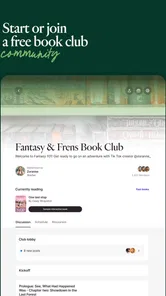
Another highlight is the community feature. You can join book clubs, participate in discussions, and even leave reviews. It’s a great way to connect with fellow enthusiasts and share your thoughts on the latest reads and shows. Plus, it’s always fun to see different perspectives on the same story.
The Final Verdict
So, is Fable: Books & TV worth downloading? Absolutely! Whether you're looking to discover new books, catch up on TV adaptations, or simply want an all-in-one entertainment hub, this app has got you covered. It’s like carrying a library and a mini-theater in your pocket. So go ahead, give it a try, and let the adventures begin!
Fable: Track & Discuss Books Frequently Asked Questions
Who develops Fable: Books & TV, and what is the app mainly for?
Fable: Books & TV is developed by Fable Group Inc. and is a Books & Reference app for finding, discussing, and organizing books and shows. It is built around bringing those interests together in one place, with a social angle for people who enjoy sharing what they read or watch. If you want a dedicated way to keep these interests organized and talk about them with others, that is the app’s central appeal.
What operating system does my Android device need to run Fable: Books & TV?
For Android users, Fable: Books & TV requires Android 8.0 or later. Checking your device’s operating system before downloading is a simple way to avoid compatibility problems. The app is also available for iOS, so it serves users across both major mobile platforms. Its main purpose remains the same on either platform: helping you find, discuss, and organize books and shows.
Is Fable: Books & TV suitable for teens, and what kind of content can I expect?
Fable: Books & TV is intended for a Teen audience and centers on books and shows. Its focus is not simply on browsing titles: the app is designed to help users find, discuss, and organize the books and shows they enjoy. That makes it worth considering whether its community-oriented approach suits you, especially if you want a place to share reading and viewing interests.
Is Fable: Books & TV free to download, and are there in-app purchases?
The app is free to download, so you can get started without paying an upfront price. It also offers in-app purchases, with listed prices ranging from $9.99 to $69.99 per item. Before buying anything, check the purchase details shown in the app and consider whether the features or content included are useful to you. The free download and optional purchases are separate parts of the cost.
What is Fable: Books & TV and how does it work?
Fable: Books & TV is an innovative app that combines the joy of reading books and watching TV shows in one seamless platform. Users can explore a rich library of books and TV series, curated to offer a diverse selection of genres. The app allows you to synchronize your reading and viewing experiences, making it easy to switch between the two. It also offers personalized recommendations based on your preferences, enabling a tailored entertainment experience.
Pros
- Extensive library of books and TV shows
- User-friendly interface for easy navigation
- High-quality streaming without interruptions
- Personalized recommendations based on preferences
- Offline access to content for convenience
Cons
- Requires a subscription for full access
- Limited free content available
- Occasional bugs in app updates
- High data usage during streaming
- Some content not available in all regions












